K8S Definition: The Namespace
- The namespace (ns) logically segments a cluster: access rights, quotas.
- System namespaces (kube-system…) should be protected.
- By default, objects in different namespaces can communicate with each other.
- Consider the segmentation when designing the cluster.
Explanations
A namespace (short name ns) within a Kubernetes cluster is a specific execution environment in which other objects can be declared.
You can apply specific access rules and resource quotas (CPU/RAM/disk) to a namespace.
Namespaces allow you to use a single Kubernetes cluster for different purposes and audiences. This is a way to logically segment your cluster. Except for certain specific objects, an object defined in a namespace will have its scope limited to that namespace.
For example, you can create a production namespace administered and accessed by a specific pool of users, and a developpement namespace administered and accessed by a pool of other people.
Several organizational structures can be envisioned, such as dividing resources by service or family of applications. If a cross-functional team (the well-known pizza team or devsecops/sre/latest trend) is responsible for a particular application, you can delegate a specific namespace to them in which they are completely autonomous. Another team, responsible for a different application, would also have a dedicated namespace.
A team should not be able to deploy resources in another team's namespace, and ideally, should have absolutely no visibility into what is running outside of their own namespace.
Default Namespace
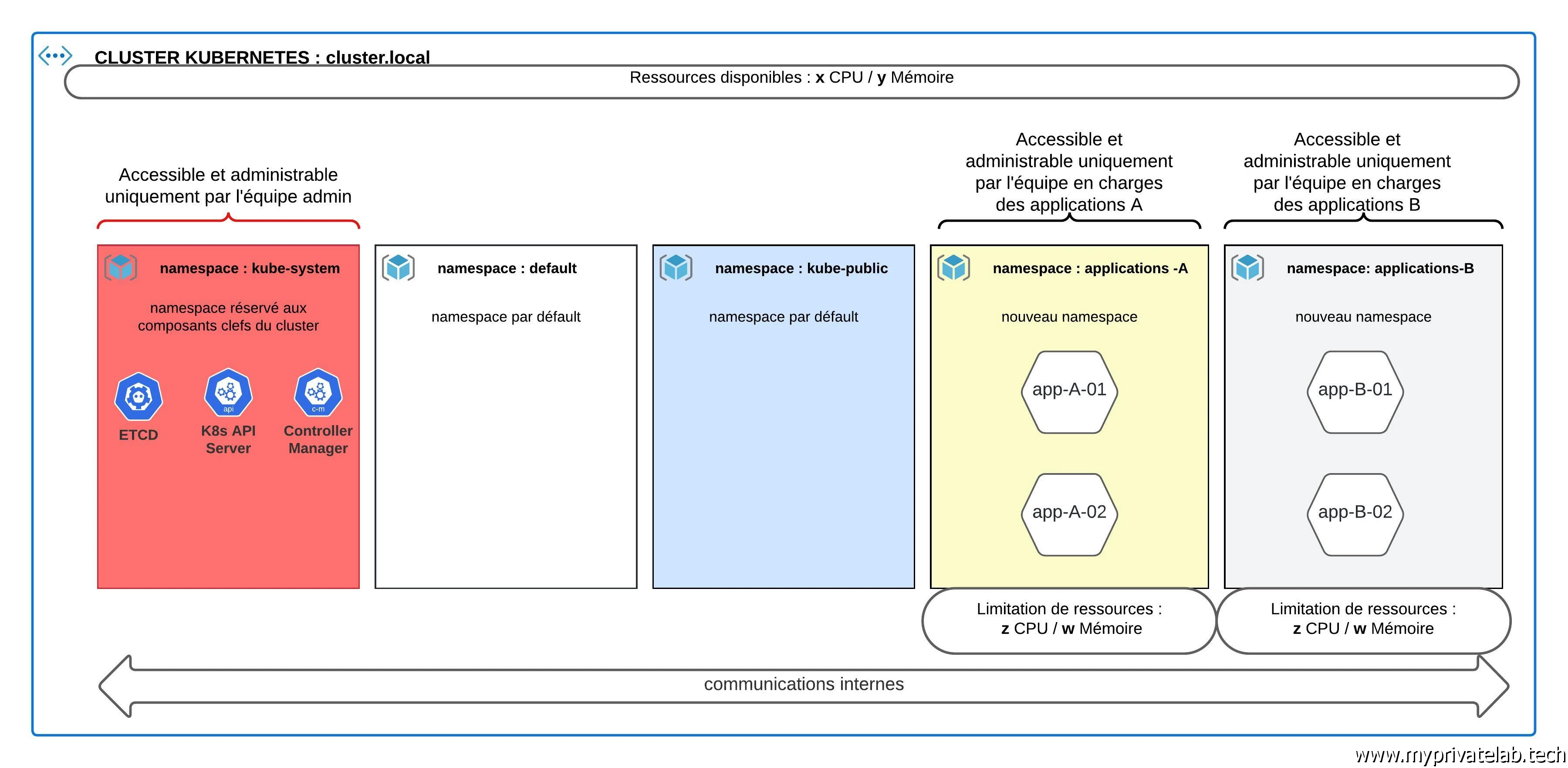
When you deploy a cluster, three namespaces are created by default.
- kube-system: Its name is quite explicit, and within this namespace, you will find all the "system" components of the cluster: the API server, the DNS server, and so on. I can tell you that access to this namespace must be carefully controlled. In fact, in some Kubernetes as a Service offerings, this namespace may not even be accessible to you.
- default: If you don't specify anything in your deployments or commands, this is the namespace that will be used. However, if your goal is to deploy a production solution, it's not necessarily a good idea to use this namespace. You'll quickly end up mixing things up; it's better to think about a namespace architecture from the start.
- kube-public: This is an open namespace intended to host objects without access restrictions. Again, in production, it's generally not recommended to use this namespace.
Click the image to enlarge.
Inter-namespace Communication
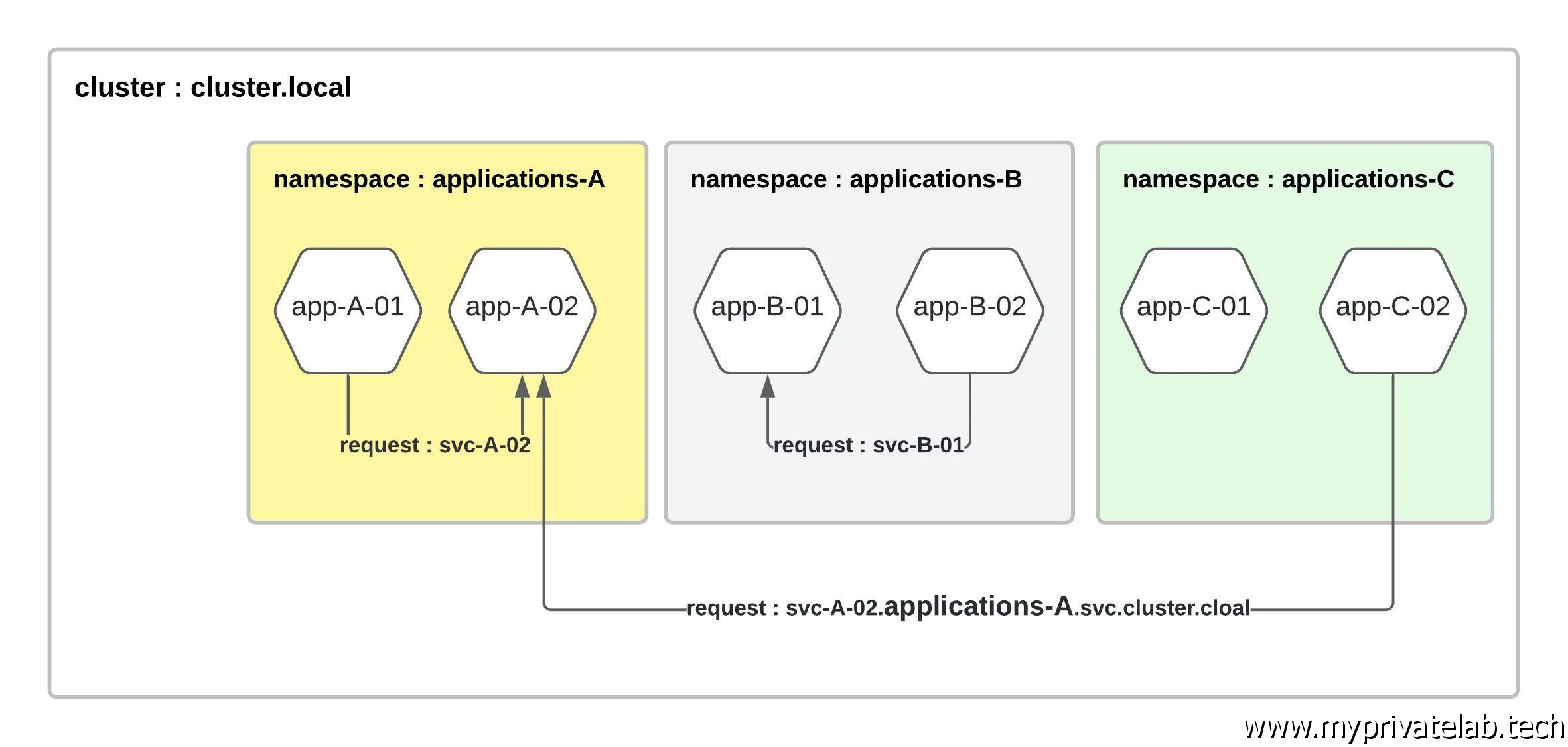
Be aware that, by default, having objects in different namespaces does not prevent them from communicating with each other. Kubernetes applies a logic of 'everyone can talk to everyone'. In my previous example, just because two teams are responsible for a different application doesn't mean those two applications don't need to exchange information.
If two services (in the K8S sense: an object that allows the exposure of a pod) are not in the same namespace, they can call each other using a DNS-based naming logic. In fact, every Kubernetes cluster has an internal DNS resolution, and a namespace is seen as a namespace.
The highest level is cluster.local, which is the 'root' domain. Then you go down to the service level svc, then to the namespace level, and finally to the name of the service itself.
For example, a SuperApps application that is exposed through a service svc-superapps in a namespace developpement would be addressed within the cluster by the DNS name: svc-superapps.developpement.svc.cluster.local.
If an application shares the same namespace, it can access SuperApps directly using its short name svc-superapps, but if it comes from a different namespace, it will need to access SuperApps using its full name.
Of course, it is possible to restrict network communication between namespaces, but this requires additional configuration. Simply remember that by default, while a namespace allows you to limit user access to the objects it hosts, it does not apply any communication restrictions.
Click the image to enlarge.
Usage and Manipulation
A namespace is declared like any other Kubernetes object in a YAML file.
    ---
    apiVersion: v1
    kind: Namespace
    metadata:
      name: mon-namespace
The namespace is described in the Kubernetes documentation
Conclusion
Ultimately, the most important thing to remember about namespaces is that they are structural elements for your cluster.
It is very important to consider, before creating the cluster, the organization you will apply at the namespace level.
It is possible to do without namespaces, but it would be a major mistake in production. It is very important to organize your Kubernetes objects according to the logic you want to adopt in terms of access security and resource distribution.
Even though, by default, communication between namespaces is allowed, namespaces allow, through other mechanisms deployed later, the possibility of filtering traffic between the objects they host.
Working with namespaces also allows you to optimize your hardware infrastructure. Where you might think you need to create multiple K8S clusters for segmentation and usage purposes, you can switch to a single cluster, but relying on the use of several correctly configured namespaces.
By applying access rules, resource consumption limitations, and traffic filtering, a single cluster may be sufficient if logical segmentation is considered sufficient within security constraints.