Step 7: Initializing the cluster with kubeadm
- Initializing the first control plane with kubeadm init via the xkub_kubeadm_init role.
- Detailed kubeadm v1beta4 configuration schema.
- kube-proxy skipped in favor of Cilium.
- Generating join artifacts; appendix of commands outside Ansible.
Introduction
In the previous article, we explained and detailed the operation of kube-vip, the component responsible for managing the availability of the K8S API between the different control planes.
As with the rest of the cluster configuration, we relied on a playbook and an Ansible role.
The role in question is xkub_kube_vip and has already been presented previously.
The reference playbook for this role is xkub_30_cluster.yml. However, it not only calls the xkub_kube_vip role, but also the xkub_kubeadm_init and xkub_kubeadm_join roles. These are responsible for initializing the cluster and sequentially registering nodes within it.
We will focus on the xkub_kubeadm_init role in this article. This will be an opportunity to explain how a Vanilla Kubernetes cluster is initialized with Kubeadm.
For reference, the content of the playbook xkub_30_cluster.yml is as follows:
---

# Ordre strict, chaque play doit terminer sur TOUS ses hôtes avant le suivant :
#   1. kube-vip sur les 3 control planes (AVANT tout kubeadm init/join)
#   2. kubeadm init sur le seul control plane primaire
#   3. kube-vip rebasculé sur admin.conf (fin du bootstrap)
#   4. kubeadm join (CP2/CP3 puis workers) + labels/taints de tous les nœuds
#   5. Cilium (Helm), depuis le control plane primaire

- name: kube-vip — VIP API server en static pod
  hosts: k8s_controlplane_lan
  become: true
  roles:
    - xkub_kube_vip

- name: kubeadm init — control plane primaire
  hosts: "{{ groups['k8s_controlplane_lan'] | sort | first }}"
  become: true
  roles:
    - xkub_kubeadm_init

- name: kube-vip — retour au kubeconfig admin après le bootstrap
  hosts: "{{ groups['k8s_controlplane_lan'] | sort | first }}"
  become: true
  roles:
    - xkub_kube_vip

- name: kubeadm join — control planes additionnels, workers, labels et taints
  hosts: k8s_controlplane_lan:k8s_workers_lan:k8s_workers_web:gpu
  become: true
  roles:
    - xkub_kubeadm_join

- name: Cilium — CNI avec kubeProxyReplacement (chart Helm depuis le control plane primaire)
  hosts: "{{ groups['k8s_controlplane_lan'] | sort | first }}"
  become: true
  roles:
    - xkub_cilium
playbooks/xkub_30_cluster.yml
In the dedicated article, we have already discussed calling xkub_kube_vip on all control plane servers in the cluster (see the presentation of the cluster architecture).
Let's focus on the role "xkub_kubeadm_init".
The xkub_kubeadm_init role
This role will initialize the cluster from the first control plane. This is always how it is done; we identify the first control plane that will join the cluster, and it is from this server that we launch the kubeadm commands to initialize the cluster from a configuration file.
In our case, it is the VM prdk8sgru501.
It will be automatically targeted by Ansible thanks to the instruction in the playbook hosts: "{{ groups['k8s_controlplane_lan'] | sort | first}}" which will select from the inventory (ansible), the first server in the group "k8s_controlplane_lan". This is prdk8sgru501.
If we now go into the role's tree structure, we can detail its operation.
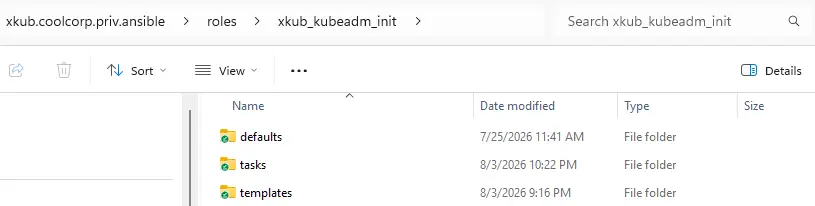
Click the image to enlarge.
Default folder (role variables)
We start as usual with the default folder
This folder contains a single file, main.yml, which contains the role's variables.
---
# Rôle xkub_kubeadm_init — initialise le premier control plane
xkub_kubeadm_init_config_api_version: v1beta4
xkub_kubeadm_init_config_path: /etc/kubernetes/kubeadm-config.yaml

#  Cilium remplace intégralement kube-proxy, qui n'est donc jamais installé.
xkub_kubeadm_init_skip_phases: addon/kube-proxy

# Client Python "kubernetes" requis par kubernetes.core.k8s (labellisation
#  et toute opération kubernetes.core future) —
# installé uniquement sur ce nœud (hôte délégué du cluster, cf.
# xkub_primary_control_plane dans group_vars/clu_k8s_xkub/main.yml).
xkub_kubeadm_init_python_kubernetes_package: "kubernetes=={{ python_kubernetes_client_version }}"

# Kubeconfig admin rapatrié en LOCAL (poste de contrôle) pour les vérifications
xkub_kubeadm_init_local_kubeconfig_dest: "{{ inventory_dir }}/../fetch/kubeconfig-xkub.yaml"

# Durée de vie du token de join généré à chaque exécution (04_join_artifacts.yml).
# 15 minutes au lieu des 24 h par défaut de kubeadm : le token n'est consommé que
# dans le même run ansible-playbook ; les tokens générés à vide sur un cluster
# déjà formé expirent ainsi très vite.
xkub_kubeadm_init_join_token_ttl: "15m"
roles/xkub_kubeadm_init/defaults/main.yml
There are only a few of them, and they are explained in the comments.
However, we will look at a few of them.
xkub_kubeadm_init_config_api_version represents the version of the configuration schema that we will use, and is specific to kubeadm.
Kubeadm and schema version
Indeed, when you want to initialize a vanilla cluster with kubeadm, you use kubeadm init. This command can be customized in two ways: either via command-line arguments, or via a YAML configuration file (which is what we will do).
The value v1beta4 corresponds to the header of this file and refers to the structure of the YAML file and the options it contains.
Kubeadm evolves over versions, and options appear and disappear with each release. Therefore, we fix our choice on the v1beta4 schema, which was introduced with Kubernetes 1.31.
An interesting point: we see the notion of "beta" in the version chosen. This is not a problem for production as one might imagine. Indeed, within the Kubernetes ecosystem, the term "beta" does not mean that the code is unstable or buggy. It indicates the level of guarantee regarding the stability of the YAML file structure (the API schema), and not the reliability of the tool itself.
As I have already explained in my article dedicated to updating a K8S cluster, Kubernetes classifies the evolution of its objects (APIs) into three strict stages:
- Alpha (v1alpha1, etc.): experimental and disabled by default. Features may disappear or change radically from one version to another without prior notice. Should never be used in production.
- Beta (v1beta3, v1beta4, etc.): Code that has been tested, approved, and is enabled by default. This is what is used in production. The "beta" label simply means that the Kubernetes developers reserve the right to adjust the name or location of certain YAML fields in future versions before permanently fixing the format.
- Stable (v1): Completely locked down. The configuration schema is set in stone and will not undergo any breaking changes to ensure absolute backward compatibility over the long term.
For a central tool like kubeadm, cluster architectures, certificate management, and security standards are constantly evolving. The Kubernetes development team has deliberately kept the kubeadm configuration API in beta for years to maintain the flexibility to add or refine deployment options, without being constrained by the rigidity of a v1 version.
This is not a problem for the stability of your cluster, but it should still be taken into account when performing updates. Because fields and locations may vary, your configuration files may undergo significant changes. It is therefore crucial to be vigilant about the combinations between your target Kubernetes version and the configuration schema used by kubeadm.
xkub_kubeadm_init_config_path is simply the location where our configuration file will be created, which Ansible will generate and then pass as arguments to the kubeadm init command's configuration.
xkub_kubeadm_init_skip_phases allows you to specify which components you do not want kubeadm to initialize. In this case, only one: kube-proxy.
kube-proxy is a network component that runs on each node and is responsible for applying the local cluster network configuration and associating it with the concept of a Service.
We will discuss this again when we cover the configuration of Cilium, the CNI (Container Network Interface) we chose during our architecture phase. Cilium will provide this functionality, so we don't need kube-proxy as things stand.
The Tasks directory
Now let's move on to the tasks directory of the role.
Here you will find the classic main.yml, which references all the tasks to be executed and the order in which they should be run.
---
# Rôle xkub_kubeadm_init - appliqué au seul xkub_primary_control_plane
# (inventory/group_vars/clu_k8s_xkub/main.yml). Les kube-vip static pods (rôle
# xkub_kube_vip) doivent déjà être en place sur les 3 control planes AVANT ce rôle
- name: Fichier de configuration kubeadm
  ansible.builtin.import_tasks: 01_config.yml
  tags:
    - xkub
    - xkub.kubeadm_init
    - xkub.kubeadm_init.config

- name: kubeadm init (idempotent si déjà initialisé)
  ansible.builtin.import_tasks: 02_init.yml
  tags:
    - xkub
    - xkub.kubeadm_init
    - xkub.kubeadm_init.init

- name: Outillage Python pour kubernetes.core (hôte délégué du cluster)
  ansible.builtin.import_tasks: 03_tooling.yml
  tags:
    - xkub
    - xkub.kubeadm_init
    - xkub.kubeadm_init.tooling

- name: Artefacts de join (token + certificate-key générés à la volée)
  ansible.builtin.import_tasks: 04_join_artifacts.yml
  tags:
    - xkub
    - xkub.kubeadm_init
    - xkub.kubeadm_init.join_artifacts

- name: Rapatriement du kubeconfig admin (vérification uniquement)
  ansible.builtin.import_tasks: 05_kubeconfig.yml
  tags:
    - xkub
    - xkub.kubeadm_init
    - xkub.kubeadm_init.kubeconfig
roles/xkub_kubeadm_init/tasks/main.yml
Then we examine each task
01_config.yml
The first task's sole purpose is to create our kubeadm configuration file from the template kubeadm-config.yaml.j2, which we will see later (this template will be copied to the location defined by our variable xkub_kubeadm_init_config_path).
---
- name: Déployer le fichier de configuration kubeadm
  ansible.builtin.template:
    src: kubeadm-config.yaml.j2
    dest: "{{ xkub_kubeadm_init_config_path }}"
    owner: root
    group: root
    mode: "0600"
roles/xkub_kubeadm_init/tasks/01_config.yml
02_init.yml
Next comes the task that is actually responsible for initializing the cluster.
---
# Idempotence : /etc/kubernetes/admin.conf n'existe que si `kubeadm init` a
# déjà réussi sur ce nœud - c'est le marqueur utilisé partout dans ce rôle.
- name: Vérifier si le control plane est déjà initialisé
  ansible.builtin.stat:
    path: /etc/kubernetes/admin.conf
  register: xkub_kubeadm_init_admin_conf

# --upload-certs : chiffre et dépose les certs partagés dans un Secret
# kube-system pour permettre aux CP2/CP3 de les récupérer au join (au lieu de
# les copier à la main). --skip-phases=addon/kube-proxy : kubeProxyReplacement
- name: Initialiser le premier control plane (kubeadm init)
  ansible.builtin.command:
    cmd: >-
      kubeadm init
      --config {{ xkub_kubeadm_init_config_path }}
      --upload-certs
      --skip-phases={{ xkub_kubeadm_init_skip_phases }}
  when: not xkub_kubeadm_init_admin_conf.stat.exists
  register: xkub_kubeadm_init_result
  changed_when: true

# NE PAS utiliser ansible_env.HOME ici. Le play porte `become: true`, donc la
# collecte de faits (module setup) s'exécute elle aussi en root : ansible_env
# décrit l'environnement de ROOT, et ansible_env.HOME vaut /root. Le kubeconfig
# atterrissait donc dans /root/.kube/config, invisible pour l'utilisateur de
# connexion — kubectl retombait sur son défaut localhost:8080.
# `~{{ ansible_user }}` est résolu côté cible par expanduser (paramètres de type
# `path`), indépendamment de l'utilisateur qui exécute le module.
- name: Créer le répertoire ~/.kube de l'utilisateur de connexion
  ansible.builtin.file:
    path: "~{{ ansible_user }}/.kube"
    state: directory
    owner: "{{ ansible_user }}"
    group: "{{ ansible_user }}"
    mode: "0700"

# Confort pour les vérifications kubectl en SSH direct sur ce nœud
# kubectl ne sert QU'À la vérification, jamais à configurer le cluster).
- name: Copier le kubeconfig admin pour l'utilisateur de connexion
  ansible.builtin.copy:
    src: /etc/kubernetes/admin.conf
    dest: "~{{ ansible_user }}/.kube/config"
    owner: "{{ ansible_user }}"
    group: "{{ ansible_user }}"
    mode: "0600"
    remote_src: true
roles/xkub_kubeadm_init/tasks/02_init.yml
This one contains a lot more things.
First, we check whether the control plane is already associated with a cluster by verifying the existence of a file /etc/kubernetes/admin.conf
This file is indeed generated as output from a cluster initialization command; if it exists, then the node in question already has a K8S configuration.
If this is not the case, then we can run the initialization command
kubeadm init
  --config {{ xkub_kubeadm_init_config_path }}
  --upload-certs
  --skip-phases={{ xkub_kubeadm_init_skip_phases }}
You will find our variables being used; so if you were not using Ansible, you would type the following command
kubeadm init --config /etc/kubernetes/kubeadm-config.yaml --upload-certs --skip-phases=addon/kube-proxyThis should be done as root on prdk8sgru501. (Note: kubeadm is used under the root identity).
The entire result will be stored in an Ansible variable xkub_kubeadm_init_result
Principles behind the kubeadm init command
When this command is executed by Ansible, kubeadm retrieves all the basic components necessary for a cluster to function (via container images available online in the project's repository).
- etcd: A highly available key-value database. It stores the entire configuration, current state, and secrets of the cluster. It is the single source of truth for Kubernetes. It will be replicated between all our control planes
- api-server: The central and front-end entry point of the Control Plane. It validates requests, authenticates them, and acts as the sole intermediary for communication (other components and users communicate with the api-server, which is the only one authorized to read/write to etcd). Its accessibility is ensured by kube-vip to provide resilience in its access between all control planes.
- kube-controller-manager: the cluster's state guardian. It runs background control loops to compare the actual state of the cluster with the desired state (for example, automatically recreating a Pod if it crashes to ensure the correct number of replicas).
- kube-scheduler: the scheduler. It detects new Pods waiting for assignment and chooses the most suitable node (server) to run them, based on available resources (CPU, RAM) and affinity rules.
It will configure these components in relation to the content of the configuration file that we will provide as an argument (and which we will present later).
As with kube-VIP, a YAML file corresponding to each of these components will be generated and placed in /etc/kubernetes/manifests/, the famous location of static pods that we have already discussed in the previous article and which can be read and executed by the kubelets already installed on the servers during the previous phases of the deployment.
When these components are launched for the first time, many configuration elements will be set up, such as the creation of internal cluster certificates and the setup of the key-value database etcd.
After a few minutes, the entire system will be initialized, and the cluster configuration, including the authentication elements for connecting to it as an administrator, will be written to a specific configuration file.
It is this output file containing the elements necessary to connect to the cluster that will then be retrieved in the subsequent actions of the task, so that a copy can be placed in the current context of the standard user (here ansible-windows, the account used to connect to the servers via SSH (see here for more explanation).
This will avoid having to be root to execute kubectl commands, since the K8S CLI kubectl (which we deployed previously) will look for this configuration file in the user's context.
Warning: it is important to note that at this stage, we have a configuration that allows us to connect to the cluster as "cluster-admin", which is the highest level of access allowed.
The file therefore becomes critical, and in a production environment it is not meant to be used outside of installation or debugging phases.
Feel free to browse my article on how Kubernetes RBAC works to learn more about this topic.
03_tooling.yml
The following file, 03_tooling.yml, only deals with the installation of additional packages, including Python
---
# xkub_primary_control_plane est l'hôte délégué (delegate_to) pour TOUTES les
# opérations kubernetes.core.k8s de ce projet (xkub_kubeadm_join, phases 5+) :
# le module k8s s'exécute sur cet hôte et a donc besoin du client Python
# "kubernetes" localement — jamais sur le poste de contrôle W11.
# python3-packaging n'est PAS une dépendance du client kubernetes : c'est le
# module ansible.builtin.pip lui-même qui l'importe sur l'hôte cible pour
# comparer les versions. Absent de l'installation minimale de Rocky 10, il fait
# échouer la tâche suivante avec « No module named 'packaging' ».
- name: Installer pip et ses dépendances Ansible sur le control plane primaire
  ansible.builtin.dnf:
    name:
      - python3-pip
      - python3-packaging
    state: present

# PEP 668 : depuis Python 3.12, une distribution peut marquer son interpréteur
# système « externally managed » via un fichier EXTERNALLY-MANAGED, et pip
# refuse alors d'installer dans les site-packages du système. On détecte le
# marqueur au lieu de supposer le comportement de Rocky 10.
- name: Détecter un interpréteur système « externally managed » (PEP 668)
  ansible.builtin.find:
    paths: /usr/lib
    patterns: EXTERNALLY-MANAGED
    recurse: true
    depth: 2
  register: xkub_kubeadm_init_pep668

# --break-system-packages uniquement si le marqueur est présent. Le client
# kubernetes n'est fourni par aucun RPM de base : le risque de conflit avec un
# fichier géré par dnf est nul. L'alternative (virtualenv dédié) imposerait de
# surcharger ansible_python_interpreter sur toutes les tâches kubernetes.core
# du projet, pour un bénéfice théorique sur un nœud dédié au cluster.
- name: Installer le client Python kubernetes ({{ python_kubernetes_client_version }})
  ansible.builtin.pip:
    name: "{{ xkub_kubeadm_init_python_kubernetes_package }}"
    executable: pip3
    state: present
    extra_args: "{{ '--break-system-packages' if xkub_kubeadm_init_pep668.matched | int > 0 else omit }}"
roles/xkub_kubeadm_init/tasks/03_tooling.yml
However, it is still important for Ansible to be able to continue its subsequent actions. Indeed, Ansible is based on Python and relies on certain third-party libraries to interact with the components that we request access to.
This applies to Kubernetes, and when we need to add nodes to the cluster using the upcoming role xkub_kubeadm_join, Ansible will require a number of Python dependencies to be available on the server, including the Python client for Kubernetes.
Incidentally, the variable "python_kubernetes_client_version" which is used is defined in our file common to all roles, "versions.yml", located in ".\inventory\group_vars\clu_k8s_xkub\versions.yml" (feel free to review the presentation of variable management in Ansible).
It must be consistent with our Kubernetes version (1.36.5).
04_join_artifacts.yml
We continue with the task 04_join_artifacts.yml
---
# Artefacts de join générés À LA VOLÉE à CHAQUE exécution de ce rôle (jamais
# stockés en clair sur disque ni committés — règle 8 du CLAUDE.md du dossier).
# Rejouer ce rôle sur un cluster déjà formé régénère un token/certificate-key
# inutilisés (le rôle xkub_kubeadm_join ne les consomme que si un nœud n'a pas
# encore rejoint, cf. son test sur /etc/kubernetes/kubelet.conf) : sans
# conséquence, kubeadm expire de lui-même ces secrets (token après
# xkub_kubeadm_init_join_token_ttl = 15 min, secret de certificat 2h).
# `changed_when: false` : ce sont des actions de génération/rafraîchissement,
# pas une divergence d'état à réconcilier.
#
# DIAGNOSTIC — pourquoi `failed_when: false` + une tâche d'échec explicite :
# `no_log: true` protège le token, mais il masque AUSSI le message d'erreur si
# la commande échoue ("output has been hidden due to the fact that 'no_log:
# true' was specified"), ce qui rend la panne impossible à analyser sans
# rejouer à la main sur le nœud. On neutralise donc l'échec de la commande, et
# on le remonte dans une tâche dédiée qui n'affiche QUE rc + stderr : le secret
# (token, clé de certificat) est toujours sur stdout, jamais sur stderr.
- name: Générer une commande de join à la volée (token éphémère, tous nœuds)
  ansible.builtin.command:
    cmd: kubeadm token create --ttl {{ xkub_kubeadm_init_join_token_ttl }} --print-join-command
  register: xkub_kubeadm_init_join_command_raw
  changed_when: false
  failed_when: false
  no_log: true

- name: Échec de génération du token — remonter rc et stderr (sans le secret)
  ansible.builtin.fail:
    msg: >-
      `kubeadm token create --print-join-command` a échoué
      (rc={{ xkub_kubeadm_init_join_command_raw.rc | default('n/a') }}).
      stderr : {{ xkub_kubeadm_init_join_command_raw.stderr | default('') | trim | default('(vide)', true) }}
      {{ xkub_kubeadm_init_join_command_raw.msg | default('') }}
  when: xkub_kubeadm_init_join_command_raw.rc | default(1) != 0

- name: Générer une clé de certificat à la volée (join d'un control plane)
  ansible.builtin.command:
    cmd: >-
      kubeadm init phase upload-certs
      --upload-certs
      --config {{ xkub_kubeadm_init_config_path }}
  register: xkub_kubeadm_init_certificate_key_raw
  changed_when: false
  failed_when: false
  no_log: true

- name: Échec de génération de la clé de certificat — remonter rc et stderr
  ansible.builtin.fail:
    msg: >-
      `kubeadm init phase upload-certs` a échoué
      (rc={{ xkub_kubeadm_init_certificate_key_raw.rc | default('n/a') }}).
      stderr : {{ xkub_kubeadm_init_certificate_key_raw.stderr | default('') | trim | default('(vide)', true) }}
      {{ xkub_kubeadm_init_certificate_key_raw.msg | default('') }}
  when: xkub_kubeadm_init_certificate_key_raw.rc | default(1) != 0

# Ces facts sont lus depuis d'autres plays (hostvars[...]) par le rôle
# xkub_kubeadm_join, dans le MÊME run ansible-playbook (les facts persistent entre
# plays d'un même run, pas au-delà). no_log évite qu'ils apparaissent en clair
# dans la sortie/les logs Ansible.
- name: Exposer la commande de join et la clé de certificat aux autres nœuds
  ansible.builtin.set_fact:
    xkub_kubeadm_init_join_command: "{{ xkub_kubeadm_init_join_command_raw.stdout_lines | last }}"
    xkub_kubeadm_init_certificate_key: "{{ xkub_kubeadm_init_certificate_key_raw.stdout_lines | last }}"
  no_log: true
roles/xkub_kubeadm_init/tasks/04_join_artifacts.yml
This task is a bit special because it is actually a prerequisite for the role xkub_kubeadm_join, which will follow this role xkub_kubeadm_init. Indeed, it prepares the variables necessary to add other control plane nodes (prdk8sgru502 and prdk8sgru503) and worker nodes (prdk8smin5xx).
The join command (kubeadm token create --print-join-command) will return a specific output to be used on the other servers that are intended to join the cluster, and it contains a token valid for 15 minutes (variable xkub_kubeadm_init_join_token_ttl), instead of the default 24 hours of kubeadm, since it is only consumed during the execution of the playbook. This output will be saved by Ansible so that it can then be reused by the role xkub_kubeadm_join
The certificate key (kubeadm init phase upload-certs --upload-certs) encrypts the control plane certificates (CA, etcd, front-proxy, sa) and deposits them in the Secret (in the K8S sense) kubeadm-certs, which expires after 2 hours. It is only used for prdk8sgru502 and prdk8sgru503.
The join commands will then be adjusted in the following role, based on the target node's membership in the Ansible inventory group associated with the control plane or worker nodes.
Note the use of the "no_log: true" option to prevent these variables from being displayed on the screen when the Ansible playbook is executed.
05_kubeconfig.yml
We finish with the task 05_kubeconfig.yml
---
# Rapatriement du kubeconfig admin sur le poste de contrôle, pour les
# vérifications `kubectl` uniquement (règle 7). Ignoré par git ("fetch/" et
# "admin.conf" figurent dans .gitignore).
- name: Créer le répertoire local de sortie du kubeconfig
  ansible.builtin.file:
    path: "{{ xkub_kubeadm_init_local_kubeconfig_dest | dirname }}"
    state: directory
    mode: "0700"
  delegate_to: localhost
  become: false

- name: Rapatrier le kubeconfig admin (poste de contrôle)
  ansible.builtin.fetch:
    src: /etc/kubernetes/admin.conf
    dest: "{{ xkub_kubeadm_init_local_kubeconfig_dest }}"
    flat: true
roles/xkub_kubeadm_init/tasks/05_kubeconfig.yml
This task is also a bit special, as it will be used to retrieve our configuration file mentioned earlier, which contains access credentials for the cluster, to the machine where Ansible is running, which in my case is my W11 PC.
The file is copied to the path defined in the variable xkub_kubeadm_init_local_kubeconfig_dest, which we haven't mentioned yet, but it is present in the main.yml file of the default folder of the role.
This is simply to allow us to perform post-deployment checks to verify that the cluster is accessible from the outside and that the nodes are properly initialized.
This file should be deleted once the operations are complete.
The templates
We have now reviewed all the tasks. It's time to move on to the templates, or rather, the single template, as we only use one.
kubeadm-config.yaml.j2
This file is very important. It will serve as a basis for generating the configuration file that Ansible will pass as an argument to kubeadm for cluster initialization.
---
# {{ ansible_managed }}
# ATTENTION : ce commentaire doit rester APRÈS le premier `---`. Placé avant,
# il constitue à lui seul le premier document YAML pour le découpeur multi-
# documents de kubeadm, qui le rejette (« invalid configuration for
# GroupVersionKind /, Kind= »). Un `---` en tête de fichier est inoffensif.
apiVersion: kubeadm.k8s.io/{{ xkub_kubeadm_init_config_api_version }}
kind: InitConfiguration
localAPIEndpoint:
  # IP du nœud courant — PAS la VIP (l'endpoint HA est controlPlaneEndpoint)
  advertiseAddress: "{{ ansible_host }}"
  bindPort: {{ k8s_api_port }}
nodeRegistration:
  criSocket: "unix:///run/containerd/containerd.sock"
  kubeletExtraArgs:
    - name: node-ip
      value: "{{ ansible_host }}"
---
apiVersion: kubeadm.k8s.io/{{ xkub_kubeadm_init_config_api_version }}
kind: ClusterConfiguration
kubernetesVersion: "{{ k8s_version }}"
clusterName: "{{ k8s_cluster_name }}"
controlPlaneEndpoint: "{{ k8s_control_plane_endpoint }}:{{ k8s_api_port }}"
networking:
  dnsDomain: cluster.local
  podSubnet: "{{ k8s_pod_cidr }}"
  serviceSubnet: "{{ k8s_service_cidr }}"
apiServer:
  certSANs:
    - "127.0.0.1"
    - "localhost"
    - "{{ k8s_api_vip }}"
    - "{{ k8s_cluster_fqdn }}"
{% for host in groups['k8s_controlplane_lan'] | sort %}
    - "{{ host }}"
    - "{{ host.split('.')[0] }}"
    - "{{ hostvars[host].ansible_host }}"
{% endfor %}
scheduler: {}
controllerManager: {}
---
apiVersion: kubelet.config.k8s.io/v1beta1
kind: KubeletConfiguration
cgroupDriver: systemd
failSwapOn: true
authentication:
  anonymous:
    enabled: false
roles/xkub_kubeadm_init/templates/kubeadm-config.yaml.j2
We can see a reference to the variable xkub_kubeadm_init_config_api_version, whose role we have explained.
But many other variables are used, many of which come from higher-level files, notably versions.yml, which we have already discussed, and which is derived from our architectural choices, defined in the introduction to this cookbook.
For a better understanding of the file, here's what it will correspond to on prdk8sgru501 in /etc/kubernetes/kubeadm-config.yaml after the Ansible playbook is run.
apiVersion: kubeadm.k8s.io/v1beta4
kind: InitConfiguration
localAPIEndpoint:
  # IP du nœud courant — PAS la VIP (l'endpoint HA est controlPlaneEndpoint)
  advertiseAddress: "192.168.10.161"
  bindPort: 6443
nodeRegistration:
  criSocket: "unix:///run/containerd/containerd.sock"
  kubeletExtraArgs:
    - name: node-ip
      value: "192.168.10.161"
---
apiVersion: kubeadm.k8s.io/v1beta4
kind: ClusterConfiguration
kubernetesVersion: "1.36.5"
clusterName: "xkub"
controlPlaneEndpoint: "xkub.coolcorp.priv:6443"
networking:
  dnsDomain: cluster.local
  podSubnet: "10.11.0.0/16"
  serviceSubnet: "10.12.0.0/16"
apiServer:
  certSANs:
    - "127.0.0.1"
    - "localhost"
    - "192.168.10.121"
    - "xkub.coolcorp.priv"
    - "prdk8sgru501.coolcorp.priv"
    - "prdk8sgru501"
    - "192.168.10.161"
    - "prdk8sgru502.coolcorp.priv"
    - "prdk8sgru502"
    - "192.168.10.162"
    - "prdk8sgru503.coolcorp.priv"
    - "prdk8sgru503"
    - "192.168.10.163"
scheduler: {}
controllerManager: {}
---
apiVersion: kubelet.config.k8s.io/v1beta1
kind: KubeletConfiguration
cgroupDriver: systemd
failSwapOn: true
authentication:
  anonymous:
    enabled: false
/etc/kubernetes/kubeadm-config.yaml
Because this file is important, we will take the time to detail it, block by block.
InitConfiguration Block (Node local configuration)
This block defines the parameters specific to the server on which the kubeadm init command is executed (in this case, the node prdk8sgru501).
- localAPIEndpoint: Defines the address on which this specific node will listen.
- advertiseAddress (192.168.10.161): This is the actual IP address of prdk8sgru501. It's crucial not to use the virtual IP (VIP) of the cluster here.
- bindPort (6443): The standard port for the Kubernetes API.
- nodeRegistration: Instructions for registering this node in the cluster.
- criSocket: This tells kubeadm to communicate with containerd (unix:///run/containerd/containerd.sock) to manage containers.
- kubeletExtraArgs: This explicitly forces the Kubelet service to use the IP address 192.168.10.161 for this node, preventing it from binding to the wrong network interface if the server has multiple interfaces.
ClusterConfiguration block (Global cluster configuration)
This block defines the global parameters that will apply to the entire cluster (all control plane and worker nodes).
- kubernetesVersion (1.36.5) and clusterName (xkub): This sets the exact version of Kubernetes to be deployed and the internal name of the cluster.
- controlPlaneEndpoint (xkub.coolcorp.priv:6443): This is key for high availability. Instead of workers pointing to a control plane, they will point to this hostname, which corresponds to our VIP under kube-vip (see article on kube-vip).
- networking: Defines the internal network addressing of the cluster.
- dnsDomain (cluster.local): The root domain for internal DNS resolution of Services.
- podSubnet (10.11.0.0/16): The IP range allocated to Pods, which we defined in our architecture
- serviceSubnet (10.12.0.0/16): The IP range allocated to Kubernetes Services (the virtual IPs managed by Cilium).
- apiServer (certSANs): This is the list of "Subject Alternative Names" (SANs) for the API Server's TLS certificate. For HTTPS to work without errors, the certificate must contain all the addresses through which the API can be contacted.
- You can see the address of the Load Balancer/VIP (192.168.10.121 and xkub.coolcorp.priv).
- You can see the target architecture: the three master nodes planned (prdk8sgru501, 502 and 503 with their respective IPs .161.162.163) (this implies that we are not planning to add any additional control plane nodes!).
KubeletConfiguration block (Configuration of the local Kubelet daemon)
This last block directly configures the Kubelet (the agent that runs on each server to start containers) in a uniform way.
- cgroupDriver: systemd: This is required for modern Linux distributions. It tells the Kubelet to use systemd to manage container resources (CPU/RAM), aligning it with containerd and the host OS.
- failSwapOn: true: Kubernetes requires that swap (virtual memory on disk) be disabled on the system to ensure predictable performance. If swap is enabled, the Kubelet will refuse to start.
- authentication.anonymous.enabled: false: This is a basic security rule that prohibits unauthenticated requests on the Kubelet's administrative port.
Conclusion
At this stage, we are still unable to run the playbook xkub_30_cluster.yml, as there are other roles that need to be presented first, which make up the playbook. Nevertheless, we are making progress in understanding the configuration of a K8S cluster.
What is important to remember here is the initialization principle associated with kubeadm and the use of a specific configuration file, related to our target version of Kubernetes that we want to deploy.
It is also worth noting the role of the basic components of a cluster, which we have briefly reviewed here.
As it stands, it is perfectly possible to adopt this approach for deploying a single K8S node. It is important to understand that once the first node is initialized via kubeadm, all the fundamentals are already in place and active.
The API is then ready to be accessed, and it is through this mechanism that we will subsequently simply register our other nodes, which can then present themselves with the authentication information retrieved during this xkub_kubeadm_init role.
This is what we will see in the next article with the presentation of the xkub_kubeadm_join role
Summary of variables and equivalent commands outside of Ansible
This appendix summarizes all the variables used by Ansible in this article and provides an equivalent for the commands and configurations implemented by Ansible in this section.
Variables used
| Variable | Valeur | Déclarée dans |
|---|---|---|
xkub_kubeadm_init_config_api_version |
v1beta4 |
roles/xkub_kubeadm_init/defaults/main.yml |
xkub_kubeadm_init_config_path |
/etc/kubernetes/kubeadm-config.yaml |
roles/xkub_kubeadm_init/defaults/main.yml |
xkub_kubeadm_init_skip_phases |
addon/kube-proxy |
roles/xkub_kubeadm_init/defaults/main.yml |
xkub_kubeadm_init_python_kubernetes_package |
kubernetes=={{ python_kubernetes_client_version }} → kubernetes==37.0.2 |
roles/xkub_kubeadm_init/defaults/main.yml |
xkub_kubeadm_init_join_token_ttl |
15m |
roles/xkub_kubeadm_init/defaults/main.yml |
xkub_kubeadm_init_local_kubeconfig_dest |
{{ inventory_dir }}/../fetch/kubeconfig-xkub.yaml → xkub.coolcorp.priv.ansible/fetch/kubeconfig-xkub.yaml (poste W11) |
roles/xkub_kubeadm_init/defaults/main.yml |
python_kubernetes_client_version |
37.0.2 |
inventory/group_vars/clu_k8s_xkub/versions.yml |
k8s_version |
1.36.5 |
inventory/group_vars/clu_k8s_xkub/versions.yml |
k8s_cluster_name |
xkub |
inventory/group_vars/clu_k8s_xkub/main.yml |
k8s_cluster_fqdn |
xkub.coolcorp.priv |
inventory/group_vars/clu_k8s_xkub/main.yml |
k8s_control_plane_endpoint |
xkub.coolcorp.priv (le template ajoute :6443) |
inventory/group_vars/clu_k8s_xkub/main.yml |
k8s_api_vip |
192.168.10.121 |
inventory/group_vars/clu_k8s_xkub/main.yml |
k8s_api_port |
6443 |
inventory/group_vars/clu_k8s_xkub/main.yml |
k8s_pod_cidr |
10.11.0.0/16 |
inventory/group_vars/clu_k8s_xkub/main.yml |
k8s_service_cidr |
10.12.0.0/16 |
inventory/group_vars/clu_k8s_xkub/main.yml |
dnsDomain (pas une variable) |
cluster.local |
écrit en dur dans roles/xkub_kubeadm_init/templates/kubeadm-config.yaml.j2 |
xkub_primary_control_plane |
prdk8sgru501.coolcorp.priv |
inventory/group_vars/all/main.yml |
ansible_user |
ansible-windows |
inventory/hosts.yml (all.vars) |
ansible_host |
192.168.10.161 (prdk8sgru501), .162, .163 (certSANs) |
inventory/hosts.yml |
groups['k8s_controlplane_lan'] |
prdk8sgru501/502/503.coolcorp.priv |
inventory/hosts.yml |
xkub_kubeadm_init_admin_conf |
résultat du stat sur /etc/kubernetes/admin.conf (marqueur d'idempotence) |
register dans roles/xkub_kubeadm_init/tasks/02_init.yml |
xkub_kubeadm_init_result |
sortie de kubeadm init |
register dans roles/xkub_kubeadm_init/tasks/02_init.yml |
xkub_kubeadm_init_pep668 |
présence du marqueur EXTERNALLY-MANAGED |
register dans roles/xkub_kubeadm_init/tasks/03_tooling.yml |
xkub_kubeadm_init_join_command_raw / xkub_kubeadm_init_certificate_key_raw |
sorties brutes des commandes de génération (no_log) |
register dans roles/xkub_kubeadm_init/tasks/04_join_artifacts.yml |
xkub_kubeadm_init_join_command |
commande kubeadm join … complète (secret, no_log) |
set_fact dans roles/xkub_kubeadm_init/tasks/04_join_artifacts.yml |
xkub_kubeadm_init_certificate_key |
clé de chiffrement des certificats (secret, no_log) |
set_fact dans roles/xkub_kubeadm_init/tasks/04_join_artifacts.yml |
Equivalent without Ansible
Connexion : ssh [email protected], puis sudo -i pour les commandes en root.
| # | Action | Serveur | Compte | Commande(s) |
|---|---|---|---|---|
| 1 | Écrire la configuration kubeadm | prdk8sgru501 | root | Créer /etc/kubernetes/kubeadm-config.yaml (bloc A)chmod 600 /etc/kubernetes/kubeadm-config.yaml |
| 2 | Initialiser le premier control plane (seulement si /etc/kubernetes/admin.conf est absent) |
prdk8sgru501 | root | kubeadm init --config /etc/kubernetes/kubeadm-config.yaml --upload-certs --skip-phases=addon/kube-proxy |
| 3 | Créer ~/.kube pour le compte de connexion |
prdk8sgru501 | root | install -d -m 700 -o ansible-windows -g ansible-windows ~ansible-windows/.kube |
| 4 | Donner le kubeconfig admin à ansible-windows |
prdk8sgru501 | root | install -m 600 -o ansible-windows -g ansible-windows /etc/kubernetes/admin.conf ~ansible-windows/.kube/config |
| 5 | Installer pip | prdk8sgru501 | root | dnf install -y python3-pip python3-packaging |
| 6 | Détecter un Python « externally managed » (PEP 668) | prdk8sgru501 | root | find /usr/lib -maxdepth 2 -name EXTERNALLY-MANAGED |
| 7 | Installer le client Python kubernetes (requis par kubernetes.core) |
prdk8sgru501 | root | pip3 install kubernetes==37.0.2Ajouter --break-system-packages si l'étape 6 a trouvé le fichier |
| 8 | Générer la commande de join (token valable 15 min) | prdk8sgru501 | root | kubeadm token create --ttl 15m --print-join-commandConserver la dernière ligne : elle sert à l'étape 8 |
| 9 | Générer la clé de certificat (valable 2 h) | prdk8sgru501 | root | kubeadm init phase upload-certs --upload-certs --config /etc/kubernetes/kubeadm-config.yamlConserver la dernière ligne : elle sert au join des control planes |
| 10 | Rapatrier le kubeconfig sur le poste de contrôle | poste W11 (WSL2 / Git Bash), depuis xkub.coolcorp.priv.ansible/ |
compte local du poste, SSH en ansible-windows |
mkdir -p fetch && chmod 700 fetchscp [email protected]:.kube/config fetch/kubeconfig-xkub.yaml |
Ansible lit directement /etc/kubernetes/admin.conf en root. Sans Ansible, on récupère la copie posée à l'étape 4 : le contenu est identique. Le dossier fetch/ est exclu par .gitignore. Supprimer le fichier une fois les contrôles faits.
Les sorties des étapes 8 et 9 sont des secrets : ne pas les coller dans un ticket ni dans un historique partagé. Ansible les masque avec no_log: true.
Bloc A /etc/kubernetes/kubeadm-config.yaml (rendu sur prdk8sgru501)
---
apiVersion: kubeadm.k8s.io/v1beta4
kind: InitConfiguration
localAPIEndpoint:
  advertiseAddress: "192.168.10.161"
  bindPort: 6443
nodeRegistration:
  criSocket: "unix:///run/containerd/containerd.sock"
  kubeletExtraArgs:
    - name: node-ip
      value: "192.168.10.161"
---
apiVersion: kubeadm.k8s.io/v1beta4
kind: ClusterConfiguration
kubernetesVersion: "1.36.5"
clusterName: "xkub"
controlPlaneEndpoint: "xkub.coolcorp.priv:6443"
networking:
  dnsDomain: cluster.local
  podSubnet: "10.11.0.0/16"
  serviceSubnet: "10.12.0.0/16"
apiServer:
  certSANs:
    - "127.0.0.1"
    - "localhost"
    - "192.168.10.121"
    - "xkub.coolcorp.priv"
    - "prdk8sgru501.coolcorp.priv"
    - "prdk8sgru501"
    - "192.168.10.161"
    - "prdk8sgru502.coolcorp.priv"
    - "prdk8sgru502"
    - "192.168.10.162"
    - "prdk8sgru503.coolcorp.priv"
    - "prdk8sgru503"
    - "192.168.10.163"
scheduler: {}
controllerManager: {}
---
apiVersion: kubelet.config.k8s.io/v1beta1
kind: KubeletConfiguration
cgroupDriver: systemd
failSwapOn: true
authentication:
  anonymous:
    enabled: false