Step 6: kube-vip
- The API server is the entry point for the entire cluster; a resilient VIP is required.
- kube-vip in ARP mode, deployed as a static pod read by kubelet.
- Ansible role xkub_kube_vip and playbook xkub_30_cluster.yml.
- Switching between super-admin.conf and admin.conf at bootstrap.
Introduction
Setting up HAproxy and Keepalived in the previous article addressed our need to expose applications running on the cluster to the outside.
However, there is still one access point that we have not yet addressed: the K8S API.
Kubernetes is API-centric; all configuration and deployment actions, once the cluster is in place, go through the API component.
In a classic architecture, as is the case here, this is executed on each control plane to provide associated resilience.
Its access is indeed critical, just like the etcd database that is used in the backend.
Therefore, it is necessary to associate a network HA mechanism with the connectivity of this API.
In my previous cookbook, the logic was the same as for applications, namely the use of HAproxy.
But this time, a different solution will be used: kube-vip
Kube-Vip
kube-vip is an open source project designed to provide a highly available virtual IP address (VIP) and load balancing features for Kubernetes clusters.
Click the image to enlarge.
It is particularly suitable for on-premise infrastructures where you cannot rely on native integrations specific to managed Kubernetes services offered by some cloud providers.
The advantage of using kube-VIP instead of deploying HAproxy is that it simplifies dependencies related to the external tool stack. This was also the goal of its creator, Dan Finneran, who, with the aim of making K8s deployment on bare metal simpler, published his project in early 2020. It was officially accepted by the CNCF (Cloud Native Computing Foundation) in June 2021.
It is written in Go, runs directly within the cluster as a pod, which makes its deployment and monitoring simpler, as it is identical to any other application under k8s.
Operation
Kube-VIP can operate in two distinct modes:
- ARP (Address Resolution Protocol) mode (Layer 2): This is the simplest mode to deploy on a local network. kube-vip uses a leader election mechanism. Only one node in the cluster is elected and assigns itself the virtual IP address. It then broadcasts a gratuitous ARP to inform the network switches that this IP address is now associated with its MAC address. If this node fails, a new election takes place within seconds, and the new leader broadcasts a new ARP to restore network traffic.
- BGP (Border Gateway Protocol) mode (Layer 3): In this mode, all nodes running kube-vip announce the virtual IP address to the infrastructure routers via the BGP protocol. The network router (and no longer the cluster itself) distributes traffic between the different nodes, typically using ECMP (Equal-Cost Multi-Path) routing. This enables true multi-node load balancing and removes the single-leader bottleneck of ARP mode
In this cookbook, the ARP mode is used because it is more basic and faster to implement.
Deployment
As with previous articles, we will use Ansible to generate the necessary configuration and deploy it.
Prerequisites
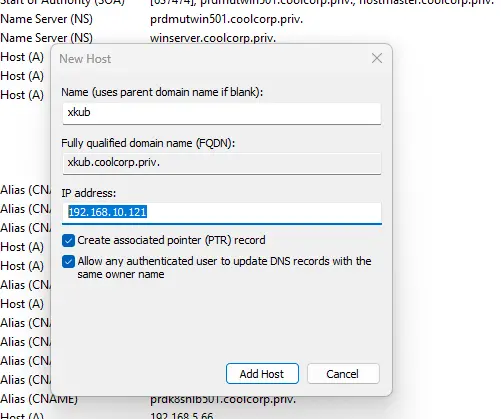
Before anything else, since we are going to start the steps related to the k8s clusters themselves, you must ensure that the DNS record associated with the API is operational.
Click the image to enlarge.
Feel free to review the architecture proposed in step 0 for more information, but in our case the API of the "xkub.coolcorp.priv" cluster points to the IP 192.168.10.121, which is none other than the VIP that will be managed by kube-vip.
After establishing this initial condition, we can begin examining the Ansible playbook.
Playbook Overview
This playbook is named xkub_30_cluster.yml
---

# Ordre strict, chaque play doit terminer sur TOUS ses hôtes avant le suivant :
#   1. kube-vip sur les 3 control planes (AVANT tout kubeadm init/join)
#   2. kubeadm init sur le seul control plane primaire
#   3. kube-vip rebasculé sur admin.conf (fin du bootstrap)
#   4. kubeadm join (CP2/CP3 puis workers) + labels/taints de tous les nœuds
#   5. Cilium (Helm), depuis le control plane primaire

- name: kube-vip — VIP API server en static pod
  hosts: k8s_controlplane_lan
  become: true
  roles:
    - xkub_kube_vip

- name: kubeadm init — control plane primaire
  hosts: "{{ groups['k8s_controlplane_lan'] | sort | first }}"
  become: true
  roles:
    - xkub_kubeadm_init

- name: kube-vip — retour au kubeconfig admin après le bootstrap
  hosts: "{{ groups['k8s_controlplane_lan'] | sort | first }}"
  become: true
  roles:
    - xkub_kube_vip

- name: kubeadm join — control planes additionnels, workers, labels et taints
  hosts: k8s_controlplane_lan:k8s_workers_lan:k8s_workers_web:gpu
  become: true
  roles:
    - xkub_kubeadm_join

- name: Cilium — CNI avec kubeProxyReplacement (chart Helm depuis le control plane primaire)
  hosts: "{{ groups['k8s_controlplane_lan'] | sort | first }}"
  become: true
  roles:
    - xkub_cilium
playbooks/xkub_30_cluster.yml
It will apply several roles that will be chained together
- xkub_kube_vip: This is the role specific to kube-vip. Note that it is only attached to the k8s_controlplane_lan group, which represents all of the control plane nodes.
- Xkub_kubeadm_init: This role is responsible for initiating the creation of the cluster. It will not be discussed in detail here but will be covered in a future article.
- xkub_kube_vip: This role is referenced again by the playbook, and you will understand why at the end of this article.
- xkub_kubeadm_join: This role is responsible for joining the nodes to the cluster.
- xkub_cilium: This role is responsible for deploying Cilium as a CNI (Container Network Interface).
Role xkub_kube_vip
Let's focus on the role xkub_kube_vip
Variables
We start with the defaults directory, containing the standard main.yml file
---
# Rôle xkub_kube_vip — VIP de l'API server (kube-apiserver :6443) en static pod,
# mode ARP
# Version épinglée dans inventory/group_vars/clu_k8s_xkub/versions.yml (kube_vip_version).

xkub_kube_vip_image: "ghcr.io/kube-vip/kube-vip:v{{ kube_vip_version }}"

# Interface portant la VIP API. Auto-détectée via les facts Ansible
xkub_kube_vip_interface: "{{ ansible_default_ipv4.interface }}"

# kube-vip ne gère QUE la VIP de l'API server
# LoadBalancer restent hors périmètre — Traefik est exposé par les paires
xkub_kube_vip_enable_services: false

xkub_kube_vip_manifest_path: /etc/kubernetes/manifests/kube-vip.yaml

# Kubeconfig monté dans le static pod ur
# Kubernetes >= 1.29". En régime établi c'est admin.conf ; pendant le tout
# premier `kubeadm init`, admin.conf n'est pas encore utilisable (ses bindings
# RBAC n'existent pas), il faut donc super-admin.conf. Le rôle choisit tout
# seul entre les deux selon l'état réel du nœud (tasks/01_static_pod.yml).
xkub_kube_vip_kubeconfig_bootstrap: /etc/kubernetes/super-admin.conf
xkub_kube_vip_kubeconfig_steady: /etc/kubernetes/admin.conf
roles/xkub_kube_vip/defaults/main.yml
This is where all the necessary variables will be configured.
Some of these variables, such as xkub_kube_vip_image, depend on higher-level variables, notably kube_vip_version, which is defined in the versions.yml file associated with the group clu_k8s_xkub in the folder inventory\group_vars\clu_k8s_xkub, specifically 1.3.1
Feel free to review Step 3 of the cookbook, which defines the Ansible logic used and the placement of variables.
The variable xkub_kube_vip_interface points to a system variable to retrieve the IP address of the node on which the configuration is being performed. We will use the server's address as the base interface for kube-vip
xkub_kube_vip_enable_services is set to false because kube-vip will only be used for the API VIP and not for other purposes; Traefik will handle that later.
Xkub_kube_vip_manifest_path is an interesting and important variable to understand.
Focus on Kubernetes components and static pods
This will allow us to take a brief detour in the article to explain a principle of how Kubernetes works.
K8S operates as a set of components, each with a predefined role, such as:
- kube-apiserver (The API server). This is the "entry point" to the cluster. It's the one that interests us specifically here. It's the only component with which you (via kubectl) and other components communicate directly. It validates and configures data for API objects (Pods, Services, etc.).
- Etcd: This is Kubernetes' database. It's a consistent and highly available key-value store. It stores the entire state of the cluster (which components are running where, what configuration is applied, etc.).
- kube-scheduler: This is the scheduler. It monitors newly created Pods that have not yet been assigned to a node, and chooses the best node to run them on based on resource requirements, hardware constraints, or affinity rules.
- kube-controller-manager: This is the controller manager. It runs background control loops that monitor the shared state of the cluster (via the API server) and attempt to match the current state to the desired state (for example, if a node fails, the Node Controller detects it and recreates the missing Pods elsewhere).
The very principle of a Vanilla K8S cluster, as we are creating here, is to retrieve these different components and run them on target nodes.
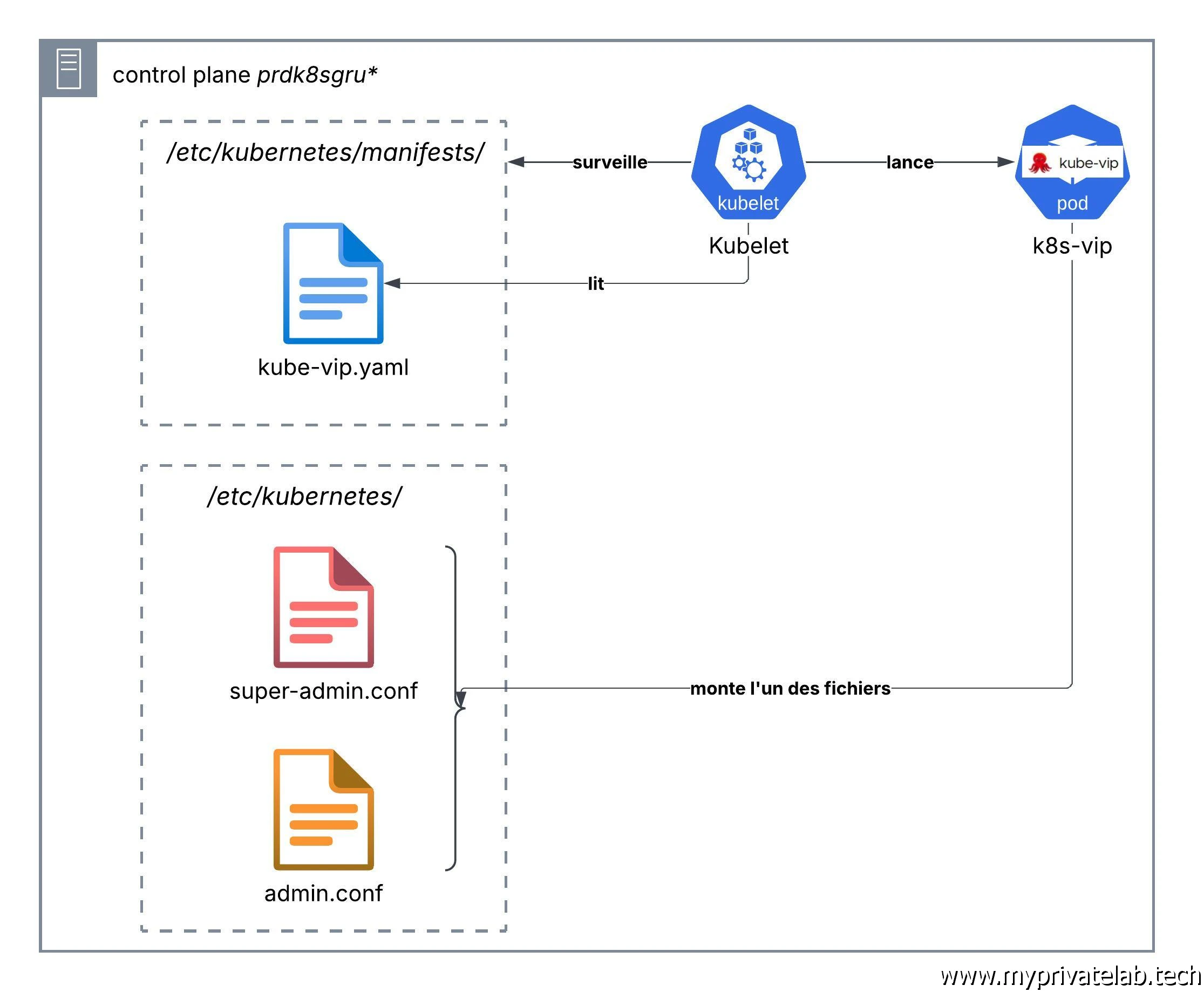
Kube-vip will be an additional component, but it will rely for its startup on the same mechanism as most of these basic components, namely through what are called static pods.
Most of the components mentioned, including kube-VIP, run as containers and are therefore executed within a pod. However, at this stage of deployment, the k8S cluster is not initialized. How can we submit a kube-VIP pod when, in fact, the kube-apiserver that should be contacted is not yet active?
This is where our famous kubelet deployed in step 4 of this cookbook come into play. Available on each node as a service, it has the ability to run pods located in a specific directory: the static pods.
In fact, each pod definition visible in this folder by a kubelet is automatically executed as soon as conditions allow (container runtime available...).
This is how the first components of the cluster can be initialized, which, in turn, can then be used to execute the desired Kubernetes objects and enter a classic deployment logic.
Kube-vip will inherit this mechanism, and that's why its configuration manifest will be copied to /etc/kubernetes/manifests/kube-vip.yaml, which is the value of the xkub_kube_vip_manifest_path variable, i.e., the location monitored by the kubelet to execute static pods.
In summary, kube-vip carries the VIP of the API server, which is the IP address 192.168.10.121 on port 6443 (see architecture). It is deployed as a static pod, with a manifest placed directly in /etc/kubernetes/manifests/, which kubelet starts automatically, without going through the API server.
Click the image to enlarge.
The other two variables, xkub_kube_vip_kubeconfig_bootstrap and xkub_kube_vip_kubeconfig_steady, are also interesting, but I won't go into detail now. We will understand their importance later in the article when we talk about the kube-vip manifest.
Tasks
We can continue with the task directory.
As usual, the main.yml file only references other tasks.
---
# Rôle xkub_kube_vip — VIP API server en static pod
# control planes AVANT xkub_kubeadm_init/xkub_kubeadm_join (playbooks/xkub_30_cluster.yml).
- name: Static pod kube-vip (VIP API server)
  ansible.builtin.import_tasks: 01_static_pod.yml
  tags:
    - xkub
    - xkub.kube_vip
    - xkub.kube_vip.static_pod
roles/xkub_kube_vip/tasks/main.yml
This is relatively simple here, since only the 01_static_pod.yml task is present.
---
- name: Créer le répertoire des manifestes statiques kubelet
  ansible.builtin.file:
    path: /etc/kubernetes/manifests
    state: directory
    owner: root
    group: root
    mode: "0755"

# Le kubeconfig à monter dépend de l'état RÉEL du nœud, pas d'un ordre supposé
# des plays : admin.conf n'existe qu'une fois `kubeadm init` (primaire) ou
# `kubeadm join --control-plane`  passé. Tant qu'il manque sur le
# control plane primaire, on est en phase de bootstrap et il faut monter
# super-admin.conf. Baser la décision sur ce stat rend le rôle
# rejouable : sur un cluster déjà formé il rebascule de lui-même vers
# admin.conf et ne produit plus aucun changement.
- name: Vérifier si ce control plane dispose déjà d'un kubeconfig admin
  ansible.builtin.stat:
    path: "{{ xkub_kube_vip_kubeconfig_steady }}"
  register: xkub_kube_vip_admin_conf

- name: Déterminer le kubeconfig à monter (bootstrap ou régime établi)
  ansible.builtin.set_fact:
    xkub_kube_vip_kubeconfig_path: >-
      {{ xkub_kube_vip_kubeconfig_bootstrap
         if (not xkub_kube_vip_admin_conf.stat.exists
             and inventory_hostname == xkub_primary_control_plane)
         else xkub_kube_vip_kubeconfig_steady }}

# Piège connu  : juste après ce dépôt, et tant
# que `kubeadm init`/`kubeadm join --control-plane` n'a pas écrit le
# kubeconfig, le conteneur kube-vip tourne en CrashLoopBackOff (kubeconfig
# vide). C'est attendu : kubelet le relance automatiquement et le pod devient
- name: Déployer le static pod kube-vip (VIP API {{ k8s_api_vip }}:{{ k8s_api_port }})
  ansible.builtin.template:
    src: kube-vip.yaml.j2
    dest: "{{ xkub_kube_vip_manifest_path }}"
    owner: root
    group: root
    mode: "0644"
roles/xkub_kube_vip/tasks/01_static_pod.yml
This task has several objectives.
Since the Kubernetes cluster is not created at this stage, it is necessary to ensure that the directory for reading the manifests of the static pod, which we mentioned earlier, exists. (/etc/kubernetes/manifests)
But that's not all, and this is where we will talk about the role of the variables xkub_kube_vip_kubeconfig_bootstrap and xkub_kube_vip_kubeconfig_steady, which we left aside.
Upon startup, kube-VIP must immediately connect to the API server. To do this, it searches for a kubeconfig file, which is usually created during the deployment of a Kubernetes cluster and allows interaction with it. This is something we will see later when executing the kubeadm init command, which will be executed by the xkub_kubeadm_init role.
kube-vip must also authenticate with the API to take the leader election lock. In fact, it creates a lease, a standard K8S object type (coordination.k8s.io/v1), to record which control plane is handling the API at any given time.
To perform this action, kube-vip must have significant permissions and authenticate with the API using a cluster administrator role.
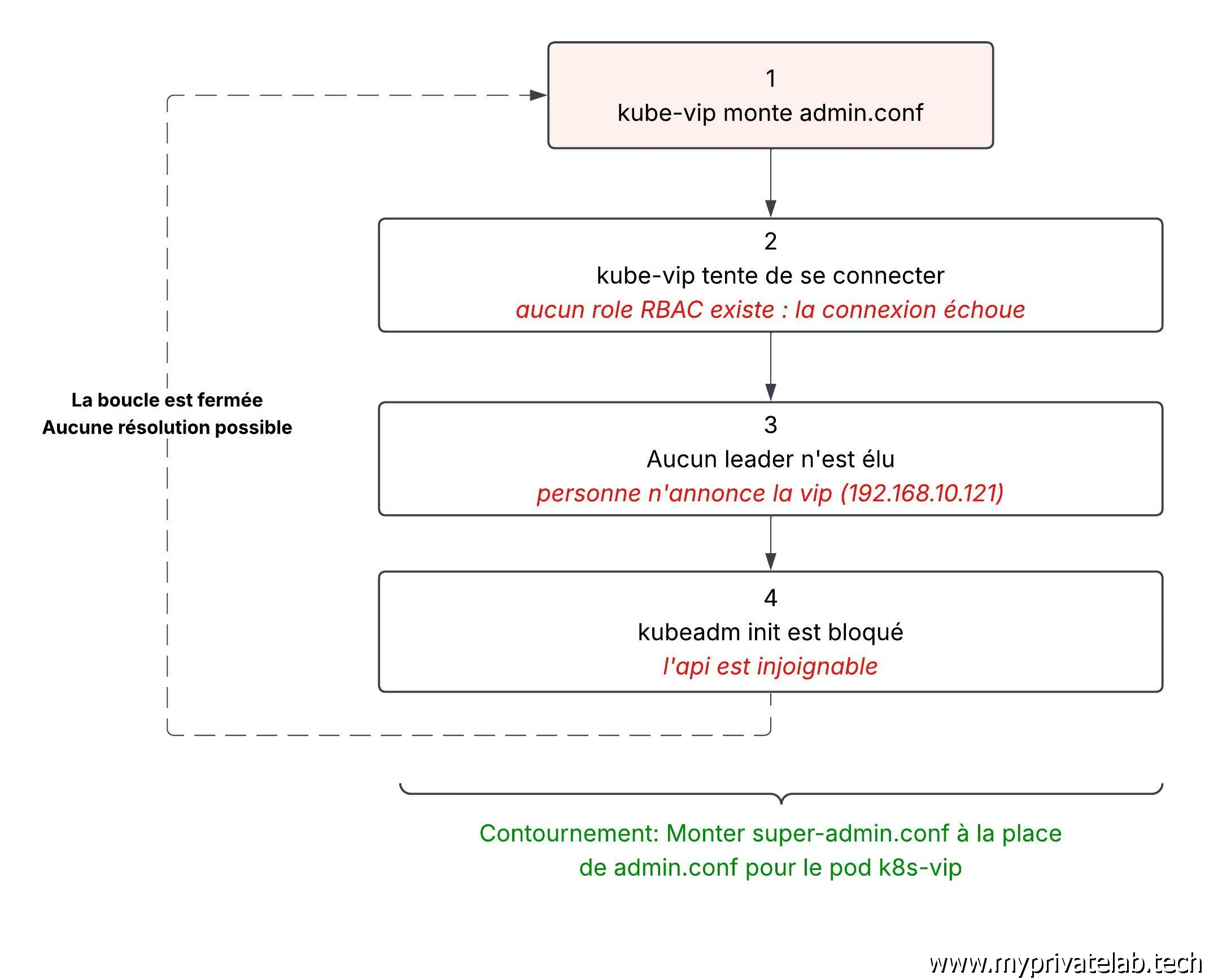
However, for the time being, not only does the API Server not exist, but when we move on to cluster initialization later, this process will not yet be complete. This is because the role expected by Kube-VIP is not yet available, as it is defined at the end of the cluster startup phase, which we call bootstrapping. Bootstrapping involves accessing the API…which will depend on kube-vip…which itself will not be available because it cannot authenticate….This creates a circular dependency with the risk that subsequent steps where we initialize the cluster may fail.
Click the image to enlarge.
But... since Kubernetes 1.29, kubeadm init generates two kubeconfig files for the administrator
- admin.conf: This file is created at the end of the cluster initialization process and contains all the default roles.
- super-admin.conf: This file contains a configuration where the superuser is "hardcoded" directly into the API, without any concept of roles.
The super-admin.conf file is therefore a kind of backup file, and it is extremely critical because it can bypass the entire RBAC (Role-Based Access Control) mechanism available in K8S (feel free to read my article on the subject).
This is exactly what we need for k8s-vip... but only during the cluster bootstrapping process. After that, once all the nodes are in place, there will be no more need to use super-admin.conf, and we can switch back to admin.conf
This is the core principle of the actions defined in 01_static_pod.yml: to make the k8s-vip manifest dynamic based on the cluster's state. Let's not forget that an Ansible playbook must be able to be replayed at any time.
You now understand why the playbook xkub_30_cluster.yml refers to the role xkub_kube_vip twice. Once the cluster is initialized, we re-run the configuration of kube-vip so that it switches to the file admin.conf.
Finally, remember that at this stage, despite what I have just described, the kube-vip pod will fail until kubeadm init has been run, because even super-admin.conf does not yet exist.
In any case, the kubelet keeps retrying to run the manifest. As soon as the conditions are met, kube-vip will become available automatically.
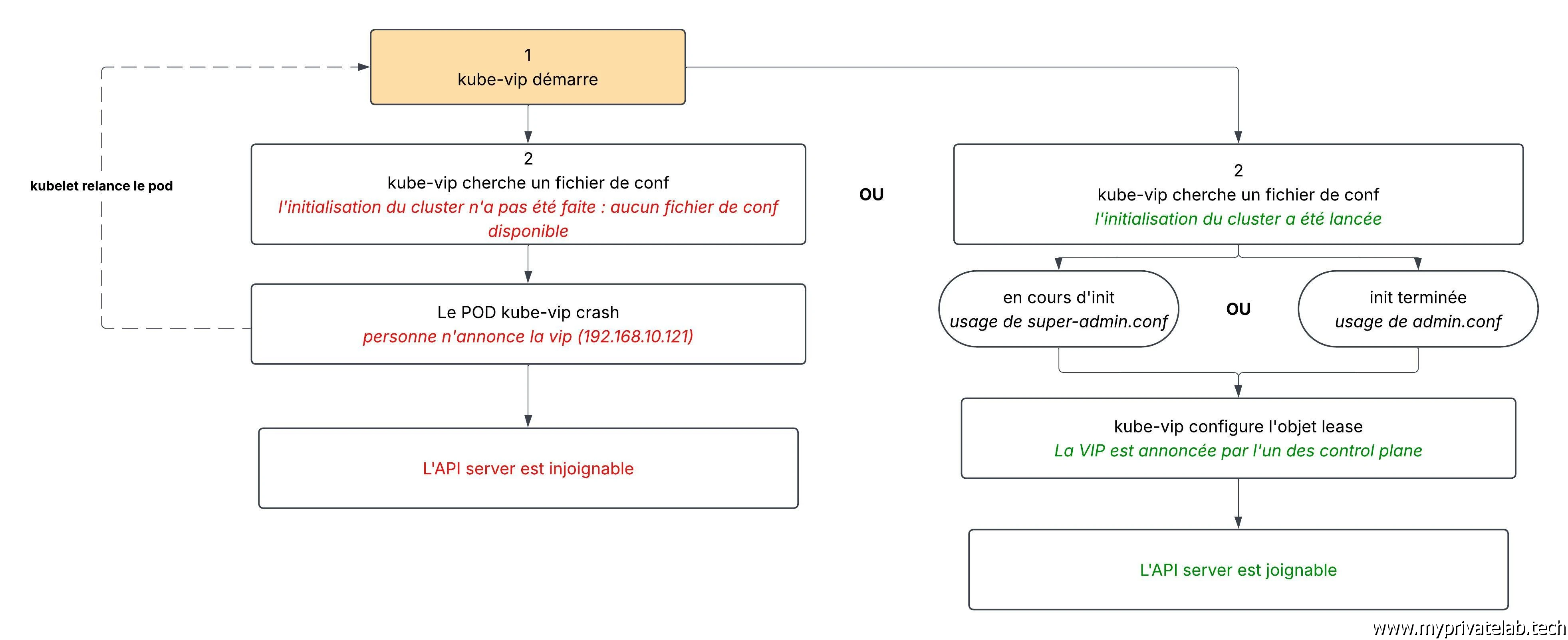
Click the image to enlarge.
Templates
Now, let's move on to the templates directory, where we will find the file kube-vip.yaml.j2
# {{ ansible_managed }}
# Static pod kube-vip — VIP API server {{ k8s_api_vip }}:{{ k8s_api_port }}.
# Déposé AVANT `kubeadm init` / `kubeadm join --control-plane` : kubelet
# démarre ce pod dès qu'il lit son staticPodPath (/etc/kubernetes/manifests),
# indépendamment de l'état du reste du control plane.
apiVersion: v1
kind: Pod
metadata:
  name: kube-vip
  namespace: kube-system
spec:
  containers:
    - name: kube-vip
      image: {{ xkub_kube_vip_image }}
      imagePullPolicy: IfNotPresent
      args:
        - manager
      env:
        - name: vip_arp
          value: "true"
        - name: port
          value: "{{ k8s_api_port }}"
        - name: vip_interface
          value: "{{ xkub_kube_vip_interface }}"
        - name: vip_subnet
          value: "32"
        - name: vip_ddns
          value: "false"
        - name: cp_enable
          value: "true"
        - name: cp_namespace
          value: kube-system
        - name: svc_enable
          value: "{{ xkub_kube_vip_enable_services | bool | lower }}"
        - name: vip_leaderelection
          value: "true"
        - name: vip_leasename
          value: plndr-cp-lock
        - name: vip_leaseduration
          value: "5"
        - name: vip_renewdeadline
          value: "3"
        - name: vip_retryperiod
          value: "1"
        - name: address
          value: "{{ k8s_api_vip }}"
      # Le mode ARP n'a besoin que de NET_ADMIN (adresse sur l'interface) et
      # NET_RAW (ARP gratuit) : SYS_TIME, présent dans le manifeste généré par
      # `kube-vip manifest pod`, est retiré.
      securityContext:
        capabilities:
          add:
            - NET_ADMIN
            - NET_RAW
      volumeMounts:
        - mountPath: /etc/kubernetes/admin.conf
          name: kubeconfig
  hostAliases:
    - hostnames:
        - kubernetes
      ip: 127.0.0.1
  hostNetwork: true
  volumes:
    # Le chemin CÔTÉ HÔTE varie selon la phase (bootstrap : super-admin.conf,
    # régime établi : admin.conf), alors que le chemin monté DANS le conteneur
    # reste toujours /etc/kubernetes/admin.conf — c'est celui que kube-vip lit.

    # type: FileOrCreate est le second point important : au tout premier
    # démarrage, ce hostPath n'existe pas encore. Sans ce type explicite, le
    # runtime crée un RÉPERTOIRE vide à cet emplacement pour satisfaire le
    # montage, ce qui fait ensuite échouer kubeadm (impossible d'écrire un
    # fichier sur un chemin occupé par un répertoire). FileOrCreate garantit
    # qu'un FICHIER vide est créé, que kubeadm remplace normalement ensuite.
    - hostPath:
        path: {{ xkub_kube_vip_kubeconfig_path }}
        type: FileOrCreate
      name: kubeconfig
roles/xkub_kube_vip/templates/kube-vip.yaml.j2
This is the definition of our famous manifest for kube-vip. Once placed in the /etc/Kubernetes/manifests directory of each control plane, it will be read by the kubelet service and executed as a static pod.
The kube-vip container image, as defined in the variable seen earlier, will be pulled and then started with the parameters we want, including the cluster's API port (6443) and our VIP, 192.168.10.121, which xkub.coolcorp.priv resolves to, as configured at the beginning of the article.
We are in ARP mode via the option defined in the environment variable vip_arp, set to true.
In terms of security, the container only receives the two Linux capabilities required for this mode: NET_ADMIN to bring up the VIP on the interface and NET_RAW to send gratuitous ARP announcements. The SYS_TIME capability, present in the manifest generated by default by kube-vip, is intentionally removed.
We also define the name of the lease object and other elements whose names are quite descriptive.
The most notable part of the template is the use of the variable xkub_kube_vip_kubeconfig_path, which represents the value to be used for mounting either admin.conf or super-admin.conf within the kube-VIP container's context, so that it can know how to communicate with the API Server. This is the purpose of what we have seen previously and the task 01_static_pod.yml, which ultimately copies the template with the correct values to the control plane servers.
As mentioned earlier, this template will be redeployed during the second iteration of the role xkub_kube_vip, so that once the cluster is in place, kube-vip can be configured with the final location of the configuration file.
If we look at the final result, here's what the file will look like on, for example, the first control plane prdk8sgru501 (192.168.10.161).
#
apiVersion: v1
kind: Pod
metadata:
  name: kube-vip
  namespace: kube-system
spec:
  containers:
    - name: kube-vip
      image: ghcr.io/kube-vip/kube-vip:v1.3.1
      imagePullPolicy: IfNotPresent
      args:
        - manager
      env:
        - name: vip_arp
          value: "true"
        - name: port
          value: "6443"
        - name: vip_interface
          value: "enX0"
        - name: vip_subnet
          value: "32"
        - name: vip_ddns
          value: "false"
        - name: cp_enable
          value: "true"
        - name: cp_namespace
          value: kube-system
        - name: svc_enable
          value: "false"
        - name: vip_leaderelection
          value: "true"
        - name: vip_leasename
          value: plndr-cp-lock
        - name: vip_leaseduration
          value: "5"
        - name: vip_renewdeadline
          value: "3"
        - name: vip_retryperiod
          value: "1"
        - name: address
          value: "192.168.10.121"
      securityContext:
        capabilities:
          add:
            - NET_ADMIN
            - NET_RAW
      volumeMounts:
        - mountPath: /etc/kubernetes/admin.conf
          name: kubeconfig
  hostAliases:
    - hostnames:
        - kubernetes
      ip: 127.0.0.1
  hostNetwork: true
  volumes:
    - hostPath:
        path: /etc/kubernetes/admin.conf
        type: FileOrCreate
      name: kubeconfig
/etc/kubernetes/manifests/kube-vip.yaml
Conclusion
We will not run the playbook now. Before that, it is necessary to discuss other roles, especially xkub_kubeadm_init. As you have probably understood, kube-vip and cluster initialization are closely linked, and it makes more sense to treat them one after the other in a single playbook.
It remains important to understand how kube-vip works and to have retained the fundamental principles that we described in this article regarding the operation of Kubernetes.
It is a deliberate choice on my part to reveal important theoretical aspects gradually, as we go through the Ansible configuration files to discover which actions will be performed and why.
If some points are still unclear, they should become clearer in the following steps. We will continue in the next article with the cluster bootstrapping.
Summary of variables and equivalent commands outside of Ansible
This appendix summarizes all the variables used by Ansible in this article and provides equivalents for the commands and configurations implemented by Ansible in this section.
Variables used
| Variable | Valeur | Déclarée dans |
|---|---|---|
kube_vip_version |
1.3.1 |
inventory/group_vars/clu_k8s_xkub/versions.yml |
xkub_kube_vip_image |
ghcr.io/kube-vip/kube-vip:v{{ kube_vip_version }} → ghcr.io/kube-vip/kube-vip:v1.3.1 |
roles/xkub_kube_vip/defaults/main.yml |
xkub_kube_vip_interface |
{{ ansible_default_ipv4.interface }} → enX0 |
roles/xkub_kube_vip/defaults/main.yml (valeur issue des facts Ansible) |
xkub_kube_vip_enable_services |
false |
roles/xkub_kube_vip/defaults/main.yml |
xkub_kube_vip_manifest_path |
/etc/kubernetes/manifests/kube-vip.yaml |
roles/xkub_kube_vip/defaults/main.yml |
xkub_kube_vip_kubeconfig_bootstrap |
/etc/kubernetes/super-admin.conf |
roles/xkub_kube_vip/defaults/main.yml |
xkub_kube_vip_kubeconfig_steady |
/etc/kubernetes/admin.conf |
roles/xkub_kube_vip/defaults/main.yml |
k8s_api_vip |
192.168.10.121 |
inventory/group_vars/clu_k8s_xkub/main.yml |
k8s_api_port |
6443 |
inventory/group_vars/clu_k8s_xkub/main.yml |
xkub_primary_control_plane |
{{ groups['k8s_controlplane_lan'] | sort | first }} → prdk8sgru501.coolcorp.priv |
inventory/group_vars/all/main.yml |
xkub_kube_vip_admin_conf |
résultat du stat sur admin.conf |
register dans roles/xkub_kube_vip/tasks/01_static_pod.yml |
xkub_kube_vip_kubeconfig_path |
super-admin.conf sur prdk8sgru501 tant que admin.conf n'existe pas, admin.conf dans tous les autres cas |
set_fact dans roles/xkub_kube_vip/tasks/01_static_pod.yml |
ansible_user |
ansible-windows |
inventory/hosts.yml (all.vars) |
Equivalent without Ansible
Connexion : ssh ansible-windows@<serveur>, puis sudo -i. Toutes les commandes tournent en root.
| # | Action | Serveur(s) | Compte | Commande(s) |
|---|---|---|---|---|
| 1 | Créer le répertoire des static pods | prdk8sgru501, 502, 503 | root | install -d -m 755 -o root -g root /etc/kubernetes/manifests |
| 2 | Vérifier si le nœud a déjà un kubeconfig admin | prdk8sgru501, 502, 503 | root | ls -l /etc/kubernetes/admin.conf (absent avant kubeadm init/join) |
| 3 | Déposer le static pod kube-vip | prdk8sgru501, 502, 503 | root | Créer /etc/kubernetes/manifests/kube-vip.yaml (bloc A), chmod 644.Valeur de path: : /etc/kubernetes/super-admin.conf sur prdk8sgru501 (bootstrap), /etc/kubernetes/admin.conf sur 502 et 503 |
| 4 | (étape 7 : kubeadm init sur prdk8sgru501) |
voir the step 7 appendix | ||
| 5 | Repasser kube-vip sur admin.conf |
prdk8sgru501 | root | sed -i 's#path: /etc/kubernetes/super-admin.conf#path: /etc/kubernetes/admin.conf#' /etc/kubernetes/manifests/kube-vip.yaml |
| 6 | Vérifier (après kubeadm init) |
prdk8sgru501 | root | crictl ps --name kube-vipip -br addr show enX0 (la VIP 192.168.10.121 doit apparaître sur le leader) |
Le kubelet surveille /etc/kubernetes/manifests/. Toute modification du fichier recrée le pod, sans kubectl : c'est le principe du static pod.
Bloc A /etc/kubernetes/manifests/kube-vip.yaml
apiVersion: v1
kind: Pod
metadata:
  name: kube-vip
  namespace: kube-system
spec:
  containers:
    - name: kube-vip
      image: ghcr.io/kube-vip/kube-vip:v1.3.1
      imagePullPolicy: IfNotPresent
      args:
        - manager
      env:
        - name: vip_arp
          value: "true"
        - name: port
          value: "6443"
        - name: vip_interface
          value: "enX0"
        - name: vip_subnet
          value: "32"
        - name: vip_ddns
          value: "false"
        - name: cp_enable
          value: "true"
        - name: cp_namespace
          value: kube-system
        - name: svc_enable
          value: "false"
        - name: vip_leaderelection
          value: "true"
        - name: vip_leasename
          value: plndr-cp-lock
        - name: vip_leaseduration
          value: "5"
        - name: vip_renewdeadline
          value: "3"
        - name: vip_retryperiod
          value: "1"
        - name: address
          value: "192.168.10.121"
      securityContext:
        capabilities:
          add:
            - NET_ADMIN
            - NET_RAW
      volumeMounts:
        - mountPath: /etc/kubernetes/admin.conf
          name: kubeconfig
  hostAliases:
    - hostnames:
        - kubernetes
      ip: 127.0.0.1
  hostNetwork: true
  volumes:
    - hostPath:
        # prdk8sgru501 avant kubeadm init : /etc/kubernetes/super-admin.conf
        # prdk8sgru502/503, et prdk8sgru501 après init : /etc/kubernetes/admin.conf
        path: /etc/kubernetes/super-admin.conf
        type: FileOrCreate
      name: kubeconfig