Gateway API - Functionality and example with Traefik
- Ingress, limited by non-standardized annotations, are being replaced by the Gateway API.
- Fundamentals of the Gateway API.
- Installation and configuration with Traefik.
- Coexistence with Ingress: migrate at your own pace.
Introduction
Kubernetes is a very dynamic ecosystem, constantly evolving.
Some methods, even if they have been used for a significant period of time, can be deprecated and eventually replaced by other solutions.
This applies to exposing assets outside the clusters.
Even today, one way to accomplish this task is to use objects of type Ingress.
These objects are manipulated and processed by Ingress Controllers, such as NGINX or Traefik.
I will detail the usage of Traefik and the functionality of Ingress in this article.
Although the combination of Ingress and Ingress Controller works, the entire system is starting to show some limitations.
One of the most frequent criticisms of this type of architecture is the use of non-standardized annotations specific to each controller to define advanced options.
The Ingress object itself is very limited in its functions, and as soon as you need to implement advanced routing or third-party features, such as URL rewriting, each Ingress Controller uses its own syntax.
Furthermore, the separation between the infrastructure scope and the application scope is somewhat blurred, which can create responsibility issues regarding the administration of a k8S cluster in some organizations.
Therefore, since 2019, initiatives have been taken to try to improve the situation. This culminated in October 2023 with the general availability (GA) release of the Gateway API.
It is an official project of Kubernetes, separate from the main development. Its life cycle is faster than the core's, with new releases every 3 to 6 months.
Without rendering the logic of Ingress obsolete, the Gateway API is now the preferred method for the Kubernetes community to expose its applications.
This article aims to demonstrate how to transition to this new exposure method and explain how the Gateway API works by presenting the new elements it introduces.
Be aware that it is entirely possible to have both Ingress-based and Gateway API-based exposure coexist within the same cluster.
Also note that while Ingress remains fully integrated with K8S, NGINX has already announced its intention to end support for them in favor of the Gateway API.
As for me, I primarily use Traefik. Although it hasn't yet announced any changes as of this writing, I will begin migrating to the Gateway API to stay up-to-date.
This article will therefore focus on Traefik, but NGINX users will also find useful information about how the Gateway API works, which may be helpful during their own migrations.
Fundamentals
Recap of how Ingress works
Before discussing the Gateway API, let's review, through a simplified diagram, the current method of exposing my applications based on my Kubernetes cluster, Traefik, and Ingress.
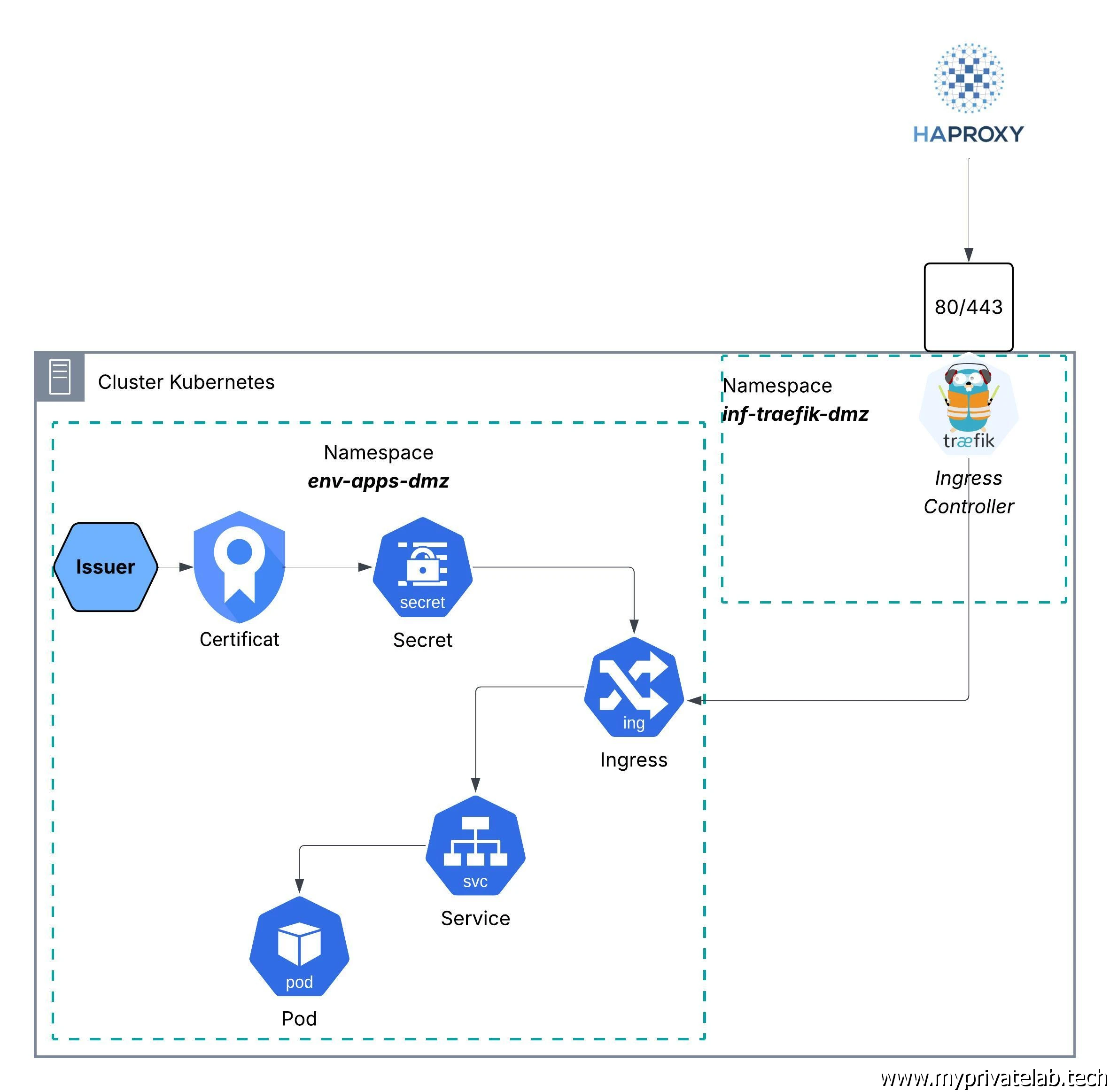
Click the image to enlarge.
In this mode of operation, any specific advanced processing is handled by middleware objects specific to Traefik. The Ingress is very basic and mainly serves to link to the Service.
If you want to learn more about this type of logic, feel free to browse this article.
Basics of the Gateway API
The Gateway API is different. It will use several new objects.
| Resource | Scope | Role |
|---|---|---|
| GatewayClass | Cluster | Defines the controller (Traefik) |
| Gateway | Namespace | Concrete entry point (listeners) |
| HTTPRoute | Namespace | Routing rules (hostname → service) |
| ReferenceGrant | Namespace | Authorizes cross-namespace secret access |
As you can see, this adds complexity, but in return, we gain better separation of concerns and a native ability to handle advanced routing issues.
Here is the equivalent of the simplified diagram above, but within the logic of the Gateway API.
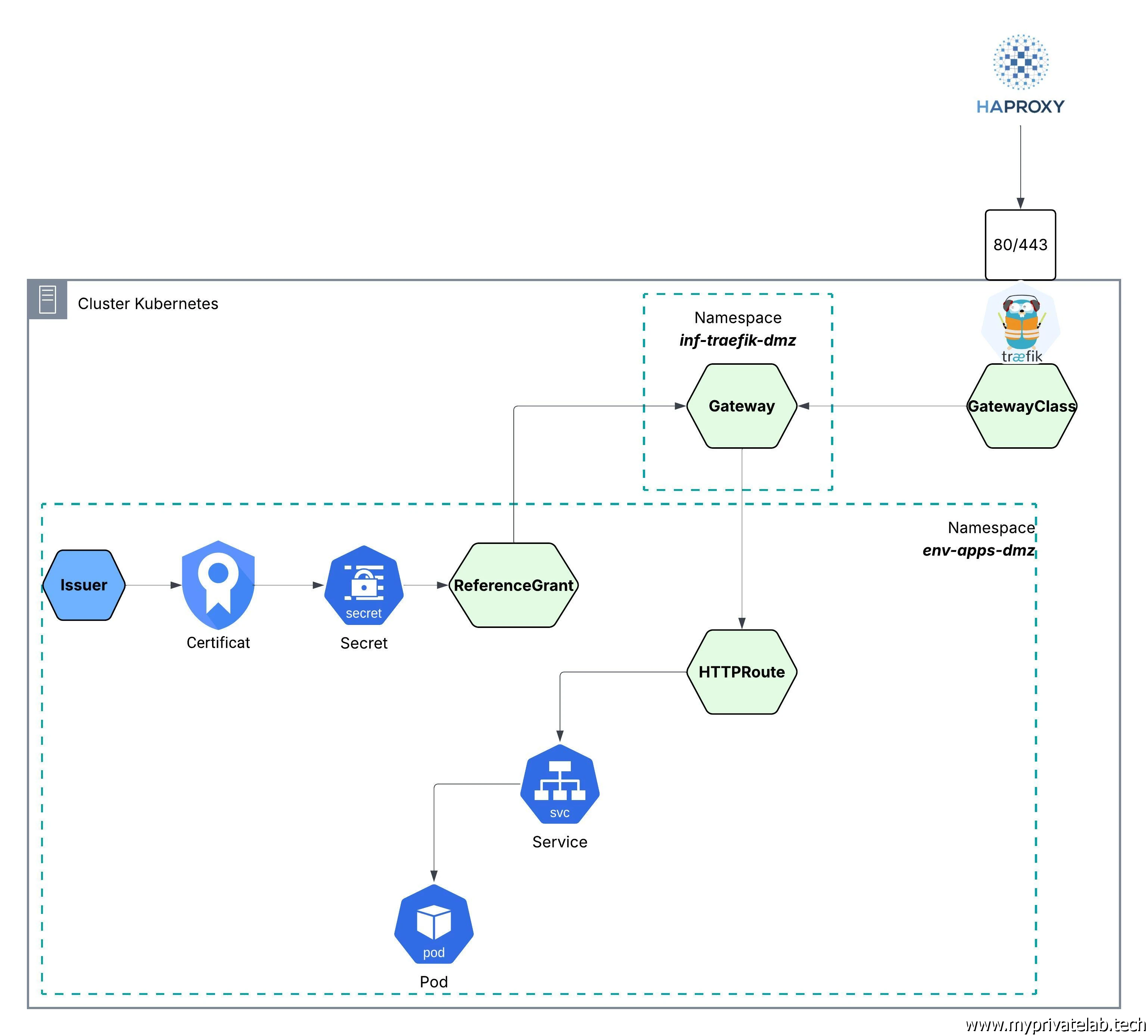
Click the image to enlarge.
Traefik switches from an Ingress Controller to a GatewayClass.
This GatewayClass will allow you to create Gateways. You can choose to create multiple Gateways or share a single Gateway for several applications.
A gateway can process HTTPRoute objects, which contain the routing rules for sending requests to the correct Services, applying the appropriate processing.
When a gateway is not in the same Namespace as the HTTPRoutes it controls, it is essential to create a ReferenceGrant object to allow the gateway to access objects from the application's namespace, such as secrets that contain the certificates to be used.
So yes, it's more complex, but in this way, we delegate advanced features to K8S objects independent of the chosen gateway tool like GatewayClass.
Thus, unlike before, whether you use NGINX or Traefik, the routing syntaxes will be the same.
Furthermore, we clearly define responsibility boundaries if needed.
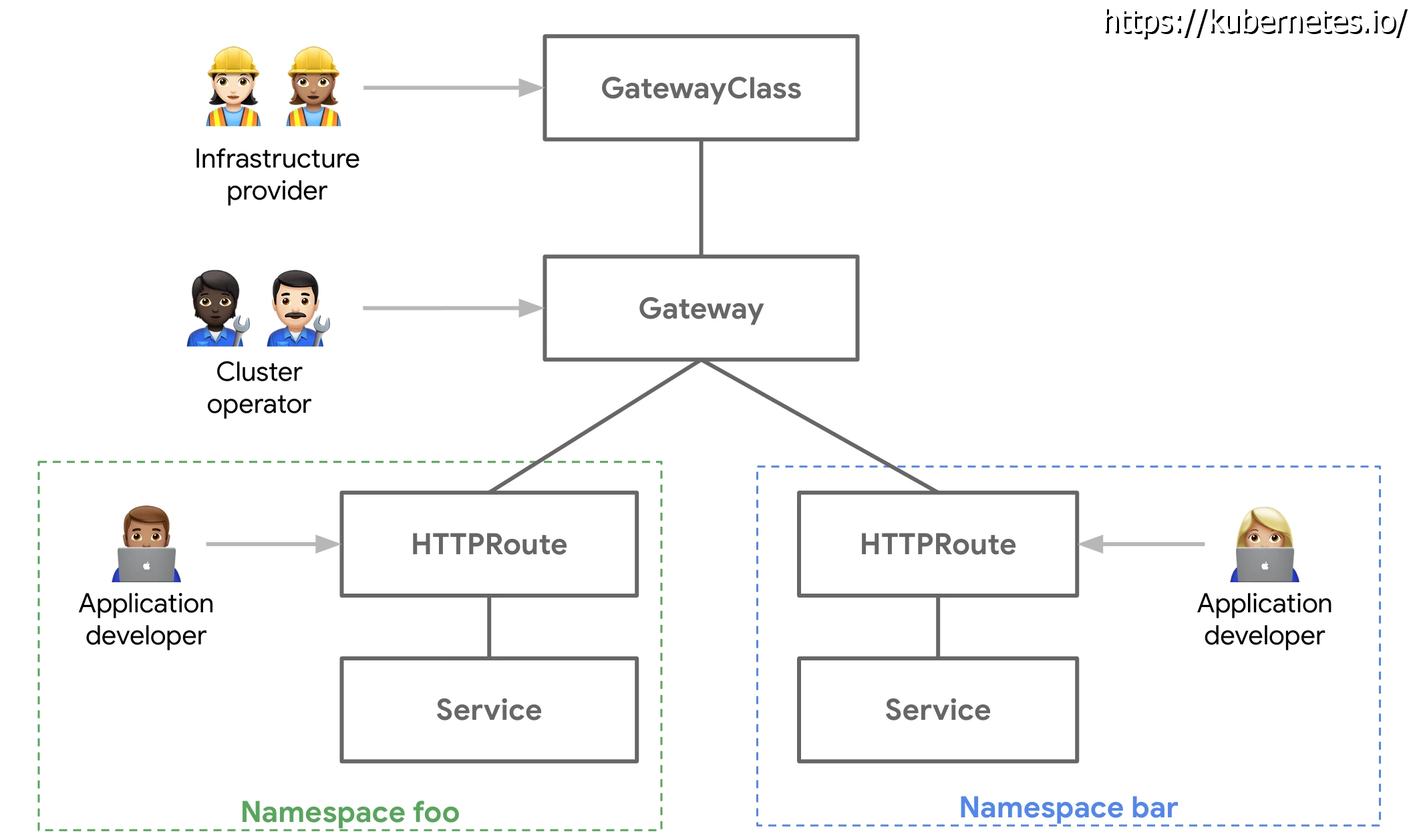
Click the image to enlarge.
Finally, the Gateway API is expected to evolve, and other objects may be used or will be able to be used.
For example, a GRPCRoute object already exists to allow a gateway to map traffic on the gRPC (gRPC Remote Procedure) protocol, which is an improved way of making API calls.
Other objects are currently being tested, such as TCPRoute, UDPRoute, BackendLBPolicy, RateLimitPolicy, at various stages of development.
As you will understand from the names of these objects, we are approaching the implementation of a true load balancer within Kubernetes, and that in a standardized way.
Installation and configuration
Let's now try to make this more concrete through an implementation on my lab.
I invite you to learn about my current architecture, especially via this link.
The goal is to add support for the Gateway API to my Traefik instance dedicated to my DMZ traffic and to make a test application available outside of my cluster using the new associated objects.
Installing the Gateway API
The Gateway API is not part of the core of K8S, so you need to start by adding these objects to the Kubernetes API.
Several methods exist. The simplest method is to apply the YAML files provided on the project's GitHub directly using the command kubectl apply --server-side -f https://github.com/kubernetes-sigs/gateway-api/releases/download/v1.4.0/standard-install.yaml.
Of course, the version must be adapted according to the time and constraints.
If, like me, you encounter an issue during deployment, simply remove the installation that was just performed and then restart it.
kubectl delete -f https://github.com/kubernetes-sigs/gateway-api/releases/download/v1.4.0/standard-install.yaml
kubectl apply --server-side -f https://github.com/kubernetes-sigs/gateway-api/releases/download/v1.4.0/standard-install.yaml
This may be related to already installed components, for example, through the upstream deployment of Traefik, which can itself deploy the Gateway API.
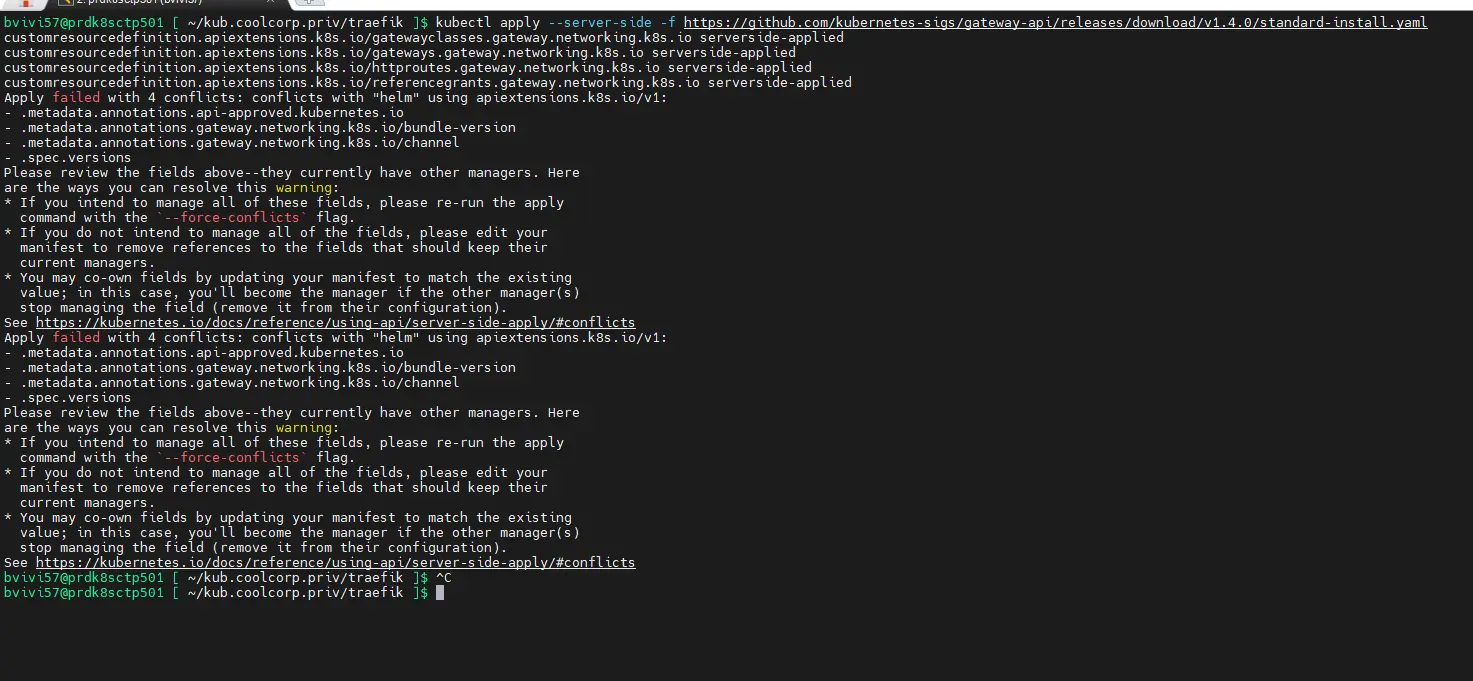
Click the image to enlarge.

Click the image to enlarge.
Modifying the Traefik configuration
Traefik will actually be the second component to be modified.
In this case, I am currently only modifying my dedicated Traefik instance for my DMZ. (Feel free to review my Traefik architecture).
I will modify the configuration file that I usually pass to Helm when deploying or updating Traefik on my cluster.
I will start from my initial file and add some elements to it.
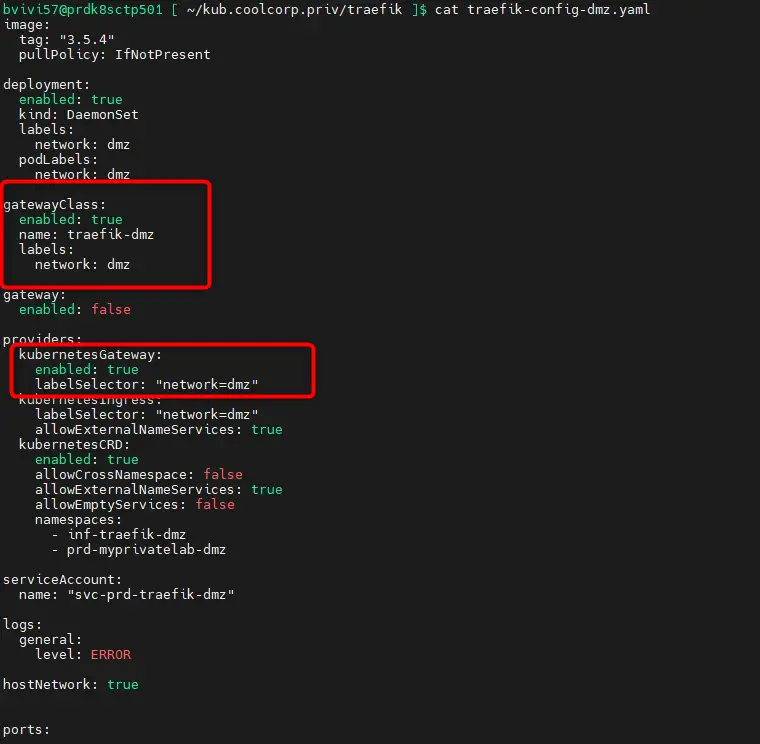
Here is the complete configuration from my traefik-config-dmz.yaml file:
image:
  tag: "3.5.4"
  pullPolicy: IfNotPresent

deployment:
  enabled: true
  kind: DaemonSet
  labels:
    network: dmz
  podLabels:
    network: dmz

gatewayClass:
  enabled: true
  name: traefik-dmz
  labels:
    network: dmz

gateway:
  enabled: false

providers:
  kubernetesGateway:
    enabled: true
    labelSelector: "network=dmz"
  kubernetesIngress:
    labelSelector: "network=dmz"
    allowExternalNameServices: true
  kubernetesCRD:
    enabled: true
    allowCrossNamespace: false
    allowExternalNameServices: true
    allowEmptyServices: false
    namespaces:
      - inf-traefik-dmz
      - prd-myprivatelab-dmz

serviceAccount:
  name: "svc-prd-traefik-dmz"

logs:
  general:
    level: ERROR

hostNetwork: true


ports:
  web:
    port: 80
    expose:
      default: true
    redirections:
      entryPoint:
        to: websecure
        scheme: https
        permanent: true
  websecure:
    port: 443
    expose:
      default: true
    proxyProtocol:
      trustedIPs:
        - "192.168.10.91"
    forwardedHeaders:
      trustedIPs:
        - "192.168.10.91"
    tls:
      enabled: true

securityContext:
  capabilities:
    drop: [ALL]
    add: [NET_BIND_SERVICE]
  readOnlyRootFilesystem: true
  runAsGroup: 0
  runAsNonRoot: false
  runAsUser: 0

updateStrategy:
  rollingUpdate:
    maxSurge: 0
    maxUnavailable: 1
  type: RollingUpdate

additionalArguments:
  - "--providers.kubernetesingress.ingressclass=traefik-dmz"
  - "--serversTransport.insecureSkipVerify=true"
Click the image to enlarge.
Let's focus on a few key elements:
gatewayClass:
  enabled: true
  name: traefik-dmz
  labels:
    network: dmz

gateway:
  enabled: false
This part of the configuration will:
- Enable the creation of the gatewayClass "traefik-dmz" associated with the label network: DMZ
- It will prevent the automatic creation of the Gateway. By default, Traefik tries to create a gateway to attach it to the gatewayclass. However, in this case, certain elements cannot be configured. Therefore, we will prefer to create it manually, separately, later.
providers:
  kubernetesGateway:
    enabled: true
    labelSelector: "network=dmz"
This section enables support for the KubernetesGateway provider associated with the Gateway API by Traefik. We also indicate which publications associated with this provider should be taken into account, by applying a filter to the Namespaces that include the label "network=dmz".
This way, I can continue to use different instances of Traefik, depending on whether I need to publish applications in the DMZ or LAN, since my Kubernetes cluster has nodes in both network segments. This was a way for me to save resources and avoid having two specific clusters.
No further parameters are needed.
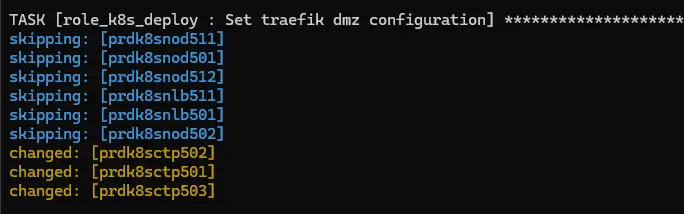
As I explain in my cookbook, I push my configuration files with Ansible to automate my updates.
I then run my playbook to push this new file to my control planes... but that's anecdotal for today's topic.
Click the image to enlarge.
Regardless, I have prepared my configuration file, and all that remains is to execute a Helm command (since I deployed Traefik with Helm) to update my Traefik instance in the DMZ with this new configuration.
helm upgrade traefik-dmz traefik/traefik -f traefik-config-dmz.yaml -n inf-traefik-dmz --set nodeSelector.traefik-dmz=yes --set tolerations[0].key=node-role.kubernetes.io/worker-dmz --set tolerations[0].operator=Exists --set tolerations[0].effect=NoSchedule

Click the image to enlarge.
Once the operation is complete, I can verify that I now have a gatewayclass. Since this object is cluster-wide, there is no need to specify a Namespace:
kubectl get gatewayclass

Click the image to enlarge.
Its status must be set to true, as it needs to match my Traefik installation.
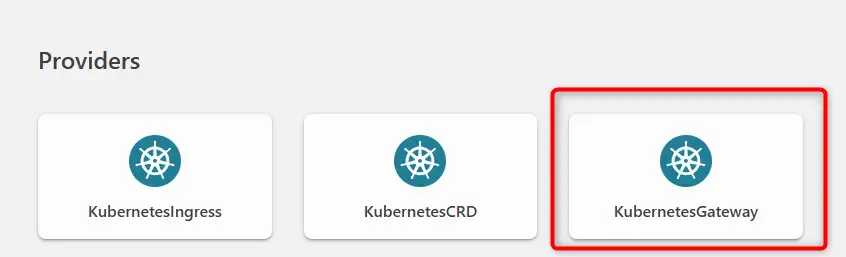
If we now consult the Traefik dashboard, we also see support for the Gateway API via the kubernetesGateway provider, in addition to Ingress and custom Traefik objects.
Click the image to enlarge.
This is the advantage here, as you can very well use all three methods to publish your applications outside the cluster.
The three methods (custom Traefik object, Ingress, Gateway API) can coexist, and you can change them on a per-application basis for smooth transitions.
Creating the Gateway object
Now that my gatewayclass is ready and my Traefik instance in the DMZ is able to work according to the logic of the Gateway API, we need to create the Gateway object (since we did not want to create it automatically in the Traefik configuration).
To do this, we create the following configuration file: 08-gateway-dmz.yml.
---
apiVersion: gateway.networking.k8s.io/v1
kind: Gateway
metadata:
  name: traefik-gateway-dmz
  namespace: inf-traefik-dmz
  labels:
    network: dmz
spec:
  gatewayClassName: traefik-dmz
  listeners:
  - name: web
    port: 80
    protocol: HTTP
    allowedRoutes:
      namespaces:
        from: Selector
        selector:
          matchLabels:
            network: dmz
  - name: websecure
    port: 443
    protocol: HTTPS
    allowedRoutes:
      namespaces:
        from: Selector
        selector:
          matchLabels:
            network: dmz
    tls:
      mode: Terminate
      certificateRefs:
        - name: sec-gateway-default-cert
I have chosen to place this access point in the same namespace (inf-traefik-dmz) as my containers running the Traefik instance in the DMZ. I decided to design a single Gateway that will be able to serve multiple HTTProutes from my Namespaces reserved for applications in the DMZ.
The file is relatively simple to understand.
We define the listening ports of our gateway, which are the same as those opened by Traefik, namely 80 (web) and 443 (websecure).
We apply a filter to the Namespaces, so that the Gateway only interacts with those containing applications designed for publication in the DMZ, by manipulating the network=dmz label.
Very important, we finish with the tls: section.
This is where we must specify a secret (sec-gateway-default-cert) containing the default certificate of the Gateway. In fact, as soon as you ask a Gateway to handle TLS traffic, it must have a certificate.
This certificate will not be used unless no other certificate is found that can match the URL of the published site thanks to the SNI (Server Name Indication) logic.
Therefore, this certificate can be a private certificate and does not necessarily require using a certificate generated by a trusted CA.
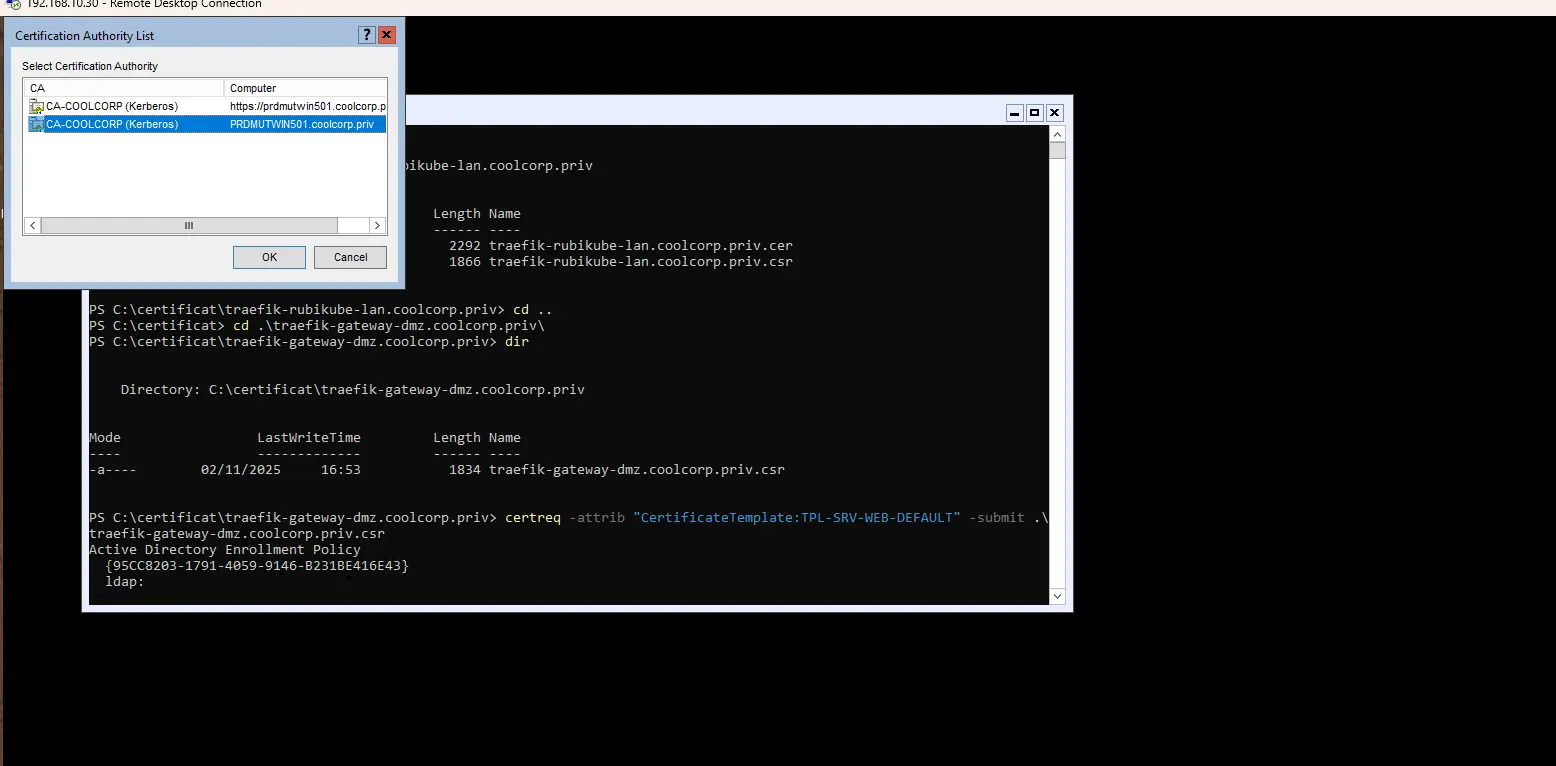
In my case, I will use my old Windows internal PKI to generate a certificate on a default name traefik-gateway-dmz.coolcorp.priv.
I will not go into too much detail about the creation of the certificate; everyone has their own way of doing it.
Click the image to enlarge.
It is crucial that the certificate and private key are stored in a secret, which will itself be stored in the same Namespace as the Gateway and declared in its configuration.
kubectl create secret tls sec-gateway-default-cert --cert=traefik-gateway-dmz.coolcorp.priv.cer --key=traefik-gateway-dmz.coolcorp.priv.key -n inf-traefik-dmz

Click the image to enlarge.
Next, we apply the configuration to declare our gateway.
kubectl apply -f .\08-gateway-dmz.yml
We verify that it is available in the desired Namespace.
kubectl get gateway -n inf-traefik-dmz

Click the image to enlarge.
Testing and usage
We can then proceed with a test to validate the functionality of the entire system.
To do this, we start by creating a dedicated Namespace.
kubectl create ns dev-demoapigateway-dmz

Click the image to enlarge.
Then, we label this namespace with network=dmz so that it is recognized by our gateway.
kubectl label namespace dev-demoapigateway-dmz network=dmz

Click the image to enlarge.
We continue with standard objects.
Such as an issuer based on Let's Encrypt to automate the creation of the certificate specific to the published application.
---
apiVersion: cert-manager.io/v1
kind: Issuer
metadata:
  name: issuer-demoapigateway-letsencrypt
  namespace: dev-demoapigateway-dmz
  labels:
    environment: dev
    network: dmz
    application: demoapigateway
spec:
  acme:
    email: [email protected]
    server: https://acme-v02.api.letsencrypt.org/directory
    privateKeySecretRef:
      name: sec-issuer-demoapigateway
    solvers:
      - http01:
          ingress:
            class: traefik-dmz
            podTemplate:
              metadata:
                labels:
                  network: dmz
              spec:
                nodeSelector:
                  network: dmz
                tolerations:
                  - key: "node-role.kubernetes.io/worker-dmz"
                    operator: "Exists"
                    effect: "NoSchedule"
            ingressTemplate:
              metadata:
                labels:
                  network: dmz
For those who are not comfortable with this type of object, I encourage you to read my article on installing CertManager and also my tutorial on publishing an application to my reference K8S cluster.
Then, we design its deployment and service to describe its application.
In this case, here, it is simply deploying an Nginx image.
apiVersion: apps/v1
kind: Deployment
metadata:
  name: deploy-demoapigateway-lan
  namespace: dev-demoapigateway-dmz
  labels:
    environment: dev
    network: dmz
    application: demoapigateway
spec:
  strategy:
    type: Recreate
  selector:
    matchLabels:
      environment: dev
      network: dmz
      application: demoapigateway
  template:
    metadata:
      labels:
        environment: dev
        network: dmz
        application: demoapigateway
    spec:
      nodeSelector:
        network: dmz
      tolerations:
         - key: "node-role.kubernetes.io/worker-dmz"
           operator: "Exists"
           effect: "NoSchedule"
      containers:
      - name: demo-nginx-traefik-dmz
        image: nginx:1.27
        resources:
          requests:
            memory: "8Mi"
            cpu: "250m"
          limits:
            memory: "256Mi"
            cpu: 1
        livenessProbe:
          initialDelaySeconds: 5
          periodSeconds: 5
          exec:
           command:
           - ls /usr/share/nginx/html
        ports:
        - containerPort: 80
---
kind: Service
apiVersion: v1
metadata:
  name: svc-demoapigateway-lan
  namespace: dev-demoapigateway-dmz
  labels:
    environment: dev
    network: dmz
    application: demoapigateway
spec:
  ports:
    - name: http
      port: 80
      protocol: TCP
      targetPort: 80
  selector:
    environment: dev
    network: dmz
    application: demoapigateway
Finally, the last object we are familiar with is the certificate that we will associate with our issuer so that it is automatically generated and placed in a secret.
---
apiVersion: cert-manager.io/v1
kind: Certificate
metadata:
  name: cert-demoapigateway
  namespace: dev-demoapigateway-dmz
  labels:
    environment: dev
    network: dmz
    application: demoapigateway
spec:
  secretName: sec-demoapigateway-tls
  issuerRef:
    name: issuer-demoapigateway-letsencrypt
    kind: Issuer
  dnsNames:
    - demo.myprivatelab.tech
The things that will change are for the following objects.
We start with a ReferenceGrant object.
---
apiVersion: gateway.networking.k8s.io/v1beta1
kind: ReferenceGrant
metadata:
  name: allow-gateway-ref-demoapigateway
  namespace: dev-demoapigateway-dmz
  labels:
    environment: dev
    network: dmz
    application: demoapigateway
spec:
  from:
  - group: gateway.networking.k8s.io
    kind: Gateway
    namespace: inf-traefik-dmz
  to:
  - group: ""
    kind: Secret
    name: sec-demoapigateway-tls
As mentioned previously, my gateway is not in the same Namespace as my application, but I still want it to use the certificate described above and specific to my test URL demo.myprivatelab.tech.
I do not want the gateway to use the default certificate that it has.
But for the correct certificate to be chosen, I must authorize the gateway to use a secret from a different Namespace than its execution namespace.
This is the role of the ReferenceGrant object, named here allow-gateway-ref-demoapigateway.
Finally, we move on to the last object, our HTTProute:
---
apiVersion: gateway.networking.k8s.io/v1
kind: HTTPRoute
metadata:
  name: httproute-demoapigateway
  namespace: dev-demoapigateway-dmz
  labels:
    environment: dev
    network: dmz
    application: demoapigateway
spec:
  parentRefs:
  - name: traefik-gateway-dmz
    namespace: inf-traefik-dmz
    sectionName: websecure
  hostnames:
  - demo.myprivatelab.tech
  rules:
  - matches:
    - path:
        type: PathPrefix
        value: /
    backendRefs:
    - name: svc-demoapigateway-lan
      port: 80
It has a syntax and logic that is quite similar to Ingress.
The goal is to redirect requests to demo.myprivatelab.tech to the correct Service associated with my pod nginx.
This configuration:
spec:
  parentRefs:
  - name: traefik-gateway-dmz
    namespace: inf-traefik-dmz
    sectionName: websecure
is where we link the HTTProute and the Gateway.
We apply all our objects to complete the experience.
kubectl apply -f mondossiercontenantlesyamls
Normally, we should not encounter any errors.
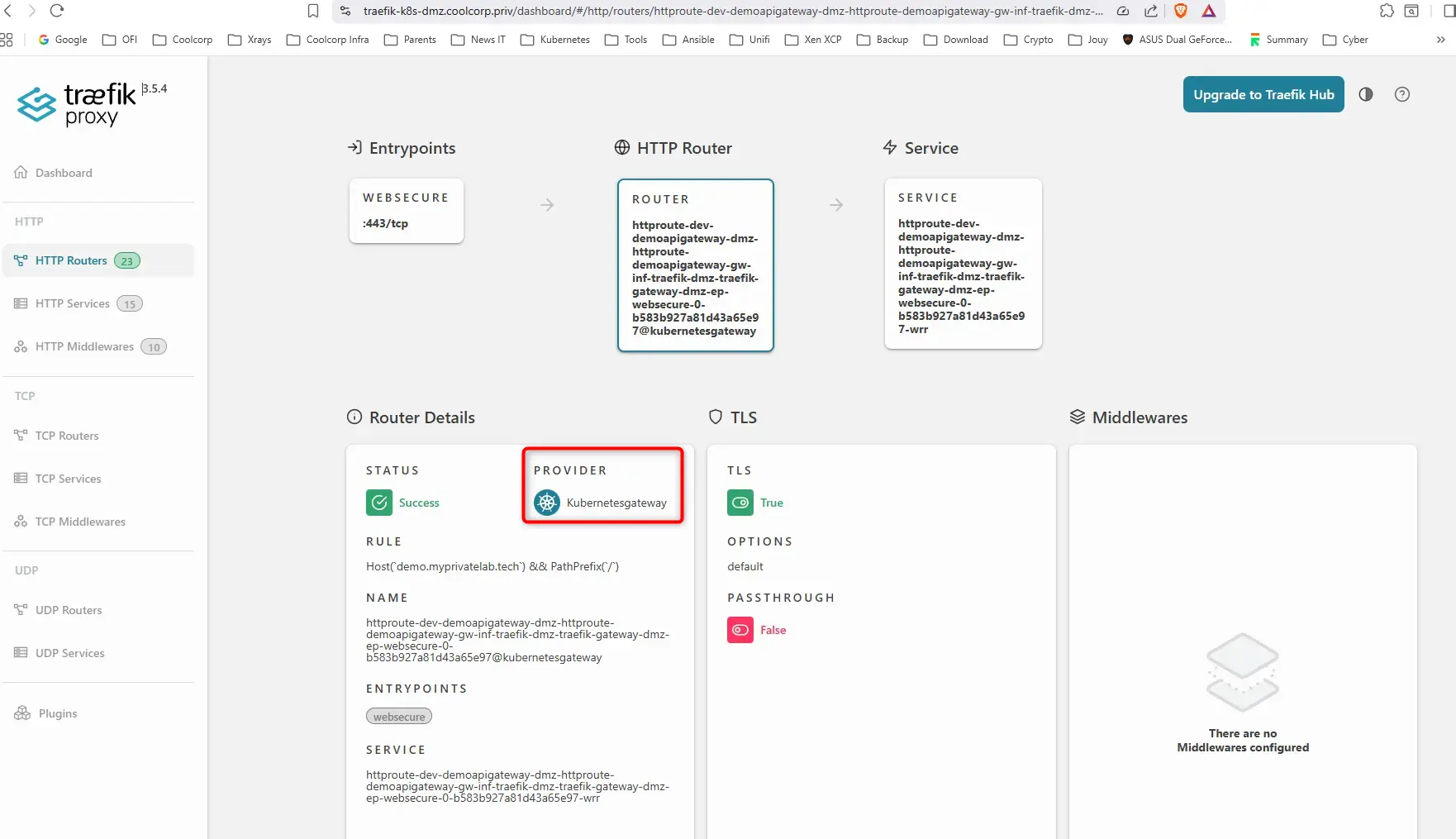
To verify that everything is properly supported on the Traefik side, you can check the dashboard of this latter.
You can see my publication demo.myprivatelab.tech, which uses the KubernetesGateway provider.
Click the image to enlarge.
The site is also visible online.
The operation was successful.
Conclusion
This article served as an introduction for me to using the Gateway API within Kubernetes.
I think it's important that we start getting used to its use now, because it has become the recommended method, and may one day be the only supported method, for publishing applications outside of the cluster.
Although this may seem more complex than before, you can quickly get used to it thanks to the standardization of syntax and the approach of a traditional load balancer.
The migration can be done at your own pace, and the ability to coexist with Ingress today makes the changes easier.
So, even though the Gateway API has not yet reached its full maturity, its basic objects can already be used. Don't hesitate to adopt it and start developing your skills...it's never too early to do things right 😊.