Step 3: Ansible and OS base configuration
- Ansible configures the nodes based on the inventory generated by Terraform.
- Recap of principles: idempotence, roles, naming conventions.
- Playbook xkub_10_base.yml and role xkub_common: packages, chrony/NTP, hostname, /etc/hosts.
- AI helps write the YAML while I stay in control.
Introduction
Now that all servers are deployed and ready for use, it's time to apply the necessary configuration for deploying the Kubernetes cluster.
The chosen approach is to use Ansible to configure each server with the prerequisites needed for the installation and proper functioning of K8S.
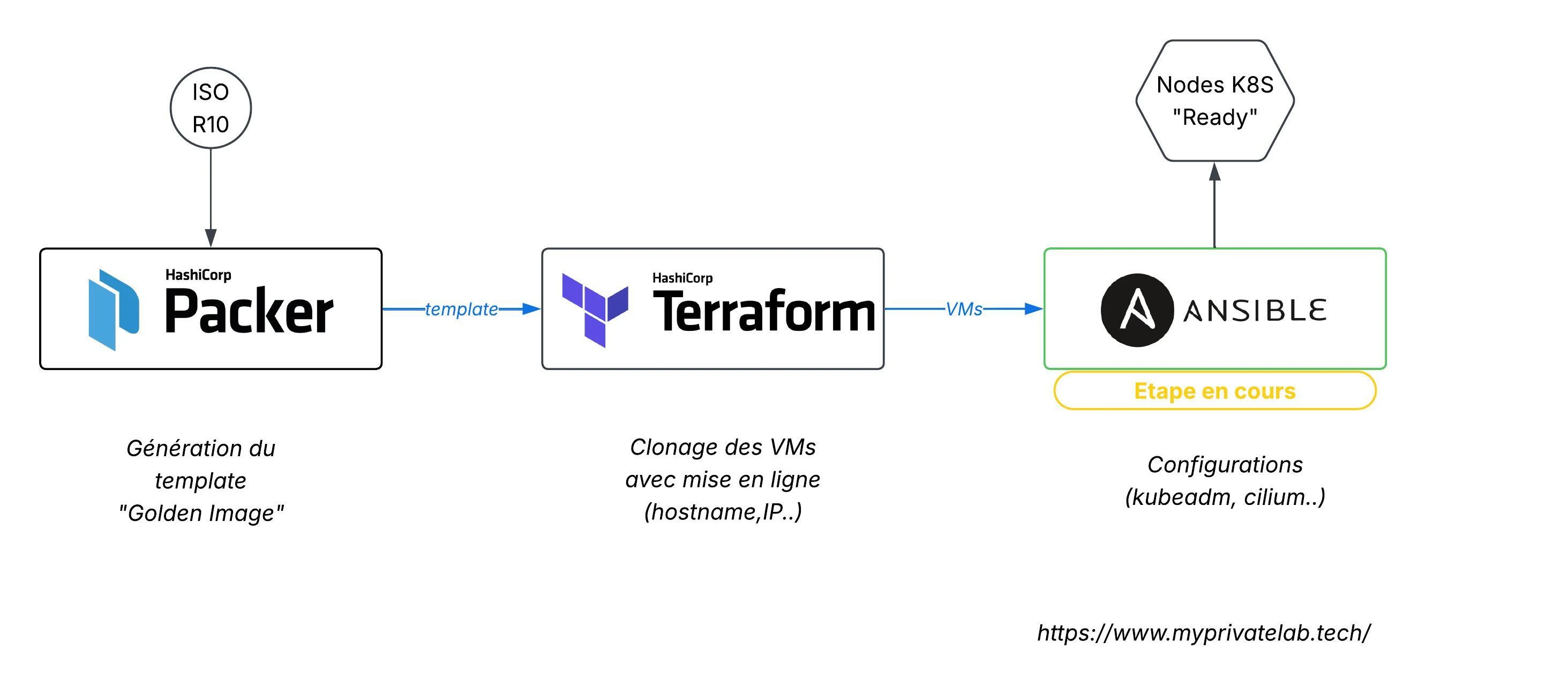
Click the image to enlarge.
The advantage of this method is that you can easily re-run deployments and track the evolution of your cluster over time by only modifying Ansible variables.
This article is not intended to be an Ansible tutorial. It's preferable if you already have experience using the tool. Nevertheless, I will try to recap some principles and explain certain fundamentals.
Ansible
To proceed with this step, you need an available Ansible instance (a Control Node in Ansible terminology). Ansible can be easily installed in various ways. In my case, it is installed on my Windows workstation through the WSL layer. The SSH public key for my user ansible-windows has been included in the template.
As a reminder, the deployed VMs are based on a "golden image" generated by Packer, and we have specifically prepared the SSH layer to be controlled by my Ansible instance.
This is the instance that will be used to connect to each server.
The inventory
To work, Ansible needs an inventory from which it can identify the targets it needs to access to perform the tasks you request.
This inventory can take several forms. It can be dynamic via a script call or static using a flat file.
The second case will be used here. Indeed, during the previous phase, we asked Terraform to produce an inventory file as output of the deployment.
This is the file we will use. In addition to referencing the names and IP addresses of the servers, it also contains groups of machines, grouped together using tags that we configured in the Terraform files.
This will allow Ansible to target specific servers based on their role in the final architecture. For example, it allows us to distinguish between control plane nodes, worker nodes, or even apply the HAProxy configuration only to load balancers. (Feel free to review the presentation of the target architecture).
All of these elements are located in the inventory subdirectory.
The main file generated by Terraform is hosts.yml, and here's its content.
# ------------------------------------------------------------------
# Inventaire Ansible GÉNÉRÉ par Terraform
# Régénéré à chaque `terraform apply`.
# ------------------------------------------------------------------
"all":
  "children":
    "clu_k8s_xkub":
      "children":
        "gpu":
          "hosts": {}
        "k8s_controlplane_lan":
          "hosts":
            "prdk8sgru501.coolcorp.priv":
              "ansible_host": "192.168.10.161"
            "prdk8sgru502.coolcorp.priv":
              "ansible_host": "192.168.10.162"
            "prdk8sgru503.coolcorp.priv":
              "ansible_host": "192.168.10.163"
        "k8s_workers_lan":
          "hosts":
            "prdk8smin501.coolcorp.priv":
              "ansible_host": "192.168.10.171"
            "prdk8smin502.coolcorp.priv":
              "ansible_host": "192.168.10.172"
        "k8s_workers_web":
          "hosts":
            "prdk8smin510.coolcorp.priv":
              "ansible_host": "192.168.5.171"
            "prdk8smin511.coolcorp.priv":
              "ansible_host": "192.168.5.172"
        "nlb_haproxy_lan":
          "hosts":
            "prdnlbhap501.coolcorp.priv":
              "ansible_host": "192.168.10.185"
            "prdnlbhap502.coolcorp.priv":
              "ansible_host": "192.168.10.186"
        "nlb_haproxy_web":
          "hosts":
            "prdnlbhap510.coolcorp.priv":
              "ansible_host": "192.168.5.185"
            "prdnlbhap511.coolcorp.priv":
              "ansible_host": "192.168.5.186"
    "k8s_traefik_lan":
      "hosts":
        "prdk8smin501.coolcorp.priv":
          "ansible_host": "192.168.10.171"
        "prdk8smin502.coolcorp.priv":
          "ansible_host": "192.168.10.172"
    "k8s_traefik_web":
      "hosts":
        "prdk8smin510.coolcorp.priv":
          "ansible_host": "192.168.5.171"
        "prdk8smin511.coolcorp.priv":
          "ansible_host": "192.168.5.172"
    "os_lin_r10":
      "children":
        "gpu": {}
        "k8s_controlplane_lan": {}
        "k8s_workers_lan": {}
        "k8s_workers_web": {}
        "nlb_haproxy_lan": {}
        "nlb_haproxy_web": {}
    "sys_net_lan":
      "children":
        "gpu": {}
        "k8s_controlplane_lan": {}
        "k8s_workers_lan": {}
        "nlb_haproxy_lan": {}
    "sys_net_web":
      "children":
        "k8s_workers_web": {}
        "nlb_haproxy_web": {}
  "vars":
    "ansible_user": "ansible-windows"
inventory/hosts.yml
It contains the following groups:
Host Groups
| Group | Function | Attached Machines |
|---|---|---|
| k8s_controlplane_lan | Control planes for the cluster (kubeadm, etcd, API server) | prdk8sgru501, prdk8sgru502, prdk8sgru503 |
| k8s_workers_lan | Kubernetes workers on the LAN | prdk8smin501, prdk8smin502 |
| k8s_workers_web | Kubernetes workers in the DMZ (isolated: label + taint network=dmz) | prdk8smin510, prdk8smin511 |
| nlb_haproxy_lan | HAProxy + keepalived pair, application VIP on the LAN | prdnlbhap501, prdnlbhap502 |
| nlb_haproxy_web | HAProxy + keepalived pair, application VIP in the DMZ | prdnlbhap510, prdnlbhap511 |
| gpu | Baremetal GPU worker (NVIDIA RTX 3060) | (empty for now, but it will be the future physical node prdk8smin520) |
| k8s_traefik_lan | Nodes where the LAN Traefik instance is scheduled | prdk8smin501, prdk8smin502 |
| k8s_traefik_web | Nodes where the DMZ Traefik instance is scheduled | prdk8smin510, prdk8smin511 |
Cross-cutting Groups
| Group | Function | Actual machines (after expansion) |
|---|---|---|
| clu_k8s_xkub | The entire xkub cluster (all K8s nodes + HAProxy) | the 11 VMs: prdk8sgru501/502/503, prdk8smin501/502, prdk8smin510/511, prdnlbhap501/502, prdnlbhap510/511 (+ gpu to come) |
| os_lin_r10 | OS marker: Rocky Linux 10 | the same 11 VMs as clu_k8s_xkub |
| sys_net_lan | LAN network zone (192.168.10.0/24) | prdk8sgru501/502/503, prdk8smin501/502, prdnlbhap501/502 (+ gpu) |
| sys_net_web | DMZ network zone (192.168.5.0/24) | prdk8smin510/511, prdnlbhap510/511 |
This mechanism will allow us to target specific groups of machines, or even all the machines when it comes to configuring something common to the entire cluster.
Note that we could switch to a dynamic inventory via the XenOrchestra API. When using Terraform, labels were also applied to the virtual machines themselves. It would therefore be possible to reproduce this categorization function by querying the tags assigned to each virtual machine, as well as the metadata provided by the xcp-ng tools installed on each server.
This is an evolution that would be interesting to implement later. For now, I have preferred to keep it basic.
Now that the inventory is handled, we can talk about the rest of the Ansible tree structure.
Principles
Without going into detail, Ansible is an automation tool without agents, based solely on SSH connections (or WinRM on Windows; yes, Ansible can configure Microsoft operating systems).
The principle is to write YAML files, which we call playbooks, in which we describe the desired state for the targets present in the inventory. For example, indicating that a particular package should be installed, or that a particular configuration file should be located at a specific location with specific content.
To make things simpler, Ansible has modules: some are provided by default, while others can be downloaded online to extend the capabilities of the tool. Each module allows you to configure or manipulate a component on the servers without the user having to know the specific syntax for that component. It is the use of keywords, which are specific to each module but respect a simple and readable Ansible syntax organization, that serve as instructions.
Playbooks can call one another, and we often talk about roles to define a set of instructions grouped in several YAML files but tied to the same objective.
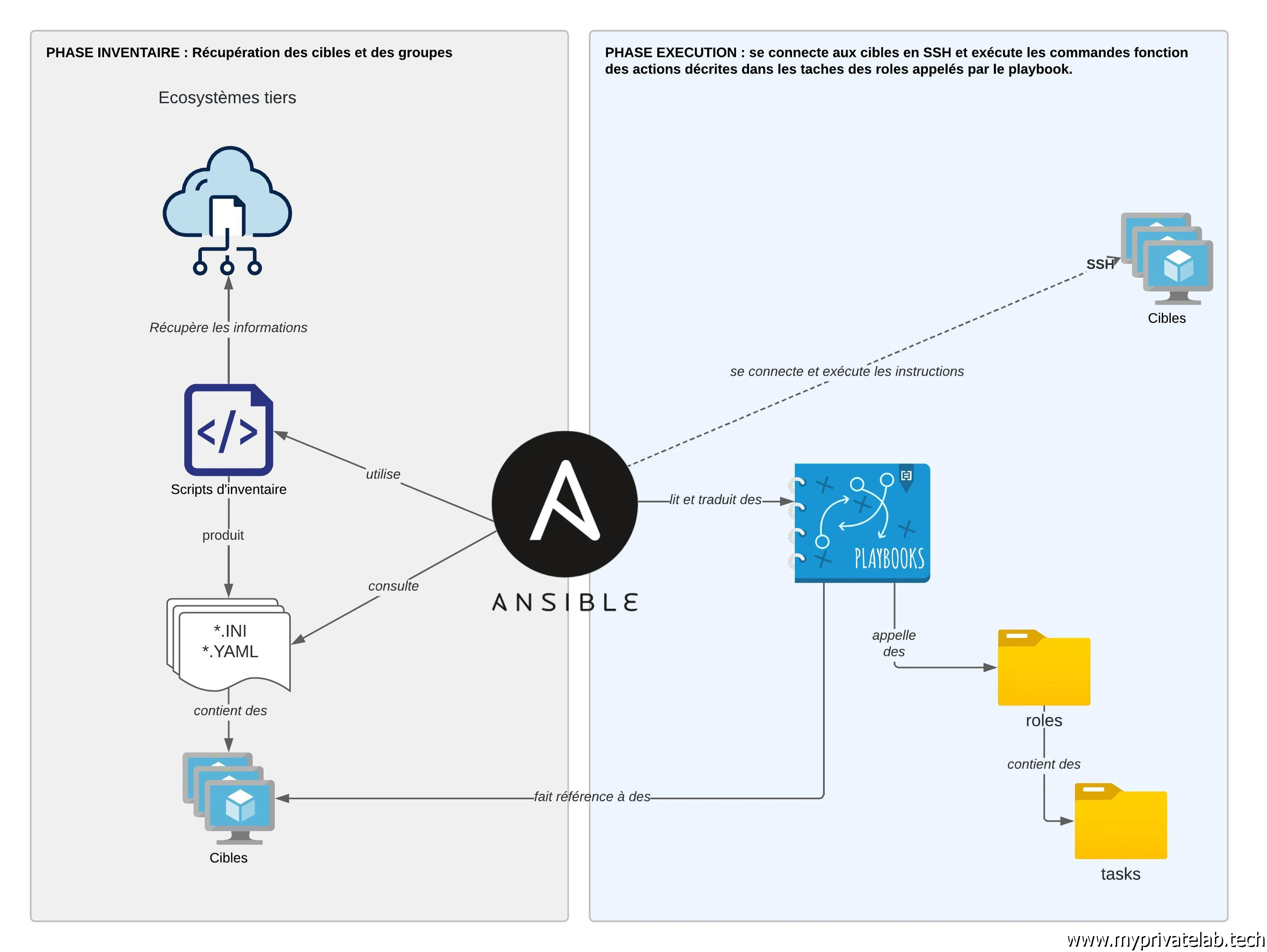
Click the image to enlarge.
We will define a number of variables to simplify the creation of configuration elements, with the possibility of templating certain elements.
Ultimately, Ansible examines the playbooks that we submit to it, establishes a connection with the targets listed in the inventory, and then executes the instructions on the machines concerned.
One of the most important things to consider is the concept of idempotence. Behind this somewhat obscure word lies the principle of being able to re-run Ansible playbooks without any risk of errors.
If a machine is not in the desired state, these parameters will be modified; conversely, if the machine is already at the target state, nothing will be changed.
With each Ansible execution, we will be informed of what is compliant, what is not compliant, and what required a change.
Modules play a significant role in this process because, unlike traditional scripts where users must process the output and code their interpretation, modules natively integrate the results of commands and automate remediation as needed.
This is extremely powerful because, in addition to automating configurations, Ansible can serve as a guarantee of compliance. By scheduling regular re-execution of your playbooks, you ensure that you always have servers compliant with your expectations.
Always keep in mind that your Ansible playbooks must be able to be replayed without risk. This is sometimes a challenge in certain areas, especially when using modules that only execute shell commands, but it is very important.
When a playbook succeeds, always think about re-executing it a second time to ensure that idempotence is respected.
Directory structure and naming conventions
Other important aspects include the naming of your files and the integration logic. Ansible allows for various combinations, and even though fundamental directories must be present and associated with specific functions, you can quickly create complex logic and, importantly, adopt different choices between administrators.
Therefore, defining a nomenclature and a way of doing things is important.
AI is perfect for this, thanks to the use of a Claude sub-agent and dedicated Ansible skills that you can customize to ensure that you always have the same logic for creating and organizing your roles and playbooks.
Here is my choice of directory structure and the logic we will follow in all phases of using Ansible for this cookbook.

Click the image to enlarge.
If we go into a little more detail, here is the structure specific to deploying the cluster:

Click the image to enlarge.
Note that this approach is likely to evolve and be extended to other aspects of the Kubernetes deployment, but the logic will remain the same. This type of directory structure is designed to live in a production environment. The important thing is to maintain a stable and reliable configuration and to always reuse the same sets of configurations.
If a value needs to be modified or added, it's best to manage it in a single location.
The xkub_10_base.yml playbook
To illustrate these diagrams and make things a bit more concrete, we will start by setting up the prerequisites, which is the playbook xkub_10_base.yml
Here's its content:
---
# Socle OS de tous les nœuds puis prérequis Kubernetes.
- name: Socle OS commun (tous les nœuds du cluster)
  hosts: clu_k8s_xkub
  become: true
  roles:
    - xkub_common

- name: Prérequis Kubernetes (control planes + workers + GPU)
  hosts: k8s_controlplane_lan:k8s_workers_lan:k8s_workers_web:gpu
  become: true
  roles:
    - xkub_k8s_prereqs
playbooks/xkub_10_base.yml
It will use two roles:
- xkub_common for OS configuration, which is common to all nodes.
- Xkub_k8s_prereqs for the prerequisites necessary for Kubernetes. Here, we only target the K8S nodes, not the load balancers.
The xkub_common role
Now, let's take a closer look at the xkub_common role:

Click the image to enlarge.
defaults/main.yml
We start by looking at the file defaults/main.yml to see the variables specific to this role:
---
# Rôle xkub_common — valeurs par défaut (préfixe = nom du rôle, cf. CONVENTIONS.md).

# Paquets de base sur tous les nœuds (l'outillage K8s est dans xkub_k8s_prereqs).
# chrony n'y figure pas : déjà présent et actif par défaut sur Rocky Linux 10
# (voir tasks/02_time_sync.yml, qui ne fait que reconfigurer le serveur NTP).
xkub_common_packages:
  - wget
  - tar
  - git

# Gestion du fichier /etc/hosts (tous les nœuds du cluster + VIP API).
# Filet de sécurité si le DNS interne (192.168.10.30) est indisponible.
xkub_common_manage_hosts: true

# Mise à jour complète dnf (opt-in : long, à déclencher volontairement)
xkub_common_dnf_full_update: false
roles/xkub_common/defaults/main.yml
There are three of them, and the most interesting one is xkub_common_packages, which defines the list of packages to be deployed on all nodes. These are standard tools like Git, wget, and tar. In general, avoid installing too many packages on Kubernetes nodes. For security or performance reasons, you should only install the minimum necessary.
The variable xkub_common_manage_hosts, set to true, is also important because it allows you to force the content of the hosts files on the servers. Normally, this is not necessary; DNS should handle this, but with Kubernetes, it's sometimes preferable and recommended to operate in this way. It's a safety net... But it needs to be maintained and updated if the server IPs change. (This operation can be simplified using Ansible and its templating principle, which we will discuss shortly).
handlers/main.yml
On the handlers/main.yml side, there's not much to declare, except for restarting chronyd when we need to modify the NTP configuration
---
- name: Restart chronyd
  ansible.builtin.systemd_service:
    name: chronyd
    state: restarted
roles/xkub_common/handlers/main.yml
As a reminder, in Ansible, a handler is a mechanism that allows you to trigger an action (often a service restart) when a change is detected in a task. Here, if the chrony configuration is modified, the handler Restart chronyd will be called to apply the changes.
Tasks
The most interesting things are located in the tasks directory, which is divided into three files, all referenced in main.yml
---
# Rôle xkub_common — socle OS de tous les nœuds (VMs et baremetal).
- name: Paquets de base
  ansible.builtin.import_tasks: 01_packages.yml
  tags:
    - xkub
    - xkub.common
    - xkub.common.packages

- name: Synchronisation du temps (chrony)
  ansible.builtin.import_tasks: 02_time_sync.yml
  tags:
    - xkub
    - xkub.common
    - xkub.common.time_sync

- name: Nom d'hôte et /etc/hosts
  ansible.builtin.import_tasks: 03_hostname_hosts.yml
  tags:
    - xkub
    - xkub.common
    - xkub.common.hostname_hosts
roles/xkub_common/tasks/main.yml
Note the use of tags, which allow you to target the execution of a subset of tasks. For example, if you only want to execute the "time synchronization" part, you can run the playbook with the option --tags xkub.common.time_sync.
Even though they are optional, I recommend always using them. This helps organize your playbooks and makes debugging or targeted execution of certain parts easier. If you use AI like me to write your playbooks, this can be an instruction to give to your code assistant so that it includes tags at each step. Also, impose a naming convention for these tags, as is the case here.
Let's take a closer look at the task files.
01_packages.yml
---
# Paquets de base (Rocky Linux 10 )
- name: Installer les paquets de base
  ansible.builtin.dnf:
    name: "{{ xkub_common_packages }}"
    state: present
    update_cache: true

# Mise à jour complète, uniquement si demandée explicitement
# (ex : ansible-playbook ... -e xkub_common_dnf_full_update=true). Reste opt-in
# plutôt qu'activé par défaut : une fois le cluster vivant (phase 4+), rejouer
# ce rôle ne doit pas redémarrer un nœud sans drain préalable.
- name: Mettre à jour l'ensemble des paquets (opt-in)
  ansible.builtin.dnf:
    name: "*"
    state: latest
  register: xkub_common_dnf_full_update_result
  when: xkub_common_dnf_full_update | bool

# Un update noyau/systemd/glibc ne prend effet qu'après redémarrage — sans ce
# reboot, "à jour" ne serait que partiellement vrai. Conditionné au résultat
# réel (idempotent : rejouer sans rien de changé ne redémarre pas).
- name: Redémarrer si la mise à jour l'exige (opt-in)
  ansible.builtin.reboot:
    reboot_timeout: 300
  when:
    - xkub_common_dnf_full_update | bool
    - xkub_common_dnf_full_update_result is changed
roles/xkub_common/tasks/01_packages.yml
This is where we will use the variable xkub_common_packages
02_time_sync.yml
---
# Un cluster etcd exige des horloges synchronisées. chrony est déjà présent et
# actif par défaut sur Rocky Linux 10 (pool public) : on ne fait ici que le
# repointer vers le serveur NTP interne (net_ntp_servers, group_vars/clu_k8s_xkub/main.yml).
- name: Déployer la configuration chrony (serveur NTP interne)
  ansible.builtin.template:
    src: chrony.conf.j2
    dest: /etc/chrony.conf
    owner: root
    group: root
    mode: "0644"
  when: net_ntp_servers | length > 0
  notify: Restart chronyd

- name: S'assurer que chronyd est actif
  ansible.builtin.systemd_service:
    name: chronyd
    state: started
    enabled: true
roles/xkub_common/tasks/02_time_sync.yml
Time synchronization between all nodes in a Kubernetes cluster is very important. It is essential to have a reliable and common NTP source for all nodes, and that's what these Ansible instructions are for.
03_hostname_hosts.yml
---
# Le hostname est déjà posé par cloud-init (Terraform) : on garantit ici la
# cohérence avec l'inventaire (idempotent, ne change rien si déjà correct).
- name: Aligner le hostname sur l'inventaire
  ansible.builtin.hostname:
    name: "{{ inventory_hostname }}"

- name: Déployer /etc/hosts (nœuds du cluster + VIP API)
  ansible.builtin.template:
    src: hosts.j2
    dest: /etc/hosts
    owner: root
    group: root
    mode: "0644"
  when: xkub_common_manage_hosts | bool
roles/xkub_common/tasks/03_hostname_hosts.yml
As mentioned previously, this is related to the variable xkub_common_manage_hosts for managing hosts.
Templates
Finally, we have the template folder, which contains our templated configuration files thanks to the jinja2 format (a very fast template engine developed for the Python language).
chrony.conf.j2
# {{ ansible_managed }}
# Configuration chrony — serveurs NTP internes coolcorp.priv
{% for server in net_ntp_servers %}
server {{ server }} iburst
{% endfor %}

driftfile /var/lib/chrony/drift
makestep 1.0 3
rtcsync
leapsectz right/UTC
logdir /var/log/chrony
roles/xkub_common/templates/chrony.conf.j2
This will allow us to generate the configuration for chrony, the NTP synchronization tool included by default in Rocky Linux 10, so that it syncs from all the time servers listed in the global variable net_ntp_servers
Details about variables and their scope
This variable is not specific to the xkub_common role, but is defined at the inventory folder level in inventory/group_vars/clu_k8s_xkub
---
# =============================================================================
# Variables du cluster xkub.coolcorp.priv — portée : groupe clu_k8s_xkub
# =============================================================================

# --- Identité du cluster -----------------------------------------------------
k8s_cluster_name: xkub
k8s_cluster_fqdn: xkub.coolcorp.priv
# Endpoint API haute dispo : résolu vers la VIP kube-vip
k8s_control_plane_endpoint: xkub.coolcorp.priv
k8s_api_vip: 192.168.10.121
k8s_api_port: 6443
k8s_pod_cidr: 10.11.0.0/16
k8s_service_cidr: 10.12.0.0/16

# --- Réseau / domaines -------------------------------------------------------
net_domain: coolcorp.priv
net_domain_public: coolcorp.fr
net_dns_server: 192.168.10.30
net_lan_subnet: 192.168.10.0/24
net_dmz_subnet: 192.168.5.0/24
# Serveur NTP interne (contrôleur de domaine)
net_ntp_servers:
  - ntp.coolcorp.priv

# --- VIPs applicatives (paires HAProxy + keepalived) -------------------------
haproxy_vip_lan: 192.168.10.187
haproxy_vip_dmz: 192.168.5.187
haproxy_vip_prefix: 24

# --- NodePorts Traefik -------------------------------------------------------
traefik_nodeport_lan_http: 30080
traefik_nodeport_lan_https: 30443
traefik_nodeport_dmz_http: 31080
traefik_nodeport_dmz_https: 31443

# --- Ports système Kubernetes ------
k8s_port_kubelet: 10250
k8s_port_kube_proxy_health: 10256
k8s_port_etcd_range: 2379-2380
k8s_port_nodeport_range: 30000-32767
cilium_port_vxlan_udp: 8472
cilium_port_health: 4240
cilium_port_hubble_peer: 4244
cilium_port_hubble_relay: 4245
inventory/group_vars/clu_k8s_xkub/main.yml
For those who are not familiar with Ansible, this is an important configuration point that we have not yet discussed: variable management in Ansible.
These can be defined at different levels. Depending on their location, their scope will be different, and so will their priority.
For example, for this variable net_ntp_servers, it can be used by any role for which the target servers belong to the group "clu_k8s_xkub".
Variables defined at the group level can therefore be used across different roles.
Be aware that you can also define a variable at the level of a specific host
If the same variable is defined at multiple levels, a priority mechanism will take over.
Note that
- Role (roles/xxx/defaults/main.yml)
This is the default level. Variables defined in the defaults/ directory of a role have the lowest priority in Ansible. They are designed to be easily overridden. - Group (group_vars/)
Variables applied to a group of hosts override the default values of the role. - Host (host_vars/ or in the inventory)
Since a host is more specific than a group, its variables override those of the group and the role.
And of course, there's a catch, because there's another variable level for the role, namely,
- Role (roles/xxx/vars/main.yml)
This one has a very high priority. Its variables override host and group variables. This vars/ subdirectory of a role should only be used for internal configuration that the user must not modify.
If we go back to my variable net_ntp_servers, it is actually a list of sub-elements, where each one corresponds to an NTP server.
In my case, I only have one server, which is ntp.coolcorp.priv, and this is an alias to my domain controller.
This way, I can be sure that all of my Kubernetes cluster nodes will have the same time reference as the rest of my network.
If we were to do this manually, it would involve editing the /etc/chrony.conf file on each server to include this content:
server ntp.coolcorp.priv iburst

driftfile /var/lib/chrony/drift
makestep 1.0 3
rtcsync
leapsectz right/UTC
logdir /var/log/chrony
/etc/chrony.conf
The other template hosts.j2 is nothing more than the hosts file that will be placed on each server
# {{ ansible_managed }}
127.0.0.1   localhost localhost.localdomain localhost4 localhost4.localdomain4
::1         localhost localhost.localdomain localhost6 localhost6.localdomain6

# Endpoint API Kubernetes (VIP kube-vip)
{{ k8s_api_vip }}   {{ k8s_cluster_fqdn }}

# Nœuds du cluster (généré depuis l'inventaire)
{% for host in groups['clu_k8s_xkub'] | sort %}
{{ hostvars[host].ansible_host }}   {{ host }} {{ host.split('.')[0] }}
{% endfor %}
roles/xkub_common/templates/hosts.j2
In concrete terms, this means that the hosts.j2 file generates the content of the /etc/hosts file on each node in the cluster with these values:
127.0.0.1   localhost localhost.localdomain localhost4 localhost4.localdomain4
::1         localhost localhost.localdomain localhost6 localhost6.localdomain6

# Endpoint API Kubernetes (VIP kube-vip)
192.168.10.121   xkub.coolcorp.priv

# Nœuds du cluster (généré depuis l'inventaire)
192.168.10.161   prdk8sgru501.coolcorp.priv prdk8sgru501
192.168.10.162   prdk8sgru502.coolcorp.priv prdk8sgru502
192.168.10.163   prdk8sgru503.coolcorp.priv prdk8sgru503
192.168.10.171   prdk8smin501.coolcorp.priv prdk8smin501
192.168.10.172   prdk8smin502.coolcorp.priv prdk8smin502
192.168.5.171   prdk8smin510.coolcorp.priv prdk8smin510
192.168.5.172   prdk8smin511.coolcorp.priv prdk8smin511
192.168.10.185   prdnlbhap501.coolcorp.priv prdnlbhap501
192.168.10.186   prdnlbhap502.coolcorp.priv prdnlbhap502
192.168.5.185   prdnlbhap510.coolcorp.priv prdnlbhap510
192.168.5.186   prdnlbhap511.coolcorp.priv prdnlbhap511
/etc/hosts generated on each node
Conclusion
We now need to continue with the description of the xkub_k8s_prereqs role before we can actually execute the playbook. However, the article is already quite extensive, and I prefer to address this specific Kubernetes node role in a dedicated topic.
At this stage, it's important to keep the chosen Ansible logic in mind. Even if you are not an expert in the tool, you need to understand the relationships between components.
The choice of using Ansible as an automation tool is not just a technical preference; it's also a good way to gradually explain the configurations needed to deploy a Kubernetes cluster.
Here, it's important to note the importance of NTP configuration and host files. All nodes that make up a Kubernetes cluster communicate with each other. Name resolution errors, such as significant latency in DNS, can have negative consequences for the cluster. This is why we implement a safety net by templating the "host" file for deployment on each node. A time difference is also detrimental to servers belonging to the same K8S cluster. If they do not have precise date synchronization, it will lead to critical errors.
Enforcing these best practices within an Ansible role helps secure configurations and avoid omissions and errors.
AI is once again a very good partner for simplifying YAML writing and ensuring the consistency of the chosen structure (especially to make sure playbooks can be replayed). But here too, it's not about letting it do everything without understanding what you want to achieve. Letting AI manage an Ansible configuration without understanding Ansible is a serious mistake. Note that here, the naming and organization choices are mine; I then asked the AI to write the YAML files according to my requirements.
We will now address the xkub_k8s_prereqs role in the next article to focus more on the configuration elements specific to Kubernetes.