My infrastructure
- A personal home lab for experimenting with things that public cloud environments don't always allow: virtualization, storage, networking, security, and containers.
- An overview of the hardware, storage, network, and architecture used.
- Windows VMs (Active Directory, DNS, DHCP) and Linux VMs (Ubuntu Server) for monitoring and home automation.
- Guiding principle: choose the tool that best suits the need, even if it means changing solutions later.
In the age of public cloud, why bother hosting your own infrastructure? As for me, I am a strong advocate for cloud solutions, which I often highlight in my profession. However, I always keep in mind that the public cloud is one possible option, but not the only solution.
For my personal needs (and out of pure enjoyment), I tend to keep the necessary resources for hosting at home. I find it's an excellent way to learn, even if I am willing to look for more performant or efficient solutions later. Nevertheless, I always strive to apply cloud best practices and keep in mind the possibility of moving my assets without having to completely rethink my configuration (which is why I particularly appreciate Kubernetes).
If I take a moment to describe what I use, it's because most of the tutorials I create and write articles about are based on this infrastructure. So here's what it looks like and why I designed it this way. It's important to note that it is subject to change, especially in light of market developments and technological advancements.
The Basics
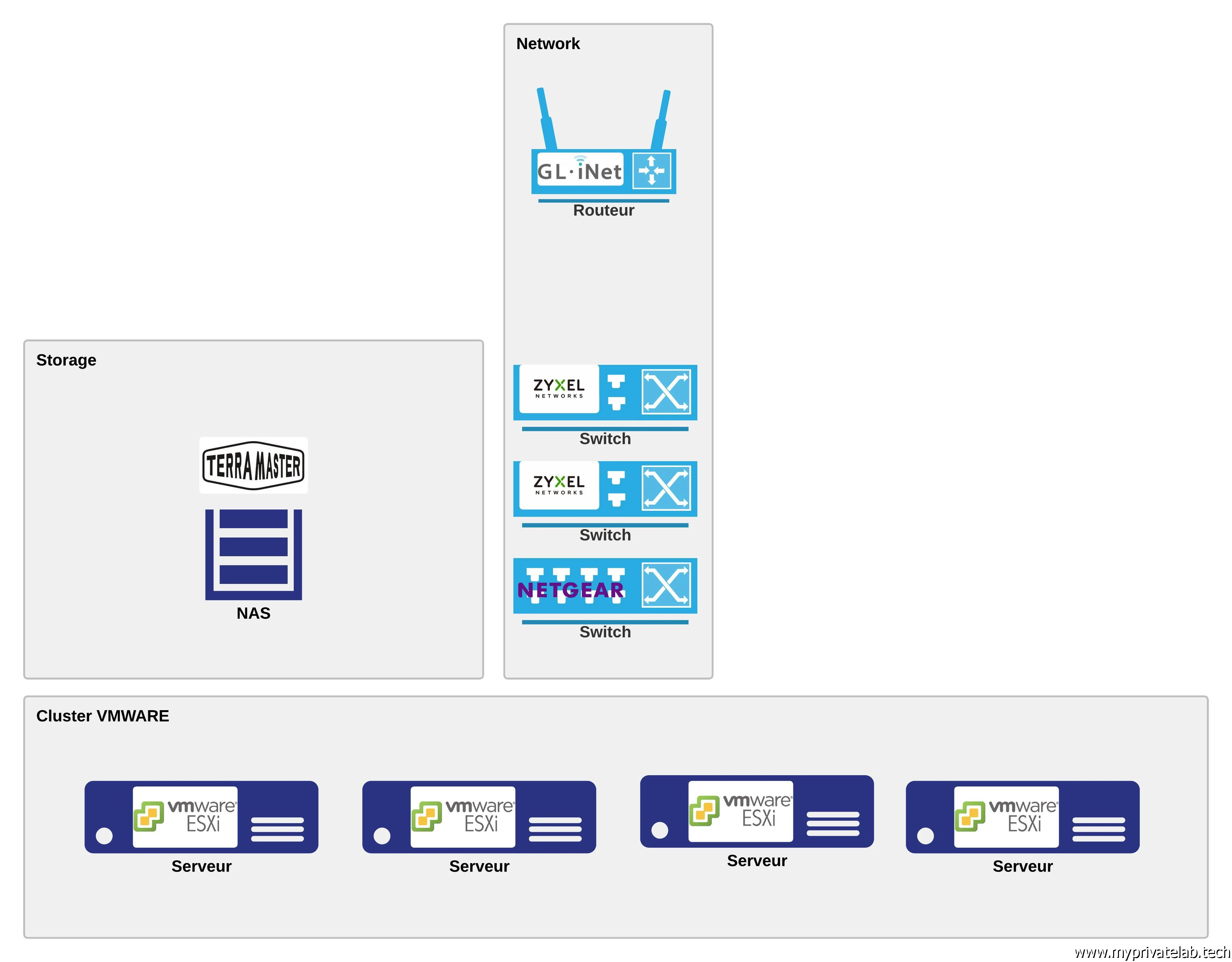
My lab is primarily based on a VMware architecture. The idea is to group several ESXi servers within a cluster managed by a vCenter instance. Following the acquisition of VMware by Broadcom, like many professionals, I am concerned about the future of this ecosystem. I am experimenting with other solutions, including XCP-ng. However, given my experience with this platform, I remain attached to this approach for now. Despite the ongoing changes, VMware is still widely used in businesses and relies on a solid foundation that has proven itself.
Click the image to enlarge.
The hardware
The servers
Over time, VMware has gradually restricted the execution of its ESXi hypervisor on non-standard hardware. This was particularly noticeable with version 7.0, where injecting unofficial drivers into the installation ISO is no longer possible. To circumvent this limitation, I had to find solutions, as it was impossible for me to install servers in racks in my apartment, and economically, purchasing professional hardware was not feasible. My infrastructure therefore relies on two types of servers:
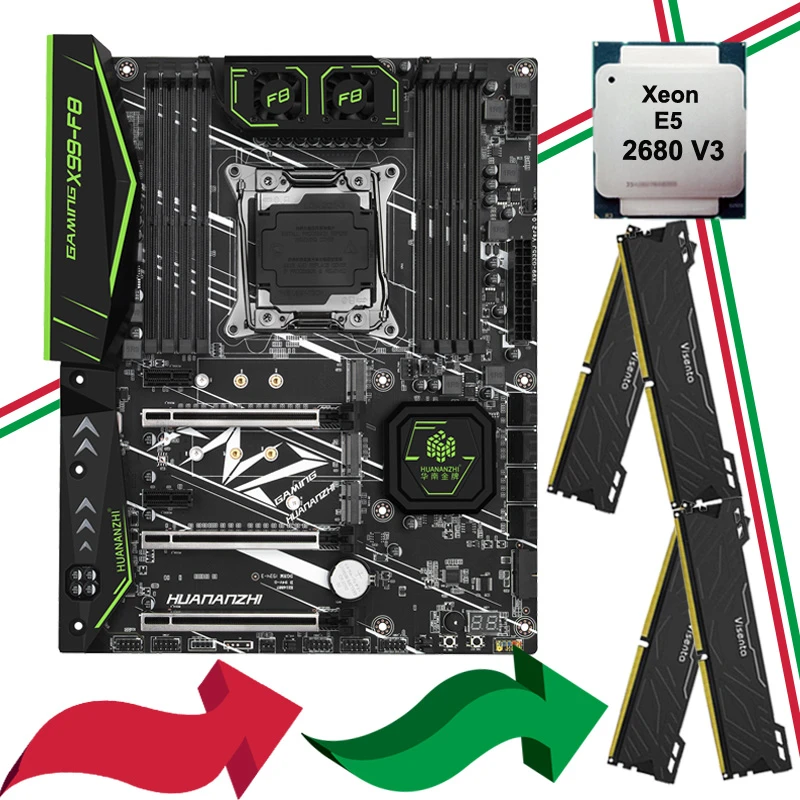
- The first is based on the Intel X99 platform, dating from 2014. This platform offers the advantage of providing many components at affordable prices on the second-hand market. It is possible to use consumer motherboards with XEON-type processors, which are commonly available on Chinese websites. It should be noted that many end-of-life devices have been recovered by resellers from the Middle Kingdom to be reused under other brands. It is not uncommon to find chipset chips from well-known manufacturers integrated into components of lesser-known brands. My most powerful server runs on a Chinese HUANANZHI X99-F8 motherboard, and has been running 24 hours a day for over 2 years without any issues. I have deployed the latest version of ESXi on it, although I am aware that version 8 will be the last to support this processor architecture.
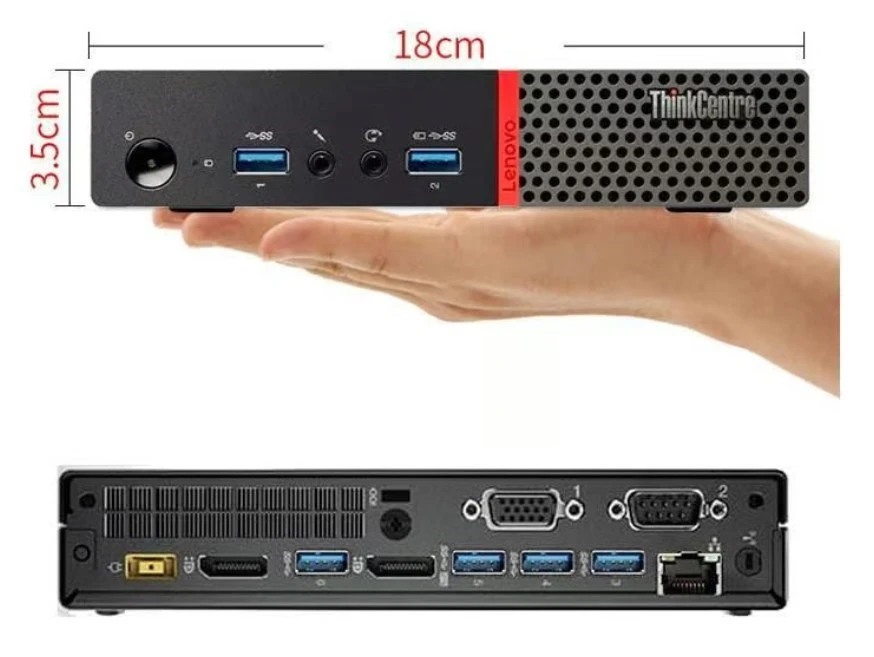
- The second type of server is based on Lenovo ThinkCentre mini workstations from 2018. These used models are readily available on the market. They have the advantage of taking up very little space and consuming minimal power (30 to 65 watts). However, they offer limited expandability and only have one interface, which can be restrictive. Fortunately, Lenovo included an internal PCI port with the option to add an expansion card. Instead of using Realtek network cards, which are no longer supported beyond vSphere 6.0, I found adapter kits on AliExpress to utilize the available port inside the enclosures. I combined these with dual-port network cards featuring the Broadcom BCM5720 chipset. This allows me, for around €40, to have enough interfaces for my lab. Other solutions are possible, including via USB ports, but I preferred to maintain an internal integration to limit external extensions (all of this is in my living room…)
Click the image to enlarge.
Click the image to enlarge.
The storage
Each server is equipped with at least one SSD, which serves as a datastore and hosts virtual machines. Despite VMware's advice to the contrary, I chose to install the hypervisor itself on a USB drive (this is not the case for XCP-ng). To provide shared datastores, I also use a 4-bay NAS Terramaster F4-424. This allows me to expose NFS volumes.
The network
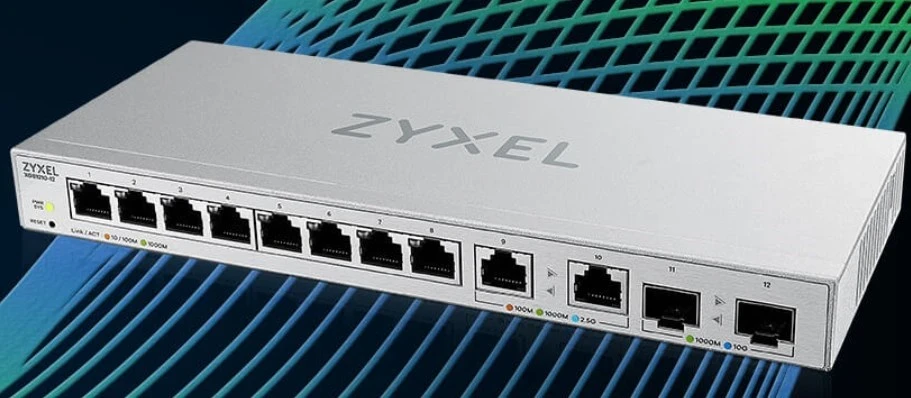
For my infrastructure, I use several network switches, including two main ones from the ZYXEL brand, model XGS1210-12.
Click the image to enlarge.
These two switches are interconnected by a 10G link and each has an additional 10G link, as well as two 2.5G ports in addition to their 1G ports. For practical reasons, I also have three Netgear 8-port switches located in different parts of my apartment to extend the network. Regarding my web connection, I only use the ONT box provided by my internet service provider, without the set-top box. I connect the internet directly to a GL.Inet GL-AP1300 router. Although this model may not be very well known, it is a very interesting product because it allows you to use the Open Source OpenWRT firmware in addition to providing a SIM card slot. This gives me redundancy for my internet connection. In case of a fiber outage, I have a 4G connection that prevents my infrastructure from losing connectivity, even though performance is reduced in this situation.
Architecture
Networking and virtualization
Each server is equipped with three network interfaces, which allows me to follow a classic three-tier deployment model. I can provision virtual machines in three distinct network zones:
- DMZ_FIRST: This is the network located directly behind my internet router.
- VLAN_WEB: This intermediate network allows me to host certain services, including my websites.
- LAN: Internal network with a default VLAN, as well as a VLAN dedicated to VMOTION, which enables the movement of virtual machines from one server to another.
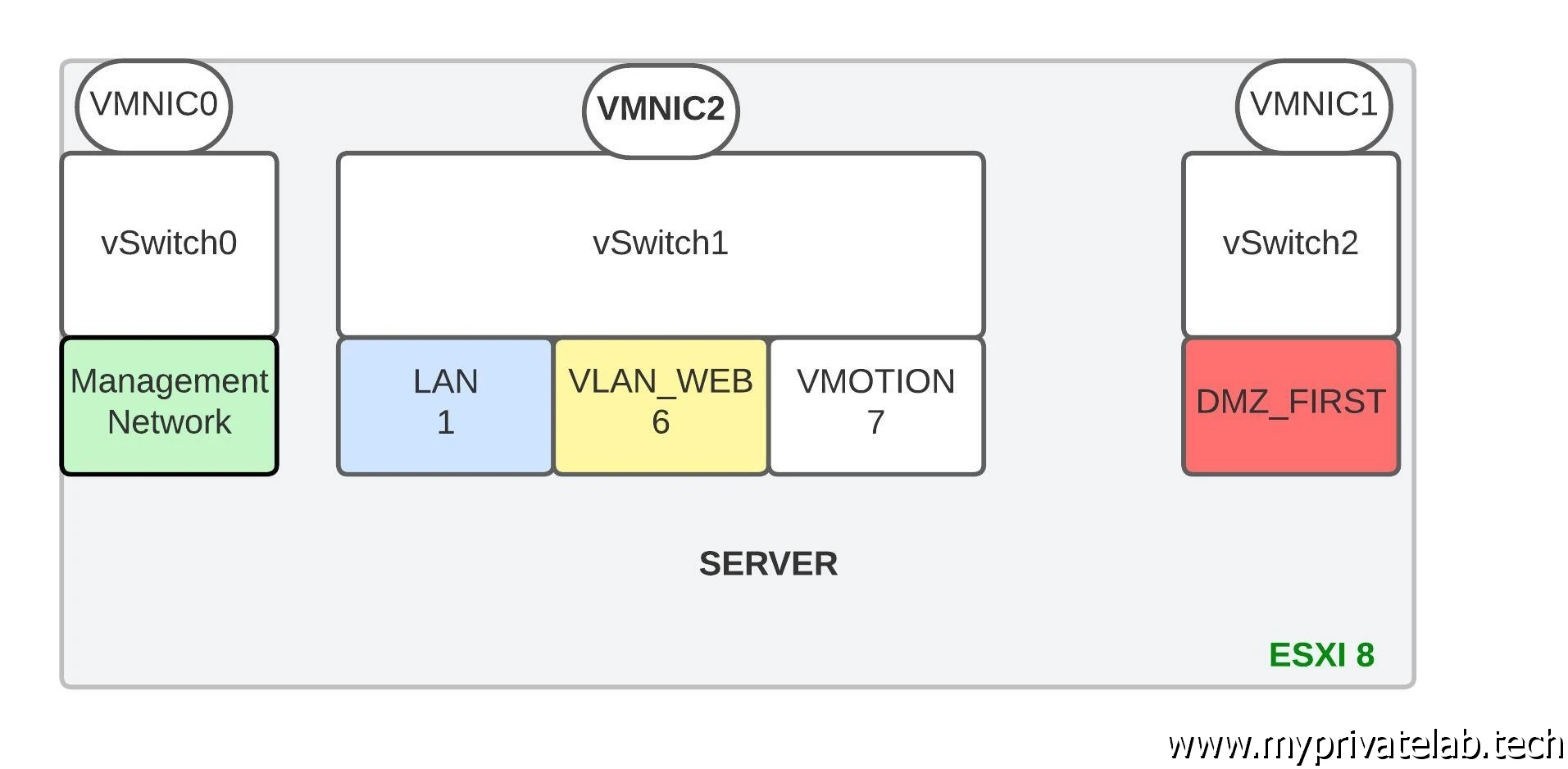
Click the image to enlarge.
Security
Each of these zones is secured by a firewall, the first being integrated into my internet router. The other two firewalls are virtual machines using OPNsense. Thanks to these, I can perform precise filtering of network traffic and implement intrusion detection and prevention functions (IPS/IDS) to further enhance the security of my access.
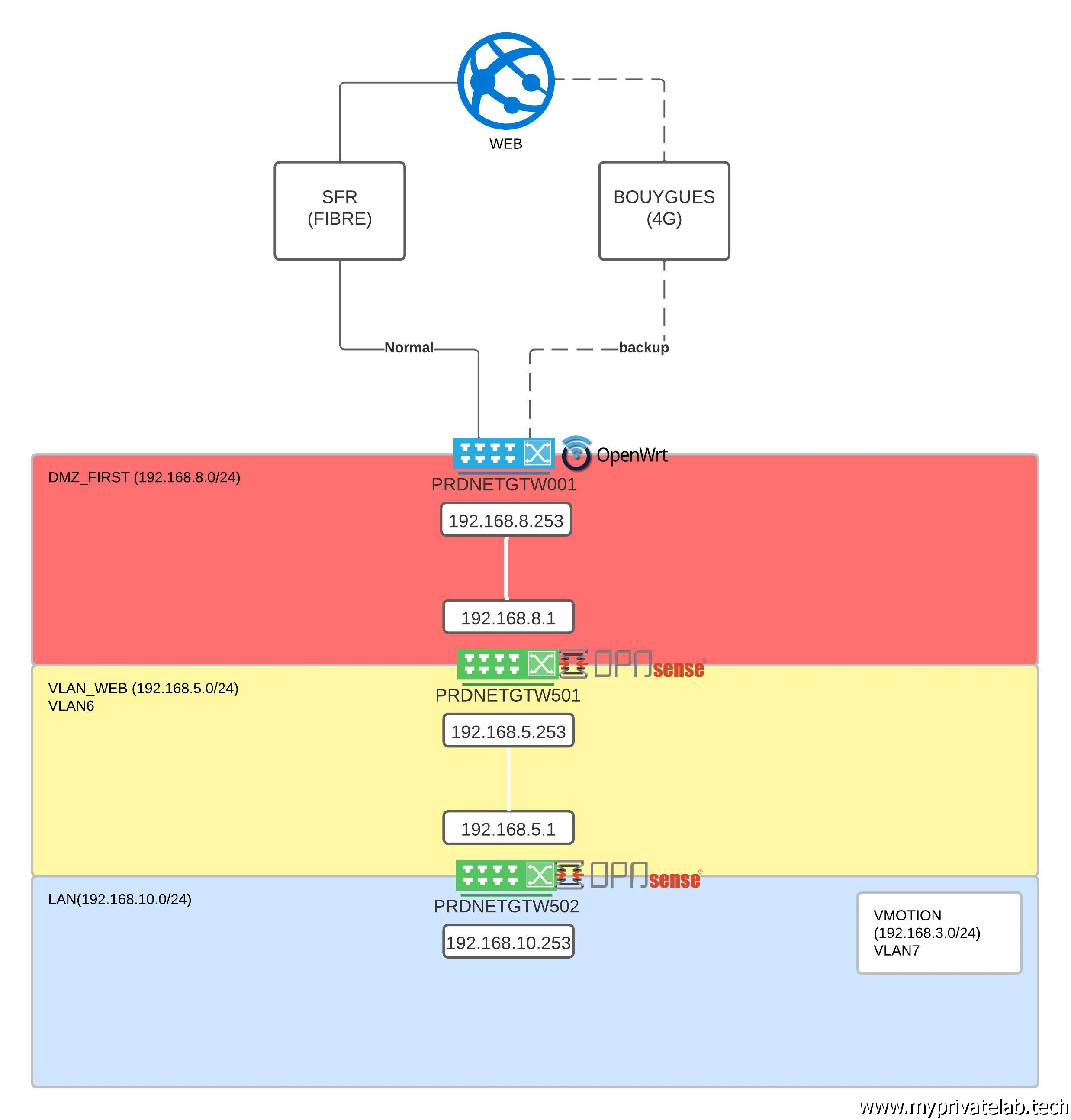
Click the image to enlarge.
Containers
As time goes by, my preference is increasingly shifting towards using containers rather than virtual machines, although I believe that both have their place. To run my containers, I naturally chose Kubernetes, which has become an essential standard for this type of need and is constantly expanding. My Kubernetes nodes are deployed on virtual machines running a minimalist operating system (PhotonOS). The goal is to have at least three control planes to ensure high availability of the service, as well as a certain number of worker nodes in my LAN zone and others in my WEB zone. Given that my resources are not infinite, deploying a single Kubernetes cluster allows me to optimize my infrastructure while taking advantage of the capabilities of K8S to isolate my applications within Namespaces. If these terms are unfamiliar to you, don't worry; this site is here to explain all of this in detail, and you will find many explanations in other articles.
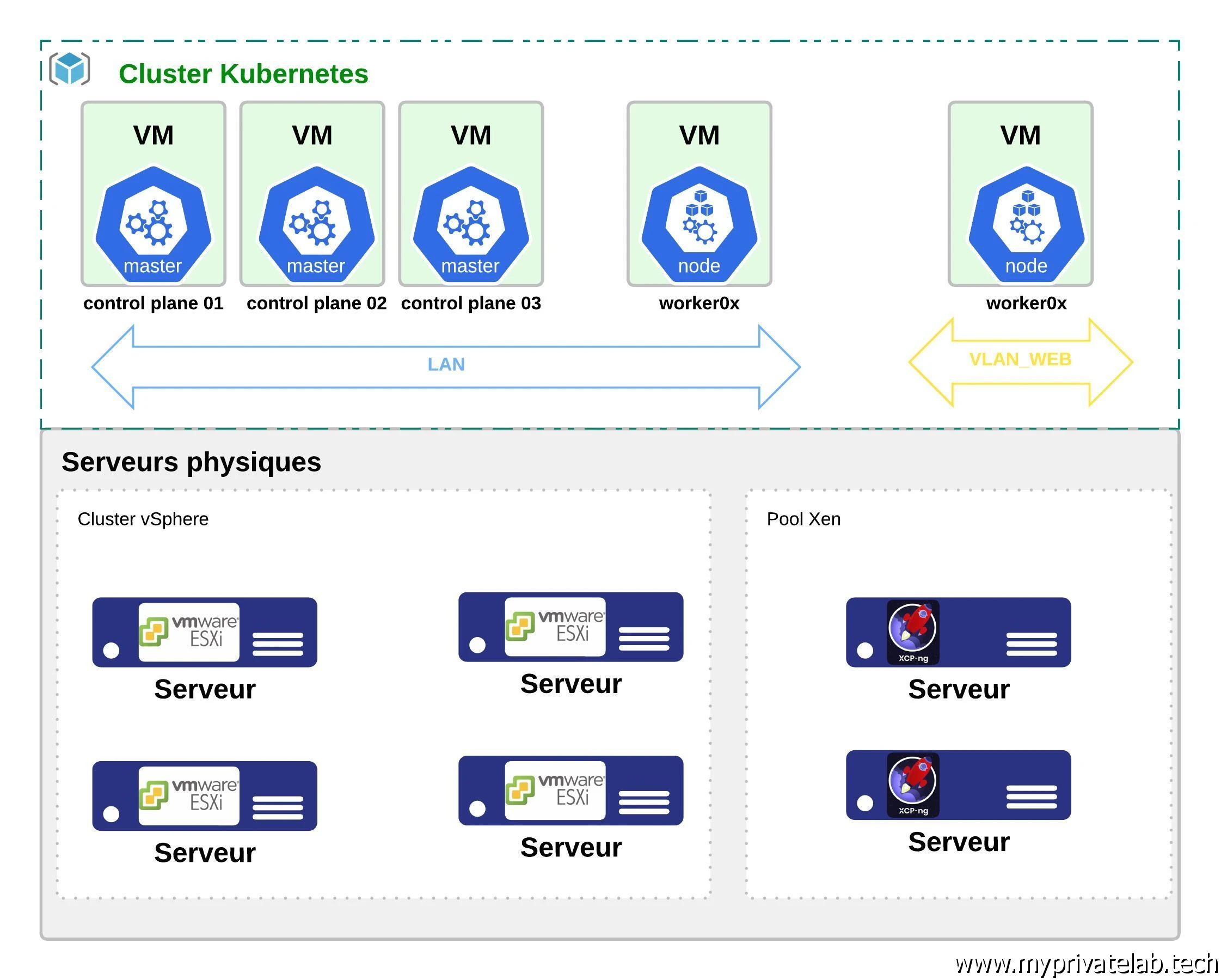
Click the image to enlarge.
Windows/Linux
Throughout my career in the IT field (and still today), I have witnessed the rivalry between Windows and Linux. From Microsoft MVPs convinced of the superiority of their favorite software vendor to fervent open-source advocates who unconditionally denigrate the skills of Microsoft administrators, I quickly understood one essential thing: bad operating systems are rare, and what matters most is the context of use and the skills of the people using them.
Over time, the boundaries between Windows and Linux have blurred, with both sometimes inspiring each other to evolve. For my part, I appreciate both ecosystems, and in my lab, I have Windows Server virtual machines for managing services such as Active Directory, DNS, and DHCP, as well as Linux virtual machines, particularly under Ubuntu Server, for monitoring and home automation. I am convinced that it is essential to choose the right tool based on specific needs and the skills of internal teams.