Step 4: System and network prerequisites for Kubernetes
- Role xkub_k8s_prereqs: pinned kubeadm, kubelet and kubectl packages.
- Overlay and br_netfilter kernel modules, sysctl parameters.
- Installation of containerd with crun, and crictl.
- Network flow matrix and firewalld hardening; appendix with the commands outside Ansible.
Introduction
In the previous article, we introduced Ansible and presented the logic used to deploy the various configurations on all nodes.
We also began analyzing the first playbook, "xkub_10_base.yml," detailing the first role it is associated with: xkub_common
That role is relatively basic and focused on the minimal OS essentials.
Now it's time to move on to the second role in this playbook: xkub_k8s_prereqs
Going through this role will let us illustrate the prerequisites for Kubernetes.
Whether you use Ansible or manual configuration, it is important to understand the configurations that need to be implemented and what effects they will have on K8S.
Role xkub_k8s_prereqs
Here is a presentation of the role's directory structure xkub_k8s_prereqs. This role will only be applied to machines belonging to the groups k8s_controlplane_lan, k8s_workers_lan and k8s_workers_web, which are part of the Ansible inventory (see the previous article).

Click the image to enlarge.
Therefore, all future Kubernetes nodes will be affected; servers with HAproxy are not concerned by these prerequisites.
defaults\main.yml
We start with the file main.yml, located in the defaults folder of the role.
Here is its content
---
# Rôle xkub_k8s_prereqs — valeurs par défaut.
# Les versions (k8s_version, containerd_*) viennent de group_vars/clu_k8s_xkub/versions.yml,
# les ports de group_vars/clu_k8s_xkub/main.yml.

# Paquets sur TOUS les nœuds K8s (control planes, workers, GPU).
# iproute-tc : évite le warning kubelet "tc not found".
# crun + container-selinux : runtime OCI et politique SELinux (containerd est
# livré en binaire officiel, sans runtime OCI). RHEL/Rocky Linux 10 a RETIRÉ
# runc : crun (Podman 5, cgroups v2) est désormais le seul runtime OCI
# disponible — voir tasks/03_containerd.yml pour le pointage explicite du
# binaire dans /etc/containerd/config.toml (le générateur par défaut de
# containerd ne connaît que le nom "runc").
# conntrack-tools, ethtool, ebtables, socat : binaires exigés par les preflight
# checks de kubeadm (kubeadm init/join échoue si l'un d'eux est absent).
# cri-tools (crictl) n'est PAS ici : installé depuis le binaire officiel GitHub
# (voir tasks/03_containerd.yml), indisponible par défaut sur Rocky Linux 10.
xkub_k8s_prereqs_packages:
  - "kubeadm-{{ k8s_version }}"
  - "kubelet-{{ k8s_version }}"
  - nfs-utils
  - iproute-tc
  - crun
  - container-selinux
  - conntrack-tools
  - ethtool
  - ebtables
  - socat

# Paquets réservés aux control planes
xkub_k8s_prereqs_controlplane_packages:
  - "kubectl-{{ k8s_version }}"

# Modules noyau requis (containerd + CNI)
xkub_k8s_prereqs_kernel_modules:
  - overlay
  - br_netfilter

# Ports firewalld : firewalld RESTE ACTIF, ouvertures explicites.
# Ouvert largement sur tous les nœuds K8s : uniquement le kubelet.
# Les ports Cilium inter-nœuds (VXLAN, health, Hubble peer) sont ouverts par rich
# rule restreinte aux IP des nœuds K8s : voir xkub_k8s_prereqs_fw_node_only_ports.
xkub_k8s_prereqs_fw_ports_common:
  - "{{ k8s_port_kubelet }}/tcp"

# Ouvertures larges à fermer explicitement (une règle permanente posée par une
# exécution antérieure ne disparaît pas parce qu'on la retire d'une liste).
# - 10256 : santé kube-proxy, sans objet (Cilium remplace kube-proxy) ;
# - 4245  : Hubble Relay, service ClusterIP, n'a pas à être joignable sur l'hôte ;
# - 4240, 4244 : santé Cilium et Hubble peer, restreints aux nœuds K8s.
xkub_k8s_prereqs_fw_ports_removed:
  - "{{ k8s_port_kube_proxy_health }}/tcp"
  - "{{ cilium_port_hubble_relay }}/tcp"
  - "{{ cilium_port_health }}/tcp"
  - "{{ cilium_port_hubble_peer }}/tcp"

# Ports Cilium inter-nœuds, acceptés depuis les seules IP des nœuds K8s (une rich
# rule par couple IP source / port). Sources : xkub_k8s_prereqs_fw_vxlan_source_groups.
xkub_k8s_prereqs_fw_node_only_ports:
  - { port: "{{ cilium_port_health }}", protocol: tcp }
  - { port: "{{ cilium_port_hubble_peer }}", protocol: tcp }

# Services firewalld retirés de la zone `public` (cockpit : console web non utilisée
# sur les nœuds K8s).
xkub_k8s_prereqs_fw_services_removed:
  - cockpit

# Unités systemd arrêtées et MASQUÉES sur les nœuds K8s : un service qui n'écoute
# pas n'est pas exposé aux pods. rpcbind (111) : inutile en NFSv4.
xkub_k8s_prereqs_masked_units:
  - cockpit.socket
  - cockpit.service
  - rpcbind.socket
  - rpcbind.service

# Control planes uniquement — API server. Il doit rester joignable largement
# depuis le LAN (kubelets des workers, kube-vip, poste d'administration) : on
# ne le restreint donc pas par source ici.
xkub_k8s_prereqs_fw_ports_controlplane:
  - "{{ k8s_api_port }}/tcp"

# etcd (2379 client, 2380 peer) est traité à part, en rich_rule restreinte aux
# seuls control planes (audit sécurité phase 3, constat 4). etcd contient TOUS
# les objets du cluster, Secrets compris : il ne doit jamais être exposé au
# reste du LAN (workers, HAProxy, nœud GPU). Le trafic légitime est uniquement
# control plane ↔ control plane, plus l'API server local via 127.0.0.1.
xkub_k8s_prereqs_fw_etcd_source_group: k8s_controlplane_lan

# Workers uniquement (NodePorts, dont ceux de Traefik) :
xkub_k8s_prereqs_fw_ports_worker:
  - "{{ k8s_port_nodeport_range }}/tcp"

# Groupes d'inventaire considérés comme workers pour le firewall
xkub_k8s_prereqs_worker_groups:
  - k8s_workers_lan
  - k8s_workers_web
  - gpu

# --- Zone firewalld dédiée aux interfaces Cilium -------------------------------
# Le trafic détourné par Cilium vers un proxy local (Envoy, proxy DNS) traverse la
# chaîne INPUT de l'hôte. Arrivant par lxc* ou cilium_vxlan, il tombait dans la
# zone `public` et finissait en REJECT : ces interfaces ont donc leur propre zone.
xkub_k8s_prereqs_fw_cilium_zone: cilium

# Interfaces liées à la zone. `lxc+` est un joker firewalld (couvre aussi lxc_health).
xkub_k8s_prereqs_fw_cilium_interfaces:
  - lxc+
  - cilium_vxlan

# La zone a le target ACCEPT : tout ce qui n'est pas explicitement refusé passe.
# Les refus sont des rich rules à priorité NÉGATIVE, évaluées avant le target.
xkub_k8s_prereqs_fw_cilium_deny_priority: -100

# Refus sur TOUS les nœuds K8s : aucun pod n'a à ouvrir de session SSH sur un nœud.
xkub_k8s_prereqs_fw_cilium_deny_ports_common:
  - { port: "22", protocol: tcp }

# Refus sur les control planes : etcd (sans ce refus, le target ACCEPT annulerait
# la restriction etcd par source) et 2112, métriques Prometheus de kube-vip
# exposées sans authentification.
xkub_k8s_prereqs_fw_cilium_deny_ports_controlplane:
  - { port: "{{ k8s_port_etcd_range }}", protocol: tcp }
  - { port: "2112", protocol: tcp }

# VXLAN 8472/udp : ni authentifié ni chiffré, il n'est ouvert (zone `public`)
# qu'aux IP des nœuds K8s, une rich rule par IP source (pas aux HAProxy).
# Après ajout d'un nœud, rejouer le rôle sur TOUS les nœuds.
xkub_k8s_prereqs_fw_vxlan_source_groups:
  - k8s_controlplane_lan
  - k8s_workers_lan
  - k8s_workers_web
  - gpu
roles/xkub_k8s_prereqs/defaults/main.yml
The variables of the role
This is where you will find the various variables specific to the role
The packages
Starting with the list of packages to deploy, "xkub_k8s_prereqs_packages".
Two variables are themselves derived from higher-level variables, concerning the version of Kubernetes to be deployed.
- "kubeadm-{{ k8s_version }}"
- "kubelet-{{ k8s_version }}"
At the time of this article, the target version of K8S is 1.36.5, and it is fixed in the file inventory\group_vars\clu_k8s_xkub\versions.yml.
---
# =============================================================================
# TOUTES les versions épinglées du volet Ansible .
# Une seule source : ne jamais mettre une version en dur dans un rôle.
# Binaires téléchargés hors dnf : chaque URL est accompagnée de la somme SHA256
# de l'archive (variable *_sha256), vérifiée AVANT extraction.
# =============================================================================

# Kubernetes (dépôt pkgs.k8s.io — le dépôt mineur v1.36 est dérivé de cette valeur)
k8s_version: "1.36.5"
...
...
excerpt from inventory\group_vars\clu_k8s_xkub\versions.yml
Kubeadm is the installation assistant for the Kubernetes cluster. It allows us to initialize the cluster and then maintain it, especially during upgrade operations.
It will retrieve each image of the different components of Kubernetes and then configure them based on the configuration file that we pass as arguments.
Kubeadm must be available on each node.
Kubelet acts as an agent within a Kubernetes cluster. It must be present and running continuously on each server that makes up the cluster.
It is one of the few K8S components that are not containers, but rather a service at the OS level.
Among its tasks, kubelet is responsible for:
- Ensuring the startup of pods not created by Kubernetes, which are called static pods. These are most often the Kubernetes components themselves.
- Interacting with the Container Runtime (CRI) (see the first article). It communicates with it to start/stop or inspect containers.
- Communicating with components such as CNI (Container Network Interface)/CSI (Container Storage Interface) for storage and network management (see the first article).
- Executing the monitoring rules configured on the pods (we will see this later).
- Periodically reporting the status of the node on which it is deployed.
Other packages are required on all nodes, such as nfs-utils for managing NFS shares and especially crun.
Crun is runc rewritten in C and is responsible for the lowest-level runtime for executing containers (see the introduction article of this cookbook).
I won't necessarily detail the other packages, but be aware that they must be installed before deploying K8S and apply to Red Hat-family operating systems, such as the Rocky Linux 10 we are using here. Other Linux families may require a different list.
The variable "xkub_k8s_prereqs_controlplane_packages" contains the packages that only need to be present on a control plane. In this case, it's kubectl, the command-line interface for Kubernetes.
After deploying K8S, we primarily use kubectl to communicate with and manage the cluster.
To do this, the kubectl tool refers to a configuration file generated during cluster creation. This file contains the credentials needed to access the cluster's API. Feel free to refer to my specific article on the subject if needed.
The modules
In addition to application-specific packages, it is also necessary to ensure that certain modules are present in the Linux kernel.
This is the role of the variable xkub_k8s_prereqs_kernel_modules.
It ensures that the overlay module is present, i.e. the OverlayFS file system driver. This driver provides the layered system specific to containers, meaning the stacking of the read-only layers used by the container image (Read Only Layer) with an added writable layer (Read-Write Layer).
The second module is "br_netfilter". It allows the kernel's network filtering subsystem (Netfilter / iptables) to see and inspect traffic passing through virtual network bridges (Linux Bridges).
Without this component, CNI (Container Network Interface) plugins cannot function, and therefore, there would be no network connectivity between Kubernetes components.
Note that some packages or modules may already be present by default in the OS installation. However, listing them for deployment via Ansible ensures that they are indeed present and active.
Ports and network flows
We continue with the variable xkub_k8s_prereqs_fw_ports_common.
This section deals with the ports that need to be opened on all Kubernetes servers.
Most of these are described in this file: inventory/group_vars/clu_k8s_xkub/main.yml.
---
# =============================================================================
# Variables du cluster xkub.coolcorp.priv — portée : groupe clu_k8s_xkub
# (tous les nœuds K8s + paires HAProxy).
# =============================================================================

#

k8s_api_port: 6443

# --- NodePorts Traefik -------------------------------------------------------
# SOURCE DE VÉRITÉ UNIQUE partagée entre les rôles xkub_haproxy_keepalived
# (backends) et xkub_traefik_instance (service NodePort).
traefik_nodeport_lan_http: 30080
traefik_nodeport_lan_https: 30443
traefik_nodeport_dmz_http: 31080
traefik_nodeport_dmz_https: 31443

# --- Ports système Kubernetes------
k8s_port_kubelet: 10250
k8s_port_kube_proxy_health: 10256
k8s_port_etcd_range: 2379-2380
k8s_port_nodeport_range: 30000-32767
cilium_port_vxlan_udp: 8472
cilium_port_health: 4240
cilium_port_hubble_peer: 4244
cilium_port_hubble_relay: 4245
excerpt from inventory/group_vars/clu_k8s_xkub/main.yml
The ports are either related to Kubernetes itself or to the CNI Cilium. This is where the choice of CNI has its first impact. The traffic that needs to be opened between nodes can vary depending on the CNI.
For Kubernetes, only the port specific to the kubelet, which we discussed earlier, is widely open on all nodes. In contrast, the health check port of kube-proxy, another component related to networking, is explicitly closed: since its role is taken over by Cilium, kube-proxy is never installed.
The ports used by Cilium between nodes (VXLAN, health checks, Hubble peer) are only open to the IP addresses of the Kubernetes nodes, via firewall rules called "rich_rule" (variables xkub_k8s_prereqs_fw_node_only_ports and xkub_k8s_prereqs_fw_vxlan_source_groups). The Hubble Relay port is closed: it's an internal service to the cluster that doesn't need to be accessible on the host.
Another variable, xkub_k8s_prereqs_fw_ports_controlplane, only affects the ports specific to the control plane, namely the default port 6443 for the API (a component that runs exclusively on the control planes).
(The port is also fixed in \inventory\group_vars\clu_k8s_xkub\main.yml).
The variable xkub_k8s_prereqs_fw_etcd_source_group is a bit special. It affects the port specific to the etcd database.
As a reminder, Kubernetes uses a key/value store, namely etcd by default, to store the configurations of various K8S objects.
This database is essential because, without it, the cluster has no configuration and cannot function. That's why its contents are replicated on each control plane. At any given time, one control plane is designated as the master, and the API consults the contents of its etcd database, while the other control planes replicate the contents of that database to their own storage.
Therefore, the ports open for communication between etcd instances should only be established between the control planes. It's therefore a good security practice to filter them with the IP addresses of the associated servers.
To do this, on Rocky Linux, we will also use "rich_rule" rules.
This security feature was driven by my Claude subagent "k8s-security-auditor.md", dedicated to cybersecurity (see Step 0 of the cookbook). One of the benefits of using AI here is combining subagents with each other: the one dedicated to Ansible and the one dedicated to security.
Regarding ports, we now come to the variable "xkub_k8s_prereqs_fw_ports_worker", which is specific to opening ports on the workers.
With fewer ports at this level, we will focus on the Traefik ports (since certain workers will host this component: see the architecture in the first article), as well as the nodeports, which is the standard way to expose a pod. I won't go into detail here; we'll discuss it later.
The role also performs some cleanup. The variable xkub_k8s_prereqs_fw_ports_removed lists the broad openings that need to be explicitly closed (a permanent rule set during a previous execution does not simply disappear when it is removed from a list), xkub_k8s_prereqs_fw_services_removed removes the Cockpit service from the public zone, and xkub_k8s_prereqs_masked_units lists the system services to be stopped and masked (Cockpit, rpcbind), which are unnecessary on a Kubernetes node.
Remaining is the group of variables xkub_k8s_prereqs_fw_cilium_*, specific to a firewall zone dedicated to Cilium interfaces. We will return to this later with task 05_firewalld.yml.
In summary, here is the matrix of traffic flows and port openings.
| Port / Protocol | Service | Traffic Source | Destination | Scope (nodes & variable) | Justification |
|---|---|---|---|---|---|
| 10250/tcp | kubelet API | Control planes (kube-apiserver) | All K8s nodes (LAN + DMZ + GPU) | All nodes xkub_k8s_prereqs_fw_ports_common |
Allows the API server to drive the node's kubelet: kubectl logs / exec / port-forward, metrics reporting. Without this port, the node joins the cluster but cannot be operated remotely. LAN → DMZ traffic must also be allowed on the external firewalls (OPNsense in my case). |
| 10256/tcp | kube-proxy healthz | None (port closed) | All K8s nodes | Closed on all nodes xkub_k8s_prereqs_fw_ports_removed |
kube-proxy health endpoint. Not relevant here: Cilium replaces kube-proxy, which is never installed. Therefore, the opening is explicitly removed. |
| 8472/udp | VXLAN (Cilium overlay) | Only OTHER K8s nodes, /32 addresses (rich_rule firewalld) | All K8s nodes | All nodes Iterates over xkub_k8s_prereqs_fw_vxlan_source_groups |
Cilium overlay tunnel: all pod-to-pod inter-node traffic passes through it. Since VXLAN is neither authenticated nor encrypted, it is only accepted from the IP addresses of Kubernetes nodes (not from HAProxy). It must absolutely be allowed on firewalls between LAN and DMZ; otherwise, pods in the DMZ workers will be disconnected from the rest of the cluster. |
| 4240/tcp | Cilium health | Only OTHER K8s nodes, /32 addresses (rich_rule firewalld) | All K8s nodes | All nodes xkub_k8s_prereqs_fw_node_only_ports |
Node-to-node cilium-health probes. They feed cilium status and cilium connectivity test: without this port, the CNI works but reports itself as degraded. |
| 4244/tcp | Hubble peer | hubble-relay (pod), seen with its node's IP address: other K8s nodes only (rich_rule firewalld) | All K8s nodes | All nodes xkub_k8s_prereqs_fw_node_only_ports |
Hubble peer discovery service: hubble-relay connects to it to subscribe to the flows observed by each Cilium agent. |
| 4245/tcp | Hubble relay | None on the host (port closed). | All K8s nodes | Closed on all nodes xkub_k8s_prereqs_fw_ports_removed |
Aggregated access point to the cluster's network flows (observability). It is a ClusterIP service, reached from inside the cluster: it does not need to be reachable on the host, so the opening is removed. |
| 6443/tcp | kube-apiserver | kubelets from all worker nodes (LAN, DMZ, GPU), kube-vip, and administration workstation | Control planes .161 / .162 / .163 and API VIP 192.168.10.121 | Control planes only Condition: 'k8s_controlplane_lan' in group_names |
The single entry point for the Kubernetes API. Intentionally not restricted by source: it must remain widely accessible from the LAN (kubelets from both zones, kube-vip VIP, administration). Access control is handled through API authentication and RBAC, not the firewall. |
| 2379-2380/tcp | etcd (2379 client, 2380 peer) | Only OTHER control planes, /32 addresses (rich_rule firewalld). | Control planes .161 / .162 / .163 | Control planes only Loop over the k8s_controlplane_lan group |
Access restricted by source. etcd contains all cluster objects, including Secrets (in plain text until at-rest encryption is enabled). A wide-open port would give any compromised worker or node direct access to the complete cluster state. Legitimate traffic is only control plane ↔ control plane, with the local API server accessing via 127.0.0.1. |
| 30000-32767/tcp | NodePort range (including Traefik). | HAProxy LAN .185 / .186 → workers LAN HAProxy DMZ .185 / .186 → workers DMZ |
Worker nodes LAN, worker nodes DMZ, GPU node | Workers only k8s_workers_lan, k8s_workers_web, gpu |
The range where NodePort services are published, including the two Traefik instances: 30080/30443 on the LAN side, and 31080/31443 on the DMZ side. This is the link between the HAProxy VIPs and the cluster ingress. |
The handlers
Next, we proceed to the file \handlers\main.yml
---
- name: Reload sysctl
  ansible.builtin.command: sysctl --system
  changed_when: true

- name: Restart containerd
  ansible.builtin.systemd_service:
    name: containerd
    state: restarted
    daemon_reload: true
roles/xkub_k8s_prereqs/handlers/main.yml
For reference, this file contains the instructions to be triggered following a state change caused by an Ansible task.
We will, for example, reload kernel parameters using the command sysctl --system, and we will restart containerd if necessary.
The tasks
Now we delve into the analysis of the different tasks present in the taks folder
As usual, the main.yml file only lists the order of the tasks
---
# Rôle xkub_k8s_prereqs — prépare un nœud Rocky Linux 10 pour kubeadm.
# À l'issue de ce rôle, le nœud est "prêt pour kubeadm"
- name: Dépôt Kubernetes (pkgs.k8s.io)
  ansible.builtin.import_tasks: 01_repos.yml
  tags:
    - xkub
    - xkub.k8s_prereqs
    - xkub.k8s_prereqs.repos

- name: Noyau (modules, sysctl) et swap
  ansible.builtin.import_tasks: 02_kernel.yml
  tags:
    - xkub
    - xkub.k8s_prereqs
    - xkub.k8s_prereqs.kernel

- name: Runtime containerd
  ansible.builtin.import_tasks: 03_containerd.yml
  tags:
    - xkub
    - xkub.k8s_prereqs
    - xkub.k8s_prereqs.containerd

- name: Paquets kubeadm/kubelet/kubectl épinglés
  ansible.builtin.import_tasks: 04_packages.yml
  tags:
    - xkub
    - xkub.k8s_prereqs
    - xkub.k8s_prereqs.packages

- name: Politique firewalld
  ansible.builtin.import_tasks: 05_firewalld.yml
  tags:
    - xkub
    - xkub.k8s_prereqs
    - xkub.k8s_prereqs.firewalld

- name: Services inutiles arrêtés et masqués
  ansible.builtin.import_tasks: 06_services.yml
  tags:
    - xkub
    - xkub.k8s_prereqs
    - xkub.k8s_prereqs.services
roles/xkub_k8s_prereqs/tasks/main.yml
These are described in specific files
01_repos.yml
We start with 01_repos.yml
---
# Dépôt officiel pkgs.k8s.io. La version mineure (v1.36) est dérivée de version.yml dans group_vars/clu_k8s_xkub.
# k8s_version directement dans le template — pas de set_fact intermédiaire.
- name: Déployer le dépôt Kubernetes
  ansible.builtin.template:
    src: kubernetes.repo.j2
    dest: /etc/yum.repos.d/kubernetes.repo
    owner: root
    group: root
    mode: "0644"
roles/xkub_k8s_prereqs/tasks/01_repos.yml
This task is quite easy to understand; its purpose is to add an additional repository to the operating system, specifically for retrieving Kubernetes components, namely kubeam, kubelet, and kubectl.
Each major release of K8S has its own repository. We will see later that we rely on a template that takes the variable of the Kubernetes version you want to deploy to create the file to be copied to the targets; this is what this task does.
02_kernel.yml
We continue with 02_kernel.yml
---
# --- Swap : kubelet est configuré avec failSwapOn=true --------------------
- name: Désactiver la swap active
  ansible.builtin.command: swapoff -a
  when: ansible_swaptotal_mb | int > 0
  changed_when: true

- name: Commenter les entrées swap du fstab
  ansible.builtin.replace:
    path: /etc/fstab
    regexp: '^([^#\n]*\sswap\s.*)$'
    replace: '# \1'

# --- Modules noyau ---------------------------------------------------------
- name: Charger les modules noyau au démarrage
  ansible.builtin.template:
    src: kubernetes-modules.conf.j2
    dest: /etc/modules-load.d/kubernetes.conf
    owner: root
    group: root
    mode: "0644"

- name: Charger les modules noyau immédiatement
  community.general.modprobe:
    name: "{{ item }}"
    state: present
  loop: "{{ xkub_k8s_prereqs_kernel_modules }}"

# --- Paramètres sysctl -----------------------------------------------------
- name: Déployer les paramètres sysctl Kubernetes
  ansible.builtin.template:
    src: 99-kubernetes.conf.j2
    dest: /etc/sysctl.d/99-kubernetes.conf
    owner: root
    group: root
    mode: "0644"
  notify: Reload sysctl
roles/xkub_k8s_prereqs/tasks/02_kernel.yml
At this level, we will manage all the configuration of the kernel and system components of the operating system.
We ensure that SWAP is disabled; this is normally already the case since our Golden Image does not have it, but it's better to check.
Indeed, even though, since version 1.22 of Kubernetes, it is possible to keep swap enabled, its use imposes specific conditions and restrictions.
It's simpler to leave it disabled.
For your information, swap is treated this way because Kubernetes relies on guaranteed resource scheduling. If a pod requires 2 GB of RAM, the Kubernetes scheduler expects that amount to be reserved in RAM. Using swap no longer guarantees this, which disrupts the predictability of Kubernetes.
We continue with everything related to the kernel modules we mentioned earlier. Here, we simply ensure that they are loaded at startup.
Finally, and in connection with our handler for the systcl command, the last instruction in 02_kernel.yml concerns the use of a file 99-kubernetes.conf that will contain specific parameters for the Linux kernel related to k8s (hence the need to reload these once the file is in place).
We will detail this point a little later when we talk about templates.
03_containerd.yml
Next comes 03_containerd.yml.
As the name suggests, this section covers the installation and configuration of containerd.
---
# containerd est installé depuis le binaire officiel GitHub (version épinglée
# dans versions.yml) : le paquet containerd.io des dépôts Docker ne couvre pas
# encore EL10 de façon certaine. crun et container-selinux viennent de dnf
# (installés dans 04_packages.yml via xkub_k8s_prereqs_packages).

# containerd n'étant pas géré par dnf, aucune base de données ne connaît sa
# version : on interroge le binaire lui-même. Ne PAS revenir à une garde
# `creates: /usr/local/bin/containerd` — elle teste la présence du fichier et
# non sa version, donc toute montée de version (y compris un correctif de CVE)
# serait silencieusement ignorée, la tâche skippant indéfiniment.
- name: Relever la version de containerd installée
  ansible.builtin.command:
    cmd: /usr/local/bin/containerd --version
  register: xkub_k8s_prereqs_containerd_installed
  changed_when: false
  failed_when: false

# Absent ou illisible => chaîne vide => la version cible sera (ré)installée.
- name: Extraire le numéro de version de containerd
  ansible.builtin.set_fact:
    xkub_k8s_prereqs_containerd_current: >-
      {{ (xkub_k8s_prereqs_containerd_installed.stdout
          | regex_search('v(\d+\.\d+\.\d+)', '\1')
          | default([''], true) | first) | default('', true) }}

# Intégrité : get_url vérifie la somme SHA256 épinglée dans versions.yml AVANT
# toute extraction ; une archive altérée ou une version changée sans sa somme
# fait échouer la tâche au lieu d'installer un binaire non vérifié.
- name: Télécharger l'archive containerd {{ containerd_version }} (somme SHA256 vérifiée)
  ansible.builtin.get_url:
    url: "{{ containerd_download_url }}"
    dest: /tmp/containerd-{{ containerd_version }}-linux-amd64.tar.gz
    checksum: "sha256:{{ containerd_sha256 }}"
    owner: root
    group: root
    mode: "0600"
  when: xkub_k8s_prereqs_containerd_current != containerd_version

- name: Extraire l'archive containerd {{ containerd_version }} dans /usr/local
  ansible.builtin.unarchive:
    src: /tmp/containerd-{{ containerd_version }}-linux-amd64.tar.gz
    dest: /usr/local
    remote_src: true
  when: xkub_k8s_prereqs_containerd_current != containerd_version
  notify: Restart containerd

- name: Supprimer l'archive containerd {{ containerd_version }} téléchargée
  ansible.builtin.file:
    path: /tmp/containerd-{{ containerd_version }}-linux-amd64.tar.gz
    state: absent
  when: xkub_k8s_prereqs_containerd_current != containerd_version

- name: Déployer l'unité systemd containerd
  ansible.builtin.template:
    src: containerd.service.j2
    dest: /etc/systemd/system/containerd.service
    owner: root
    group: root
    mode: "0644"
  notify: Restart containerd

- name: Créer /etc/containerd
  ansible.builtin.file:
    path: /etc/containerd
    state: directory
    owner: root
    group: root
    mode: "0755"

# Idempotence : la config par défaut n'est générée qu'à la création du fichier.
- name: Générer la configuration containerd par défaut
  ansible.builtin.shell:
    cmd: /usr/local/bin/containerd config default > /etc/containerd/config.toml
    creates: /etc/containerd/config.toml

- name: Activer le cgroup driver systemd
  ansible.builtin.replace:
    path: /etc/containerd/config.toml
    regexp: 'SystemdCgroup\s*=\s*false'
    replace: "SystemdCgroup = true"
  notify: Restart containerd

# La config générée par `containerd config default` ne connaît que le nom
# "runc" pour son handler de runtime OCI, et cherche ce binaire dans le PATH
# si BinaryName n'est pas renseigné. RHEL/Rocky Linux 10 a retiré runc au
# profit de crun : on pointe donc explicitement le binaire crun installé par dnf.
- name: Pointer le runtime OCI du handler "runc" sur le binaire crun
  ansible.builtin.lineinfile:
    path: /etc/containerd/config.toml
    regexp: '^\s*BinaryName\s*='
    insertafter: 'SystemdCgroup = true'
    line: '            BinaryName = "/usr/bin/crun"'
  notify: Restart containerd

- name: Activer et démarrer containerd
  ansible.builtin.systemd_service:
    name: containerd
    state: started
    enabled: true
    daemon_reload: true

# Même raisonnement que pour containerd ci-dessus : garde sur la version, pas
# sur la présence du binaire.
- name: Relever la version de crictl installée
  ansible.builtin.command:
    cmd: /usr/local/bin/crictl --version
  register: xkub_k8s_prereqs_crictl_installed
  changed_when: false
  failed_when: false

- name: Extraire le numéro de version de crictl
  ansible.builtin.set_fact:
    xkub_k8s_prereqs_crictl_current: >-
      {{ (xkub_k8s_prereqs_crictl_installed.stdout
          | regex_search('v(\d+\.\d+\.\d+)', '\1')
          | default([''], true) | first) | default('', true) }}

- name: Télécharger l'archive crictl {{ cri_tools_version }} (somme SHA256 vérifiée)
  ansible.builtin.get_url:
    url: "{{ cri_tools_download_url }}"
    dest: /tmp/crictl-v{{ cri_tools_version }}-linux-amd64.tar.gz
    checksum: "sha256:{{ cri_tools_sha256 }}"
    owner: root
    group: root
    mode: "0600"
  when: xkub_k8s_prereqs_crictl_current != cri_tools_version

- name: Extraire l'archive crictl {{ cri_tools_version }} dans /usr/local/bin
  ansible.builtin.unarchive:
    src: /tmp/crictl-v{{ cri_tools_version }}-linux-amd64.tar.gz
    dest: /usr/local/bin
    remote_src: true
  when: xkub_k8s_prereqs_crictl_current != cri_tools_version

- name: Supprimer l'archive crictl {{ cri_tools_version }} téléchargée
  ansible.builtin.file:
    path: /tmp/crictl-v{{ cri_tools_version }}-linux-amd64.tar.gz
    state: absent
  when: xkub_k8s_prereqs_crictl_current != cri_tools_version

- name: Configurer crictl
  ansible.builtin.template:
    src: crictl.yaml.j2
    dest: /etc/crictl.yaml
    owner: root
    group: root
    mode: "0644"
roles/xkub_k8s_prereqs/tasks/03_containerd.yml
I encourage you to review the introduction article of this guide to better understand the role of containerd in the K8S stack.
For my installation, I decided to use containerd's official upstream releases rather than the version potentially available in the OS's default repositories.
The version and URL used are declared in inventory\group_vars\clu_k8s_xkub\versions.yml.
containerd_version: "2.4.2"
containerd_download_url: "https://github.com/containerd/containerd/releases/download/v{{ containerd_version }}/containerd-{{ containerd_version }}-linux-amd64.tar.gz"
containerd_sha256: "35880c1dd4627e8ce56526bfabb39c144e83458ffdb197ce6f05d17d94d7d91e"
inventory\group_vars\clu_k8s_xkub\versions.yml
The dependency on containerd is very strong in a Vanilla Kubernetes installation. It is very important to follow the matrix (even though, here, I allowed myself some anticipation of the version).
Getting it from upstream gives me precise control over containerd.
The task downloads the archive via the variable containerd_download_url, which has not been mentioned because it is located in the inventory group variables in group_vars\clu_k8s_xkub\versions.yml (feel free to consult the previous article to fully understand how variables are linked in Ansible).
Before any extraction, Ansible verifies the integrity of the downloaded archive by comparing it to the SHA256 sum declared in containerd_sha256, in the same location as the version. A corrupted archive, or a changed version without updating its checksum, will cause the task to fail rather than installing an unverified binary.
Once downloaded, the binaries are deployed on the OS in /usr/local/bin/containerd, and then the archive is deleted.
Then Ansible will create a systemd unit to manage the startup of containerd.
Next comes the creation of the configuration file in /etc/containerd
This is first generated with these default values ( /usr/local/bin/containerd config default > /etc/containerd/config.toml )
Then it is customized to match the needs of the cluster:
- Enabling cgroups on systemd: cgroups (Control Groups) are a Linux kernel feature that acts as a resource counter and limiter for processes. It is the foundation of containerization under Linux. By default, if the main init system is systemd, two cgroup managers may exist in parallel if the configuration is not explicit. It is highly recommended (and has become the standard since the widespread adoption of cgroup v2) to align kubelet, containerd, and the host system on the same cgroup driver, which is systemd.
- Pointing containerd to crun: As a reminder, runc has been replaced by crun in Rocky Linux 10. Since containerd needs to use this component, you must ensure that it points to the correct binary.
Ansible then activates and starts containerd (hence its reference in the handler folder).
Finally, we retrieve crictl, the basic CLI for communicating with Containerd. This will allow you to interact with it on each node, much like you would with a standard Docker installation, except that here, crictl will be called.
Here too, the version, URL, and SHA256 checksum used are declared in inventory\group_vars\clu_k8s_xkub\versions.yml.
cri_tools_version: "1.36.0"
cri_tools_download_url: "https://github.com/kubernetes-sigs/cri-tools/releases/download/v{{ cri_tools_version }}/crictl-v{{ cri_tools_version }}-linux-amd64.tar.gz"
cri_tools_sha256: "83855e114566a8a8c44c548d515670f51de3a5e1da8b2effb59870e2f10c25a3"
inventory\group_vars\clu_k8s_xkub\versions.yml
04_packages.yml
We move on to 04_packages.yml
---
# Le dépôt kubernetes.repo porte un `exclude` de protection contre les mises à
# jour involontaires : on le lève explicitement à l'installation (versions
# épinglées kubeadm-X.Y.Z).
- name: Installer les paquets Kubernetes (tous les nœuds)
  ansible.builtin.dnf:
    name: "{{ xkub_k8s_prereqs_packages }}"
    state: present
    update_cache: true
    disable_excludes: kubernetes

- name: Installer kubectl (control planes uniquement)
  ansible.builtin.dnf:
    name: "{{ xkub_k8s_prereqs_controlplane_packages }}"
    state: present
    disable_excludes: kubernetes
  when: "'k8s_controlplane_lan' in group_names"

# kubelet est seulement ACTIVÉ : il boucle volontairement tant que
# `kubeadm init/join` (phase 4) n'a pas généré sa configuration.
- name: Activer kubelet (sans le démarrer)
  ansible.builtin.systemd_service:
    name: kubelet
    enabled: true
roles/xkub_k8s_prereqs/tasks/04_packages.yml
I will not go into detail; it simply involves installing the packages that we presented during the variable analysis.
The only subtlety: although kubelet is installed, it is not started; this will be done later when we initialize the cluster.
05_firewalld.yml
Next is the task file 05_firewalld.yml
---
- name: S'assurer que firewalld est actif
  ansible.builtin.systemd_service:
    name: firewalld
    state: started
    enabled: true

- name: Ouvrir les ports communs à tous les nœuds K8s
  ansible.posix.firewalld:
    port: "{{ item }}"
    permanent: true
    immediate: true
    state: enabled
  loop: "{{ xkub_k8s_prereqs_fw_ports_common }}"

- name: Ouvrir les ports control plane (API server)
  ansible.posix.firewalld:
    port: "{{ item }}"
    permanent: true
    immediate: true
    state: enabled
  loop: "{{ xkub_k8s_prereqs_fw_ports_controlplane }}"
  when: "'k8s_controlplane_lan' in group_names"

# etcd n'est ouvert qu'entre control planes : c'est la donnée la plus sensible
# du cluster (Secrets inclus, en clair dans etcd sauf chiffrement at-rest).
# Une ouverture large de 2379-2380 sur le LAN donnerait à tout worker ou nœud
# compromis un accès direct à l'intégralité de l'état du cluster.
- name: Ouvrir etcd (2379-2380) aux seuls autres control planes
  ansible.posix.firewalld:
    rich_rule: >-
      rule family="ipv4"
      source address="{{ hostvars[item].ansible_host }}/32"
      port port="{{ k8s_port_etcd_range }}" protocol="tcp" accept
    permanent: true
    immediate: true
    state: enabled
  loop: "{{ groups[xkub_k8s_prereqs_fw_etcd_source_group] | difference([inventory_hostname]) | sort }}"
  when: "'k8s_controlplane_lan' in group_names"

# Nettoyage de l'ouverture large posée par les runs antérieurs au durcissement.
- name: Retirer l'ancienne ouverture etcd non restreinte
  ansible.posix.firewalld:
    port: "{{ k8s_port_etcd_range }}/tcp"
    permanent: true
    immediate: true
    state: disabled
  when: "'k8s_controlplane_lan' in group_names"

- name: Ouvrir la plage NodePorts (workers)
  ansible.posix.firewalld:
    port: "{{ item }}"
    permanent: true
    immediate: true
    state: enabled
  loop: "{{ xkub_k8s_prereqs_fw_ports_worker }}"
  when: xkub_k8s_prereqs_worker_groups | intersect(group_names) | length > 0

# ---------------------------------------------------------------------------
# Zone `cilium` pour les interfaces lxc+ et cilium_vxlan.
# L'ORDRE DES TÂCHES CI-DESSOUS EST IMPÉRATIF :
#   1. zone + target ; 2. refus ; 3. liaison des interfaces ; 4. VXLAN restreint ;
#   5. SEULEMENT ENSUITE retrait de l'ouverture large 8472/udp.
# ---------------------------------------------------------------------------
# Création de zone et target : le module n'accepte que permanent (pas immediate).
- name: Créer la zone firewalld dédiée aux interfaces Cilium
  ansible.posix.firewalld:
    zone: "{{ xkub_k8s_prereqs_fw_cilium_zone }}"
    permanent: true
    state: present
  register: xkub_k8s_prereqs_fw_cilium_zone_result

- name: Positionner le target ACCEPT de la zone Cilium
  ansible.posix.firewalld:
    zone: "{{ xkub_k8s_prereqs_fw_cilium_zone }}"
    target: ACCEPT
    permanent: true
    state: present
  register: xkub_k8s_prereqs_fw_cilium_target_result

# Lecture seule : la zone est-elle chargée en runtime ?
- name: Lister les zones chargées en runtime
  ansible.builtin.command: firewall-cmd --get-zones
  register: xkub_k8s_prereqs_fw_runtime_zones
  changed_when: false
  check_mode: false

# Une zone créée en permanent n'existe pas en runtime tant que firewalld n'est
# pas rechargé, et les tâches suivantes (immediate) en ont besoin.
- name: Recharger firewalld pour charger la zone Cilium en runtime
  ansible.builtin.systemd_service:
    name: firewalld
    state: reloaded
  when:
    - not ansible_check_mode
    - >-
      xkub_k8s_prereqs_fw_cilium_zone_result.changed
      or xkub_k8s_prereqs_fw_cilium_target_result.changed
      or xkub_k8s_prereqs_fw_cilium_zone not in xkub_k8s_prereqs_fw_runtime_zones.stdout.split()

# Refus évalués AVANT le target ACCEPT (priorité négative). Ils doivent exister
# AVANT la liaison des interfaces, sinon etcd serait ouvert aux pods pendant une
# fenêtre sur les control planes.
- name: Refuser les ports interdits aux pods (tous les nœuds K8s)
  ansible.posix.firewalld:
    zone: "{{ xkub_k8s_prereqs_fw_cilium_zone }}"
    rich_rule: >-
      rule priority="{{ xkub_k8s_prereqs_fw_cilium_deny_priority }}"
      port port="{{ item.port }}" protocol="{{ item.protocol }}" reject
    permanent: true
    immediate: true
    state: enabled
  loop: "{{ xkub_k8s_prereqs_fw_cilium_deny_ports_common }}"

- name: Refuser etcd (2379-2380) aux pods (control planes)
  ansible.posix.firewalld:
    zone: "{{ xkub_k8s_prereqs_fw_cilium_zone }}"
    rich_rule: >-
      rule priority="{{ xkub_k8s_prereqs_fw_cilium_deny_priority }}"
      port port="{{ item.port }}" protocol="{{ item.protocol }}" reject
    permanent: true
    immediate: true
    state: enabled
  loop: "{{ xkub_k8s_prereqs_fw_cilium_deny_ports_controlplane }}"
  when: "'k8s_controlplane_lan' in group_names"

# TOUJOURS après les refus (voir ci-dessus).
- name: Lier les interfaces Cilium à la zone dédiée
  ansible.posix.firewalld:
    zone: "{{ xkub_k8s_prereqs_fw_cilium_zone }}"
    interface: "{{ item }}"
    permanent: true
    immediate: true
    state: enabled
  loop: "{{ xkub_k8s_prereqs_fw_cilium_interfaces }}"

# 8472/udp n'est accepté que depuis les IP des nœuds K8s (une règle par IP
# source). Union des groupes, sans soi-même ; pas clu_k8s_xkub (HAProxy).
- name: Ouvrir le VXLAN aux seuls autres nœuds K8s
  ansible.posix.firewalld:
    rich_rule: >-
      rule family="ipv4"
      source address="{{ hostvars[item].ansible_host }}/32"
      port port="{{ cilium_port_vxlan_udp }}" protocol="udp" accept
    permanent: true
    immediate: true
    state: enabled
  loop: >-
    {{ xkub_k8s_prereqs_fw_vxlan_source_groups
       | select('in', groups)
       | map('extract', groups)
       | flatten
       | unique
       | difference([inventory_hostname])
       | sort }}

# À retirer SEULEMENT une fois les règles restreintes posées, pour ne jamais
# couper l'overlay.
- name: Retirer l'ancienne ouverture VXLAN non restreinte
  ansible.posix.firewalld:
    port: "{{ cilium_port_vxlan_udp }}/udp"
    permanent: true
    immediate: true
    state: disabled

# Même principe d'ordre pour les ports Cilium inter-nœuds : la règle restreinte
# AVANT le retrait de l'ouverture large.
- name: Ouvrir la santé Cilium et Hubble peer aux seuls autres nœuds K8s
  ansible.posix.firewalld:
    rich_rule: >-
      rule family="ipv4"
      source address="{{ hostvars[item.0].ansible_host }}/32"
      port port="{{ item.1.port }}" protocol="{{ item.1.protocol }}" accept
    permanent: true
    immediate: true
    state: enabled
  loop: >-
    {{ xkub_k8s_prereqs_fw_vxlan_source_groups
       | select('in', groups)
       | map('extract', groups)
       | flatten
       | unique
       | difference([inventory_hostname])
       | sort
       | product(xkub_k8s_prereqs_fw_node_only_ports)
       | list }}
  loop_control:
    label: "{{ item.0 }} -> {{ item.1.port }}/{{ item.1.protocol }}"

- name: Retirer les ouvertures larges devenues inutiles ou restreintes
  ansible.posix.firewalld:
    port: "{{ item }}"
    permanent: true
    immediate: true
    state: disabled
  loop: "{{ xkub_k8s_prereqs_fw_ports_removed }}"

- name: Retirer les services firewalld inutiles de la zone public
  ansible.posix.firewalld:
    service: "{{ item }}"
    permanent: true
    immediate: true
    state: disabled
  loop: "{{ xkub_k8s_prereqs_fw_services_removed }}"
roles/xkub_k8s_prereqs/tasks/05_firewalld.yml
Similarly, I will not go into detail. It involves using the firewalld module in Ansible to configure the firewall of each OS based on the traffic matrix that was presented to you.
Note that, as with SELinux, some people recommend disabling firewalld in Kubernetes environments. Personally, even though this introduces additional tasks, I prefer to keep firewalld active (like SELinux) and configure the openings explicitly.
A firewalld zone dedicated to Cilium
The second half of the file also deserves an explanation. When a level 7 network policy is applied, Cilium (which we will detail in step 9) redirects certain packets to a local proxy (Envoy, or its DNS proxy). These packets then pass through the host's INPUT chain and arrive via the Cilium interfaces: lxc* on the pod side, and cilium_vxlan for responses coming from other nodes. Without specific configuration, firewalld places them in the default public zone and rejects them.
The chosen solution is to attach these interfaces to a dedicated zone named cilium, whose default policy (target) is ACCEPT. To prevent everything from being open to the pods, we explicitly deny certain connections, which are evaluated before this default policy thanks to a negative priority.
| Port denied to pods | Nodes | Justification |
|---|---|---|
| 22/tcp | All K8s nodes xkub_k8s_prereqs_fw_cilium_deny_ports_common |
No pod should need to SSH into a node. |
| 2379-2380/tcp | Control planes xkub_k8s_prereqs_fw_cilium_deny_ports_controlplane |
Without this denial, the ACCEPT policy of the zone would override the etcd restriction by source: any pod could connect to etcd. |
| 2112/tcp | Control planes xkub_k8s_prereqs_fw_cilium_deny_ports_controlplane |
Prometheus metrics from kube-vip, exposed on all interfaces without authentication. |
The order of tasks is important. The denials are set before attaching the interfaces to the zone; otherwise, etcd would be briefly accessible by the pods. Similarly, the VXLAN rules restricted to the nodes' IPs are created before removing the wide-open port 8472, so that the overlay network is never interrupted. The same logic applies to Cilium and Hubble peer health ports.
Note that a zone created permanently only exists at runtime after a firewalld reload, which is why the reload task is placed in the middle of the file.
06_services.yml
Finally, it's time for the last task file 06_services.yml
---
# Suppression des écoutes inutiles sur les nœuds K8s. La zone firewalld `cilium`
# laisse passer vers l'hôte tout ce qui n'est pas explicitement refusé : un
# service qui n'écoute pas est le seul qui ne soit pas exposé aux pods.

# Lecture seule. service_facts ne liste pas les unités .socket : on interroge
# systemd directement (services ET sockets, y compris déjà masqués).
- name: Lister les unités systemd installées
  ansible.builtin.command: systemctl list-unit-files --no-legend --type=service,socket
  register: xkub_k8s_prereqs_unit_files
  changed_when: false
  check_mode: false

# Masquer empêche aussi une réactivation par dépendance ou par socket.
- name: Arrêter et masquer les services inutiles
  ansible.builtin.systemd_service:
    name: "{{ item }}"
    state: stopped
    masked: true
  loop: "{{ xkub_k8s_prereqs_masked_units }}"
  when: item in (xkub_k8s_prereqs_unit_files.stdout_lines | map('split') | map('first') | list)
roles/xkub_k8s_prereqs/tasks/06_services.yml
This file stops and masks unnecessary services on a Kubernetes node, listed in xkub_k8s_prereqs_masked_units: cockpit (the web administration console) and rpcbind (unnecessary in NFSv4). Because the cilium zone allows everything that is not explicitly denied to pass through to the host, a service that does not listen remains the best way to prevent it from being exposed to pods.
Masking a unit, rather than simply disabling it, also prevents it from being restarted by a dependency or its socket.
The templates
Now we will talk about the template folder.
99-kubernetes.conf.j2
This is where you'll find the file 99-kubernetes.conf.j2
# {{ ansible_managed }}
# Paramètres noyau requis par Kubernetes (kubelet + CNI)
net.ipv4.ip_forward = 1
net.bridge.bridge-nf-call-iptables = 1
net.bridge.bridge-nf-call-ip6tables = 1
net.bridge.bridge-nf-call-arptables = 1
fs.inotify.max_user_watches = 1048576
fs.inotify.max_user_instances = 8192
roles/xkub_k8s_prereqs/templates/99-kubernetes.conf.j2
It is very important because it will influence the Linux kernel and modify its basic parameters.
| sysctl parameter | What the Linux kernel does | Consequence for Kubernetes |
|---|---|---|
| # {{ ansible_managed }} | (Comment) Header injected by Ansible. | Indicates to administrators that this file is generated automatically and should not be modified manually. |
| net.ipv4.ip_forward = 1 | Enables the routing of IPv4 packets from one network interface to another at the host level. | Vital. Allows the node to forward traffic between Pods (virtual network) and the physical network interfaces of the host machine. |
| net.bridge.bridge-nf-call-iptables = 1 | Forces IPv4 traffic passing through a virtual bridge (Linux Bridge) to be filtered by iptables. | Allows CNI plugins (Calico, Flannel, etc.) and kube-proxy to apply security (NetworkPolicies) and traffic redirection for Services. |
| net.bridge.bridge-nf-call-ip6tables = 1 | Identical to the previous one, but dedicated to IPv6 traffic. | Ensures that IPv6 traffic passing through virtual bridges also goes through ip6tables filtering rules (necessary if the cluster uses IPv6 or Dual-Stack). |
| net.bridge.bridge-nf-call-arptables = 1 | Forces ARP traffic passing through a virtual bridge to be filtered by arptables. | Allows you to inspect or filter MAC address resolution at layer 2, which is useful for certain specific network CNI plugins or to prevent MAC/ARP spoofing. |
| fs.inotify.max_user_watches = 1048576 | Increases the maximum number of files or directories that a user can monitor simultaneously in memory. | Performance & Stability. Avoids the error System limit for number of file watchers reached |
| fs.inotify.max_user_instances = 8192 | Increases the maximum number of inotify listening instances that a single user can create. | Allows the host to accommodate a large number of containers in parallel, each opening its own file monitoring instances. |
It is important to understand that a Kubernetes node is not a typical Linux server. Since it is designed to run a large number of containers, the Linux kernel must be configured so that this operation can occur without incident.
containerd.service.j2
containerd.service.j2 is a template for defining the systemd unit for containerd. There's nothing specific at this level; just some recommended settings associated with the service to ensure proper containerd functionality.
# {{ ansible_managed }}
[Unit]
Description=containerd container runtime
Documentation=https://containerd.io
After=network.target local-fs.target

[Service]
ExecStartPre=-/sbin/modprobe overlay
ExecStart=/usr/local/bin/containerd
Type=notify
Restart=always
RestartSec=5
KillMode=process
Delegate=yes
OOMScoreAdjust=-999
LimitNOFILE=1048576
# Having non-zero Limit*s causes performance problems due to accounting overhead
# in the kernel. We recommend using cgroups to do container-local accounting.
LimitNPROC=infinity
LimitCORE=infinity
TasksMax=infinity

[Install]
WantedBy=multi-user.target
roles/xkub_k8s_prereqs/templates/containerd.service.j2
crictl.yaml.j2
This is the configuration file for the crictl CLI, allowing it to query containerd.
# {{ ansible_managed }}
runtime-endpoint: unix:///run/containerd/containerd.sock
image-endpoint: unix:///run/containerd/containerd.sock
timeout: 2
debug: false
pull-image-on-create: false
disable-pull-on-run: false
roles/xkub_k8s_prereqs/templates/crictl.yaml.j2
kubernetes.repo.j2
As discussed previously, this file is specific to the Kubernetes repository associated with the deployed version and will be sent to each node for installing the kubeadm, kubectl, and kubelet packages.
# {{ ansible_managed }}
[kubernetes]
name=Kubernetes
baseurl=https://pkgs.k8s.io/core:/stable:/v{{ k8s_version.split('.')[0:2] | join('.') }}/rpm/
enabled=1
gpgcheck=1
gpgkey=https://pkgs.k8s.io/core:/stable:/v{{ k8s_version.split('.')[0:2] | join('.') }}/rpm/repodata/repomd.xml.key
exclude=kubelet kubeadm kubectl cri-tools kubernetes-cni
roles/xkub_k8s_prereqs/templates/kubernetes.repo.j2
Here's what it looks like on the target system.
[kubernetes]
name=Kubernetes
baseurl=https://pkgs.k8s.io/core:/stable:/v1.36/rpm/
enabled=1
gpgcheck=1
gpgkey=https://pkgs.k8s.io/core:/stable:/v1.36/rpm/repodata/repomd.xml.key
exclude=kubelet kubeadm kubectl cri-tools kubernetes-cni
/etc/yum.repos.d/kubernetes.repo, generated on each node
kubernetes-modules.conf.j2
And the last template ensures that the modules we discussed are loaded at server startup.
# {{ ansible_managed }}
{% for module in xkub_k8s_prereqs_kernel_modules %}
{{ module }}
{% endfor %}
roles/xkub_k8s_prereqs/templates/kubernetes-modules.conf.j2
Here's what it looks like on the target system.
overlay
br_netfilter
/etc/modules-load.d/kubernetes.conf, generated on each node
Running the playbook
That completes the xkub_k8s_prereqs role.
Following the presentation of the xkub_common role in the previous article, we covered the entire playbook xkub_10_base.yml
So, now is the time to run it.
Additional Ansible modules
Just before applying it, we'll run a simple Ansible command to ensure that all the necessary modules are installed for running the playbooks.
As a reminder, I am using Ansible installed on my W11 machine via WSL.
By default, Ansible has built-in modules, but for this cookbook, it will be necessary to integrate additional modules from the Ansible Galaxy repository, which is the repository of third-party modules for Ansible.
These additional modules are listed in the requirements.yml file, and here's its content:
---
# Collections requises
# (kubernetes.core n'est utilisé qu'à partir des phases Kubernetes).
collections:
  - name: ansible.posix
    version: 1.5.4
  - name: community.general
    version: 9.5.0
  - name: kubernetes.core
    version: 3.2.0
requirements.yml
We just need to ensure that we have the basic modules (ansible.posix, community.general) and, most importantly, the Kubernetes module (kubernetes.core). The latter will not be immediately useful but will be used later when we initialize the Kubernetes cluster.
The command to process the file and install the dependencies is ansible-galaxy collection install -r requirements.yml.
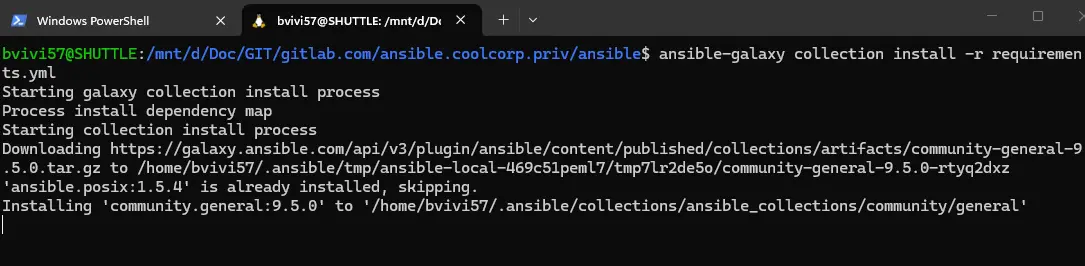
Click the image to enlarge.
Check before running
Before proceeding, it's important not to forget the DNS entries if they haven't been created yet.
For my part, I created the records at the level of my internal DNS, which is managed by my Windows server.
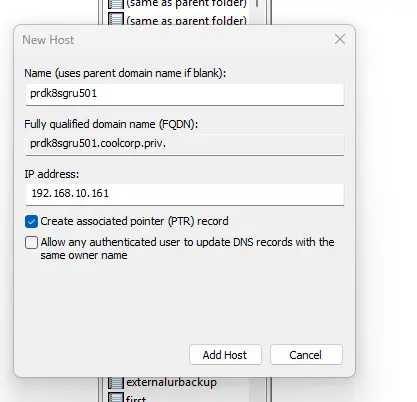
Click the image to enlarge.
This is an element that could be automated. Once the resolutions are in place, to ensure that all servers are ready, we can start by checking if Ansible has access to them.
ansible all -m ping
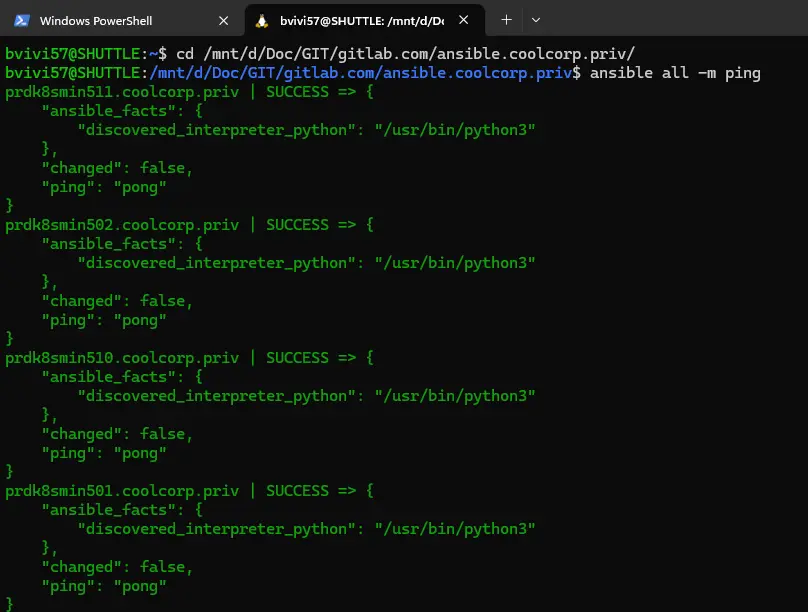
Click the image to enlarge.
Executing the playbook
If the result is positive, we can proceed to execute our playbook.
ansible-playbook playbooks/xkub_10_base.yml

Click the image to enlarge.
This is where the magic happens, as we will be able to follow the sequence of actions.
Ansible will connect to each target described in the inventory and associated with the roles to be applied.
It will execute the requested instructions in the tasks and ensure that the changes have been made correctly.
Once completed, we have a report showing the number of modifications made.
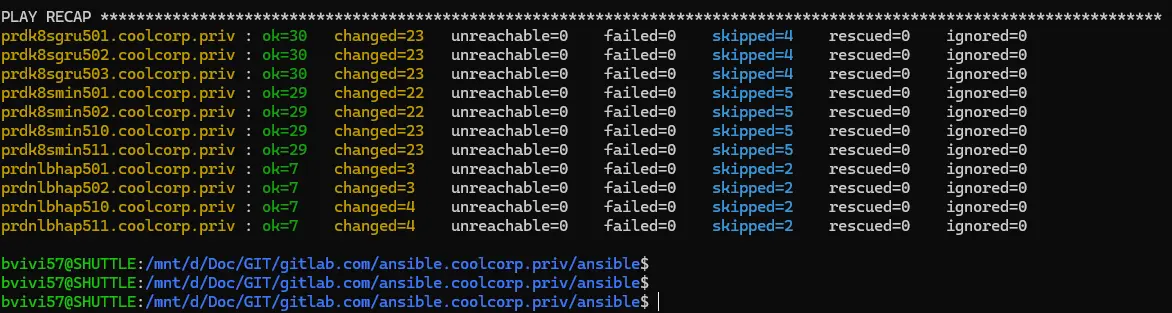
Click the image to enlarge.
Rerun the playbook
It is crucial to rerun the playbook a second time, as described in the previous article. The idempotence of Ansible playbooks must be ensured.
Normally, in the "PLAY RECAP" output, everything should be green with no changes.
As you can see here, this is not the case, but I have very few modifications.
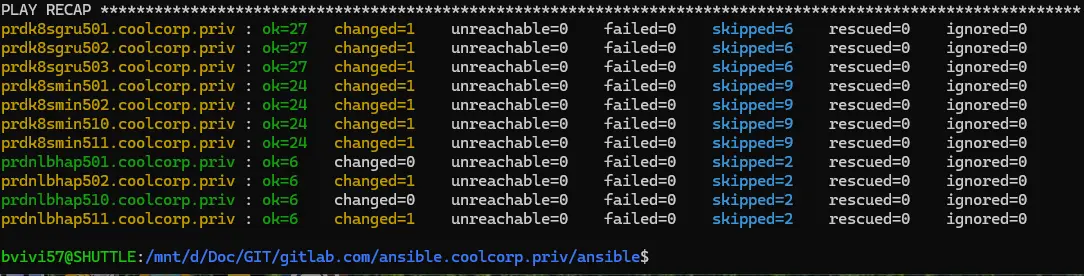
Click the image to enlarge.
Only one instruction was replayed, and it involves recreating the hosts files. In fact, the method used causes the file to be regenerated regardless of its current state.
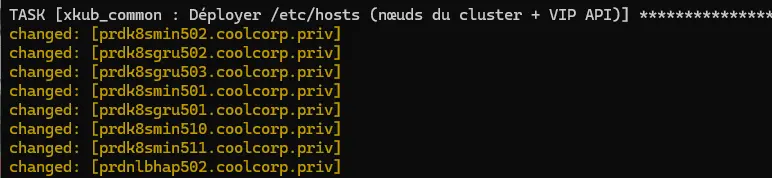
Click the image to enlarge.
This is not a major issue in itself, but if we want to be meticulous, this part should be reviewed.
Checks on the nodes
If we now connect to one of the servers that will be part of the future cluster, we can verify several things:
The hosts file,
cat /etc/hosts
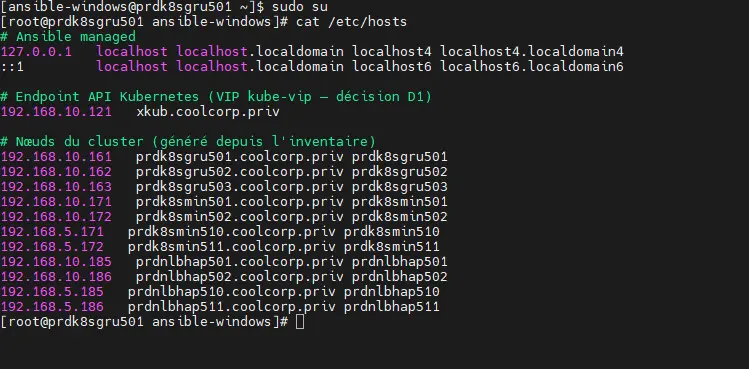
Click the image to enlarge.
the status of containerd,
systemctl status containerd
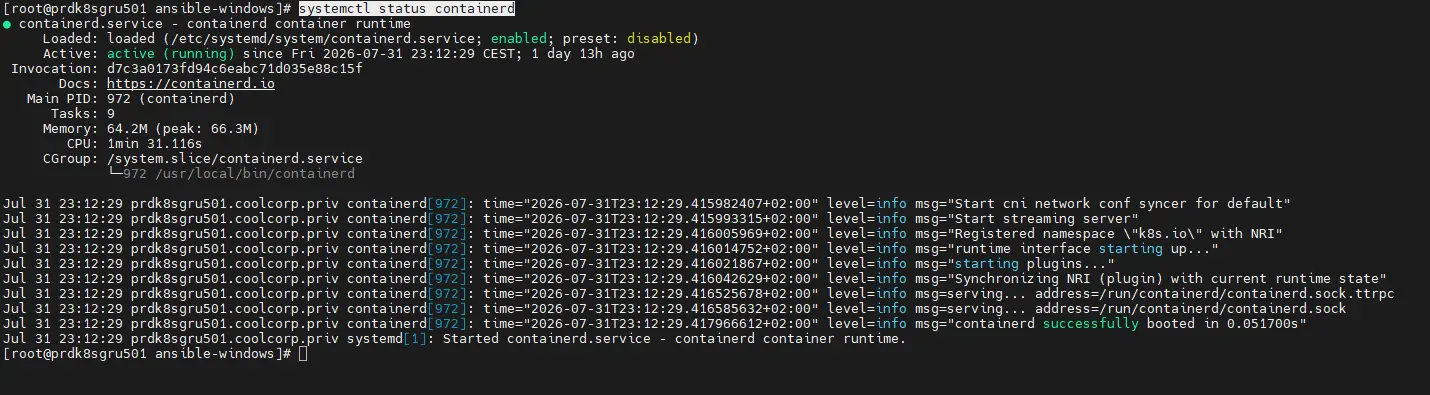
Click the image to enlarge.
We can check the version of containerd (containerd --version) and crictl (crictl --version).

Click the image to enlarge.
Finally, we can check the firewall rules (sudo firewall-cmd --list-all), specifically:
- On a future control plane:
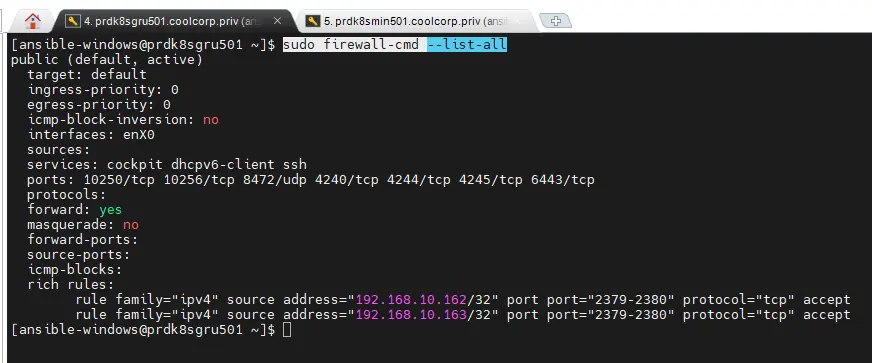
Click the image to enlarge.
- On a future worker:
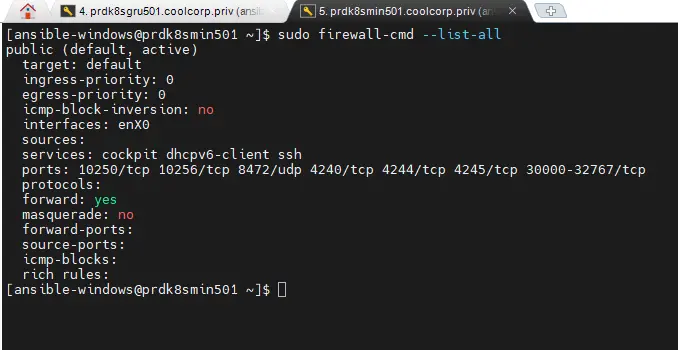
Click the image to enlarge.
We can clearly see the difference in network traffic allowed between the two nodes.
Conclusion
Our servers now have all the prerequisites necessary for their integration into a Kubernetes cluster, in accordance with the expected architecture and presented at the beginning of this cookbook.
The configuration process using Ansible logic has allowed us to address each point required for the proper functioning of K8S for the next steps.
- Installation of basic packages including crun (OS repo) and kubeadm, kubelet, kubectl from the official K8S repository
- Activation of the Linux kernel modules overlay and br_netfilter
- Installation of containerd and crictl (downloaded from upstream).
- Configuration of the Linux kernel via sysctl, specifically for internal routing and to remove limitations around the number of connections and open files
- Opening the ports necessary for the cluster and its services (Cilium, Traefik, etc.) to function, taking into account the future roles of the nodes (control plane, worker), with a dedicated firewalld zone for Cilium interfaces
- Stopping unnecessary services on the nodes (Cockpit, rpcbind).
AI accelerated the writing of the playbooks, but again, we reviewed each file to ensure consistency. Note that the AI intervened at my instruction, and some of what was written depends on the logic I wanted to implement.
Before we can proceed with initializing the cluster itself, we need to address the HAProxy servers. For this, please refer to the next article.
Summary of variables and equivalent commands outside of Ansible
This appendix summarizes all the variables used by Ansible in this article and provides equivalents for the commands and configurations implemented by Ansible in this section.
Variables used
| Variable | Valeur | Déclarée dans |
|---|---|---|
k8s_version |
1.36.5 |
inventory/group_vars/clu_k8s_xkub/versions.yml |
containerd_version |
2.4.2 |
inventory/group_vars/clu_k8s_xkub/versions.yml |
containerd_download_url |
https://github.com/containerd/containerd/releases/download/v2.4.2/containerd-2.4.2-linux-amd64.tar.gz |
inventory/group_vars/clu_k8s_xkub/versions.yml |
containerd_sha256 |
35880c1dd4627e8ce56526bfabb39c144e83458ffdb197ce6f05d17d94d7d91e |
inventory/group_vars/clu_k8s_xkub/versions.yml |
cri_tools_version |
1.36.0 |
inventory/group_vars/clu_k8s_xkub/versions.yml |
cri_tools_download_url |
https://github.com/kubernetes-sigs/cri-tools/releases/download/v1.36.0/crictl-v1.36.0-linux-amd64.tar.gz |
inventory/group_vars/clu_k8s_xkub/versions.yml |
cri_tools_sha256 |
83855e114566a8a8c44c548d515670f51de3a5e1da8b2effb59870e2f10c25a3 |
inventory/group_vars/clu_k8s_xkub/versions.yml |
k8s_api_port |
6443 |
inventory/group_vars/clu_k8s_xkub/main.yml |
k8s_port_kubelet |
10250 |
inventory/group_vars/clu_k8s_xkub/main.yml |
k8s_port_kube_proxy_health |
10256 |
inventory/group_vars/clu_k8s_xkub/main.yml |
k8s_port_etcd_range |
2379-2380 |
inventory/group_vars/clu_k8s_xkub/main.yml |
k8s_port_nodeport_range |
30000-32767 |
inventory/group_vars/clu_k8s_xkub/main.yml |
cilium_port_vxlan_udp |
8472 |
inventory/group_vars/clu_k8s_xkub/main.yml |
cilium_port_health |
4240 |
inventory/group_vars/clu_k8s_xkub/main.yml |
cilium_port_hubble_peer |
4244 |
inventory/group_vars/clu_k8s_xkub/main.yml |
cilium_port_hubble_relay |
4245 |
inventory/group_vars/clu_k8s_xkub/main.yml |
traefik_nodeport_lan_http / _https |
30080 / 30443 |
inventory/group_vars/clu_k8s_xkub/main.yml (compris dans la plage NodePort, pas utilisés directement par le rôle) |
traefik_nodeport_dmz_http / _https |
31080 / 31443 |
inventory/group_vars/clu_k8s_xkub/main.yml (idem) |
xkub_k8s_prereqs_packages |
kubeadm-1.36.5, kubelet-1.36.5, nfs-utils, iproute-tc, crun, container-selinux, conntrack-tools, ethtool, ebtables, socat |
roles/xkub_k8s_prereqs/defaults/main.yml |
xkub_k8s_prereqs_controlplane_packages |
kubectl-1.36.5 |
roles/xkub_k8s_prereqs/defaults/main.yml |
xkub_k8s_prereqs_kernel_modules |
overlay, br_netfilter |
roles/xkub_k8s_prereqs/defaults/main.yml |
xkub_k8s_prereqs_fw_ports_common |
10250/tcp |
roles/xkub_k8s_prereqs/defaults/main.yml |
xkub_k8s_prereqs_fw_ports_removed |
10256/tcp, 4245/tcp, 4240/tcp, 4244/tcp |
roles/xkub_k8s_prereqs/defaults/main.yml |
xkub_k8s_prereqs_fw_node_only_ports |
4240/tcp, 4244/tcp |
roles/xkub_k8s_prereqs/defaults/main.yml |
xkub_k8s_prereqs_fw_vxlan_source_groups |
k8s_controlplane_lan, k8s_workers_lan, k8s_workers_web, gpu |
roles/xkub_k8s_prereqs/defaults/main.yml |
xkub_k8s_prereqs_fw_services_removed |
cockpit |
roles/xkub_k8s_prereqs/defaults/main.yml |
xkub_k8s_prereqs_masked_units |
cockpit.socket, cockpit.service, rpcbind.socket, rpcbind.service |
roles/xkub_k8s_prereqs/defaults/main.yml |
xkub_k8s_prereqs_fw_cilium_zone |
cilium |
roles/xkub_k8s_prereqs/defaults/main.yml |
xkub_k8s_prereqs_fw_cilium_interfaces |
lxc+, cilium_vxlan |
roles/xkub_k8s_prereqs/defaults/main.yml |
xkub_k8s_prereqs_fw_cilium_deny_priority |
-100 |
roles/xkub_k8s_prereqs/defaults/main.yml |
xkub_k8s_prereqs_fw_cilium_deny_ports_common |
22/tcp |
roles/xkub_k8s_prereqs/defaults/main.yml |
xkub_k8s_prereqs_fw_cilium_deny_ports_controlplane |
2379-2380/tcp, 2112/tcp |
roles/xkub_k8s_prereqs/defaults/main.yml |
xkub_k8s_prereqs_fw_ports_controlplane |
6443/tcp |
roles/xkub_k8s_prereqs/defaults/main.yml |
xkub_k8s_prereqs_fw_etcd_source_group |
k8s_controlplane_lan |
roles/xkub_k8s_prereqs/defaults/main.yml |
xkub_k8s_prereqs_fw_ports_worker |
30000-32767/tcp |
roles/xkub_k8s_prereqs/defaults/main.yml |
xkub_k8s_prereqs_worker_groups |
k8s_workers_lan, k8s_workers_web, gpu |
roles/xkub_k8s_prereqs/defaults/main.yml |
ansible_user |
ansible-windows |
inventory/hosts.yml (all.vars) |
ansible_host |
IP de chaque nœud (192.168.10.161…163, .171, .172, 192.168.5.171, .172) |
inventory/hosts.yml |
ansible_swaptotal_mb |
taille de la swap active (fact collecté) | fact Ansible (setup) |
xkub_k8s_prereqs_containerd_current / xkub_k8s_prereqs_crictl_current |
version installée, extraite de --version |
set_fact dans roles/xkub_k8s_prereqs/tasks/03_containerd.yml |
Equivalent without Ansible
Connexion : ssh ansible-windows@<serveur>, puis sudo -i. Toutes les commandes ci-dessous tournent en root. « Nœuds K8s » désigne les 7 serveurs listés plus haut.
| # | Action | Serveur(s) | Compte | Commande(s) |
|---|---|---|---|---|
| 1 | Déclarer le dépôt Kubernetes v1.36 | Nœuds K8s | root | Créer /etc/yum.repos.d/kubernetes.repo (bloc A), chmod 644 |
| 2 | Couper la swap active (si présente) | Nœuds K8s | root | swapoff -a |
| 3 | Commenter la swap dans le fstab | Nœuds K8s | root | sed -ri 's/^([^#]*\sswap\s.*)$/# \1/' /etc/fstab |
| 4 | Charger les modules noyau au démarrage | Nœuds K8s | root | printf 'overlay\nbr_netfilter\n' > /etc/modules-load.d/kubernetes.conf |
| 5 | Charger les modules immédiatement | Nœuds K8s | root | modprobe overlaymodprobe br_netfilter |
| 6 | Paramètres sysctl Kubernetes | Nœuds K8s | root | Créer /etc/sysctl.d/99-kubernetes.conf (bloc B), puis sysctl --system |
| 7 | Installer containerd 2.4.2 (si containerd --version affiche une autre version), après vérification de la somme SHA256 |
Nœuds K8s | root | curl -fsSL -o /tmp/containerd-2.4.2-linux-amd64.tar.gz https://github.com/containerd/containerd/releases/download/v2.4.2/containerd-2.4.2-linux-amd64.tar.gzecho "35880c1dd4627e8ce56526bfabb39c144e83458ffdb197ce6f05d17d94d7d91e /tmp/containerd-2.4.2-linux-amd64.tar.gz" | sha256sum -c -tar -C /usr/local -xzf /tmp/containerd-2.4.2-linux-amd64.tar.gzrm -f /tmp/containerd-2.4.2-linux-amd64.tar.gz |
| 8 | Unité systemd containerd | Nœuds K8s | root | Créer /etc/systemd/system/containerd.service (bloc C), chmod 644 |
| 9 | Configuration containerd par défaut (seulement si absente) | Nœuds K8s | root | install -d -m 755 /etc/containerdcontainerd config default > /etc/containerd/config.toml |
| 10 | Activer le cgroup driver systemd | Nœuds K8s | root | sed -ri 's/SystemdCgroup\s*=\s*false/SystemdCgroup = true/' /etc/containerd/config.toml |
| 11 | Faire exécuter les conteneurs par crun | Nœuds K8s | root | Bloc D |
| 12 | Activer et (re)démarrer containerd | Nœuds K8s | root | systemctl daemon-reloadsystemctl enable --now containerdsystemctl restart containerd (si les étapes 7 à 11 ont modifié quelque chose) |
| 13 | Installer crictl 1.36.0 (si crictl --version affiche une autre version), après vérification de la somme SHA256 |
Nœuds K8s | root | curl -fsSL -o /tmp/crictl-v1.36.0-linux-amd64.tar.gz https://github.com/kubernetes-sigs/cri-tools/releases/download/v1.36.0/crictl-v1.36.0-linux-amd64.tar.gzecho "83855e114566a8a8c44c548d515670f51de3a5e1da8b2effb59870e2f10c25a3 /tmp/crictl-v1.36.0-linux-amd64.tar.gz" | sha256sum -c -tar -C /usr/local/bin -xzf /tmp/crictl-v1.36.0-linux-amd64.tar.gzrm -f /tmp/crictl-v1.36.0-linux-amd64.tar.gz |
| 14 | Configurer crictl | Nœuds K8s | root | Créer /etc/crictl.yaml (bloc E), chmod 644 |
| 15 | Paquets Kubernetes et dépendances | Nœuds K8s | root | dnf install -y --refresh --disableexcludes=kubernetes kubeadm-1.36.5 kubelet-1.36.5 nfs-utils iproute-tc crun container-selinux conntrack-tools ethtool ebtables socat |
| 16 | kubectl | prdk8sgru501, 502, 503 | root | dnf install -y --disableexcludes=kubernetes kubectl-1.36.5 |
| 17 | Activer kubelet sans le démarrer | Nœuds K8s | root | systemctl enable kubelet |
| 18 | firewalld actif | Nœuds K8s | root | systemctl enable --now firewalld |
| 19 | Port commun (kubelet) | Nœuds K8s | root | firewall-cmd --permanent --add-port=10250/tcp |
| 20 | Port de l'API server | prdk8sgru501, 502, 503 | root | firewall-cmd --permanent --add-port=6443/tcp |
| 21 | etcd ouvert aux seuls autres control planes | prdk8sgru501, 502, 503 | root | Bloc F |
| 22 | Retirer l'ancienne ouverture etcd sans restriction | prdk8sgru501, 502, 503 | root | firewall-cmd --permanent --remove-port=2379-2380/tcp |
| 23 | Plage NodePort | prdk8smin501, 502, 510, 511 | root | firewall-cmd --permanent --add-port=30000-32767/tcp |
| 24 | Créer la zone cilium (target ACCEPT) |
Nœuds K8s | root | firewall-cmd --permanent --new-zone=ciliumfirewall-cmd --permanent --zone=cilium --set-target=ACCEPT |
| 25 | Refuser SSH aux pods | Nœuds K8s | root | firewall-cmd --permanent --zone=cilium --add-rich-rule='rule priority="-100" port port="22" protocol="tcp" reject' |
| 26 | Refuser etcd et les métriques kube-vip aux pods | prdk8sgru501, 502, 503 | root | firewall-cmd --permanent --zone=cilium --add-rich-rule='rule priority="-100" port port="2379-2380" protocol="tcp" reject'firewall-cmd --permanent --zone=cilium --add-rich-rule='rule priority="-100" port port="2112" protocol="tcp" reject' |
| 27 | Lier les interfaces Cilium à la zone | Nœuds K8s | root | firewall-cmd --permanent --zone=cilium --add-interface=lxc+ --add-interface=cilium_vxlan |
| 28 | VXLAN, santé Cilium et Hubble peer ouverts aux seuls autres nœuds K8s | Nœuds K8s | root | Bloc G |
| 29 | Retirer les ouvertures larges | Nœuds K8s | root | firewall-cmd --permanent --remove-port=8472/udp --remove-port=10256/tcp --remove-port=4245/tcp --remove-port=4240/tcp --remove-port=4244/tcp |
| 30 | Retirer le service cockpit de la zone public | Nœuds K8s | root | firewall-cmd --permanent --remove-service=cockpit |
| 31 | Appliquer les règles permanentes | Nœuds K8s | root | firewall-cmd --reload |
| 32 | Arrêter et masquer les services inutiles | Nœuds K8s | root | systemctl mask --now cockpit.socket cockpit.service rpcbind.socket rpcbind.service |
Ansible applique chaque règle firewalld à la fois en permanent et en runtime (permanent: true + immediate: true). Le --reload final de l'étape 31 produit le même résultat. Toutes les commandes étant passées en --permanent, rien ne s'applique avant ce rechargement : l'ordre imposé par Ansible (refus avant liaison des interfaces, règles restreintes avant retrait des ouvertures larges) est donc respecté d'office.
Bloc A /etc/yum.repos.d/kubernetes.repo
[kubernetes]
name=Kubernetes
baseurl=https://pkgs.k8s.io/core:/stable:/v1.36/rpm/
enabled=1
gpgcheck=1
gpgkey=https://pkgs.k8s.io/core:/stable:/v1.36/rpm/repodata/repomd.xml.key
exclude=kubelet kubeadm kubectl cri-tools kubernetes-cni
Bloc B /etc/sysctl.d/99-kubernetes.conf
net.ipv4.ip_forward = 1
net.bridge.bridge-nf-call-iptables = 1
net.bridge.bridge-nf-call-ip6tables = 1
net.bridge.bridge-nf-call-arptables = 1
fs.inotify.max_user_watches = 1048576
fs.inotify.max_user_instances = 8192
Bloc C /etc/systemd/system/containerd.service
[Unit]
Description=containerd container runtime
Documentation=https://containerd.io
After=network.target local-fs.target

[Service]
ExecStartPre=-/sbin/modprobe overlay
ExecStart=/usr/local/bin/containerd
Type=notify
Restart=always
RestartSec=5
KillMode=process
Delegate=yes
OOMScoreAdjust=-999
LimitNOFILE=1048576
LimitNPROC=infinity
LimitCORE=infinity
TasksMax=infinity

[Install]
WantedBy=multi-user.target
Bloc D runtime crun dans /etc/containerd/config.toml
Si une ligne BinaryName existe déjà, on la remplace. Sinon, on l'insère sous SystemdCgroup = true.
CFG=/etc/containerd/config.toml
LINE='            BinaryName = "/usr/bin/crun"'
if grep -qE '^\s*BinaryName\s*=' "$CFG"; then
  sed -ri "s|^\s*BinaryName\s*=.*|$LINE|" "$CFG"
else
  sed -i "/SystemdCgroup = true/a\\$LINE" "$CFG"
fi
Bloc E /etc/crictl.yaml
runtime-endpoint: unix:///run/containerd/containerd.sock
image-endpoint: unix:///run/containerd/containerd.sock
timeout: 2
debug: false
pull-image-on-create: false
disable-pull-on-run: false
Bloc F rich rules etcd (une par autre control plane)
# Sur prdk8sgru501 : sources prdk8sgru502 (.162) et prdk8sgru503 (.163)
firewall-cmd --permanent --add-rich-rule='rule family="ipv4" source address="192.168.10.162/32" port port="2379-2380" protocol="tcp" accept'
firewall-cmd --permanent --add-rich-rule='rule family="ipv4" source address="192.168.10.163/32" port port="2379-2380" protocol="tcp" accept'
# Sur prdk8sgru502 : mêmes commandes avec 192.168.10.161 et 192.168.10.163
# Sur prdk8sgru503 : mêmes commandes avec 192.168.10.161 et 192.168.10.162
Bloc G rich rules VXLAN, santé Cilium et Hubble peer (une par autre nœud et par port)
# Sur chaque nœud K8s (les HAProxy ne sont pas des sources autorisées)
NODES="192.168.10.161 192.168.10.162 192.168.10.163 192.168.10.171 192.168.10.172 192.168.5.171 192.168.5.172"
SELF=$(hostname -I | awk '{print $1}')
for ip in $NODES; do
  [ "$ip" = "$SELF" ] && continue
  firewall-cmd --permanent --add-rich-rule="rule family=\"ipv4\" source address=\"$ip/32\" port port=\"8472\" protocol=\"udp\" accept"
  firewall-cmd --permanent --add-rich-rule="rule family=\"ipv4\" source address=\"$ip/32\" port port=\"4240\" protocol=\"tcp\" accept"
  firewall-cmd --permanent --add-rich-rule="rule family=\"ipv4\" source address=\"$ip/32\" port port=\"4244\" protocol=\"tcp\" accept"
done