K8S definition: The Service
- Deploying a pod is one thing; making it accessible is another.
- The Service exposes pods to each other and to the outside of the cluster.
- Service types and scope of exposure.
- Concepts similar to load balancing (HAProxy, Netscaler, F5...).
Introduction
Service is a kubernetes object. Its "shorname" is svc. The details of the object are available here.
Publishing a pod through a Deployment within a namespace is one thing; making it accessible from inside and outside the cluster is another.
The Service object exists to address this need.
A Service allows you to expose your pods so that they can communicate with each other, and also make them accessible outside of your cluster if necessary.
Operation and principles
A pod runs on a node (a physical or virtual server). This node is on an "external" network that is not the same as your pod's network.
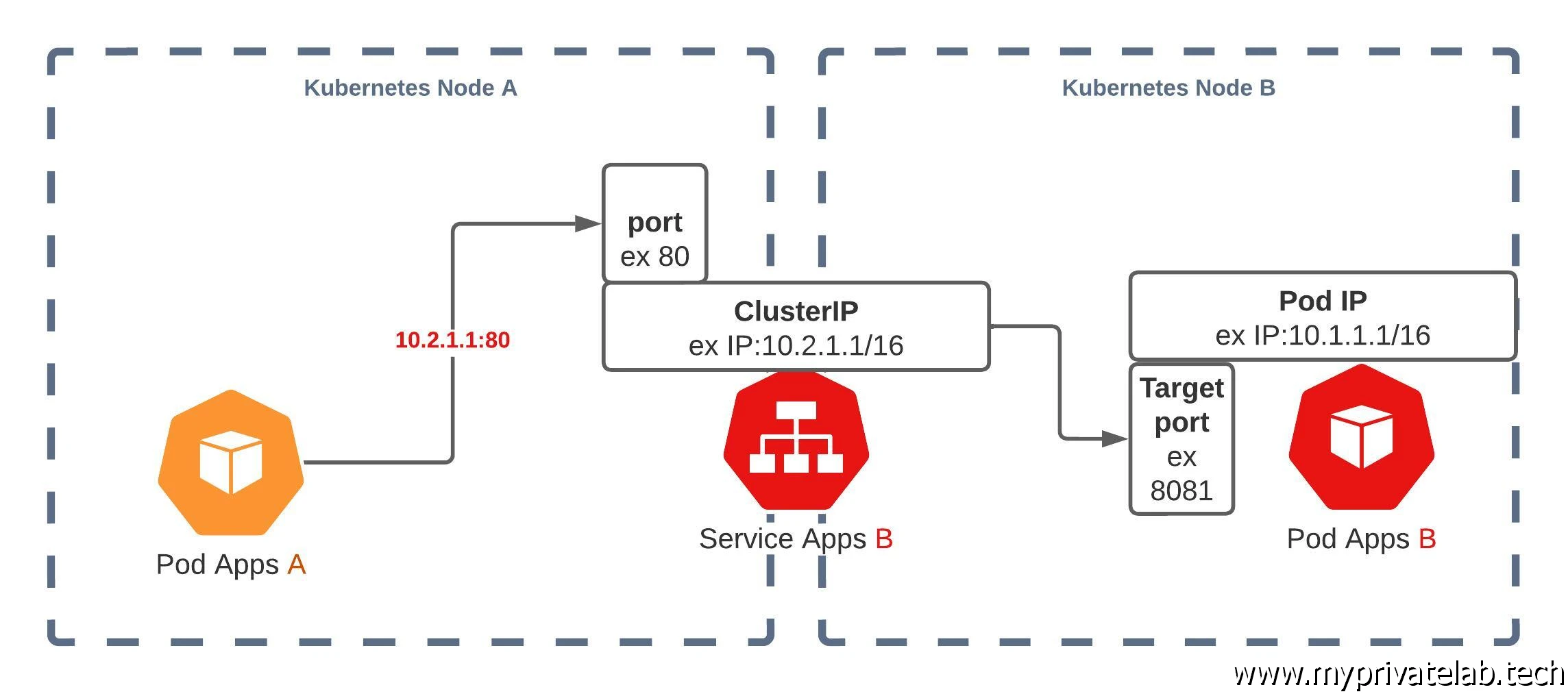
Your pod has an IP address in a specific subnet, internal to the cluster and established during its installation. By default, only the containers present within your pod can communicate with each other because they share the same IP address.
If you want to expose the applications of this pod to your other pods, you will need to use a Service.
The Services also have their own internal subnet, which is also defined during the cluster installation. Like the pod subnet, this network is not routed outside of the cluster.
A Service can be deployed primarily in three types:
- Type ClusterIP: This is the default type. It allows you to associate an IP address from the subnet associated with services with all pods that have the same application. If you have multiple identical pods distributed across different nodes, this IP address can serve as a "front" to relay your requests to any pod covered by the service. This IP address only exists internally within your cluster and cannot be accessed directly. However, any application running within your cluster can use this IP address to connect to one of the associated pods. An additional object called Ingress can also rely on this type of service and make it accessible from the outside.
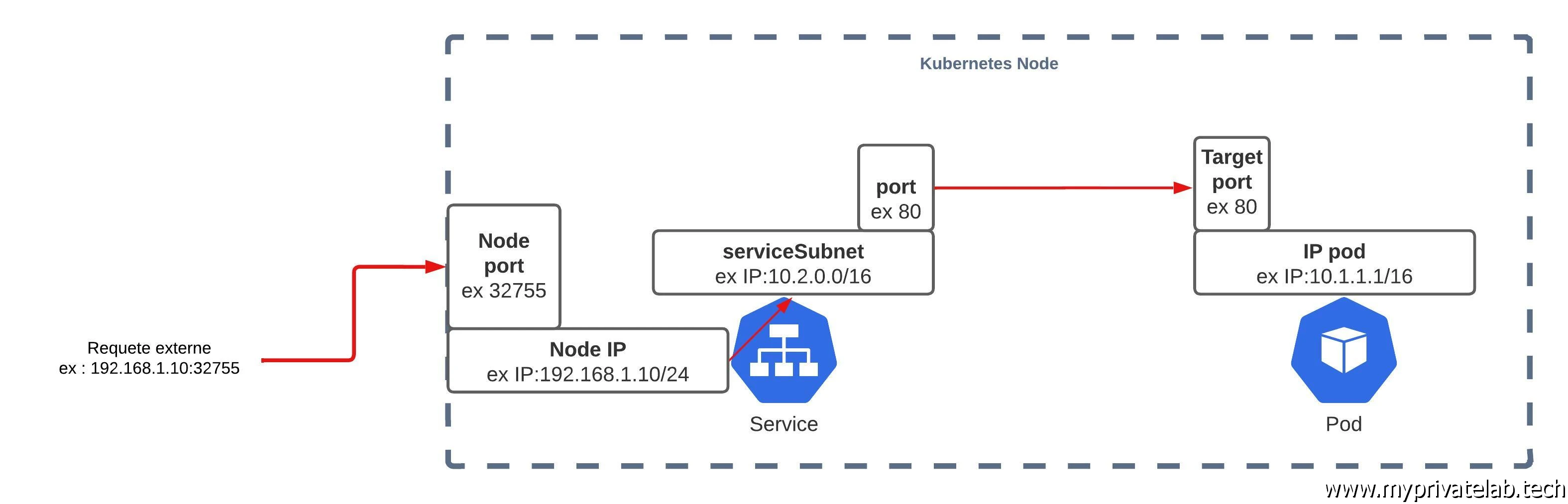
- Type NodePort: In this scenario, the service will expose a port, within the range of 30000 to 32767, on each node. By entering the server's address followed by the port number, it is possible to connect to the service. The service receives the request and then forwards it internally using its IP address from the subnet reserved for services (configured during cluster installation). The request then exits the service through an internal port (different from the external port) to reach the TargetPort exposed by the pod, allowing the pod to process the request. If you have followed so far, this type of service requires as many external ports within the 30000-32767 range on your server as there are services to expose.
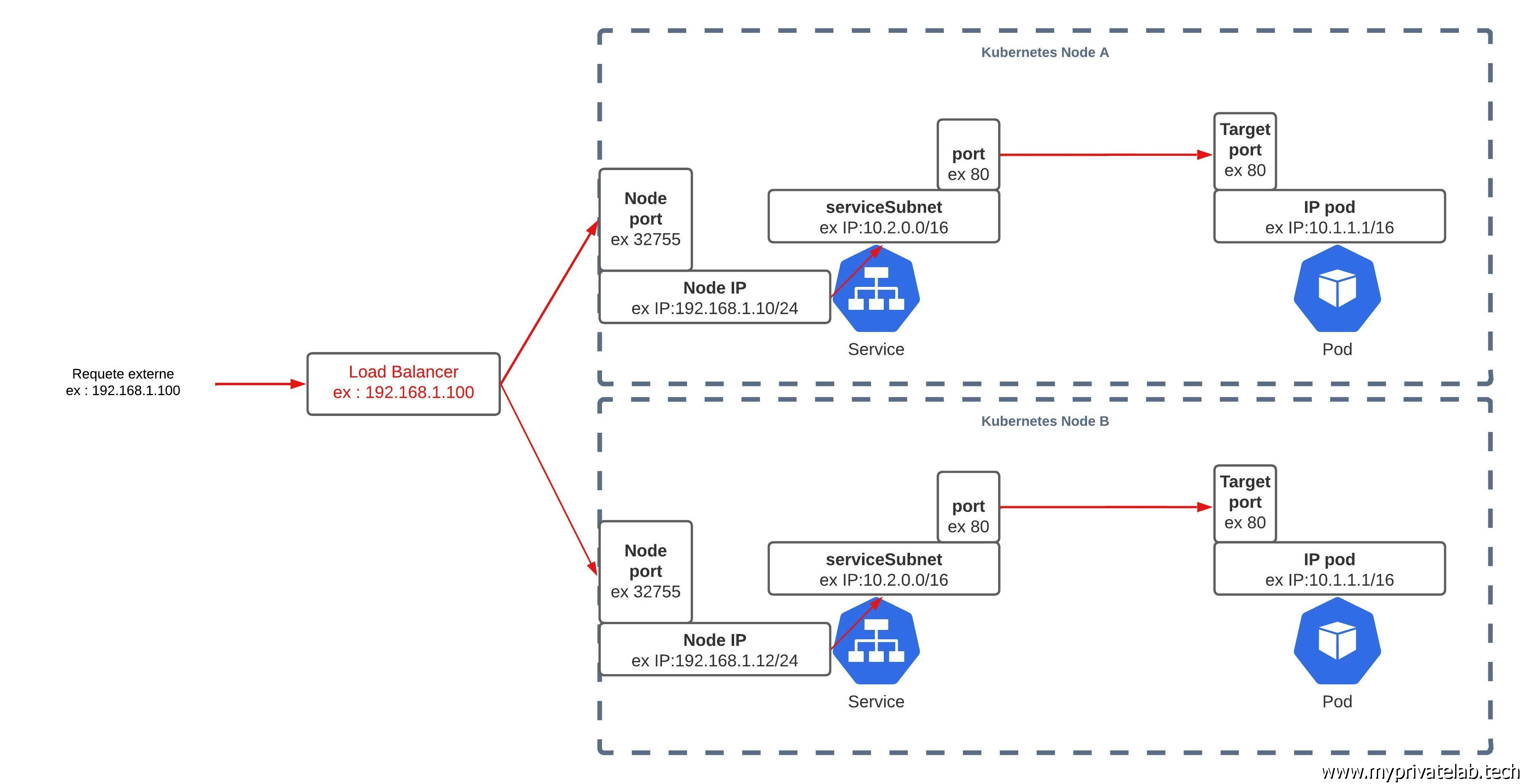
- Type LoadBalancer: This is a somewhat special type that is mainly used by cloud providers in their Kubernetes As A Service offering. It is based on the same principle as nodePort, but it automatically triggers the creation of a load balancing IP address within the cloud provider's ecosystem. This IP address, accessible from the outside, will become aware of the "external" port used by the service to "load balance" requests to the different servers on that port, which host the application. Declaring a service of this type on an internal infrastructure usually has the same effect as the nodeport type, but there are projects like MetalLB that aim to offer the same functionality in an on-premise environment as with a cloud provider.
Click the image to enlarge.
Click the image to enlarge.
Click the image to enlarge.
Personally, internally I tend to associate a standalone load balancer outside of Kubernetes that redirects to ports such as 443/80 for which I have configured an Ingress Controller, which in turn manages Ingresses attached to Services of type ClusterIP to route my requests based on my URLs. But that is not the purpose of this article.
Operations
Declaring a service is done as usual with a YAML file.
Example for a ClusterIP:
---
apiVersion: v1
kind: Service
metadata:
 name: mon-service-cluster-ip
spec:
 selector:
   app: ma-super-app
 type: ClusterIP
 ports:
 - name: http
   port: 80
   targetPort: 8080
   protocol: TCP
Example for a NodePort:
---
apiVersion: v1
kind: Service
metadata:
 name: mon-service-node-port
spec:
 ports:
 - port: 80
   protocol: TCP
   targetPort: 8080
   nodePort: 32765
 selector:
   app: ma-super-app
 type: NodePort
Example for LoadBalancer:
---
apiVersion: v1
kind: Service
metadata:
 name: mon-service-node-loadbalancer
spec:
 ports:
 - port: 80
   protocol: TCP
   targetPort: 8080
   nodePort: 30216
 selector:
   run: ma-super-app
 type: LoadBalancer
The spec section of the object allows you to specify the type of Service. Depending on the type of Service, certain options may differ, but they always have a common base.
As explained for the Deployment object, Kubernetes relies on labels to associate objects with each other. The same applies to Services, where you need to specify the labels of the pods that they should provide access to in the selection section.
This is how a service connects to a pod.
If you want to expose a pod called "ma-super-apps" via a NodePort type service, your "ma-super-apps" pod must have labels that match the selection rules of your service.
Deploying a service from its YAML file is identical to deploying all other Kubernetes objects:
kubectl apply -f monservice.yaml

Click the image to enlarge.
Once your Services are in place, you can use the following command to list them:
kubectl get svc

Click the image to enlarge.
(For illustration purposes, I'm using a specific namespace, hence the addition of the suffix -n).
You can access more details if you use the following command:
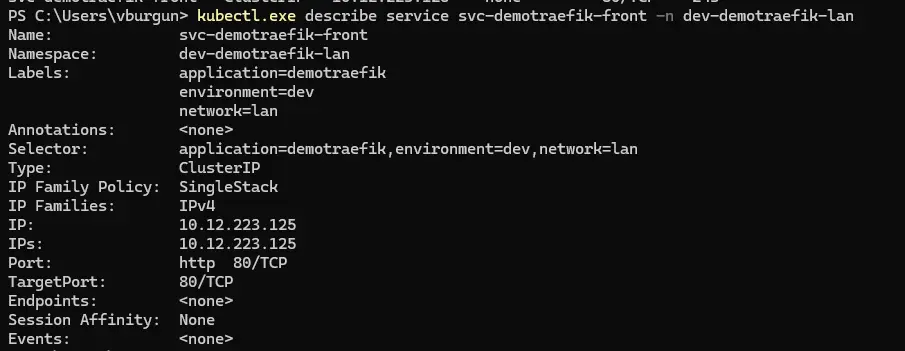
kubectl describe mon_service
Click the image to enlarge.
This will show you the IP address of your service and the labels it uses to identify the pods it should connect to.
The following command is also very useful:
kubectl get endpoints
It allows you to check if your service is "orphaned," meaning it hasn't found any pods that match its selector property

Click the image to enlarge.
Or, conversely, whether it is properly connected to one or more pods, in which case the list of IPs of those pods will be displayed in the "ENDPOINT" column.

Click the image to enlarge.
Conclusion
Services play a crucial role within the Kubernetes infrastructure. Regardless of the type chosen, it is important to understand the internal routing logic within K8S.
Beyond the issue of choosing a network provider within your cluster, keep in mind some basic principles, starting with the existence of a podSubnet and a serviceSubnet within your cluster.
In both cases, these are internal networks within your cluster that you can choose when deploying it (so never choose existing routed networks in your infrastructure for this purpose).
Each pod is assigned an IP address from the podSubnet, and each service is associated with an IP address from the serviceSubnet.
Communication between a service and a pod therefore takes place via routing between these two subnets, using an output port specific to the service and an input port specific to the pod.
This refers to the internal mechanisms of K8S. The choice of a service type, such as ClusterIP, NodePort, or LoadBalancer, is primarily related to how you intend to expose your service and its scope of exposure.
In general, Services incorporate concepts related to load balancing. For those familiar with tools like HAproxy, Netscaler, or F5, you should find common logic.