Step 2: Deploying VMs with Terraform
- Terraform (and its fork OpenTofu) describes the infrastructure in versioned HCL.
- Deploying the 11 VMs of the cluster using the Vates Xen Orchestra provider.
- Reusable module, tfvars files, XO tags, and Ansible inventory generation.
- Distributing nodes across XCP-ng pools for fault tolerance.
Introduction
In the previous step, the Packer utility allowed us to prepare a reference template, our golden image based on Rocky Linux 10.
It's time to move on to the second tool from the same vendor as Packer: Terraform.
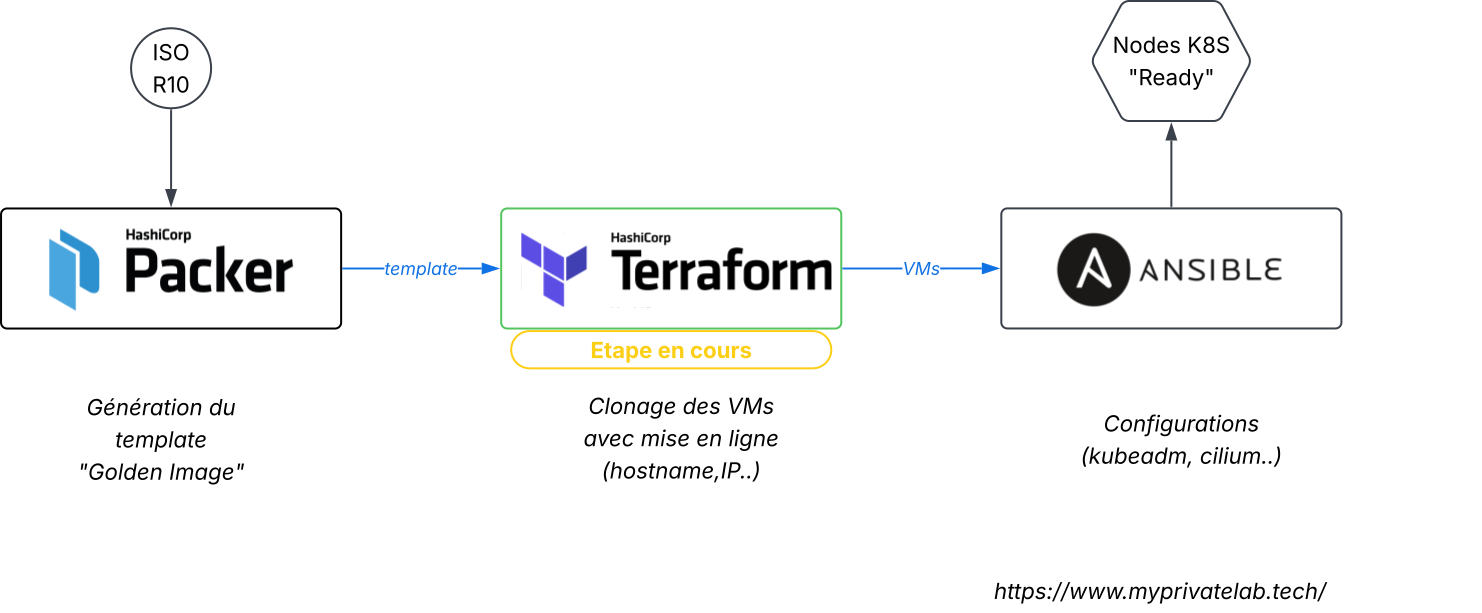
Click the image to enlarge.
Terraform
Present in the HashiCorp catalog since 2014, Terraform is the tool that popularized the term Infrastructure as Code even beyond the cloud world. The infrastructure (VMs, networks, DNS, buckets, etc.) is described in versioned text files using HCL2, the same language as Packer.
History
In 2023, HashiCorp changed Terraform's license to BSL (Business Source License), which is not recognized as an open-source license. This change led to a community fork, OpenTofu (Linux Foundation), which is currently compatible with the same .tf files.
My previous Cookbook also used this derivative version of Terraform. Since, as it stands, the code works with either version, I have reverted to Terraform, because the BSL license allows unrestricted deployment in production, including in professional environments. It mainly restricts the creation of competing commercial offerings.
Principle
Each individual is free to use the version of their choice; the strength of this ecosystem lies in the availability of over 3000 providers. These providers translate the HCL grammar into the APIs of many platforms, such as AWS, Azure, vSphere, and in our case, Xen Orchestra (XO). Vates, the vendor of XCP-ng and XO, has its own community provider that allows the use of Terraform (or OpenTofu) to deploy resources.
The basic principle behind Terraform and infrastructure as code in general is to describe the desired state, not the actions.
Unlike a script that lists things to do ("create the VM, then attach the disk..."), Terraform is declarative: you describe the desired final state ("there exists a VM prdk8sgru501, 4 vCPUs, 6 GB, on this network"), and the tool itself calculates the operations needed to achieve that.
Creation, modification, or nothing at all if what exists is already compliant. This is what makes things safe to replay (idempotent).
To perform this calculation, Terraform maintains a state file (terraform.tfstate): a snapshot of what it has actually created (VM IDs in XO, disks, MAC addresses...).
With each execution, it compares three things: the code (the intention), the state (what it believes exists), and reality (queried via the API).
The difference between the state and reality becomes an execution plan. This is displayed before any modifications are made.
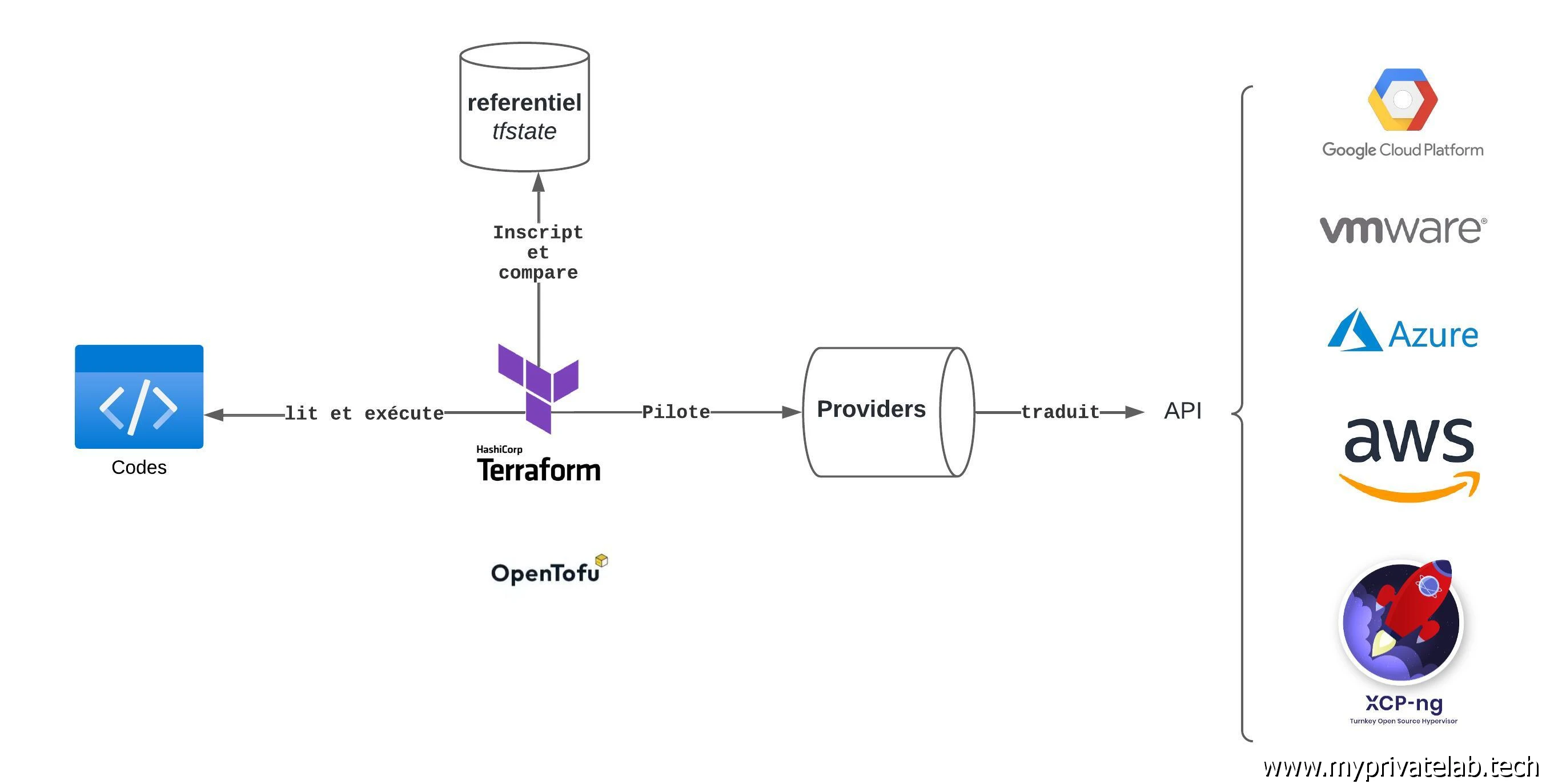
Click the image to enlarge.
Important Note
The biggest risk with Terraform is when changes are made outside of an execution using the tool.
If assets deployed and configured with Terraform are directly manipulated by operators, then Terraform's state file becomes incorrect and can cause it to perform unnecessary actions or actions that conflict with the actual state of the assets.
That is why, when using Infrastructure as Code (IAC), you must maintain the files used and carefully preserve the associated tfstate files. You should avoid making manual modifications directly to the infrastructure in question.
Alternatively, you can accept that IAC is only used for initial deployment, but not subsequently for ongoing operational maintenance. This isn't my preferred approach, but as long as you understand and manage it, it's one way of doing things.
It is important to note that if multiple people need to manipulate assets managed by Terraform, it is essential that the tfstate files can be shared and updated during each operation, whether by one or multiple users. In this case, there are tools for hosting and tracking tfstate files, such as Terraform Cloud, to work on an IAC logic within one or more teams.
Installation
Installing Terraform is not complex; like Packer, you simply need to obtain the binary compatible with your system and then ensure that it can be called from anywhere.
Package management solutions such as brew on macOS can also be used.
Directory Structure and IAC Files
As always, it's important to maintain a clear and understandable directory structure for declaring your Terraform files.
Several options are possible, and each person should adapt their directory structure to their needs and what they consider to be the most optimized solution for them. It is crucial to remain faithful to this structure and ensure that anyone working with the code respects it. You must follow the adopted declaration logic.
However, there is always a common vocabulary:
- provider: The plugin that communicates with a platform (in this case, xenorchestra).
- resource: An object that Terraform creates and manages (e.g., xenorchestra_vm).
- data source: An existing object that is only consulted (e.g., retrieving the ID of a Packer template, a network, or an SR based on its name).
- variable / locals / output: The inputs, calculated values, and outputs
- module: A reusable code subdirectory, for example, k8s-node, the module for nodes.
Regardless of the number of files used or the structure chosen to describe your assets, Terraform loads all *.tf files from the directory it is called from and merges them.
By convention, and for better readability, it is common practice to create multiple files. The structure used here is not a technical requirement, but rather relies on a logic often chosen within the community (although nothing prevents you from doing otherwise).
Project Files
| File | Role |
|---|---|
| versions.tf | The tooling contract: minimum Terraform version (>= 1.6), pinned providers (vatesfr/xenorchestra ~> 0.39, hashicorp/local ~> 2.5) and the provider block (TLS, retry_mode = "backoff"). XO authentication is not in it: it goes through the XOA_URL/XOA_TOKEN environment variables. |
| variables.tf | The deployment's inputs: declaration, description and type of each variable (pools, hosts, zones, nodes, DNS…). It contains no infrastructure values, only their definition, reinforced by validation blocks that reject inconsistent input (unknown zone, undeclared host, DMZ node without a DMZ network…) as early as the plan. |
| terraform.tfvars | The actual values of these variables: the topology (pools, hosts, local SRs) and the map of the 11 nodes (role, Ansible group, zone, placement host, IP, vCPU/RAM/disk, traefik flag). It is the only file to edit to add, move or resize a node (no secrets in it). |
| terraform.tfvars.example | The commented template of terraform.tfvars, with REMPLACER_* placeholders: it documents the expected topology and the XOA_URL/XOA_TOKEN export commands to start from scratch. |
| main.tf | The core: the data sources that resolve XO names into IDs (pool → template, LAN/DMZ networks, SR, hosts), then a single module "node" block with for_each = var.nodes: each entry of the nodes map becomes an instance of the module, wired to the right pool/network/SR according to its zone and host. |
| locals.tf | The computed values: the list of hosts actually used, XO tags per node (node_tags, mirroring the groups), and above all the structure of the Ansible inventory built from var.nodes: hosts declared in the role groups, cross-cutting groups (clu_k8s_xkub, os_lin_r10, sys_net_lan, sys_net_web) assembled through children references, and Traefik application groups derived from the traefik flag. |
| outputs.tf | The outputs: the local_file resource that writes hosts.yml into the Ansible repository on every apply (via yamlencode(), so the YAML is guaranteed valid), plus two control outputs (deployed_nodes = hostname → IP, vm_ids = XO IDs). |
| modules/k8s-node/ | The "VM mold", instantiated 11 times. main.tf: the single xenorchestra_vm resource (template clone, vCPU/RAM/disk, affinity_host for placement, XO tags, cloud-init injection). variables.tf / outputs.tf / versions.tf: the module's input/output contract. |
| templates/cloud-init/user-data.tftpl | cloud-config template rendered by templatefile() for each VM: hostname + FQDN. Intentionally minimal: the ansible-windows SSH key is already in the Packer template, so it is not redeployed. |
| templates/cloud-init/network-config.tftpl | The network-config template (NoCloud v1): static IP/prefix, zone gateway, DNS, and search domain on the enX0 interface. This is where the fixed IPs promised in phase 1 come to life. |
| terraform.tfstate (+ .backup) | The state: what Terraform has actually created (XO IDs, disks, etc.). A critical, unversioned file: losing it means losing the link between the code and the existing VMs. Never edit it by hand. |
| tfplan | A saved plan (terraform plan -out=tfplan): allows you to apply exactly what has been reviewed (terraform apply tfplan). A disposable artifact, not versioned. |
Here is the content of each of these files.
terraform {
  required_version = ">= 1.6.0"

  required_providers {
    xenorchestra = {
      source  = "vatesfr/xenorchestra"
      version = "~> 0.39.0"
    }
    local = {
      source  = "hashicorp/local"
      version = "~> 2.5"
    }
  }
}

# Authentification Xen Orchestra fournie EXCLUSIVEMENT via l'environnement :
#   XOA_URL    = "wss://prdxcpxor501.coolcorp.priv:8443"   (websocket, pas https)
#   XOA_TOKEN  = "<token XO>"
# Rien ne doit figurer ici ni dans git (cf. CLAUDE.md).
# `insecure` est passé explicitement : la variable d'env XOA_INSECURE n'est pas
# prise en compte de façon fiable par le provider 0.39.x.
# `retry_mode = "backoff"` : XAPI limite à 3 les migrations de stockage simultanées
# (TOO_MANY_STORAGE_MIGRATES) ; le provider réessaie au lieu d'échouer.
provider "xenorchestra" {
  insecure   = var.xoa_insecure
  retry_mode = "backoff"
}
versions.tf
variable "xoa_insecure" {
  description = "Désactive la vérification TLS vers Xen Orchestra (certificat auto-signé non approuvé par le poste). La variable d'environnement XOA_INSECURE n'est pas prise en compte de façon fiable par le provider 0.39.x, d'où ce passage explicite."
  type        = bool
  default     = true
}

variable "template_name" {
  description = "Nom du template XCP-ng à cloner (construit en phase 1 Packer). Défaut pour tous les pools, surchargeable par pool."
  type        = string
  default     = "prdtplroc501"
}

variable "pools" {
  description = <<-EOT
    Réseaux et template PAR POOL XCP-ng (clé = name_label exact du pool).
    Ne déclarer QUE les pools réellement utilisés (témoin : un seul pool).
      lan_network_name : name_label du réseau LAN sur ce pool
      dmz_network_name : name_label du réseau DMZ sur ce pool (requis si nœuds zone=dmz)
      template_name    : (optionnel) surcharge du template sur ce pool, sinon var.template_name
    Le template doit EXISTER sur chaque pool listé (copie cross-pool dans XO).
  EOT
  type = map(object({
    lan_network_name = string
    dmz_network_name = optional(string, "")
    template_name    = optional(string)
  }))
}

variable "hosts" {
  description = <<-EOT
    Hôtes XCP-ng utilisables (clé = name_label exact de l'hôte).
    Stockage LOCAL par hôte → le SR appartient à l'hôte ; choisir l'hôte fixe le SR.
      pool    : clé dans var.pools à laquelle l'hôte appartient
      sr_name : name_label du SR (local) où poser les disques des VMs de cet hôte
  EOT
  type = map(object({
    pool    = string
    sr_name = string
  }))

  validation {
    condition     = alltrue([for h in var.hosts : contains(keys(var.pools), h.pool)])
    error_message = "Chaque hosts[*].pool doit correspondre à une clé déclarée dans var.pools."
  }
}

variable "network_interface" {
  description = "Nom de l'interface réseau dans la VM, côté cloud-init (network-config). Sur le template Rocky 10 : enX0."
  type        = string
  default     = "enX0"
}

variable "dns_servers" {
  description = "Serveurs DNS internes (zone coolcorp.priv)."
  type        = list(string)
  default     = ["192.168.10.30"]
}

variable "search_domain" {
  description = "Domaine de recherche DNS et suffixe FQDN des nœuds."
  type        = string
  default     = "coolcorp.priv"
}

variable "zones" {
  description = "Paramètres réseau par zone (passerelle + préfixe CIDR)."
  type = map(object({
    gateway = string
    prefix  = number
  }))
  default = {
    lan = { gateway = "192.168.10.253", prefix = 24 }
    dmz = { gateway = "192.168.5.253", prefix = 24 }
  }
}

variable "nodes" {
  description = <<-EOT
    Carte des VMs à déployer (clé = hostname court).
    PREMIER ESSAI : ne mettre qu'UNE entrée (VM témoin). Étendre ensuite aux 11 nœuds.
      role          : control-plane | worker | haproxy
      ansible_group : k8s_controlplane_lan | k8s_workers_lan | k8s_workers_web | nlb_haproxy_lan | nlb_haproxy_web
      zone          : lan | dmz (doit être cohérente avec le suffixe du groupe)
      host          : clé dans var.hosts (détermine pool, SR et placement)
      ip            : IP statique (sans préfixe)
      traefik       : (optionnel, défaut false) le nœud portera une instance Traefik ;
                      l'ajoute au groupe applicatif k8s_traefik_lan ou k8s_traefik_web
                      selon sa zone (workers uniquement)
  EOT
  type = map(object({
    role          = string
    ansible_group = string
    zone          = string
    host          = string
    ip            = string
    cpus          = number
    memory_gb     = number
    disk_gb       = number
    traefik       = optional(bool, false)
  }))

  validation {
    condition     = alltrue([for n in var.nodes : contains(["lan", "dmz"], n.zone)])
    error_message = "Chaque nœud doit avoir zone = \"lan\" ou \"dmz\"."
  }

  validation {
    condition = alltrue([for n in var.nodes : contains(
      ["k8s_controlplane_lan", "k8s_workers_lan", "k8s_workers_web", "nlb_haproxy_lan", "nlb_haproxy_web"],
    n.ansible_group)])
    error_message = "ansible_group invalide (valeurs attendues : k8s_controlplane_lan, k8s_workers_lan, k8s_workers_web, nlb_haproxy_lan, nlb_haproxy_web)."
  }

  validation {
    condition     = alltrue([for n in var.nodes : (n.zone == "dmz") == contains(["k8s_workers_web", "nlb_haproxy_web"], n.ansible_group)])
    error_message = "Incohérence zone/groupe : les groupes *_web exigent zone = \"dmz\", les autres zone = \"lan\" (les groupes transverses sys_net_lan/sys_net_web sont dérivés des groupes de rôle)."
  }

  validation {
    condition     = alltrue([for n in var.nodes : !n.traefik || contains(["k8s_workers_lan", "k8s_workers_web"], n.ansible_group)])
    error_message = "traefik = true n'est permis que sur les workers (k8s_workers_lan ou k8s_workers_web)."
  }

  validation {
    condition     = alltrue([for n in var.nodes : contains(keys(var.hosts), n.host)])
    error_message = "Chaque node.host doit correspondre à une clé déclarée dans var.hosts."
  }

  validation {
    condition     = alltrue([for n in var.nodes : n.zone != "dmz" || try(var.pools[var.hosts[n.host].pool].dmz_network_name, "") != ""])
    error_message = "Un nœud zone=dmz exige dmz_network_name défini sur le pool de son hôte."
  }
}
variables.tf
# ===========================================================================
# Exemple de variables — COPIER en `terraform.tfvars` puis renseigner.
#
# Auth XO : NE PAS mettre ici. Exporter dans l'environnement avant terraform.
# L'URL est en WEBSOCKET (ws:// ou wss://), pas en https:// :
#   PowerShell : $env:XOA_URL = "wss://prdxcpxor501.coolcorp.priv:8443"; $env:XOA_TOKEN = "<token>"
#   Bash       : export XOA_URL="wss://prdxcpxor501.coolcorp.priv:8443" XOA_TOKEN="<token>"
#
# Topologie XCP-ng : 3 pools vus par le même XO
#   - pool "xcp-pool"      : hôtes prdxcpsrv001 / prdxcpsrv002 / prdxcpsrv003 (template ICI)
#   - pool "prdxcpsrv004"  : hôte  prdxcpsrv004
#   - pool "prdxcpsrv005"  : hôte  prdxcpsrv005
# Stockage LOCAL par hôte (SR par hôte). PRÉREQUIS multi-pool : le template
# prdtplroc501 doit être COPIÉ sur chaque pool utilisé (copie cross-pool dans XO).
#
# Déploiement complet : 11 VMs réparties sur les 3 pools (HA : 3 CP sur 3 pools,
# chaque paire HAProxy sur 2 pools).
# IPs conformes au plan d'adressage ARCHITECTURE.md (LAN 192.168.10.0/24 gw .253,
# DMZ 192.168.5.0/24 gw .253). Renseigner les name_label RÉELS (vus dans XO) des
# réseaux LAN/DMZ de chaque pool et du SR local de chaque hôte.
# ===========================================================================

# Certificat XO auto-signé non approuvé par le poste : désactive la vérification
# TLS du provider (XOA_INSECURE n'est pas fiable sur le provider 0.39.x).
xoa_insecure = true

pools = {
  "xcp-pool"     = { lan_network_name = "REMPLACER_LAN_xcp-pool", dmz_network_name = "REMPLACER_DMZ_xcp-pool" }
  "prdxcpsrv004" = { lan_network_name = "REMPLACER_LAN_004", dmz_network_name = "REMPLACER_DMZ_004" }
  "prdxcpsrv005" = { lan_network_name = "REMPLACER_LAN_005", dmz_network_name = "REMPLACER_DMZ_005" }
}

hosts = {
  prdxcpsrv001 = { pool = "xcp-pool", sr_name = "REMPLACER_SR_LOCAL_srv001" }
  prdxcpsrv002 = { pool = "xcp-pool", sr_name = "REMPLACER_SR_LOCAL_srv002" }
  prdxcpsrv003 = { pool = "xcp-pool", sr_name = "REMPLACER_SR_LOCAL_srv003" }
  prdxcpsrv004 = { pool = "prdxcpsrv004", sr_name = "Local-NVMe-Kingston-1TB-srv004" }
  prdxcpsrv005 = { pool = "prdxcpsrv005", sr_name = "REMPLACER_SR_LOCAL_srv005" }
}

nodes = {
  # --- Control plane (1 par pool = HA maximale) ---
  prdk8sgru501 = { role = "control-plane", ansible_group = "k8s_controlplane_lan", zone = "lan", host = "prdxcpsrv001", ip = "192.168.10.161", cpus = 4, memory_gb = 6, disk_gb = 60 }
  prdk8sgru502 = { role = "control-plane", ansible_group = "k8s_controlplane_lan", zone = "lan", host = "prdxcpsrv004", ip = "192.168.10.162", cpus = 4, memory_gb = 6, disk_gb = 60 }
  prdk8sgru503 = { role = "control-plane", ansible_group = "k8s_controlplane_lan", zone = "lan", host = "prdxcpsrv005", ip = "192.168.10.163", cpus = 4, memory_gb = 6, disk_gb = 60 }

  # --- Workers LAN ---
  prdk8smin501 = { role = "worker", ansible_group = "k8s_workers_lan", zone = "lan", host = "prdxcpsrv002", ip = "192.168.10.171", cpus = 4, memory_gb = 6, disk_gb = 80, traefik = true }
  prdk8smin502 = { role = "worker", ansible_group = "k8s_workers_lan", zone = "lan", host = "prdxcpsrv004", ip = "192.168.10.172", cpus = 4, memory_gb = 6, disk_gb = 80, traefik = true }

  # --- Workers DMZ (nécessitent dmz_network_name sur le pool de l'hôte) ---
  prdk8smin510 = { role = "worker", ansible_group = "k8s_workers_web", zone = "dmz", host = "prdxcpsrv003", ip = "192.168.5.171", cpus = 4, memory_gb = 6, disk_gb = 80, traefik = true }
  prdk8smin511 = { role = "worker", ansible_group = "k8s_workers_web", zone = "dmz", host = "prdxcpsrv005", ip = "192.168.5.172", cpus = 4, memory_gb = 6, disk_gb = 80, traefik = true }

  # --- HAProxy LAN (paire sur 2 pools) ---
  prdnlbhap501 = { role = "haproxy", ansible_group = "nlb_haproxy_lan", zone = "lan", host = "prdxcpsrv001", ip = "192.168.10.185", cpus = 2, memory_gb = 2, disk_gb = 60 }
  prdnlbhap502 = { role = "haproxy", ansible_group = "nlb_haproxy_lan", zone = "lan", host = "prdxcpsrv004", ip = "192.168.10.186", cpus = 2, memory_gb = 2, disk_gb = 60 }

  # --- HAProxy DMZ (paire sur 2 pools) ---
  prdnlbhap510 = { role = "haproxy", ansible_group = "nlb_haproxy_web", zone = "dmz", host = "prdxcpsrv002", ip = "192.168.5.185", cpus = 2, memory_gb = 2, disk_gb = 60 }
  prdnlbhap511 = { role = "haproxy", ansible_group = "nlb_haproxy_web", zone = "dmz", host = "prdxcpsrv005", ip = "192.168.5.186", cpus = 2, memory_gb = 2, disk_gb = 60 }
}
terraform.tfvars.example
# ---------------------------------------------------------------------------
# Datasources Xen Orchestra. Le provider parle à un seul XO qui voit les 3
# pools ; on désambiguïse via pool_id (template répliqué = même name_label
# sur chaque pool). Réseaux + template = par POOL ; SR = par HÔTE (stockage local).
# ---------------------------------------------------------------------------

data "xenorchestra_pool" "this" {
  for_each   = var.pools
  name_label = each.key
}

data "xenorchestra_template" "this" {
  for_each   = var.pools
  name_label = coalesce(each.value.template_name, var.template_name)
  pool_id    = data.xenorchestra_pool.this[each.key].id
}

data "xenorchestra_network" "lan" {
  for_each   = var.pools
  name_label = each.value.lan_network_name
  pool_id    = data.xenorchestra_pool.this[each.key].id
}

data "xenorchestra_network" "dmz" {
  for_each   = { for k, v in var.pools : k => v if v.dmz_network_name != "" }
  name_label = each.value.dmz_network_name
  pool_id    = data.xenorchestra_pool.this[each.key].id
}

data "xenorchestra_sr" "this" {
  for_each   = var.hosts
  name_label = each.value.sr_name
  pool_id    = data.xenorchestra_pool.this[each.value.pool].id
}

# Hôtes XCP-ng réellement utilisés par des nœuds → ID pour figer le placement.
data "xenorchestra_host" "this" {
  for_each   = local.used_hosts
  name_label = each.value
}

# ---------------------------------------------------------------------------
# Déploiement des VMs (un module générique, piloté par la map var.nodes)
# ---------------------------------------------------------------------------

module "node" {
  source   = "./modules/k8s-node"
  for_each = var.nodes

  hostname    = each.key
  template_id = data.xenorchestra_template.this[var.hosts[each.value.host].pool].id
  sr_id       = data.xenorchestra_sr.this[each.value.host].id
  network_id  = each.value.zone == "dmz" ? data.xenorchestra_network.dmz[var.hosts[each.value.host].pool].id : data.xenorchestra_network.lan[var.hosts[each.value.host].pool].id

  cpus      = each.value.cpus
  memory_gb = each.value.memory_gb
  disk_gb   = each.value.disk_gb
  tags      = local.node_tags[each.key]

  interface     = var.network_interface
  ip            = each.value.ip
  prefix        = var.zones[each.value.zone].prefix
  gateway       = var.zones[each.value.zone].gateway
  dns_servers   = var.dns_servers
  search_domain = var.search_domain

  affinity_host_id = data.xenorchestra_host.this[each.value.host].id
}
main.tf
locals {
  # Hôtes XCP-ng distincts réellement utilisés par des nœuds.
  used_hosts = toset([for n in var.nodes : n.host])

  # ---- Construction de l'inventaire Ansible -------------------------------
  # Les hôtes ne sont déclarés QUE dans les groupes de rôle ; les groupes
  # transverses (clu_k8s_xkub, os_lin_r10, sys_net_lan, sys_net_web) les
  # référencent comme enfants. Avantage : le baremetal prdk8smin520, ajouté
  # à la main dans k8s_workers_lan + gpu, héritera automatiquement de tous
  # les groupes transverses.
  role_groups = [
    "k8s_controlplane_lan",
    "k8s_workers_lan",
    "k8s_workers_web",
    "nlb_haproxy_lan",
    "nlb_haproxy_web",
  ]

  # Répartition zone réseau -> groupes de rôle (gpu = baremetal, côté LAN).
  # La cohérence zone/groupe des nœuds est garantie par une validation
  # de var.nodes.
  lan_groups = ["k8s_controlplane_lan", "k8s_workers_lan", "nlb_haproxy_lan", "gpu"]
  web_groups = ["k8s_workers_web", "nlb_haproxy_web"]

  group_hosts = {
    for g in local.role_groups : g => {
      for name, n in var.nodes :
      "${name}.${var.search_domain}" => { ansible_host = n.ip }
      if n.ansible_group == g
    }
  }

  # Tags XO par nœud : miroir exact des groupes d'inventaire Ansible de la VM
  # (rôle + transverses + traefik éventuel). Exploitable dans XO pour la
  # recherche, les smart backups et les ACLs.
  node_tags = {
    for name, n in var.nodes : name => concat(
      [
        n.ansible_group,
        "clu_k8s_xkub",
        "os_lin_r10",
        n.zone == "dmz" ? "sys_net_web" : "sys_net_lan",
      ],
      n.traefik ? [n.zone == "dmz" ? "k8s_traefik_web" : "k8s_traefik_lan"] : [],
    )
  }

  # Groupes applicatifs Traefik : sous-ensemble des workers portant le flag
  # traefik dans var.nodes (une instance LAN, une instance WEB). Seuls groupes
  # à redéclarer des hôtes en plus des groupes de rôle — c'est voulu : le
  # périmètre Traefik est un choix par nœud, pas déductible d'un groupe.
  traefik_hosts = {
    for z, g in { lan = "k8s_traefik_lan", dmz = "k8s_traefik_web" } : g => {
      for name, n in var.nodes :
      "${name}.${var.search_domain}" => { ansible_host = n.ip }
      if n.traefik && n.zone == z
    }
  }

  inventory = {
    all = {
      vars = {
        ansible_user = "ansible-windows"
      }
      children = {
        # Groupe cluster : toutes les machines de la plateforme xkub.
        "clu_k8s_xkub" = {
          children = merge(
            { for g in local.role_groups : g => { hosts = local.group_hosts[g] } },
            { gpu = { hosts = {} } },
          )
        }
        # Groupes applicatifs Traefik (hôtes déclarés directement, cf. plus haut).
        "k8s_traefik_lan" = { hosts = local.traefik_hosts.k8s_traefik_lan }
        "k8s_traefik_web" = { hosts = local.traefik_hosts.k8s_traefik_web }
        # Groupes transverses : références (vides) vers les groupes de rôle.
        "os_lin_r10"  = { children = { for g in concat(local.role_groups, ["gpu"]) : g => {} } }
        "sys_net_lan" = { children = { for g in local.lan_groups : g => {} } }
        "sys_net_web" = { children = { for g in local.web_groups : g => {} } }
      }
    }
  }
}
locals.tf
# Génère l'inventaire Ansible consommé en phase 3.
# Méthode : yamlencode() (YAML toujours valide) plutôt qu'un templatefile,
# pour garantir que `ansible-inventory --graph` parse le fichier sans surprise
# de mise en forme. Le baremetal prdk8smin520 reste à ajouter à la main.
resource "local_file" "ansible_inventory" {
  filename = "${path.module}/../xkub.coolcorp.priv.ansible/inventory/hosts.yml"
  # local_file crée en 0777 par défaut : un inventaire n'a pas à être exécutable.
  file_permission = "0644"
  content         = <<-EOT
    # ------------------------------------------------------------------
    # Inventaire Ansible GÉNÉRÉ par Terraform (phase 2) — NE PAS éditer.
    # Régénéré à chaque `terraform apply`.
    # Baremetal prdk8smin520 (GPU) : à ajouter MANUELLEMENT aux groupes
    # k8s_workers_lan ET gpu après la phase 11 — il héritera alors
    # automatiquement des groupes transverses clu_k8s_xkub, os_lin_r10
    # et sys_net_lan.
    # ------------------------------------------------------------------
    ${yamlencode(local.inventory)}
  EOT
}

output "deployed_nodes" {
  description = "Récapitulatif des VMs déclarées (hostname => IP)."
  value       = { for name, n in var.nodes : name => n.ip }
}

output "vm_ids" {
  description = "IDs Xen Orchestra des VMs créées."
  value       = { for k, m in module.node : k => m.vm_id }
}
outputs.tf
resource "xenorchestra_vm" "this" {
  name_label       = var.hostname
  name_description = "xkub.coolcorp.priv — ${var.hostname}"
  template         = var.template_id

  cpus       = var.cpus
  memory_max = var.memory_gb * 1024 * 1024 * 1024

  # Tags visibles/filtrables dans XO (recherche, smart backup, ACLs).
  tags = var.tags

  # Hôte préféré pour l'anti-affinité (soft, cf. limite documentée).
  affinity_host = var.affinity_host_id

  cloud_config = templatefile("${path.module}/../../templates/cloud-init/user-data.tftpl", {
    hostname = var.hostname
    fqdn     = "${var.hostname}.${var.search_domain}"
  })

  cloud_network_config = templatefile("${path.module}/../../templates/cloud-init/network-config.tftpl", {
    interface     = var.interface
    ip            = var.ip
    prefix        = var.prefix
    gateway       = var.gateway
    dns_servers   = var.dns_servers
    search_domain = var.search_domain
  })

  network {
    network_id = var.network_id
  }

  disk {
    sr_id      = var.sr_id
    name_label = "${var.hostname}-root"
    size       = var.disk_gb * 1024 * 1024 * 1024
  }

  # L'IP étant statique (cloud-init), l'inventaire est généré à partir de la
  # valeur déclarée, sans attendre la découverte par les guest tools. Pour
  # forcer Terraform à bloquer jusqu'à l'IP, ajouter wait_for_ip = true
  # (vérifier le support dans la version exacte du provider avant usage).
}
modules/k8s-node/main.tf
variable "hostname" {
  description = "Hostname court de la VM (= name_label XO)."
  type        = string
}

variable "template_id" {
  description = "ID du template XO à cloner."
  type        = string
}

variable "sr_id" {
  description = "ID du Storage Repository pour le disque."
  type        = string
}

variable "network_id" {
  description = "ID du réseau XO à attacher."
  type        = string
}

variable "cpus" {
  type = number
}

variable "memory_gb" {
  type = number
}

variable "disk_gb" {
  type = number
}

variable "interface" {
  description = "Nom de l'interface réseau côté cloud-init."
  type        = string
}

variable "ip" {
  description = "IP statique (sans préfixe)."
  type        = string
}

variable "prefix" {
  description = "Préfixe CIDR du sous-réseau."
  type        = number
}

variable "gateway" {
  type = string
}

variable "dns_servers" {
  type = list(string)
}

variable "search_domain" {
  type = string
}

variable "affinity_host_id" {
  description = "ID de l'hôte XCP-ng préféré (anti-affinité), ou null."
  type        = string
  default     = null
}

variable "tags" {
  description = "Tags XO/XAPI posés sur la VM (miroir des groupes d'inventaire Ansible)."
  type        = set(string)
  default     = []
}
modules/k8s-node/variables.tf
output "vm_id" {
  description = "ID XO de la VM créée."
  value       = xenorchestra_vm.this.id
}

output "ip" {
  description = "IP statique de la VM."
  value       = var.ip
}
modules/k8s-node/outputs.tf
terraform {
  required_providers {
    xenorchestra = {
      source = "vatesfr/xenorchestra"
    }
  }
}
modules/k8s-node/versions.tf
#cloud-config
# Hostname / FQDN appliqués au clone. La clé SSH ansible-windows est déjà
# présente dans le template Packer : on ne la redéploie pas ici.
fqdn: ${fqdn}
hostname: ${hostname}
prefer_fqdn_over_hostname: true
manage_etc_hosts: true
templates/cloud-init/user-data.tftpl
version: 1
config:
  - type: physical
    name: ${interface}
    subnets:
      - type: static
        address: ${ip}/${prefix}
        gateway: ${gateway}
  - type: nameserver
    address: [${join(", ", formatlist("%q", dns_servers))}]
    search: [${search_domain}]
templates/cloud-init/network-config.tftpl
The AI, thanks to a specific subagent deployed and operated by Claude Code, as described in the introduction to this cookbook, has indeed optimized the logic.
A single "node" block in main.tf is sufficient to handle all nodes. Thanks to the "for_each" instruction, each VM declared in terraform.tfvars is processed. In addition, using outputs.tf allows you to generate the Ansible inventory that can be used later if necessary in the next step.
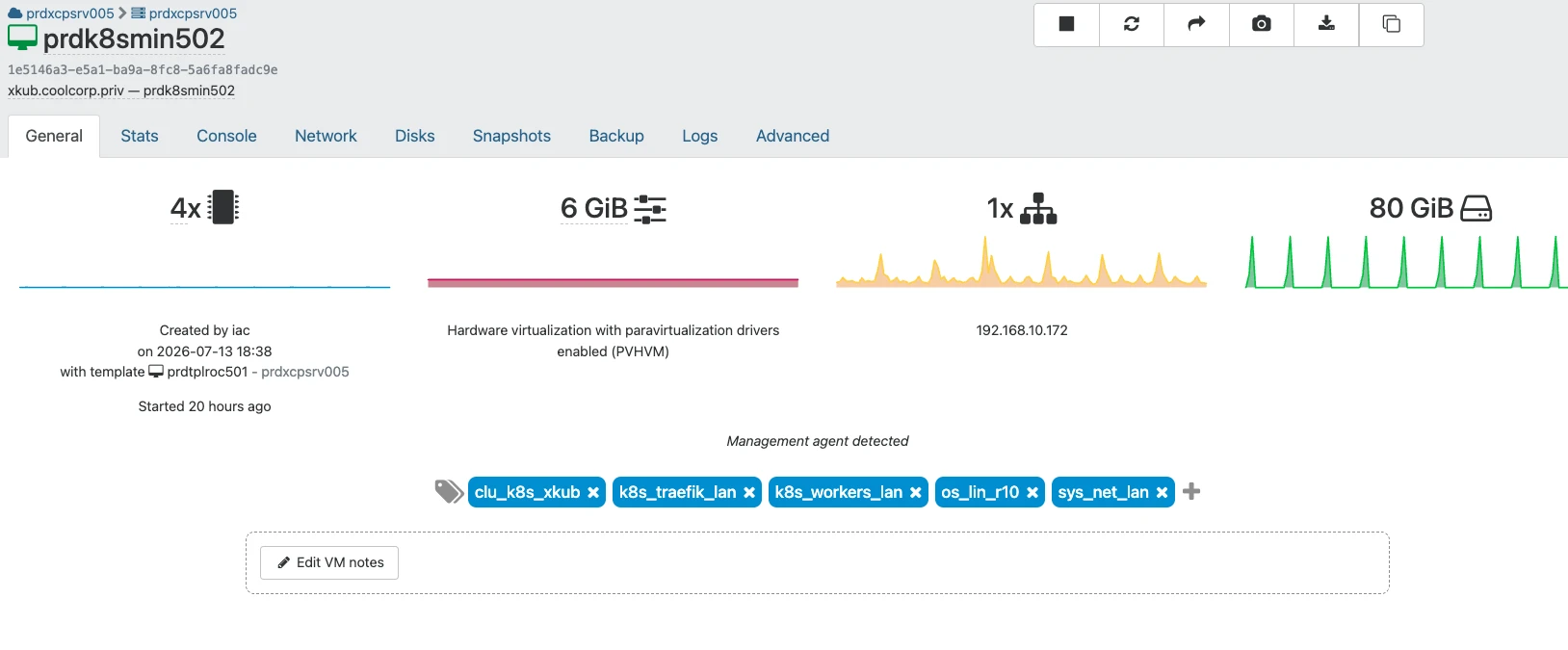
Incidentally, the names of the groups used to generate the future Ansible inventory also serve as tags for each VM at the XCP-ng level. This is a simple way to subsequently script many automated processes for various purposes by filtering on these labels.
Variable Handling
To continue, we will fill in the variables file with the details of the VMs to be deployed and, above all, their location in the XCP-ng pools.
So, we start by copying the example file:
Copy-Item terraform.tfvars.example terraform.tfvars
Click the image to enlarge.
We edit it, but to know which values to enter, you will need to go to the Xen Orchestra interface (GUI v5 or v6). The goal is to retrieve the names of the networks, specifically LAN and VLAN_WEB, for my lab under XCP-ng.
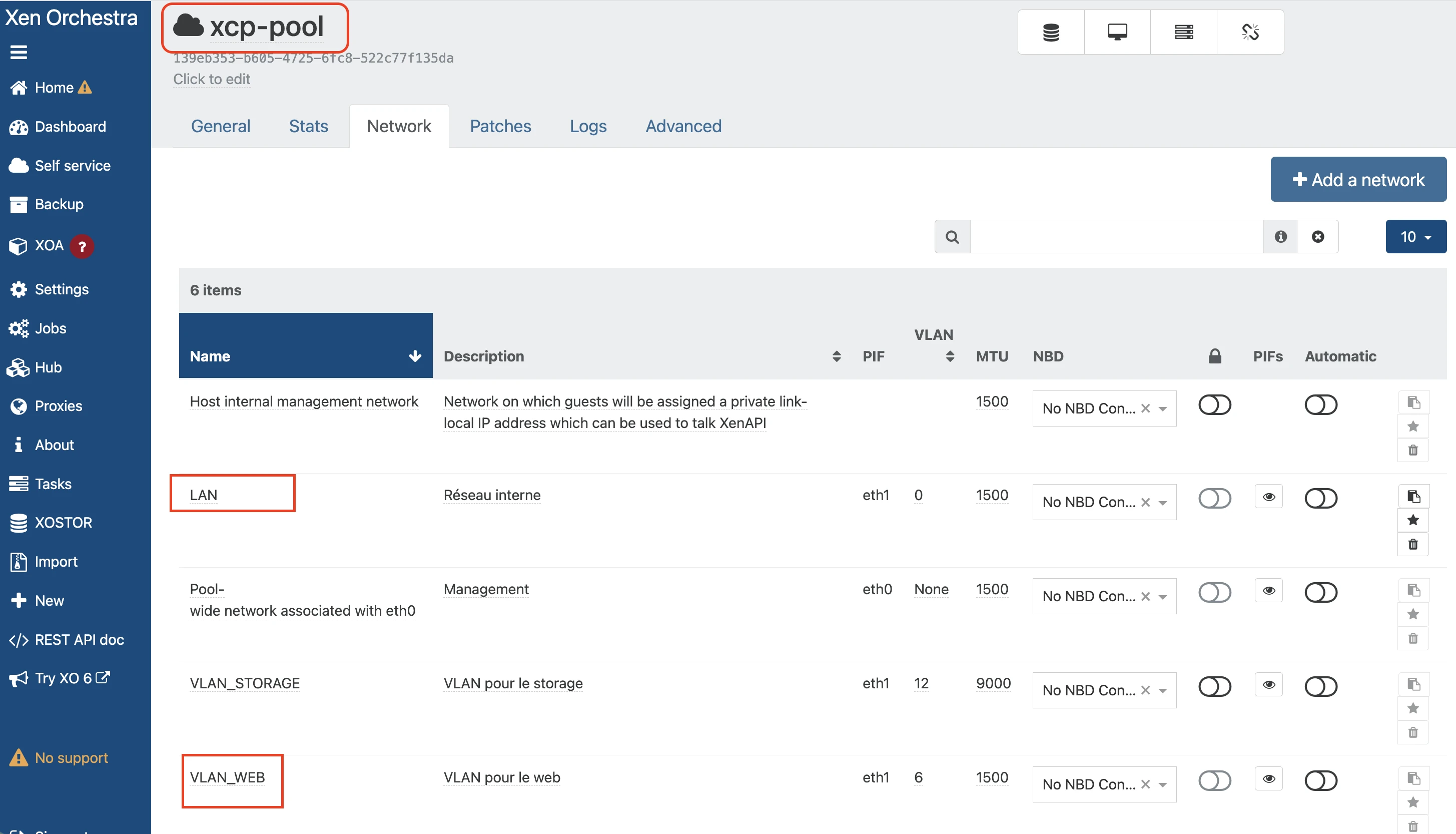
Click the image to enlarge.
Note: these names are defined at the level of each XCP pool. In my case, I used the same designations on all three pools. Next, you need to retrieve the storage repositories (SRs) that you want to use to store the VMs.
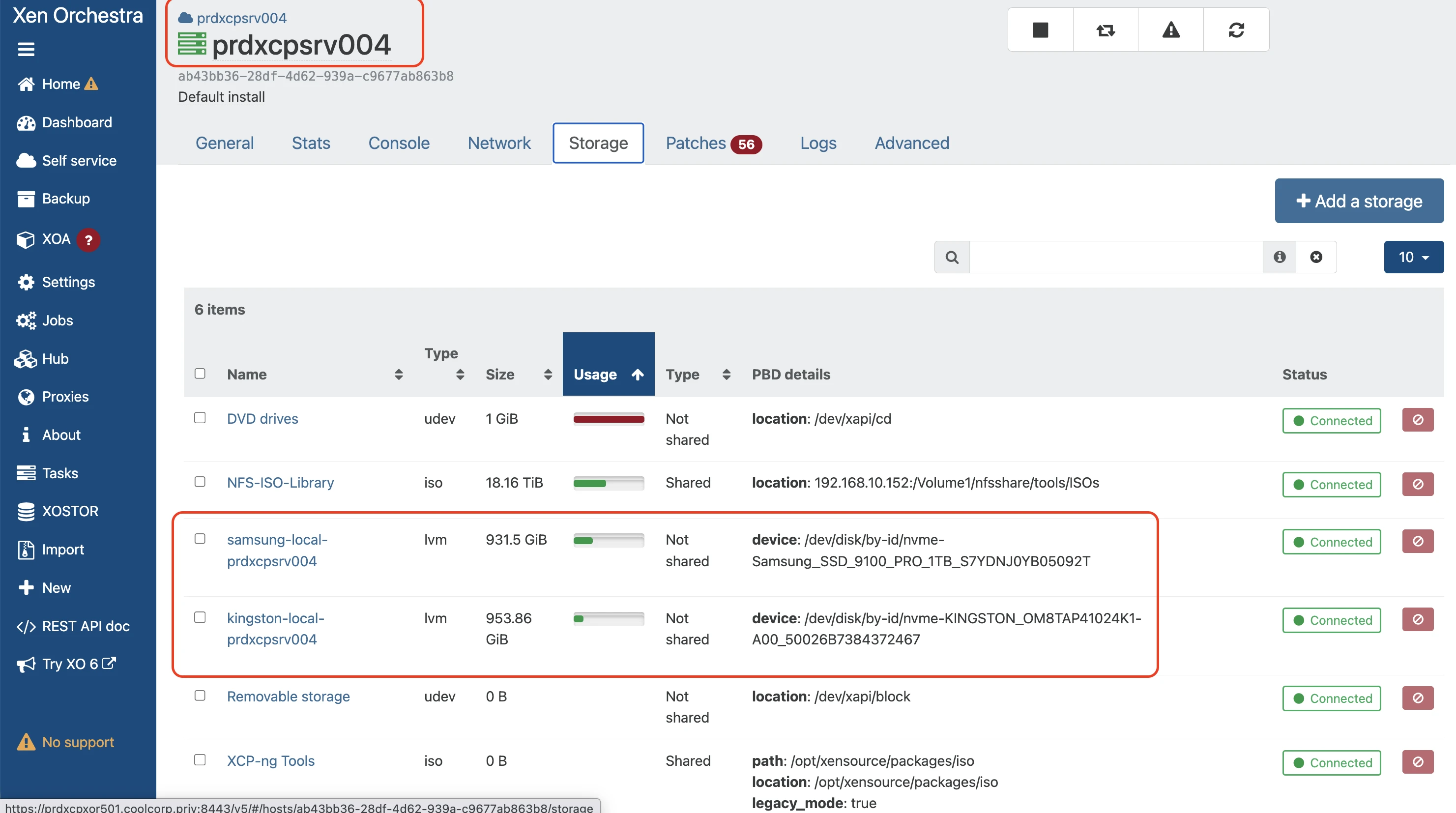
Click the image to enlarge.
I will favor the servers' local SRs, except for a few VMs that I will host on my replicated XOSTOR SR. For those who are not familiar with this, feel free to read my article on the subject and on storage with XCP-ng.
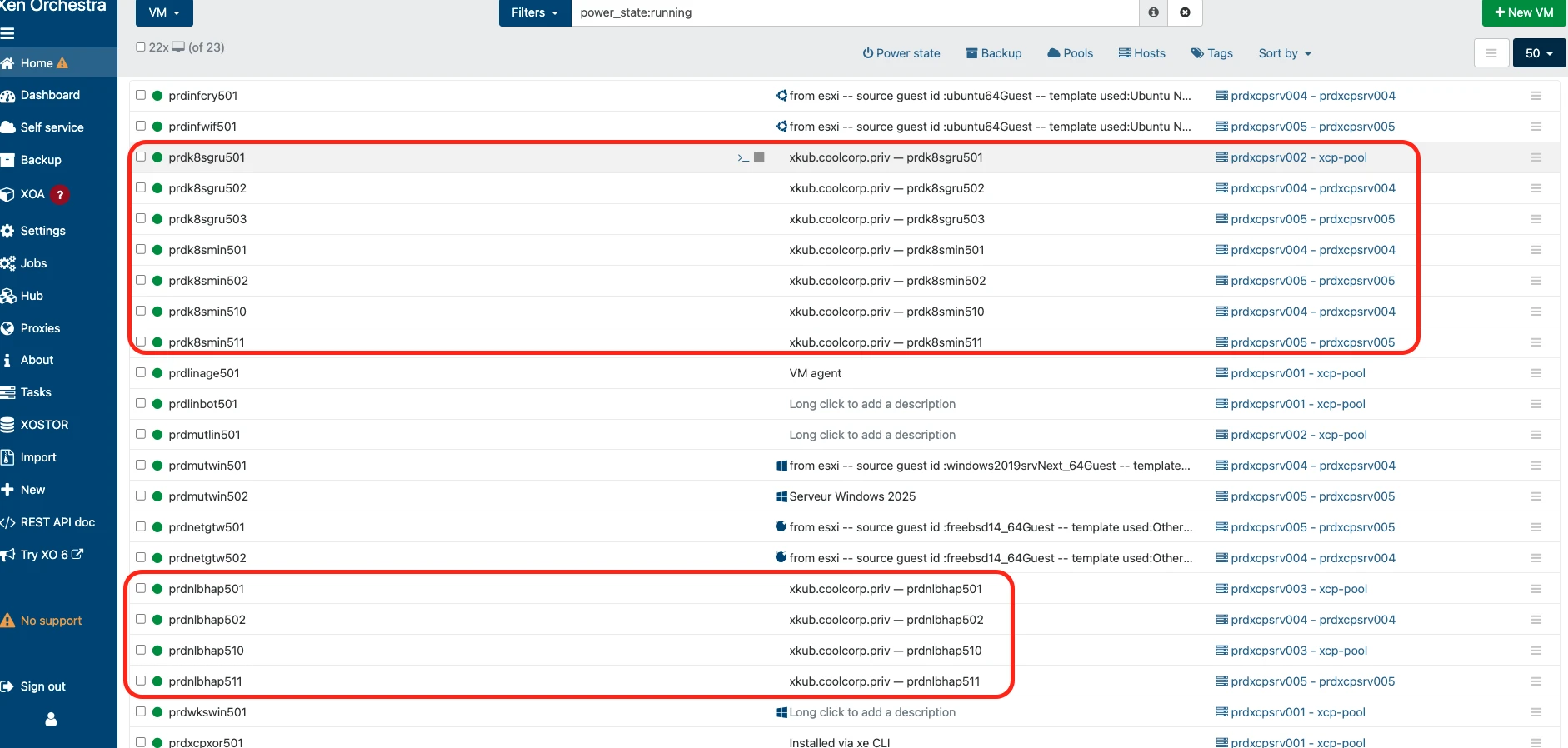
My goal is to have a distribution of roles between the physical nodes. The control plane must run on separate servers, as should the workers providing services for the same network zone. This is also the constraint that must be respected for HAproxy VMs.
The objective is to avoid single points of failure (SPOFs). Otherwise, losing a physical server would mean losing the K8S cluster.
Here is the final terraform.tfvars file:
pools = {
  "xcp-pool"     = { lan_network_name = "LAN", dmz_network_name = "VLAN_WEB" }
  "prdxcpsrv004" = { lan_network_name = "LAN", dmz_network_name = "VLAN_WEB" }
  "prdxcpsrv005" = { lan_network_name = "LAN", dmz_network_name = "VLAN_WEB" }
}

hosts = {
  prdxcpsrv001 = { pool = "xcp-pool", sr_name = "default-local-prdxcpsrv001" }
  prdxcpsrv002 = { pool = "xcp-pool", sr_name = "default-local-prdxcpsrv002" }
  prdxcpsrv003 = { pool = "xcp-pool", sr_name = "XOSTOR" }
  prdxcpsrv004 = { pool = "prdxcpsrv004", sr_name = "samsung-local-prdxcpsrv004" }
  prdxcpsrv005 = { pool = "prdxcpsrv005", sr_name = "samsung-local-prdxcpsrv005" }
}

nodes = {
  # --- Control plane (1 par pool = HA maximale) ---
  prdk8sgru501 = { role = "control-plane", ansible_group = "k8s_controlplane_lan", zone = "lan", host = "prdxcpsrv002", ip = "192.168.10.161", cpus = 4, memory_gb = 6, disk_gb = 60 }
  prdk8sgru502 = { role = "control-plane", ansible_group = "k8s_controlplane_lan", zone = "lan", host = "prdxcpsrv004", ip = "192.168.10.162", cpus = 4, memory_gb = 6, disk_gb = 60 }
  prdk8sgru503 = { role = "control-plane", ansible_group = "k8s_controlplane_lan", zone = "lan", host = "prdxcpsrv005", ip = "192.168.10.163", cpus = 4, memory_gb = 6, disk_gb = 60 }

  # --- Workers LAN ---
  prdk8smin501 = { role = "worker", ansible_group = "k8s_workers_lan", zone = "lan", host = "prdxcpsrv004", ip = "192.168.10.171", cpus = 4, memory_gb = 6, disk_gb = 80, traefik = true }
  prdk8smin502 = { role = "worker", ansible_group = "k8s_workers_lan", zone = "lan", host = "prdxcpsrv005", ip = "192.168.10.172", cpus = 4, memory_gb = 6, disk_gb = 80, traefik = true }

  # --- Workers DMZ (nécessitent dmz_network_name sur le pool de l'hôte) ---
  # srv004 (SR samsung 1 TB) : le SR default-local de srv003 (161 GB) était trop juste pour hap510 + min510
  prdk8smin510 = { role = "worker", ansible_group = "k8s_workers_web", zone = "dmz", host = "prdxcpsrv004", ip = "192.168.5.171", cpus = 4, memory_gb = 6, disk_gb = 80, traefik = true }
  prdk8smin511 = { role = "worker", ansible_group = "k8s_workers_web", zone = "dmz", host = "prdxcpsrv005", ip = "192.168.5.172", cpus = 4, memory_gb = 6, disk_gb = 80, traefik = true }

  # --- HAProxy LAN (paire sur 2 pools) ---
  # srv002 : le SR default-local de srv001 (43 GB libres) héberge aussi le disque de XO, pas de place pour hap501
  prdnlbhap501 = { role = "haproxy", ansible_group = "nlb_haproxy_lan", zone = "lan", host = "prdxcpsrv003", ip = "192.168.10.185", cpus = 2, memory_gb = 2, disk_gb = 60 }
  prdnlbhap502 = { role = "haproxy", ansible_group = "nlb_haproxy_lan", zone = "lan", host = "prdxcpsrv004", ip = "192.168.10.186", cpus = 2, memory_gb = 2, disk_gb = 60 }

  # --- HAProxy DMZ (paire sur 2 pools) ---
  prdnlbhap510 = { role = "haproxy", ansible_group = "nlb_haproxy_web", zone = "dmz", host = "prdxcpsrv003", ip = "192.168.5.185", cpus = 2, memory_gb = 2, disk_gb = 60 }
  prdnlbhap511 = { role = "haproxy", ansible_group = "nlb_haproxy_web", zone = "dmz", host = "prdxcpsrv005", ip = "192.168.5.186", cpus = 2, memory_gb = 2, disk_gb = 60 }
}
terraform.tfvars
The deployment of the entire system is very easy via a few commands.
Setting up a Dedicated User
But before that, it is necessary to retrieve the authentication information to allow Terraform to act on my Xen Orchestra platform.
To do this, I will start by adding a local user to XO, named iac. This is simply to isolate the actions performed by Terraform from the rest of the system. From a security perspective, this is also an advantage, since, if necessary, we can limit this account to the bare minimum. For my part, I am giving it administrator privileges… in my case, this is more of a convenience, but in a business environment, it is better to avoid assigning this type of role by default to a service account. Instead, prefer to define a specific role and carefully associate it with the necessary permissions.
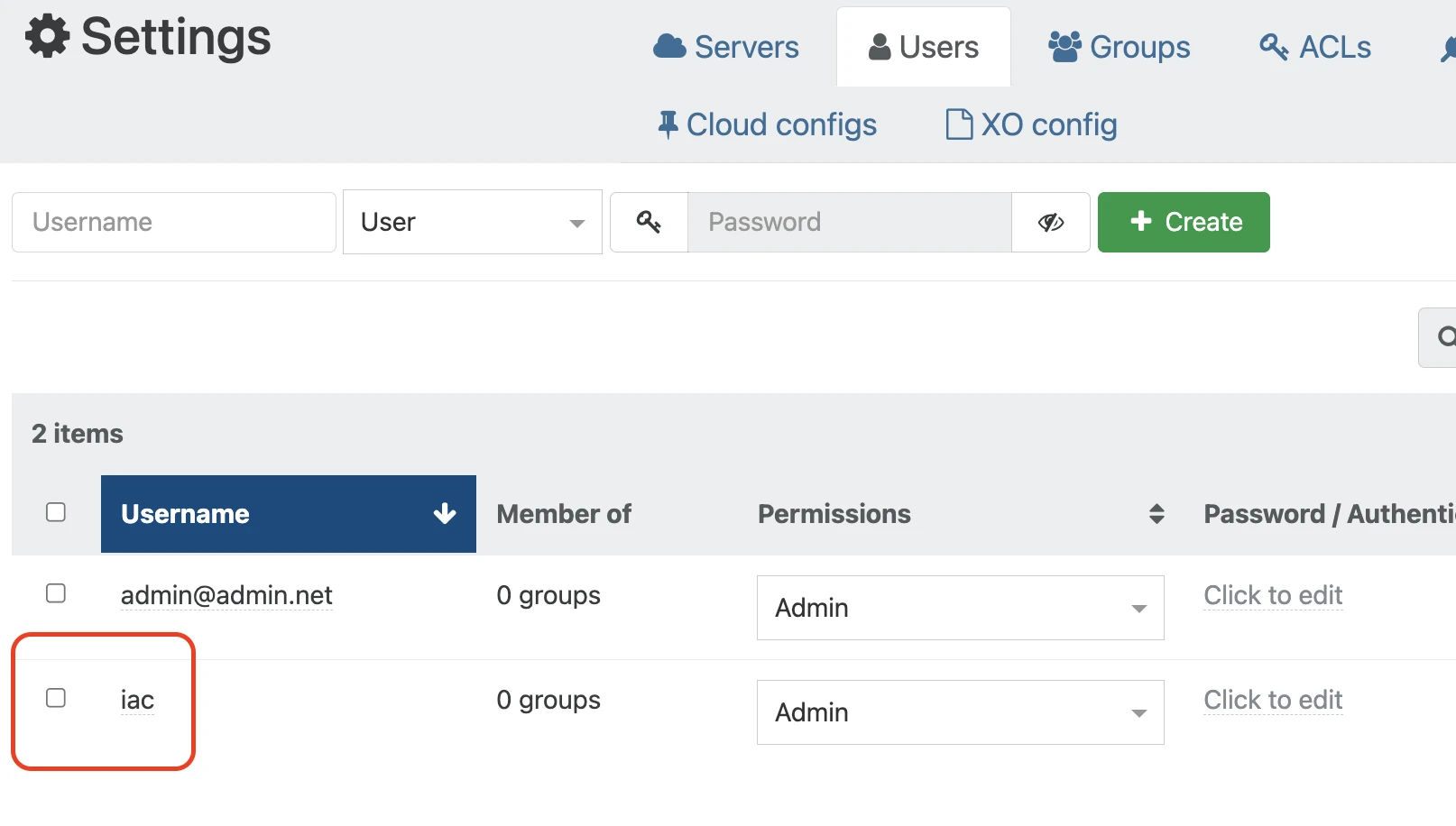
Click the image to enlarge.
Subsequently, using the identity of this new iac account, I can generate a connection token.
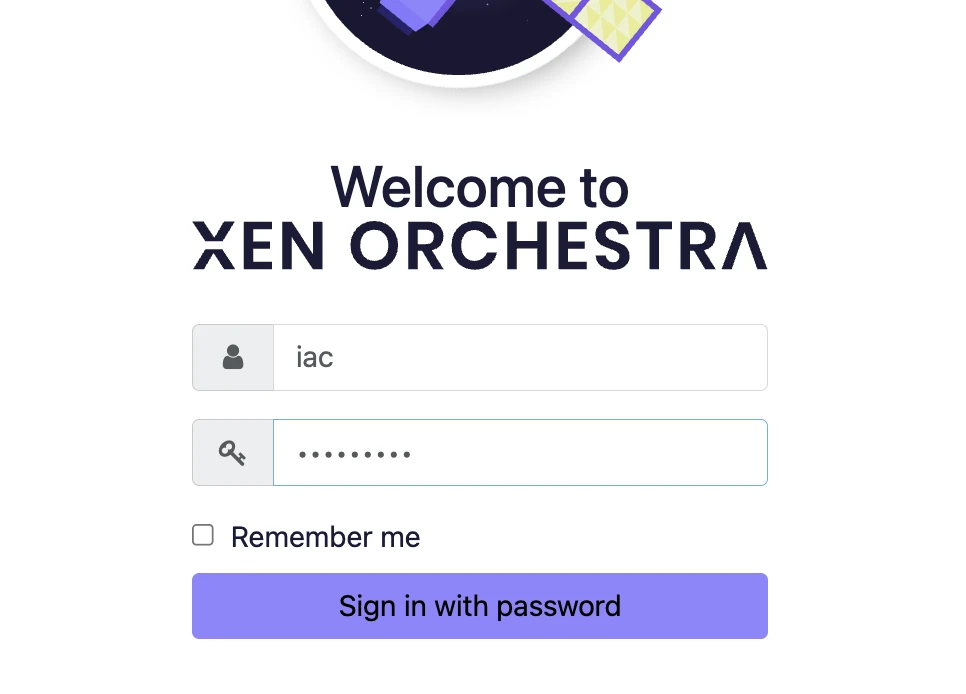
Click the image to enlarge.
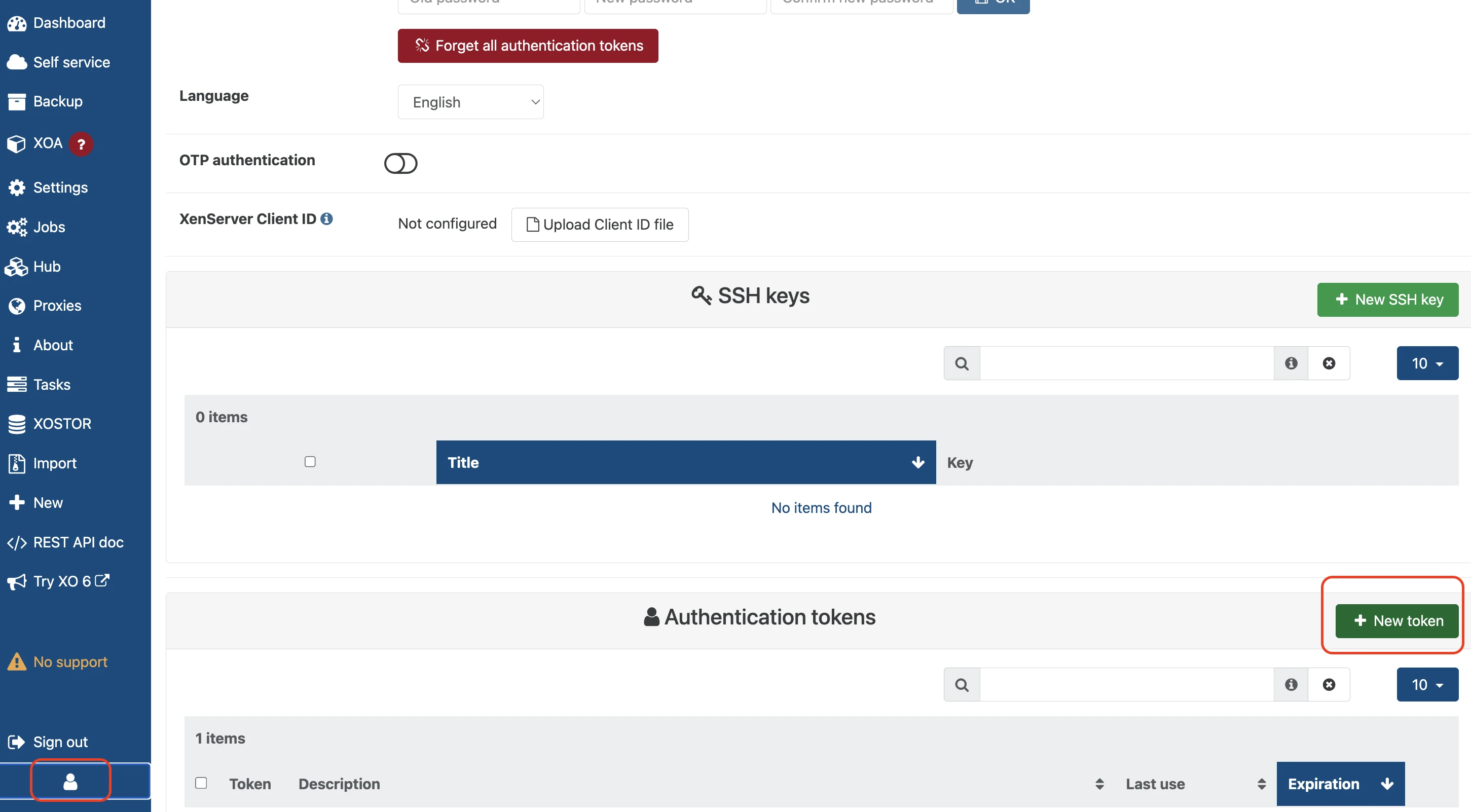
Click the image to enlarge.
Of course, this token becomes critical, and its management is very sensitive. XO allows you to limit the lifespan of the token. Therefore, avoid tokens that are five years old…
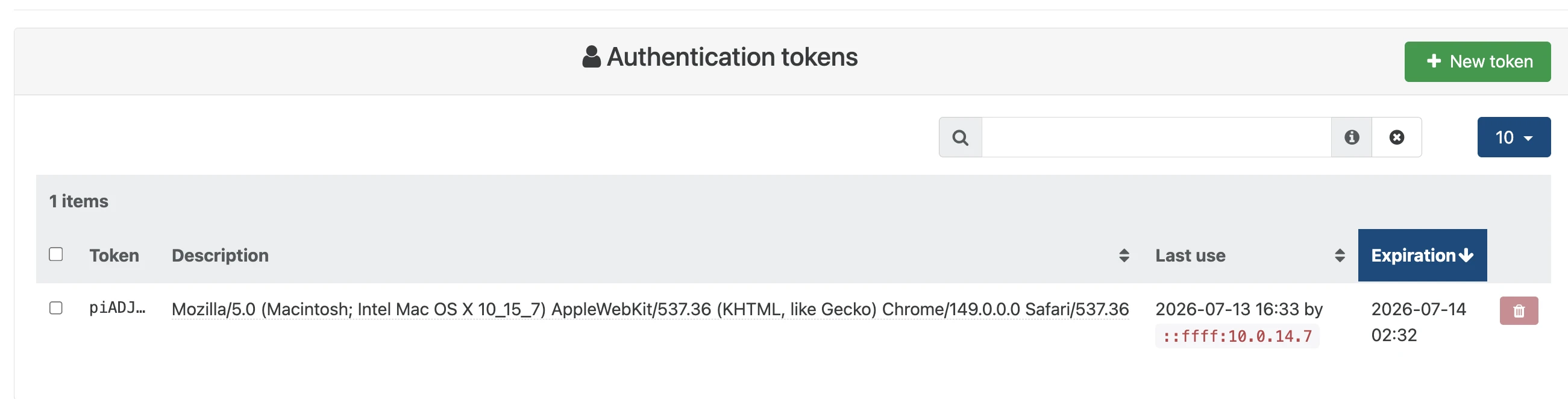
Click the image to enlarge.
In a professional environment, it would be preferable to use a tool like Vault to implement a secure mechanism for token management and automated handling. Furthermore, Vault is also part of the HashiCorp catalog and integrates very well with Terraform. I won't go into this level of configuration here, but if you are interested in the topic, I invite you to read my article on Vault in the context of implementing an AI agent under OpenClaw.
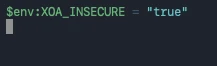
Once you have the token, and since we are keeping things basic here, you will simply need to declare it as a variable in your shell. This may not be perfect, but at least it will be invisible in the configuration and disappear when you finish your deployment and exit your shell session.
For example, for me using PowerShell:
$env:XOA_TOKEN = "<token XO>"Similarly, we declare a variable for the Xen Orchestra URL:
$env:XOA_URL = "wss://prdxcpxor501.coolcorp.priv:8443"
Click the image to enlarge.
Click the image to enlarge.
Running Commands
As with Packer, we initialize the project, specifically to retrieve the Terraform provider from Vates:
terraform init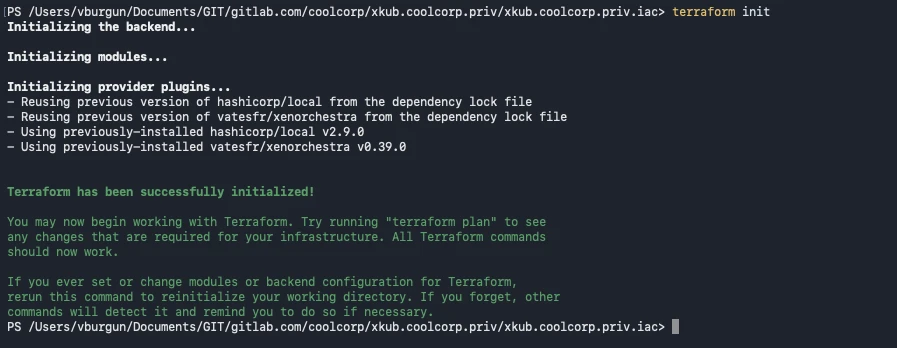
Click the image to enlarge.
Then we validate the syntax and the presence of all variables:
terraform fmt -recursive
terraform validate
Click the image to enlarge.
We generate the plan once, which allows us to verify what will be created:
terraform plan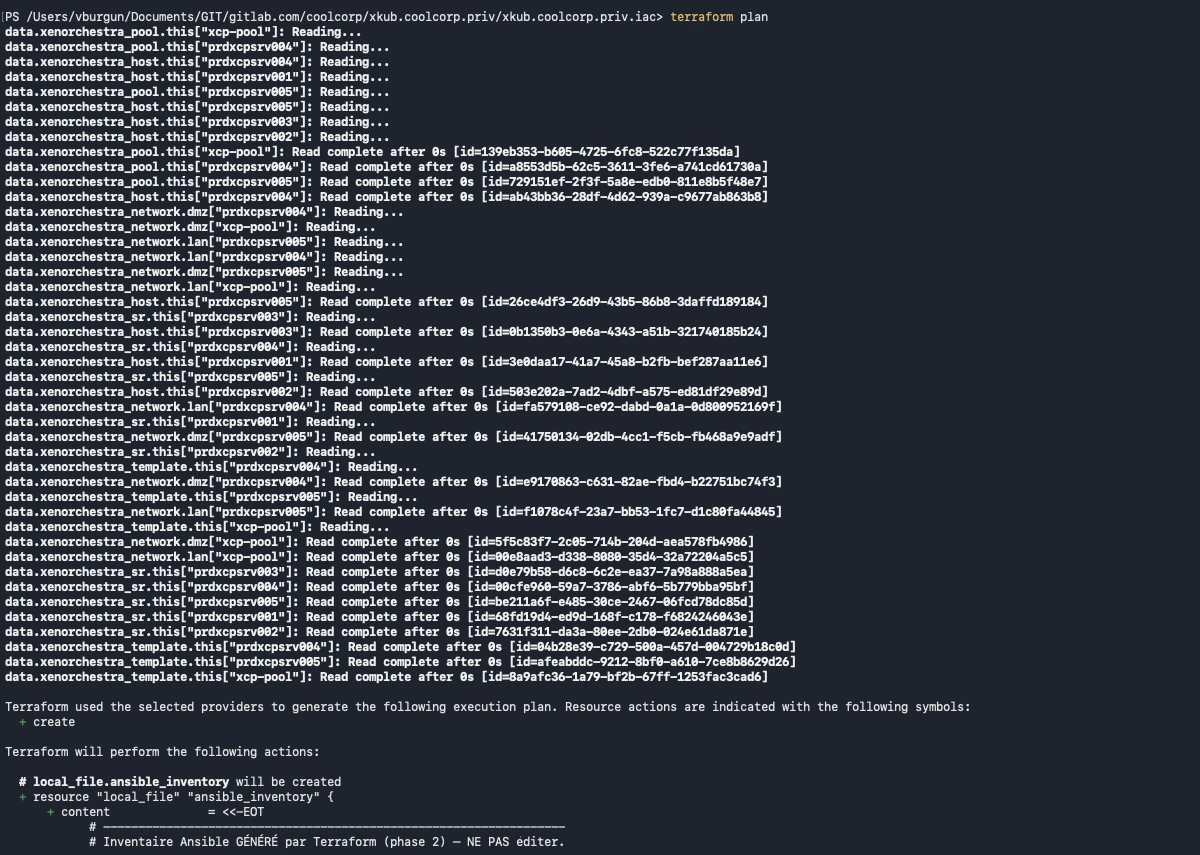
Click the image to enlarge.
Then, if the output seems correct, we can proceed with the deployment using the command:
terraform apply -parallelism=3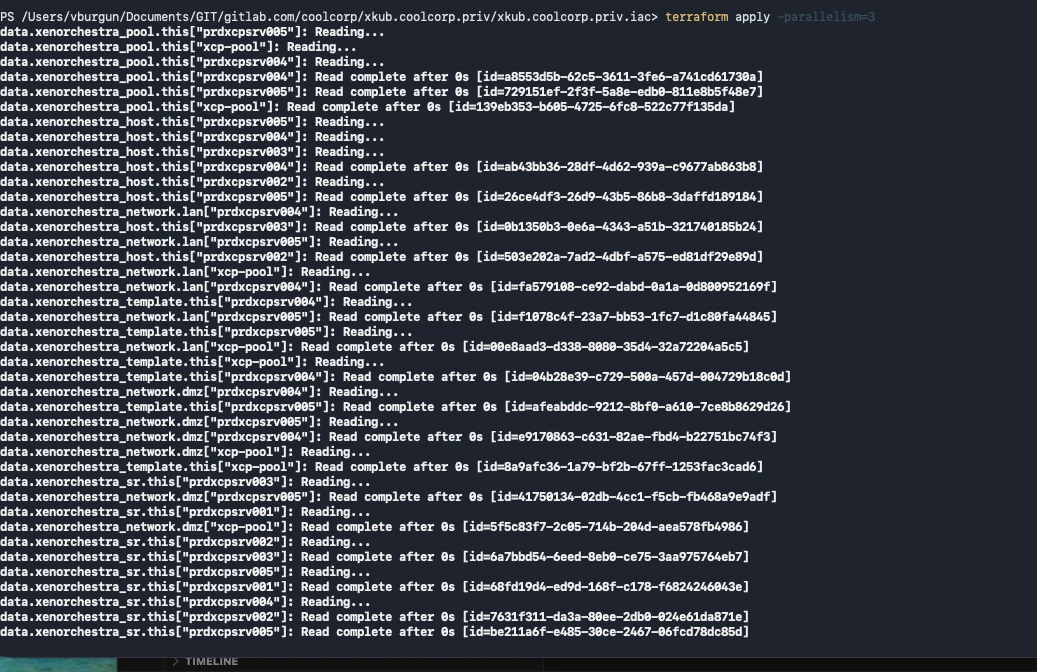
Click the image to enlarge.
The "parallelism" option is important because, without it, Terraform will try to provision all VMs in parallel, which is not supported by the Vates provider by default for security and performance reasons.
By limiting the number of parallel deployments to three, we avoid errors.
The terraform apply command will ask you to confirm the launch of the actions with "yes", providing another opportunity to carefully review the proposed output.
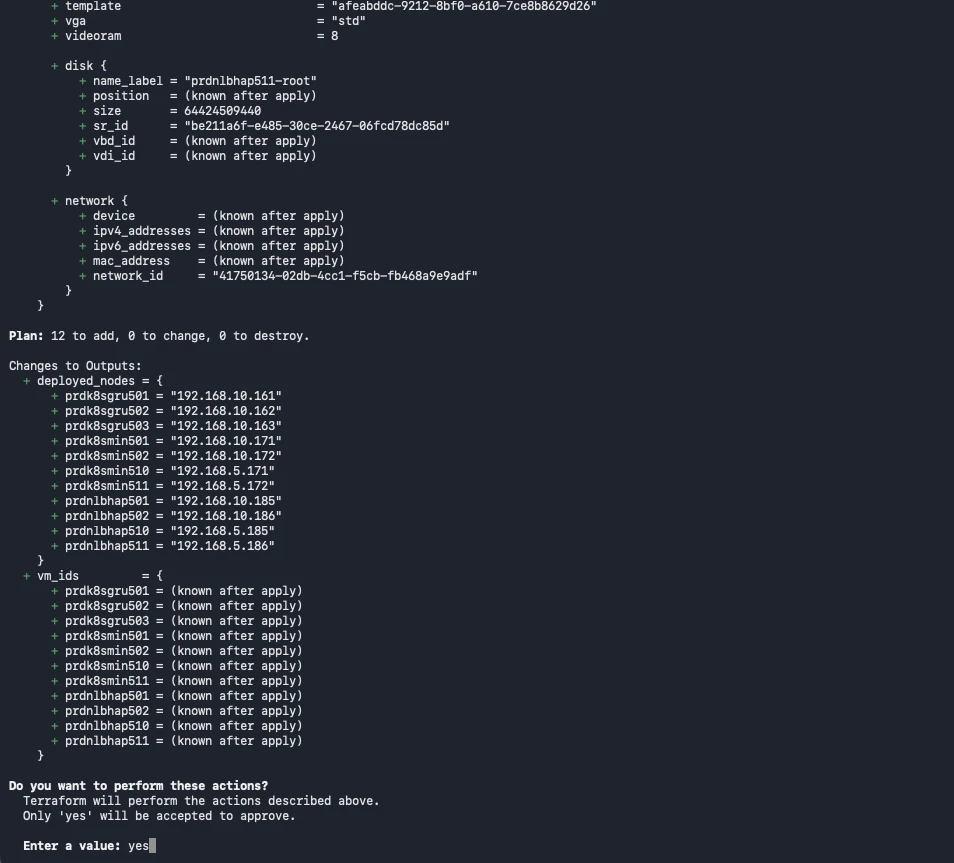
Click the image to enlarge.
If we validate, it should take only a few minutes for all our K8S nodes to start and be ready to be configured for the next steps.
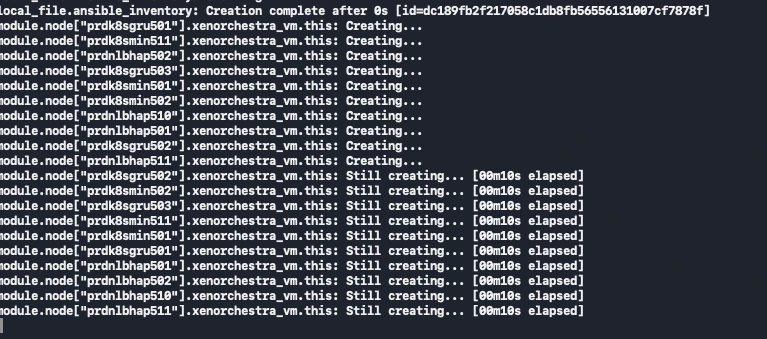
Click the image to enlarge.
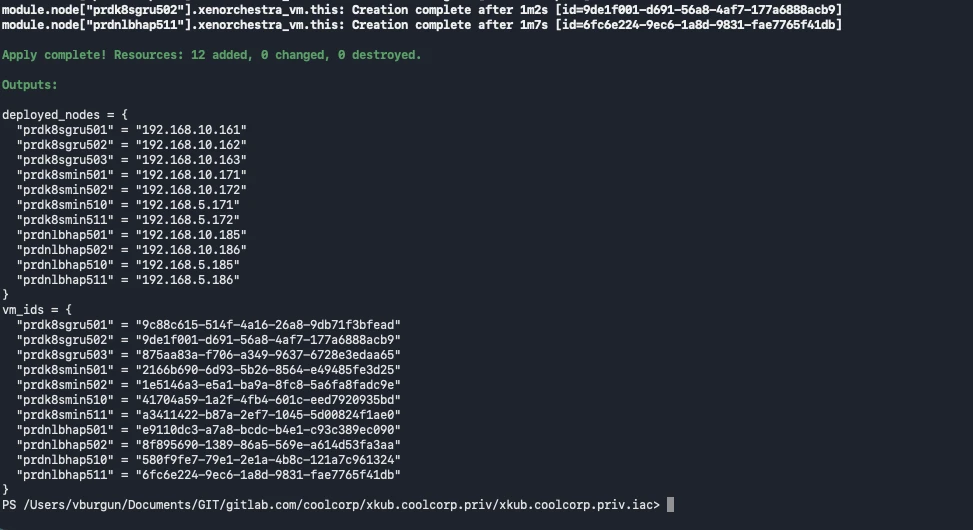
Click the image to enlarge.
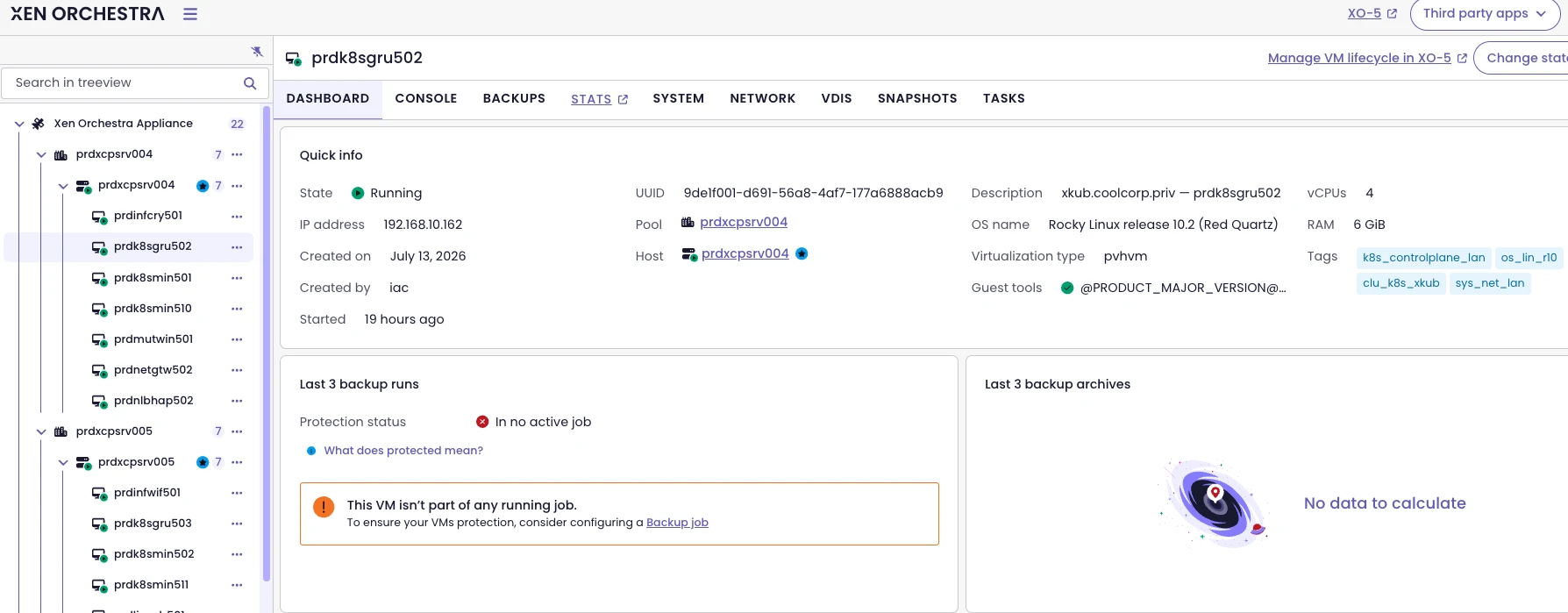
We can verify that all VMs are present and that the labels are correctly associated.
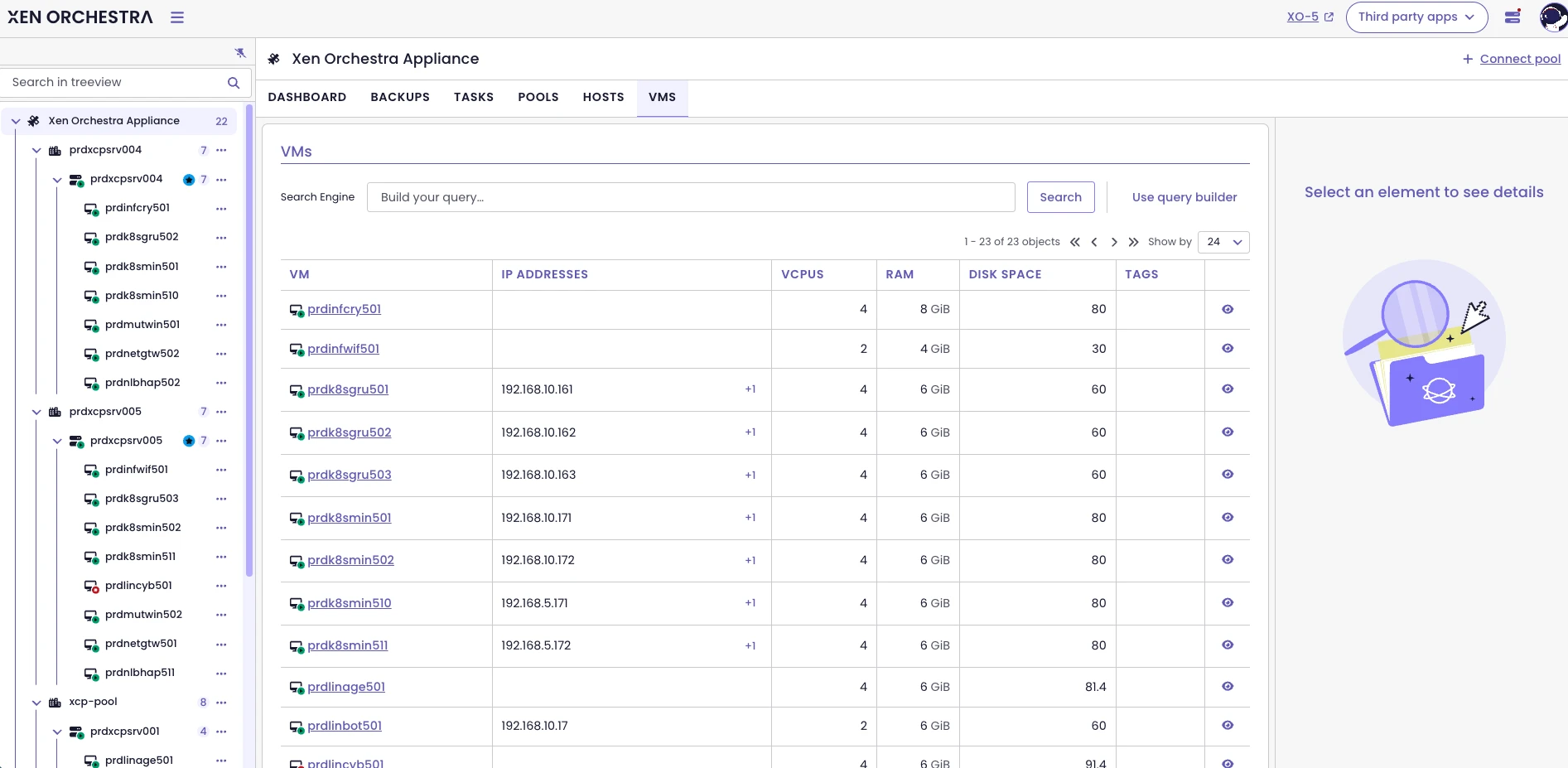
Click the image to enlarge.
Click the image to enlarge.
Click the image to enlarge.
Click the image to enlarge.
Deployment Validation
All that remains is to perform a final check using Ansible, the generated inventory, and the dedicated SSH key (see introduction to the cookbook).
If everything goes well, and since all our VMs have been cloned from the image created with Packer, we should be able to run Ansible commands to verify access to the VMs:
ansible all -i ../xkub.coolcorp.priv.ansible/inventory/hosts.yml -m ping --ssh-common-args='-o StrictHostKeyChecking=accept-new'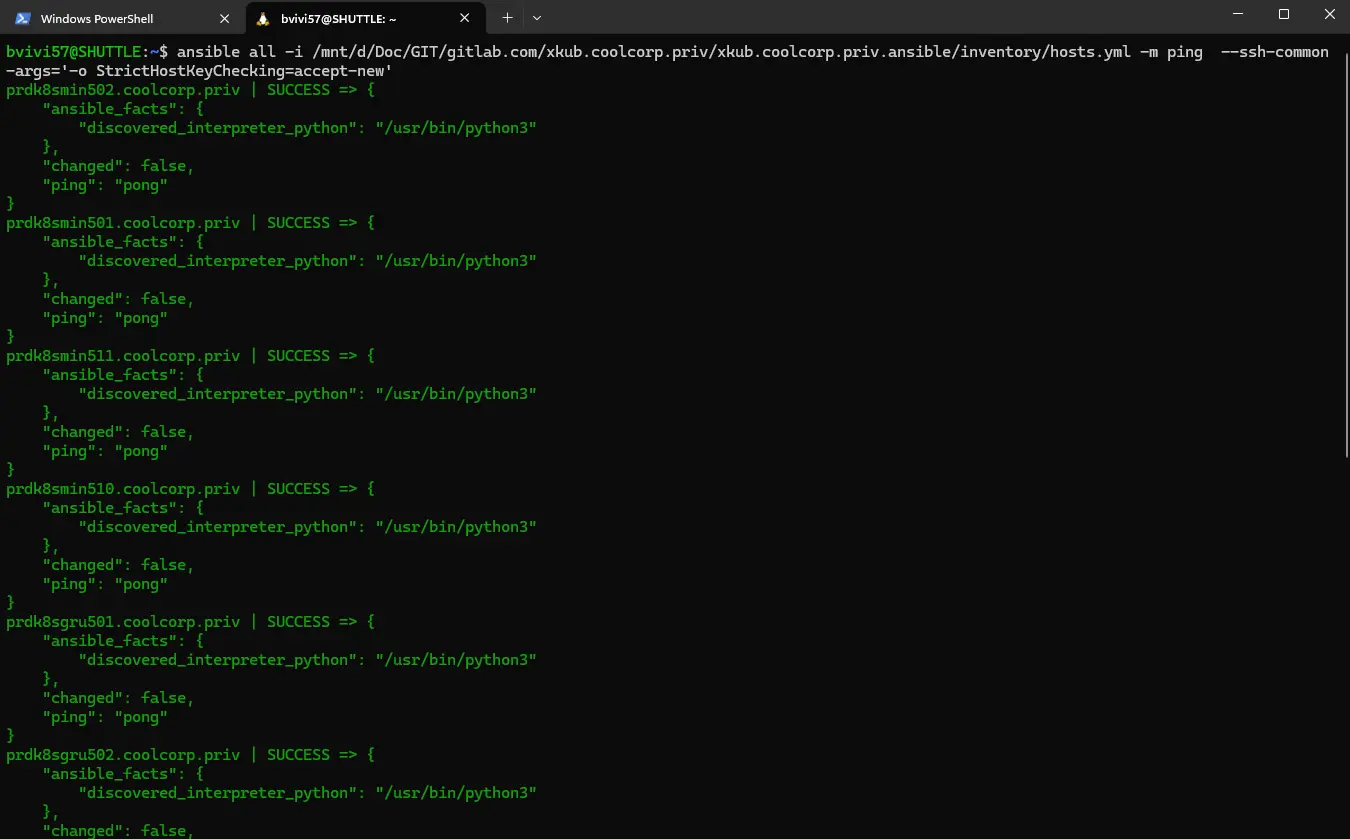
Click the image to enlarge.
Since this is the first connection, you need to pass the "StrictHostKeyChecking=accept-new" argument so that the hosts are validated on the Ansible side.
We can go further, such as using the setup module in Ansible:
ansible all -i ../xkub.coolcorp.priv.ansible/inventory/hosts.yml -m setup -a 'filter=ansible_default_ipv4'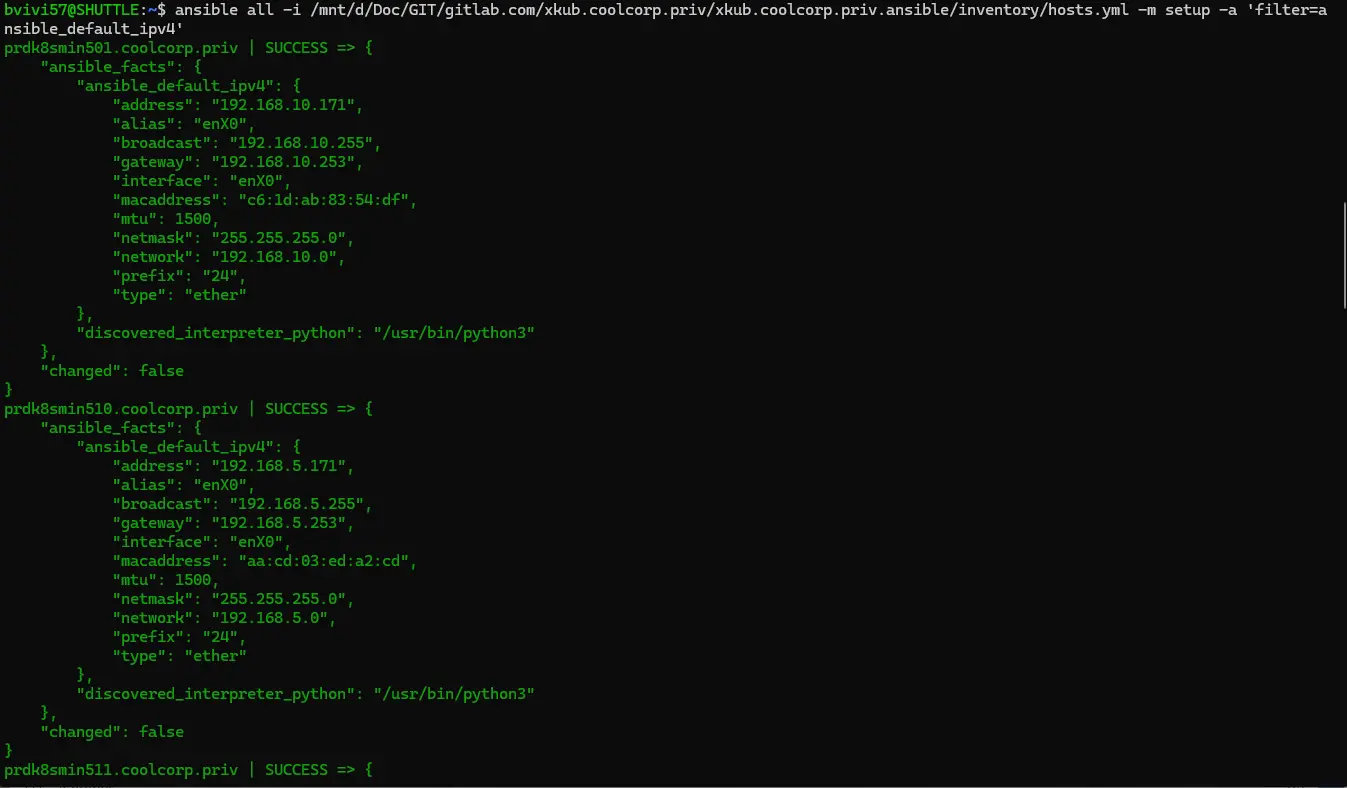
Click the image to enlarge.
The private key used for connecting to the servers is the one from my Ansible configuration, which corresponds to the configuration pushed into the golden image created with Packer during the previous step.
We will go into more detail at this level in the next article.
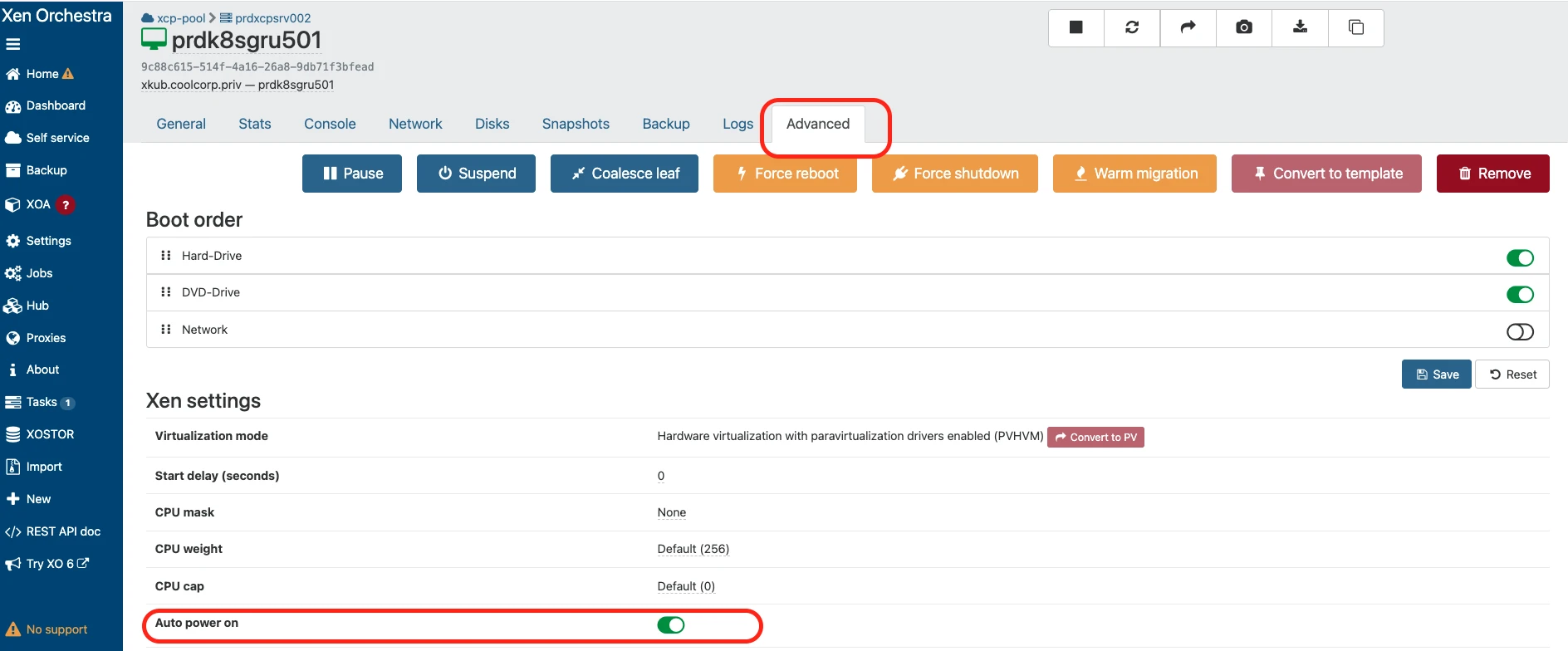
One last small configuration: enable automatic boot for all VMs. We could have certainly enabled this option in the Terraform code. This is probably an improvement to be made. In the meantime, I am enabling it manually for each VM in the advanced settings. This will ensure that if an XCP-ng server restarts, the relevant VMs restart automatically.
Click the image to enlarge.
Conclusion
All virtual resources specific to the future Kubernetes cluster have been deployed, and this has been done reliably and accurately. Once again, the Vates ecosystem is fully compatible with IAC tools like Terraform.
Each node is correctly distributed across my XCP-ng clusters to maximize service availability and ensure a minimum level of fault tolerance.
The use of AI has simplified writing the HCL code without preventing me from controlling what is being done and understanding what is produced.
If you are interested, you can find all the Terraform code in my GitHub, as well as the terraform-provisioner.md file used for the Claude Code subagent.
We will now be able to introduce Ansible and the configuration of nodes via the next article.