Hermes - Part 01: From OpenClaw to Hermes, presentation and target architecture
- OpenClaw review: functional but time-consuming to maintain; switching to Hermes Agent (Nous Research).
- Hermes: four-layer memory, self-generated skills, native security, and MCP support.
- Roger, a new DevSecOps agent, will target Xen Orchestra via MCP with a read-only account.
- Architecture: Podman rootless, Vault, LM Studio on Mac, and GLM (Z.ai), Syncthing, and Obsidian; series in 7 parts.
Introduction
If you followed my series on OpenClaw, you know that I ended the last article on a somewhat mixed note. The first it-claw agent was working; it monitored my Kubernetes cluster in read-only mode, and it could be queried from Telegram. But it wasn't without its problems.
Between the configuration changes from one version to another and the access to the GUI via the trusted-proxy mode, which eventually stopped working, I spent almost as much time keeping up with OpenClaw's updates as I did building my agent.
I was already mentioning better-designed alternatives, such as Hermes, and that I would have to do more tests quickly. This is an opportunity to create a new series of articles focusing on creating a new agent under Hermes.
The idea isn't to throw everything away. A good portion of what was built for OpenClaw remains valid: the dedicated VM, the service account, Podman in rootless mode, SELinux, Vault for secrets, NGINX as a front-end. So we're going to reuse exactly the same logic, but adapting it to Hermes and taking the opportunity to fix the weaknesses that I myself identified.
Another change: this time, I won't be illustrating the process with Kubernetes. The new agent, which I have named Roger (because…), will first focus on my virtualization platform through Xen Orchestra. Kubernetes will come later, along with my OPNsense firewall and MikroTik router.
The goal is to make Roger my personal DevSecOps engineer, responsible for supervising and monitoring my home lab on a daily basis.
In this first article, there are no commands. We'll set the scene: what Hermes is, what it offers compared to OpenClaw, what Roger will do, and most importantly, the complete architecture that we will deploy over the seven parts of the series.
Hermes Agent
History and core principles

Click the image to enlarge.
Hermes Agent is an open-source project published by Nous Research, under the MIT license. Nous Research was initially a research collective that became an applied AI laboratory, already well-known in the open-source community for its family of large language models (LLMs) called Nous Hermes.
The company was born on Discord with the aim of creating open, uncensored models focused on the user and capable of competing with proprietary giants (OpenAI, Anthropic…). The collective then structured itself as a company while maintaining a very close connection to open research and decentralization.
The Hermes project presents itself as "the self-improving AI agent" (the self-improving AI agent). Behind this somewhat marketing slogan, there is mainly an agent written in Python, highly structured, and designed to be executed as a service.
I think it's important to focus on its major feature: its ability to improve itself. When it solves a complex problem, Hermes writes its own skill Markdown file (skill) so that it doesn't have to relearn the method next time, while maintaining a persistent 4-layer memory.
This division into 4 layers of Hermes is directly inspired by human memory. It is a way to address a classic architectural problem with AI agents: how to remember everything in the long term without exploding the context window (the cost in tokens) or polluting the LLM's reasoning with noise (the famous context rot syndrome).
Instead of throwing everything into an opaque vector database (classic RAG), Nous Research has separated memory according to the nature of the information
| Layer | Local storage | Token cost | Main role |
|---|---|---|---|
| 1. Prompt Memory (Critical facts) |
MEMORY.md |
Fixed (~800 tokens/session) | Immediate technical context |
| 2. User Profile (Who) |
USER.md |
Fixed (~500 tokens/session) | Human preferences and style |
| 3. Session Search (Historical archive) |
state.db (SQLite FTS5) |
0 (loaded on demand) | Finding a past discussion |
| 4. Skills (Procedural) (expertise) |
~/.hermes/skills/*.md |
Almost none (only names in the prompt) | Reusing complex methods |
This logic is completely auditable (using Markdown and a SQLite database) and efficient.
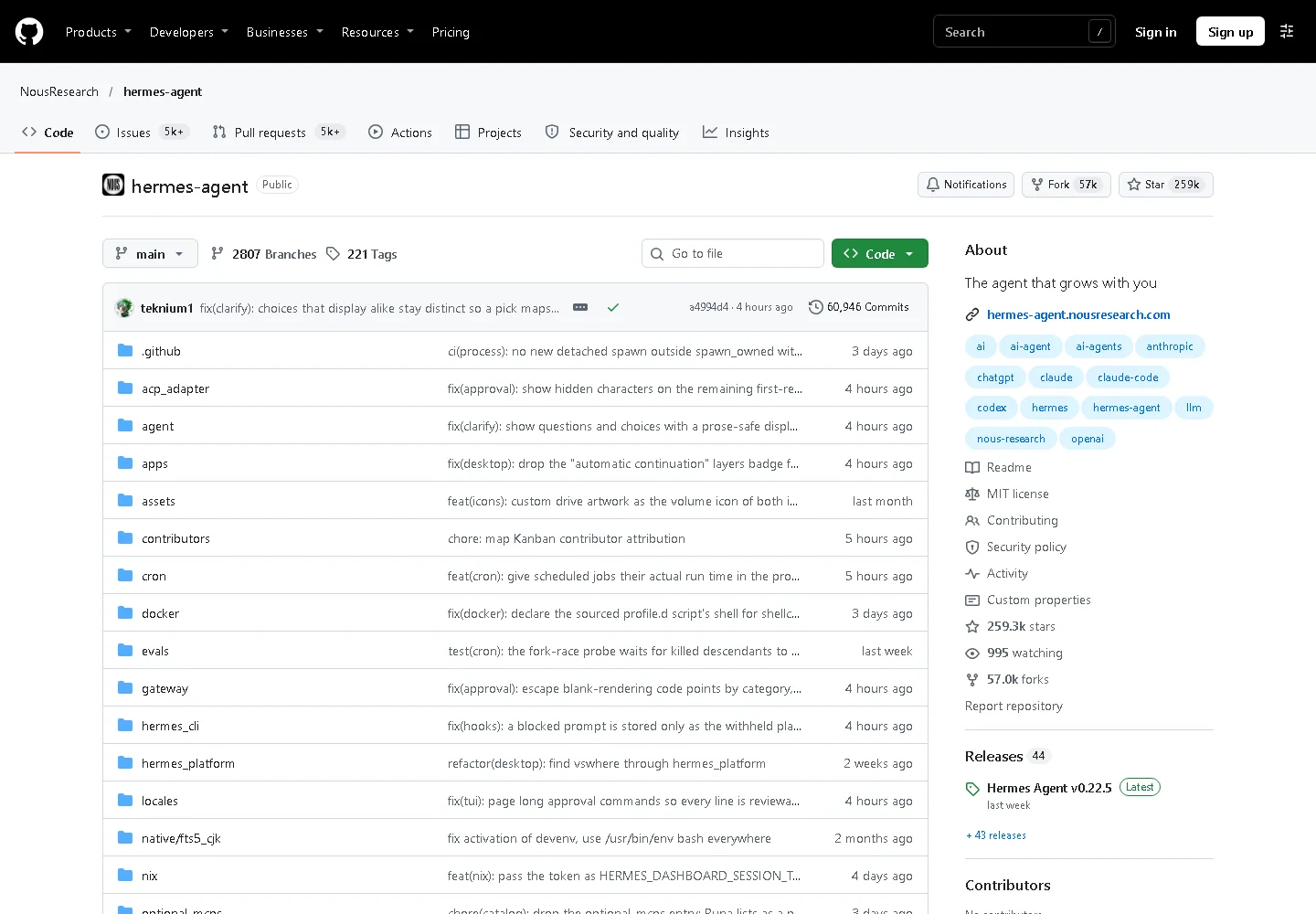
The development of this solution began in July 2025, with an initial release in February 2026, followed by a very rapid pace of development.
As I write these lines, the latest version is v0.22.5, released on October 23, 2026, and the GitHub repository has over 250,000 stars. This indicates a strong community presence.
Click the image to enlarge.
One point deserves to be emphasized immediately: the release cadence is rapid. Between October 14th and 23rd, five versions were released (from v0.22.1 to v0.22.5). This is a sign of a vibrant project, but it's also the same trap I fell into with OpenClaw. The changes can be significant, and keeping up with the project's evolution, especially in a production environment, can be time-consuming.
How it works
In principle, Hermes works like OpenClaw. It is a "wrapper" around a language model: it does not contain intelligence itself; you need to provide it with access to an LLM, either remotely or locally.
The process remains the same: you send a request (e.g., via Telegram), Hermes transmits it to the LLM along with the agent's context, the model decides which tools to call, Hermes executes them and returns the result to the model, until a response is obtained. The Perception - Decision - Action triad, described in the first part of the OpenClaw series, still applies.
The components include a CLI (hermes), a gateway that listens and connects to messaging services (Telegram, Discord, Slack, Signal...), a web dashboard for viewing configuration, sessions, and logs, and an OpenAI-compatible API that we will not enable.
All the configuration for an agent is contained in a single directory, called HERMES_HOME. It contains a file config.yaml (the configuration), a file .env (secrets), a file SOUL.md (the agent's personality), as well as sessions, memory, skills, scheduled tasks, and logs. This is much more readable than the large file openclaw.json that contained everything.
Important point: Hermes requires a context of at least 64,000 tokens to function in agent mode. Below that, it simply refuses to start. This constraint will be significant when choosing the local model; we'll come back to this a little later.
What Hermes provides natively
In addition to the philosophy of Hermes and its basic principle, what convinced me to switch was the native integration within Hermes of several elements that I had previously tried to implement myself with OpenClaw.
| Need | With OpenClaw (previous series) | With Hermes |
|---|---|---|
| Restrict who can communicate with the agent | Telegram allowlist | Allowlists per platform, optional code pairing |
| Validate a sensitive action | Nothing: the agent was read-only, that's it | Human approval of dangerous commands, with buttons in Telegram |
| Connect external tools | Binary kubectl in the image |
Native MCP (stdio, HTTP, OAuth, mTLS) with tool-by-tool filtering |
| Multiple agents | One folder per agent, manually | Native profiles, or one container per agent |
| Scheduled tasks | Heartbeat | Integrated cron, with delivery to Telegram or a file |
| Trace what the agent is doing | Command-logger hook | Hooks on each step, logs with secret masking |
| Access to the GUI | NGINX + trusted-proxy (which has become non-functional) | Dashboard with mandatory native authentication |
| Reusing an existing setup | - | OpenClaw agent importer |
The MCP (Model Context Protocol), which I presented in a dedicated article, will replace the kubectl it-claw binary. Instead of giving the agent a shell, we give it access to a server that exposes a list of well-defined tools, and Hermes allows you to choose which ones are allowed.
As for the OpenClaw importer (SOUL.md, memory, skills, etc.), I won't be using it: the target is completely different, and I prefer to rebuild properly. But if you already have an OpenClaw agent running, this is something to keep in mind.
Security
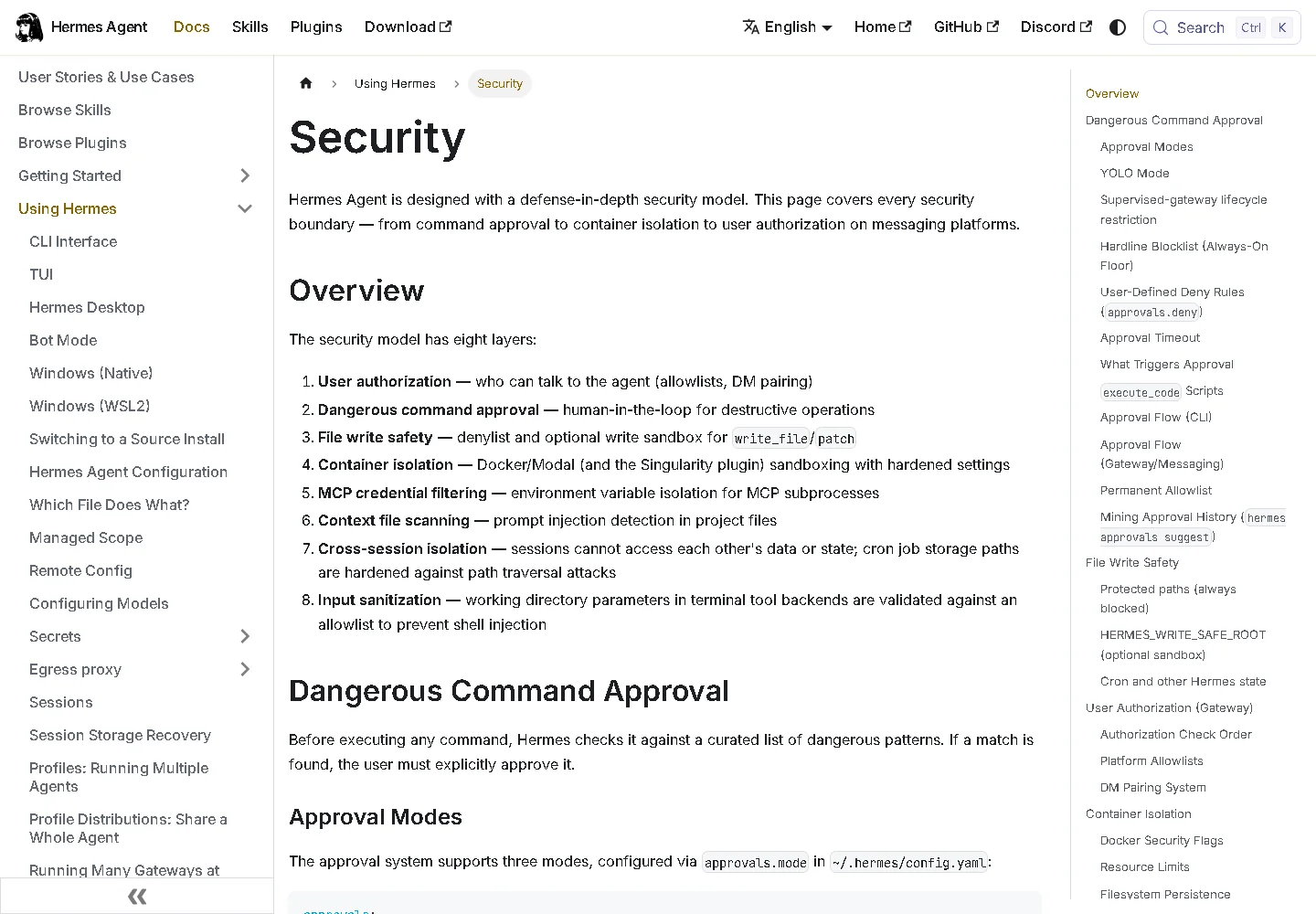
With OpenClaw, security was a major issue, and a large part of the series consisted of compensating for what the tool didn't do. Hermes starts with much healthier foundations. Its documentation describes a multi-layered security model, including:
- user authorization: only explicitly authorized accounts can communicate with the agent; others are ignored;
- approval of dangerous commands: in manual mode, any command deemed risky is suspended until human validation, and if there is no response after five minutes, it is rejected;
- a non-bypassable blocklist (
rm -rfon the root, fork bombs, etc.), active whatever you configure; - a write zone limited to the agent's directory, with protected paths like the
.env; - filtering of environment variables passed to subprocesses and MCP servers, preventing a tool from retrieving secrets that are not relevant to it;
- anti-injection analysis of context files such as the
SOUL.md; - a default block on private addresses for web tools, to prevent the agent from exploring your local network.
Click the image to enlarge.
Does this mean we can install Hermes any old way? Of course not. These are application-level safeguards. If the agent has an administrator account on your infrastructure, a configuration error or a poorly handled model can still cause damage. So we keep the same philosophy as for OpenClaw: rootless, secrets in Vault, least privilege on the targets. We stick with a multi-layered security approach.
Roger, an Admin OPS and Infra agent
The mission
Roger will be my administration assistant. Its role: monitor the state of my infrastructure, explain what it observes, suggest actions, and document all of it.
It will start with Xen Orchestra, the administration interface of my XCP-ng hosts, whose installation I described in my lab V2. Specifically, Roger must be able to answer questions such as:
- how many VMs are running and which ones are stopped?
- what is the status of the pool, hosts, and storage?
- are there any alarms or failed tasks?
- did the backups from last night complete successfully?
- which VM is currently consuming the most CPU or memory?
ultimately, the goal is to extend its scope to my OPNsense firewalls, my MikroTik (RouterOS) router and my Kubernetes cluster, as it-claw did. But one step at a time.
Access to Xen Orchestra
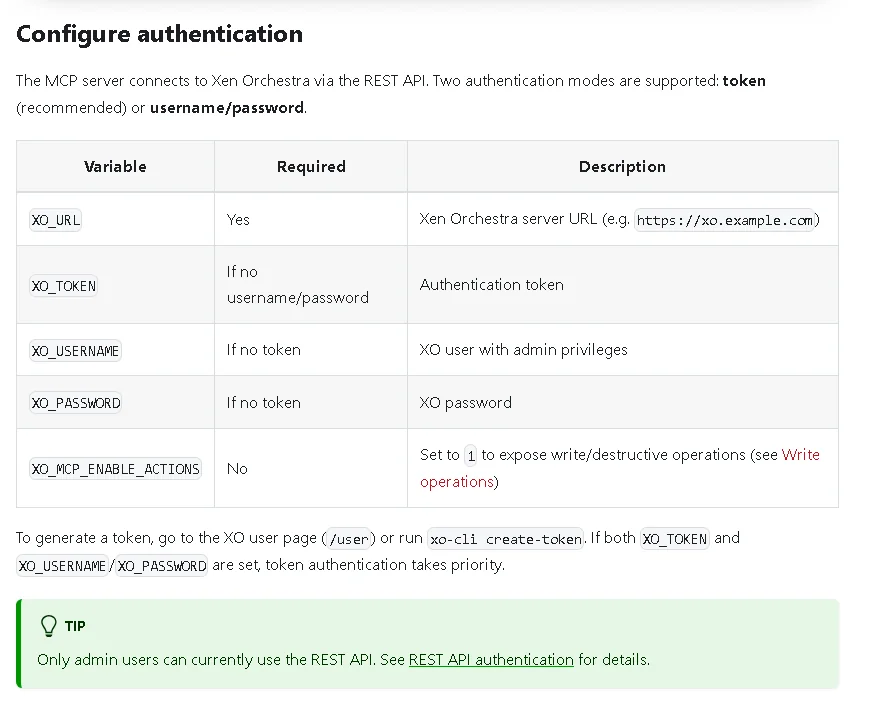
My Xen Orchestra instance is installed from source (commit 70b08) and accessible at https://prdxcpxor501.coolcorp.priv:8443. It exposes a REST API, and more importantly, Vates provides an official MCP server (@xen-orchestra/mcp). This is the equivalent of kubectl for it-claw, but better designed for an agent.
This MCP server operates in read-only mode by default. Actions (starting, stopping a VM, etc.) must be explicitly enabled, and each action requires a confirmation token valid for five minutes. You can also define a list of prohibited actions, and Xen Orchestra has a switch to disable all MCP access in case of problems.
Click the image to enlarge.
The only limitation: performance metrics (CPU, memory, disk) are not exposed by the MCP. For those, Roger will use a small homemade skill that queries the REST API, read-only.
For minimal privileges, Roger will have its own account in Xen Orchestra, svc-hermes-roger. It will not be an administrator; it will be placed in a group with read-only access to my XCP-ng pools, both through the web interface and the API. The creation process will be discussed in section 5, where we will also confirm that the MCP server works correctly with a standard account. Vates' documentation is not entirely clear on this point, so I prefer to verify it under real conditions.
Throughout this series, Roger will remain strictly read-only. Granting it permission to act on VMs will be described in the last article, but it will not be activated. I prefer to observe its behavior for a while before giving it full control.
Roger's brains
Why a local and cloud mix
For OpenClaw, I chose a completely internal solution, using Ollama and Qwen3.5 on my PC equipped with a GPU. This time, I'm changing my approach and combining two sources.
A local model, on my MacBook Pro M4 Pro (24 GB of unified memory). It will be Roger's default model for all common monitoring tasks and scheduled operations. The data remains with me.
Click the image to enlarge.
A cloud model, GLM from Z.ai. I have a GLM Coding Lite subscription, and good news: Hermes Agent is one of the officially supported tools for this offer (on a "best effort" basis, meaning without service guarantees). It will be used for more complex reasoning tasks: incident analysis, diagnosis, weekly summaries. And most importantly, it will automatically take over if the Mac is turned off.

Click the image to enlarge.
Local: LM Studio instead of Ollama

Click the image to enlarge.
You were probably expecting to see Ollama, which I presented in a previous article. It would have worked, especially since it now uses Apple's MLX engine by default. I ultimately chose LM Studio for two reasons:
- It requires an authentication token, while Ollama accepts all requests without distinction. This was one of the weaknesses I highlighted in the OpenClaw series.
- It allows for fine-grained adjustment of the context size per model, which is essential given Hermes' requirement of 64,000 tokens.
For the model, I am starting with Qwen3.5 9B in MLX 8-bit format, with a context of 65,536 tokens. On 24 GB shared with macOS, a 9 billion parameter model leaves room for this large context; a 20 or 30 billion model would quickly become too demanding. The 4-bit version will serve as a fallback if memory becomes saturated; the actual measurements will be taken in Part 04.
LM Studio will only listen locally. An NGINX installed on the Mac will act as the HTTPS front end on llmmac.coolcorp.priv, with a certificate from my internal PKI, and the macOS firewall will only accept the VM's address. No more cleartext traffic to the local model.
Cloud: GLM, with its limitations
The Coding Lite offering provides access to the glm-5.3 and glm-5.3-flash models, with quotas in credits: 2,000 per five-hour window and 10,000 per week. According to my initial calculations, this is sufficient for on-demand reasoning, but not for running Roger continuously on GLM-5.3. Hence the default local configuration.
The switch will be done manually (by changing the model for a complex question), automatically via Hermes' fallback mechanism (fallback_providers) if the Mac does not respond, or in a scheduled manner by setting the model for each scheduled task.
However, we must be honest: when GLM is used, the conversation context goes to Z.ai, including responses from tools (VM names, internal IP addresses, excerpts from notes). No secrets should pass through it; Roger will have an explicit instruction on this point, but my infrastructure inventory will leave my premises. Personally, this is not a problem. In a company, everything depends on your risk policy and any contracts you may have with providers and professional offerings. For some, two separate agents would probably be needed: one purely local, the other authorized to use the cloud without access to infrastructure tools.
Architecture chosen
Overview
As usual, we will start by presenting the architecture to be implemented before detailing the components.
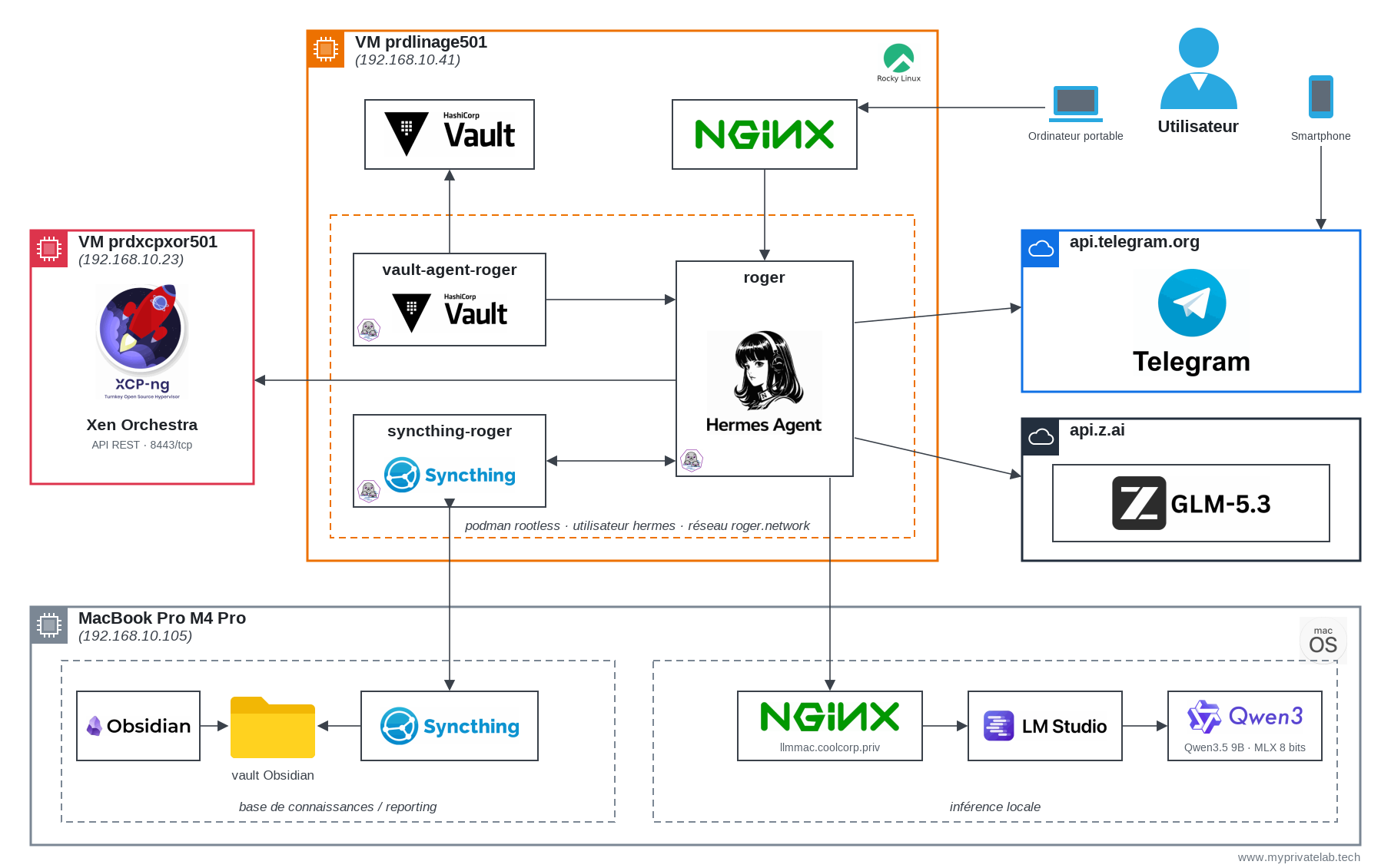
Click the image to enlarge.
We are using the same VM as for the OpenClaw series: prdlinage501, address 192.168.10.41, running on XCP-ng. I reinstalled it with a fresh update of Rocky Linux 10. We will revisit these initial operations in Part 02. It has 4 vCPUs, 80 GB of disk space, and I've increased the memory to 8 GB: the Hermes image includes Python, Node.js, and Chromium, and 6 GB was becoming a bit tight. SELinux remains in enforcing mode and firewalld is active. There is still no internet exposure.
Details of the components
The service account. Similar to OpenClaw, all components of the agent are located within a dedicated system account, hermes, without a password and without sudo privileges, operating in its own home directory (/var/lib/hermes). This directory serves as the root for all mounted trees within the containers.
Podman rootless and Quadlets. The container engine remains Podman, running in rootless mode, managed by systemd through Quadlets (the "translator" between Podman and systemd that I mentioned in the previous series). The three containers of Roger will share a dedicated Podman network, roger.network.
Vault. The vault remains at the heart of the setup. Vault 2.2.1 is installed on the VM, with a certificate from my internal PKI and the KV engine for storing Roger's secrets under secret/hermes/roger/: Telegram bot token, GLM key, LM Studio token, Xen Orchestra token, and dashboard password.
The Vault Agent sidecar. As with it-claw, a Vault Agent container (vault-agent-roger) authenticates with Vault and drops the secrets into a folder that acts as an airlock (sink). The difference is that Hermes reads its secrets from a .env file: the sidecar will therefore generate this file directly from a template. As a small bonus, AppRole access will this time be restricted to the VM's address, and the credential files will only be readable by their owner.
The Roger agent. The main container (roger) is built from the official image nousresearch/hermes-agent:v0.22.5, to which we add the Xen Orchestra MCP server, jq, and the certificate from my internal CA. It runs the Hermes gateway, which connects to Telegram, and the web dashboard.
Syncthing and Obsidian. This is the new feature of this series. I want Roger to be able to access my procedures and keep a human-readable log. To achieve this, I'm using Obsidian, a Markdown note-taking application. An "Obsidian vault" (which has nothing to do with HashiCorp Vault; don't confuse them) is simply a folder of text files in Markdown format. It will be stored on the VM, mounted within Roger's container, and synchronized to my Mac using Syncthing, an open-source, encrypted synchronization tool without any third-party servers. Roger will read the repository of my VMs (the role of each one and the placement rules to follow) and will only write to its own folder Roger/ (incident log, daily reports).
For me, this is a way to add another layer of memory to Hermes that I can directly use to expand the agent's knowledge sources. But we'll have the opportunity to discuss it further when the time comes.
NGINX. It remains in front as an HTTPS proxy for the dashboard, on roger.coolcorp.priv. However, it no longer handles authentication; that's managed by Hermes' dashboard, which enforces it whenever it's not listening only locally.
Telegram. A bot dedicated to Roger, which will only answer my ID. Hermes polls Telegram outbound (long polling): no inbound port is needed for this channel.
The flows
Here's a simplified view of the data flows. Except for accessing the dashboard and Syncthing synchronization, everything originates from the VM and goes outwards.
| Source | Destination | Port | Protection |
|---|---|---|---|
| Admin workstation | NGINX on the VM (dashboard) | 443/tcp | Internal TLS PKI + dashboard authentication |
Container vault-agent-roger |
Vault (VM) | 8200/tcp | TLS + AppRole limited to the VM's address |
Container roger |
api.telegram.org | 443/tcp outbound | TLS + bot token |
Container roger |
Xen Orchestra | 8443/tcp outbound | Internal TLS PKI + account token svc-hermes-roger |
Container roger |
Mac (llmmac.coolcorp.priv) | 443/tcp outbound | Internal TLS PKI + LM Studio token, Mac firewall |
Container roger |
api.z.ai | 443/tcp outbound | TLS + GLM key |
| Mac (Syncthing) | Syncthing on the VM | 22000/tcp-udp, 21027/udp | Syncthing TLS, device ID pairing |
Hermes' OpenAI-compatible API will not be enabled, and the Syncthing interface will only be accessible through an SSH tunnel.
What changes compared to OpenClaw
For those who followed the previous series, here are the main differences:
- User mapping. With OpenClaw, the container user mapped on the host to an exotic UID (100999), hence the
podman unshare chownand some files left in 644. Podman can map the container's UID 10000 directly to the host'shermesaccount. If this works as planned (it is one of the first tests in part 02), all files will simply belong tohermes. - A
.envgenerated by Vault Agent instead of the individual secret files read by OpenClaw. - Native dashboard authentication, which replaces the trusted-proxy mode.
- MCP instead of a binary in the image.
- Built-in safeguards and auditing (approvals, hooks, logs), which we will explore in the last article.
- An authenticated TLS frontend for the local LLM, instead of a cleartext HTTP stream.
I will also go further on operations: backups, updates, light monitoring, and a reusable template for creating other agents (that was already the goal with OpenClaw).
As with the previous series, I do not guarantee a flawless solution. Some points still need to be validated in real-world conditions, and I will let you know each time.
Series plan
The series will consist of seven parts:
- Part 01: From OpenClaw to Hermes, introduction and target architecture (you are here).
- Part 02: Preparing the OS, rootless Podman, and the hermes account, with an initial launch of the Hermes image.
- Part 03: Vault and NGINX, hardened version.
- Part 04: The brains of Roger, LM Studio on Mac, and GLM (Z.ai).
- Part 05: Xen Orchestra, Telegram, and Obsidian dependencies.
- Part 06: Implementation of Roger, from the image to the first exchanges on Telegram.
- Part 07: Safeguards, auditing, operations, and reusability.
All configurations will be versioned over time in a dedicated Git repository, without any secrets.
Conclusion
That's the introduction. Hermes seems to bring the maturity that was lacking in OpenClaw, especially regarding security, but it does not eliminate the need to build a solid runtime environment around it. That is the purpose of this series.
Roger will be more ambitious than It-claw: a new target with Xen Orchestra, two sources of LLMs, a knowledge base with Obsidian, and a real focus on operations. In the end, we should have a reusable method for creating other specialized agents, which has always been my initial goal.
Now that we know where we're going, all that remains is to prepare the VM. See the next article: Preparing the OS, Podman rootless, and the hermes account.