Step 8: Adding nodes to the cluster with kubeadm join
- The xkub_kubeadm_join role: adds control planes and then workers (LAN, DMZ web, GPU).
- Discovery mechanism and TLS bootstrap, sharing the CA keys.
- Applying labels and taints for DMZ isolation.
- Appendix of commands outside Ansible.
Introduction
The previous article covered the Ansible role xkub_kubeadm_init, which initializes the K8S cluster by running the kubeadm init command on the cluster's first control plane node (prdk8sgru501).
The logical next step is to add the remaining nodes using the xkub_kubeadm_join role.
As a reminder, this role is still called by the same playbook xkub_30_cluster.yml, which is already responsible for running, in order, the xkub_kube_vip role, then the xkub_kubeadm_init role, and now the xkub_kubeadm_join role.
The xkub_kubeadm_join role
Let's get straight to the point with a detailed presentation of this role by exploring its directory structure.
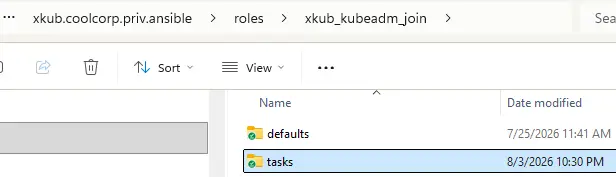
Click the image to enlarge.
Role variables
As usual, we start with the "defaults" folder to identify the role variables declared in the main.yml file
---
# Rôle xkub_kubeadm_join — fait rejoindre un nœud au cluster (control plane
# additionnel ou worker) puis pose ses labels/taints. Idempotent : ne rejoint
# rien si le nœud est déjà membre (test sur /etc/kubernetes/kubelet.conf).

# Hôte "source de vérité" pour le token/certificate-key générés par le rôle
# xkub_kubeadm_init (inventory/group_vars/clu_k8s_xkub/main.yml), et hôte délégué pour
# toutes les opérations kubernetes.core.k8s de ce rôle.
xkub_kubeadm_join_primary_controlplane: "{{ xkub_primary_control_plane }}"

# Groupes d'inventaire traités comme "workers" pour le join. Liste dupliquée
# volontairement de xkub_k8s_prereqs_worker_groups (roles/xkub_k8s_prereqs/defaults) —
# les deux rôles restent indépendants, chacun avec sa propre source de vérité.
xkub_kubeadm_join_worker_groups:
  - k8s_workers_lan
  - k8s_workers_web
  - gpu

# Attente de l'enregistrement du Node auprès de l'API avant labellisation
# (30 tentatives x 5s = 150s d'attente maximum).
xkub_kubeadm_join_node_wait_retries: 30
xkub_kubeadm_join_node_wait_delay: 5

# Filets de sécurité si un groupe n'a pas (encore) de group_vars dédié
# (ex. futur groupe sans fichier créé) : un patch avec ces valeurs par défaut
# ne fait rien (dict/liste vides), au lieu de faire échouer le rôle.
k8s_node_labels: {}
k8s_node_taints: []
roles/xkub_kubeadm_join/defaults/main.yml
The variable xkub_kubeadm_join_primary_controlplane refers to the global variable xkub_primary_control_plane, defined in the file inventory/group_vars/all/main.yml. That variable in turn applies a filter on the inventory using the instruction "{{ groups['k8s_controlplane_lan'] | sort | first }}" to identify our first control plane, which is associated with the previous role xkub_kubeadm_init for initializing the cluster, namely prdk8sgru501.
---
# =============================================================================
# group_vars/all — UNIQUEMENT ce qui doit être résolu au niveau `all`.
# Tout le reste des variables du cluster xkub vit dans
# inventory/group_vars/clu_k8s_xkub/ (portée limitée aux hôtes du cluster,
# indispensable pour cohabiter avec d'autres déploiements dans un dépôt
# Ansible mutualisé). Préfixe obligatoire ici : xkub_* (namespace du cluster).
# =============================================================================

# --- Nœud de référence pour les opérations kubernetes.core (phase 4+) --------
# `kubeadm init` s'exécute sur ce seul nœud, qui sert ensuite d'hôte délégué
# (delegate_to) pour toutes les opérations kubernetes.core.k8s/helm du projet
# (jamais depuis le poste de contrôle W11). Convention identique à
# `xkub_haproxy_keepalived_is_master` (roles/xkub_haproxy_keepalived/defaults) :
# premier nom d'hôte du groupe par tri alphabétique, donc prdk8sgru501.
# DOIT rester dans group_vars/all : cette variable est utilisée pour templater
# le motif `hosts:` des plays (playbooks/xkub_30_cluster.yml), résolu AVANT la
# sélection des hôtes — les group_vars d'un groupe ne sont pas disponibles à
# ce stade.
xkub_primary_control_plane: "{{ groups['k8s_controlplane_lan'] | sort | first }}"
inventory/group_vars/all/main.yml
It is necessary to keep this in mind because it serves as a reference for running post-initialization commands and third-party checks.
The variable xkub_kubeadm_join_worker_groups contains the list of all groups that reference the servers to be added to the clusters. This includes the LAN workers, the DMZ web worker, and the GPU worker associated with the physical server equipped with a GPU.
The remaining variables are specific parameters designed to avoid errors or specify timeouts.
Ansible will need to connect to each node that will join the cluster to execute the kubeadm join command. Depending on whether it is adding a controller or a worker, this process will take more or less time; workers generally join faster than controllers (due to fewer dependencies to execute).
Tasks
We can now explore the tasks directory
main.yml
This directory, as usual, contains the main file main.yml, which lists the order of tasks by referencing other files that detail the actions to be performed.
---
# Rôle xkub_kubeadm_join — appliqué à k8s_controlplane_lan (CP2/CP3, CP1 y compris
# mais sans effet — cf. ci-dessous), k8s_workers_lan, k8s_workers_web et gpu.
- name: Déterminer si ce nœud est déjà membre du cluster
  ansible.builtin.stat:
    path: /etc/kubernetes/kubelet.conf
  register: xkub_kubeadm_join_kubelet_conf
  tags:
    - xkub
    - xkub.kubeadm_join
    - xkub.kubeadm_join.check

# Sans effet sur xkub_primary_control_plane (déjà initialisé par xkub_kubeadm_init)
# et sur tout nœud déjà membre : les deux conditions sont vérifiées dans le
# fichier de tâches lui-même.
- name: Rejoindre un control plane additionnel (CP2/CP3)
  ansible.builtin.import_tasks: 01_join_controlplane.yml
  tags:
    - xkub
    - xkub.kubeadm_join
    - xkub.kubeadm_join.controlplane

- name: Rejoindre un worker
  ansible.builtin.import_tasks: 02_join_worker.yml
  tags:
    - xkub
    - xkub.kubeadm_join
    - xkub.kubeadm_join.worker

# Appliqué à TOUS les nœuds du play, y compris xkub_primary_control_plane —
# c'est ainsi que ce nœud reçoit lui aussi son label roles=control-plane.
- name: Labels et taints du nœud (isolation DMZ)
  ansible.builtin.import_tasks: 03_labels_taints.yml
  tags:
    - xkub
    - xkub.kubeadm_join
    - xkub.kubeadm_join.labels
roles/xkub_kubeadm_join/tasks/main.yml
01_join_controlplane.yml
We can therefore proceed directly to the file 01_join_controlplane.yml
---
# CP2/CP3 uniquement : le premier control plane est initialisé par le rôle
# xkub_kubeadm_init, jamais rejoint via cette tâche (double garde ci-dessous :
# comparaison explicite ET test kubelet.conf, qui serait de toute façon vrai
# sur xkub_primary_control_plane).
# --apiserver-advertise-address : IP du nœud, jamais la VIP (même principe que
# kubeadm-config.yaml.j2 côté xkub_kubeadm_init).
- name: kubeadm join --control-plane (CP2/CP3)
  ansible.builtin.command:
    cmd: >-
      {{ hostvars[xkub_kubeadm_join_primary_controlplane].xkub_kubeadm_init_join_command }}
      --control-plane
      --certificate-key {{ hostvars[xkub_kubeadm_join_primary_controlplane].xkub_kubeadm_init_certificate_key }}
      --apiserver-advertise-address {{ ansible_host }}
  when:
    - "'k8s_controlplane_lan' in group_names"
    - inventory_hostname != xkub_kubeadm_join_primary_controlplane
    - not xkub_kubeadm_join_kubelet_conf.stat.exists
  changed_when: true
  no_log: true
roles/xkub_kubeadm_join/tasks/01_join_controlplane.yml
This first file is dedicated to adding control plane nodes. Using the filter "'k8s_controlplane_lan' in group_names", the kubeadm join --control-plane command will only target the VMs prdk8sgruxxx, while verifying that these do not contain existing configurations (not xkub_kubeadm_join_kubelet_conf.stat.exists) and that they do not correspond to our first control plane (inventory_hostname != xkub_kubeadm_join_primary_controlplane), which was used for initialization in the previous role.
The kubeadm join --control-plane command will be supplemented with variables from the previous role (xkub_kubeadm_init) to present itself to the API running on the first node with the correct authentication information.
Indeed, remember that the previous role used the instruction "set_fact" to capture the necessary information as a variable so that it can be reused throughout the playbook.
Principles of adding a node to a cluster
Let's take this opportunity to examine the mechanism that comes into play when a server joins a Kubernetes cluster.
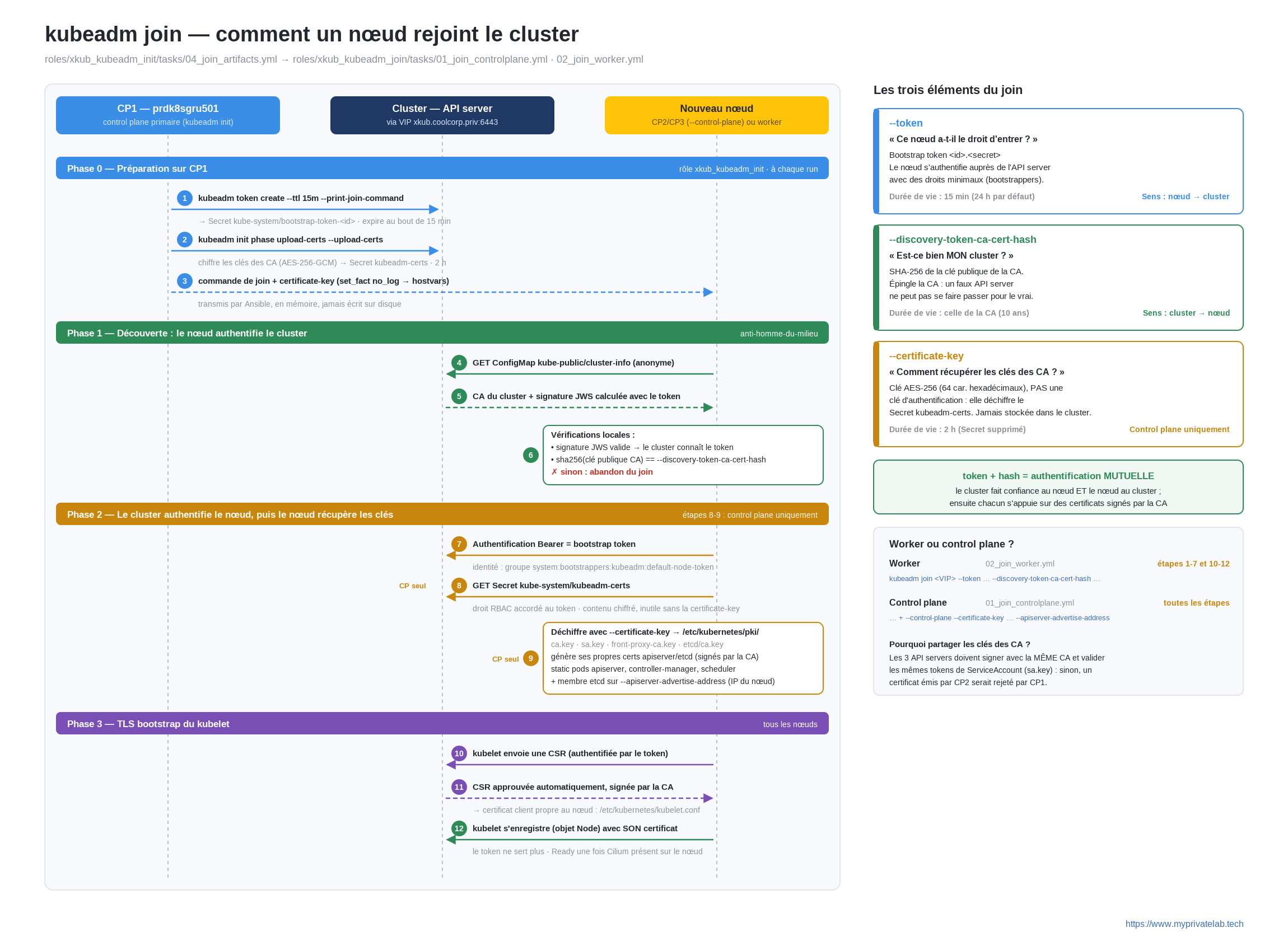
To register, a control plane-type node needs four pieces of information:
- The URL of the API (including the port), to know whom to contact; here we force it to the first control plane (whose name is declared in the API certificate, so we're fine).
- An access token: the one issued during the previous step, valid here for 15 minutes (24 hours by default with kubeadm), which is not a problem since all the operations run during a single playbook call that executes the roles one after another
- The SHA-256 hash of the public key associated with the internal CA of the cluster, to ensure that it is addressing the correct cluster for registration.
- The encryption key is used to retrieve the same private keys for the certificate authority on each control plane (This part is not necessary for a worker).
Thanks to AI, here's a diagram that explains the entire process.
Click the image to enlarge.
In summary, it is important to understand that all internal communication within the cluster between nodes uses encrypted channels based on an internal CA of the cluster and implemented during the initialization of the first control plane. The management of this CA is also the responsibility of each control plane, which is why they are required to share the associated private keys.
This method allows for two-way authentication of communication between components.
Furthermore, monitoring the validity of the certificates associated with this integrated CA is very important in cluster monitoring.
02_join_worker.yml
We can now proceed with the file 02_join_worker.yml, which is dedicated to integrating the worker nodes
---
# Workers LAN, DMZ et GPU.
#
# Taint DMZ dès l'enregistrement : poser le taint APRÈS le join
# (03_labels_taints.yml) laisse une fenêtre où le nœud DMZ est Ready sans taint,
# donc planifiable par n'importe quel pod. Le kubelet reçoit donc
# `--register-with-taints` AVANT le join : le Node est créé avec son taint dès sa
# première apparition. /etc/sysconfig/kubelet est lu par le drop-in kubeadm du
# paquet RPM (EnvironmentFile). 03_labels_taints.yml reste le filet de sécurité.
- name: Faire enregistrer le nœud avec ses taints (KUBELET_EXTRA_ARGS)
  ansible.builtin.lineinfile:
    path: /etc/sysconfig/kubelet
    regexp: '^KUBELET_EXTRA_ARGS='
    line: >-
      KUBELET_EXTRA_ARGS=--register-with-taints={% for t in k8s_node_taints %}{{ t.key }}={{ t.value }}:{{ t.effect }}{% if not loop.last %},{% endif %}{% endfor %}
    create: true
    owner: root
    group: root
    mode: "0644"
  when:
    - xkub_kubeadm_join_worker_groups | intersect(group_names) | length > 0
    - k8s_node_taints | length > 0

- name: kubeadm join (worker)
  ansible.builtin.command:
    cmd: "{{ hostvars[xkub_kubeadm_join_primary_controlplane].xkub_kubeadm_init_join_command }}"
  when:
    - xkub_kubeadm_join_worker_groups | intersect(group_names) | length > 0
    - not xkub_kubeadm_join_kubelet_conf.stat.exists
  changed_when: true
  no_log: true
roles/xkub_kubeadm_join/tasks/02_join_worker.yml
Before the join process, an initial task prepares the kubelet on the worker nodes that have taints. In this case, it's the DMZ workers (the variable k8s_node_taints is empty for the other nodes). It adds the option --register-with-taints to the file /etc/sysconfig/kubelet, which is read when the kubelet starts. The node is thus created with its taint network=dmz:NoSchedule as soon as it registers with the API. There is no period during which any pod could be scheduled on it. The task 03_labels_taints.yml, which we will see shortly, continues to apply the taints and serves as a safety net.
Here too, we run a kubeadm join command, but with fewer arguments, since these are not control planes. There is no need to initialize components like the API server or to share elements related to the internal CA management.
The previous diagram remains valid; it is simply simplified with fewer components to start on these nodes.
03_labels_taints.yml
Let's continue with the last file, 03_labels_taints.yml
---
# Appliqué à TOUS les nœuds à CHAQUE exécution : un patch Kubernetes est par
# nature idempotent (le module kubernetes.core.k8s ne remonte "changed" que
# s'il y a une réelle divergence), ce qui garantit que les labels/taints
# restent conformes même après une modification manuelle sur le cluster.
# Exécuté depuis xkub_primary_control_plane (kubeconfig local)
- name: Attendre l'enregistrement du nœud auprès de l'API
  kubernetes.core.k8s_info:
    kubeconfig: /etc/kubernetes/admin.conf
    kind: Node
    name: "{{ inventory_hostname }}"
  delegate_to: "{{ xkub_kubeadm_join_primary_controlplane }}"
  register: xkub_kubeadm_join_node_info
  until: xkub_kubeadm_join_node_info.resources | length > 0
  retries: "{{ xkub_kubeadm_join_node_wait_retries }}"
  delay: "{{ xkub_kubeadm_join_node_wait_delay }}"

- name: Poser les labels du nœud
  kubernetes.core.k8s:
    kubeconfig: /etc/kubernetes/admin.conf
    kind: Node
    name: "{{ inventory_hostname }}"
    state: patched
    definition:
      metadata:
        labels: "{{ k8s_node_labels }}"
  delegate_to: "{{ xkub_kubeadm_join_primary_controlplane }}"
  when: k8s_node_labels | length > 0

# Contrepartie indispensable de la tâche précédente : un patch FUSIONNE les
# labels, il n'en retire jamais.
- name: Retirer les labels obsolètes du nœud
  kubernetes.core.k8s:
    kubeconfig: /etc/kubernetes/admin.conf
    kind: Node
    name: "{{ inventory_hostname }}"
    state: patched
    definition:
      metadata:
        labels: "{{ k8s_node_labels_absent }}"
  delegate_to: "{{ xkub_kubeadm_join_primary_controlplane }}"
  when: k8s_node_labels_absent | length > 0

- name: Poser les taints du nœud (isolation DMZ, jamais retiré pour contourner un souci de scheduling)
  kubernetes.core.k8s:
    kubeconfig: /etc/kubernetes/admin.conf
    kind: Node
    name: "{{ inventory_hostname }}"
    state: patched
    definition:
      spec:
        taints: "{{ k8s_node_taints }}"
  delegate_to: "{{ xkub_kubeadm_join_primary_controlplane }}"
  when: k8s_node_taints | length > 0
roles/xkub_kubeadm_join/tasks/03_labels_taints.yml
This is where we will define the labels and taints for each node, based on our architectural choices as outlined in the introduction to this cookbook.
---
# Control planes (prdk8sgru501/502/503)
k8s_node_labels:
  roles: control-plane
k8s_node_taints: []
inventory/group_vars/k8s_controlplane_lan.yml
---
# Workers LAN (prdk8smin501/502)
k8s_node_labels:
  network: lan
  roles: worker-lan
  node-role.kubernetes.io/worker-lan: ""
k8s_node_taints: []

k8s_node_labels_absent:
  node-role.kubernetes.io/worker: null
inventory/group_vars/k8s_workers_lan.yml
---
# Workers DMZ (prdk8smin510/511)
k8s_node_labels:
  network: dmz
  roles: worker-dmz
  node-role.kubernetes.io/worker-dmz: ""

k8s_node_labels_absent:
  node-role.kubernetes.io/worker: null
k8s_node_taints:
  - key: network
    value: dmz
    effect: NoSchedule
inventory/group_vars/k8s_workers_web.yml
Principle of labels and taints
Remember that Kubernetes allows you to organize your nodes according to your needs, dedicating certain nodes to specific purposes. This enables you to optimize your resources and best meet certain constraints related to isolation, availability, or performance.
By default, there is a distinction between control plane nodes, which are dedicated to managing the cluster, and worker nodes, which are dedicated to running workloads. In this case, by default, a control plane node has taints that prevent applications from being launched on it, ensuring that it is not used for anything other than its intended role.
These distinctions are made using labels and taints. These are two different principles that have different objectives, but they complement each other.
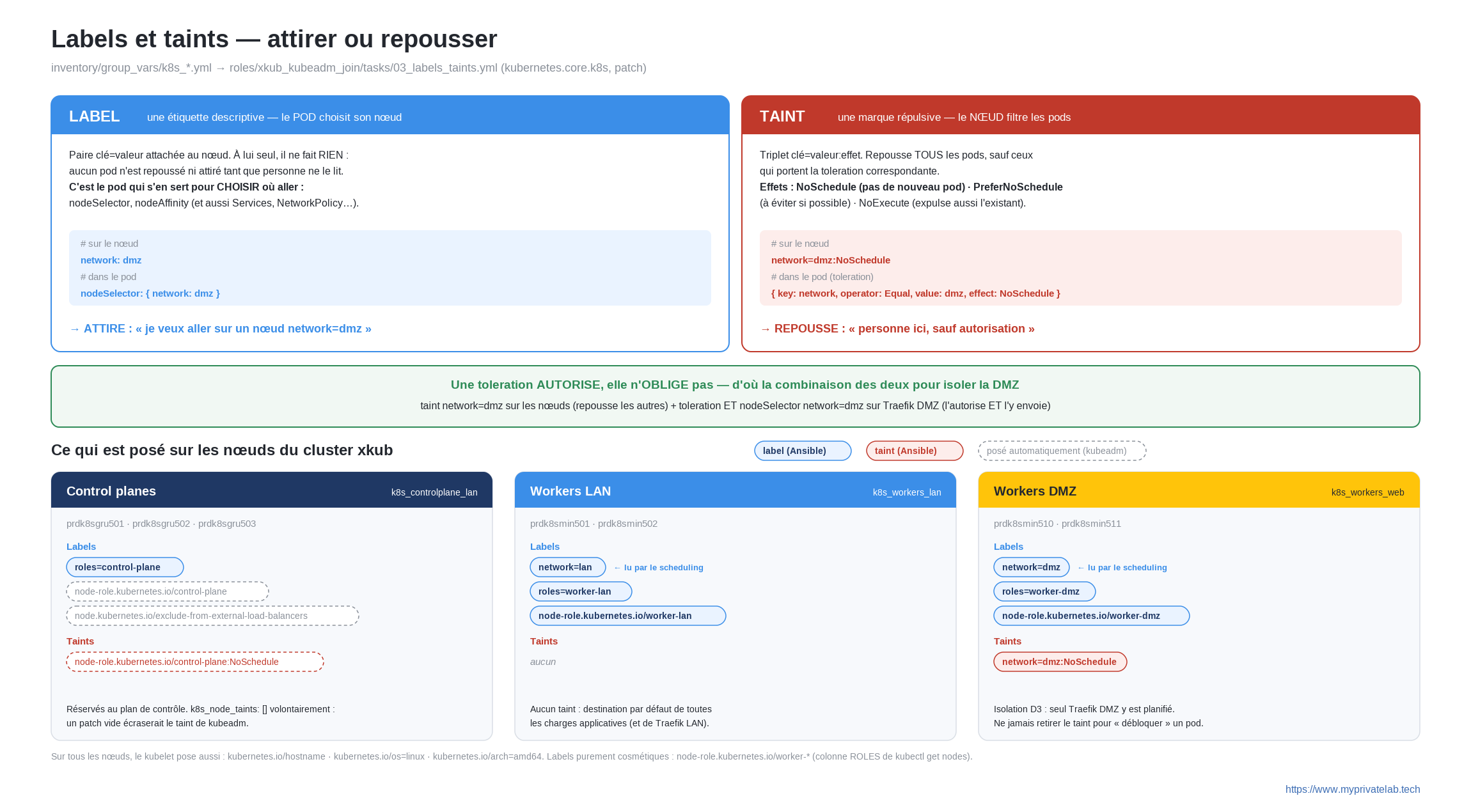
A label is easy to understand. It's a key/value pair that you assign to a K8S object, in our case, a node. It's a way to tag a server (or another Kubernetes object) so that it can be easily identified or classified later. You can associate as many labels as you want with a server. For example, in our case, the label network=lan for the worker nodes on the LAN, and network=dmz for the worker nodes exposed on the web (see architecture). Later, you can explicitly specify that a particular application should run on a node whose label corresponds to network=the_desired_network.
However, a label cannot guarantee that an asset will only run in the correct location. Using our network example, we can force an application to run on a node associated with a specific network by using a label, which implies that we have explicitly specified this information. If we do not specify anything, Kubernetes is free to select the destination node for the application itself, with the risk, for example, that an application intended for the LAN ends up on a node in the DMZ. In reality, we want to avoid this situation, even if we omit specifying the label of the node to use for our application. This is where taints come into play.
A taint is a restriction applied to a node. If a node has a taint, it automatically "repels" all pods except those that have a "toleration" for that taint. In essence, it's like saying, "Access denied to everyone, unless you have the badge (toleration) to enter."
For example, control planes have a default taint: node-role.kubernetes.io/control-plane:NoSchedule. In this notation, we find:
- The key: node-role.kubernetes.io/control-plane (identifies the role of the node).
- The effect: NoSchedule (instructs Kubernetes not to schedule any new pods on this node, unless the pod has the exact toleration for this key).
- By default, a control plane cannot be used to run an application pod that you have declared, unless, in the configuration of that pod, you specify a toleration specific to this key, which would result in the following YAML for the pod spec:
tolerations: - key: "node-role.kubernetes.io/control-plane" operator: "Exists" effect: "NoSchedule"- key: This specifically targets the protection label of the control plane.
- operator: "Exists": tells Kubernetes that it is sufficient for this key to be present on the node for the toleration to be valid (it is not necessary to check a specific value).
- effect: "NoSchedule": corresponds to the restriction of the taint that the pod must overcome
This is exactly the same mechanism we will use to prevent an application from running on a node in the DMZ, unless it has the correct toleration in its configuration.
On the DMZ servers, this Ansible task applies the taint network=dmz:NoSchedule. So for a pod to run in the DMZ, it must both specify the label network=dmz, to select a node that has it, and have a toleration that lifts the taint applied to the DMZ workers. If nothing is specified, the pod is automatically kept out of the DMZ.
With a little help from AI, here is a diagram that sums it all up.
Click the image to enlarge.
Note that for these tasks we use the Ansible module "kubernetes.core", which explains the Python libraries deployed during the previous phase alongside the cluster initialization. These commands are run only from prdk8sgru501 using the instruction delegate_to: "{{ xkub_kubeadm_join_primary_controlplane }}"
Essentially, this involves running commands of the following type:
kubectl label nodes <nom-du-noeud> <clé>=<valeur>
kubectl taint nodes <nom-du-noeud> <clé>=<valeur>:<effet>
While connected to prdk8sgru501
Conclusion
There are no other elements to describe for this role, which is ultimately relatively simple, as it simply adds nodes to the clusters and applies the correct taints and labels based on the architecture choices associated with the cluster.
Nevertheless, this was an opportunity to present some key concepts. Once again, we were able to rely on an Ansible framework produced by AI from explicit human instructions to detail how parts of K8S work.
At this stage, if we were to summarize what has been done, including the previous step for initializing the cluster, here are the equivalent commands to those presented in the form of Ansible roles.
| # | Node | Command | Purpose |
|---|---|---|---|
| 1 | CP1 (prdk8sgru501) | kubeadm init --config /etc/kubernetes/kubeadm-config.yaml --upload-certs --skip-phases=addon/kube-proxy |
Creates the cluster. --upload-certs encrypts the CA keys in the Secret kubeadm-certs. No kube-proxy is used because Cilium replaces it. |
| 2 | CP1 (prdk8sgru501) | mkdir -p ~/.kube |
Makes kubectl usable on CP1 |
| 3 | CP1 (prdk8sgru501) | sed -i 's#super-admin.conf#admin.conf#' /etc/kubernetes/manifests/kube-vip.yaml |
kube-vip reverts to normal kubeconfig once initialization is complete |
| 4 | CP1 (prdk8sgru501) | kubeadm token create --ttl 15m --print-join-command |
Displays the full join command: token + CA hash (token valid for 15 minutes). |
| 5 | CP1 (prdk8sgru501) | kubeadm init phase upload-certs --upload-certs --config /etc/kubernetes/kubeadm-config.yaml |
Re-uploads the certificates and displays a new certificate-key (valid for 2 hours). |
| 6 | CP2 (prdk8sgru502), CP3 (prdk8sgru503) (one at a time). |
kubeadm join xkub.coolcorp.priv:6443 --token <token> --discovery-token-ca-cert-hash sha256:<hash> --control-plane --certificate-key <clé> --apiserver-advertise-address <IP du nœud> |
Adds a control plane: retrieves CA keys, creates static pods, and adds an etcd member |
| 7 | Workers prdk8smin501, 502, 510, 511 |
On prdk8smin510, 511 first: echo 'KUBELET_EXTRA_ARGS=--register-with-taints=network=dmz:NoSchedule' > /etc/sysconfig/kubeletThen on all: kubeadm join xkub.coolcorp.priv:6443 --token <token> --discovery-token-ca-cert-hash sha256:<hash> |
Adds a worker (TLS bootstrap of the kubelet only). DMZ workers register directly with their taint |
| 8 | CP1 (prdk8sgru501) | kubectl label node prdk8sgru501.coolcorp.priv prdk8sgru502.coolcorp.priv prdk8sgru503.coolcorp.priv roles=control-plane |
Control plane labels |
| 9 | CP1 (prdk8sgru501) | kubectl label node prdk8smin501.coolcorp.priv prdk8smin502.coolcorp.priv network=lan roles=worker-lan node-role.kubernetes.io/worker-lan= |
LAN worker labels |
| 10 | CP1 (prdk8sgru501) | kubectl label node prdk8smin510.coolcorp.priv prdk8smin511.coolcorp.priv network=dmz roles=worker-dmz node-role.kubernetes.io/worker-dmz= |
DMZ worker isolation labels and taints |
We are almost at the end of the playbook for setting up the basic cluster. However, before we can proceed to its actual execution, we need to complete the xkub_cilium role dedicated to deploying the CNI (Container Network Interface). See you in the next article.
Summary of variables and equivalent commands outside of Ansible
This appendix summarizes all the variables used by Ansible in this article and provides equivalents for the commands and configurations implemented by Ansible in this section.
Variables used
| Variable | Valeur | Déclarée dans |
|---|---|---|
xkub_primary_control_plane |
{{ groups['k8s_controlplane_lan'] | sort | first }} → prdk8sgru501.coolcorp.priv |
inventory/group_vars/all/main.yml |
xkub_kubeadm_join_primary_controlplane |
{{ xkub_primary_control_plane }} → prdk8sgru501.coolcorp.priv |
roles/xkub_kubeadm_join/defaults/main.yml |
xkub_kubeadm_join_worker_groups |
k8s_workers_lan, k8s_workers_web, gpu |
roles/xkub_kubeadm_join/defaults/main.yml |
xkub_kubeadm_join_node_wait_retries |
30 |
roles/xkub_kubeadm_join/defaults/main.yml |
xkub_kubeadm_join_node_wait_delay |
5 (secondes) |
roles/xkub_kubeadm_join/defaults/main.yml |
k8s_node_labels (défaut) |
{} |
roles/xkub_kubeadm_join/defaults/main.yml |
k8s_node_labels (control planes) |
roles: control-plane |
inventory/group_vars/k8s_controlplane_lan.yml |
k8s_node_labels (workers LAN) |
network: lan, roles: worker-lan, node-role.kubernetes.io/worker-lan: "" |
inventory/group_vars/k8s_workers_lan.yml |
k8s_node_labels (workers DMZ) |
network: dmz, roles: worker-dmz, node-role.kubernetes.io/worker-dmz: "" |
inventory/group_vars/k8s_workers_web.yml |
k8s_node_labels_absent (défaut) |
{} |
inventory/group_vars/clu_k8s_xkub/main.yml |
k8s_node_labels_absent (workers LAN et DMZ) |
node-role.kubernetes.io/worker: null (label retiré) |
inventory/group_vars/k8s_workers_lan.yml / k8s_workers_web.yml |
k8s_node_taints (défaut) |
[] |
roles/xkub_kubeadm_join/defaults/main.yml |
k8s_node_taints (control planes, workers LAN) |
[] |
inventory/group_vars/k8s_controlplane_lan.yml / k8s_workers_lan.yml |
k8s_node_taints (workers DMZ) |
key: network, value: dmz, effect: NoSchedule |
inventory/group_vars/k8s_workers_web.yml |
xkub_kubeadm_init_join_command |
kubeadm join xkub.coolcorp.priv:6443 --token <token> --discovery-token-ca-cert-hash sha256:<hash> (secret) |
set_fact du rôle xkub_kubeadm_init (tasks/04_join_artifacts.yml), lu via hostvars |
xkub_kubeadm_init_certificate_key |
clé de certificat (secret, valable 2 h) | set_fact du rôle xkub_kubeadm_init (tasks/04_join_artifacts.yml), lu via hostvars |
xkub_kubeadm_join_kubelet_conf |
résultat du stat sur /etc/kubernetes/kubelet.conf (marqueur « déjà membre ») |
register dans roles/xkub_kubeadm_join/tasks/main.yml |
xkub_kubeadm_join_node_info |
réponse de l'API pour le Node | register dans roles/xkub_kubeadm_join/tasks/03_labels_taints.yml |
inventory_hostname |
nom FQDN du nœud, qui est aussi le nom du Node Kubernetes (ex. prdk8smin510.coolcorp.priv) |
inventory/hosts.yml |
ansible_host |
192.168.10.162 / 192.168.10.163 (--apiserver-advertise-address) |
inventory/hosts.yml |
ansible_user |
ansible-windows |
inventory/hosts.yml (all.vars) |
Equivalent without Ansible
Connexion : ssh ansible-windows@<serveur>, puis sudo -i. Toutes les commandes tournent en root. <token>, <hash> et <clé> proviennent des étapes 8 et 9 de the appendix of step 7.
| # | Action | Serveur(s) | Compte | Commande(s) |
|---|---|---|---|---|
| 1 | Vérifier que le nœud n'est pas déjà membre (sinon, passer à l'étape 4) | prdk8sgru502, 503, prdk8smin501, 502, 510, 511 | root | ls -l /etc/kubernetes/kubelet.conf |
| 2 | Join des control planes additionnels | prdk8sgru502, prdk8sgru503 | root | kubeadm join xkub.coolcorp.priv:6443 --token <token> --discovery-token-ca-cert-hash sha256:<hash> --control-plane --certificate-key <clé> --apiserver-advertise-address 192.168.10.162( 192.168.10.163 sur prdk8sgru503) |
| 3 | Join des workers (les workers DMZ s'enregistrent directement avec leur taint) | prdk8smin501, 502, 510, 511 | root | Sur prdk8smin510, 511 d'abord : echo 'KUBELET_EXTRA_ARGS=--register-with-taints=network=dmz:NoSchedule' > /etc/sysconfig/kubeletPuis sur les quatre : kubeadm join xkub.coolcorp.priv:6443 --token <token> --discovery-token-ca-cert-hash sha256:<hash> |
| 4 | Utiliser le kubeconfig admin | prdk8sgru501 | root | export KUBECONFIG=/etc/kubernetes/admin.conf |
| 5 | Attendre que chaque nœud soit enregistré (30 essais × 5 s) | prdk8sgru501 | root | Bloc A |
| 6 | Labels des control planes | prdk8sgru501 | root | kubectl label node prdk8sgru501.coolcorp.priv prdk8sgru502.coolcorp.priv prdk8sgru503.coolcorp.priv roles=control-plane --overwrite |
| 7 | Labels des workers LAN | prdk8sgru501 | root | kubectl label node prdk8smin501.coolcorp.priv prdk8smin502.coolcorp.priv network=lan roles=worker-lan node-role.kubernetes.io/worker-lan= --overwrite |
| 8 | Labels des workers DMZ | prdk8sgru501 | root | kubectl label node prdk8smin510.coolcorp.priv prdk8smin511.coolcorp.priv network=dmz roles=worker-dmz node-role.kubernetes.io/worker-dmz= --overwrite |
| 9 | Retirer le label générique worker |
prdk8sgru501 | root | kubectl label node prdk8smin501.coolcorp.priv prdk8smin502.coolcorp.priv prdk8smin510.coolcorp.priv prdk8smin511.coolcorp.priv node-role.kubernetes.io/worker- |
| 10 | Taint d'isolation DMZ (filet de sécurité, déjà posé à l'enregistrement) | prdk8sgru501 | root | kubectl taint node prdk8smin510.coolcorp.priv prdk8smin511.coolcorp.priv network=dmz:NoSchedule --overwrite |
| 11 | Vérifier | prdk8sgru501 | root (ou ansible-windows, qui a ~/.kube/config) |
kubectl get nodes -L network,roleskubectl describe node prdk8smin510.coolcorp.priv | grep -i taint |
Les étapes 6 à 10 sont rejouables grâce à --overwrite. Ansible obtient le même résultat avec des patch sur l'objet Node (kubernetes.core.k8s, state: patched), exécutés depuis prdk8sgru501.
Bloc A attente de l'enregistrement des nœuds
for n in prdk8sgru502 prdk8sgru503 prdk8smin501 prdk8smin502 prdk8smin510 prdk8smin511; do
  for i in $(seq 1 30); do
    kubectl get node "$n.coolcorp.priv" >/dev/null 2>&1 && break
    sleep 5
  done
done