Step 5: HAproxy and Keepalived load balancers
- Two pairs of HAProxy/Keepalived load balancers: LAN zone and DMZ zone.
- VRRP VIPs in unicast mode.
- Ansible role xkub_haproxy_keepalived, firewalld, and SELinux.
- VIP failover tests; appendix of commands outside Ansible.
Introduction
Now that all the servers have what is needed to deploy a Kubernetes cluster, we can move on to the load balancers.
For reference, as indicated in the architecture presentation, we will use two separate load balancing instances. The first will handle traffic from outside to the containerized applications on the LAN nodes, and the second will handle traffic from outside to the containerized applications in the DMZ.
This is a deliberate choice to have a single cluster for different hosting zones. This is one of the advantages of Kubernetes, being able to dedicate nodes to specific types of functions.
Recap of the network within Kubernetes
This also requires a good understanding of how the network works in Kubernetes.
It is very important to know that by default, all applications deployed on K8S can communicate with each other.
When you initialize a cluster, you must choose a network provider, the so-called CNI (Container Network Interface). This determines the network features supported, with varying levels of advanced capabilities that can be implemented within the cluster.
But regardless of the choice of CNI (Container Network Interface), by default, an internal network to K8S will be set up, allowing applications to connect to each other, regardless of the actual IP addresses of the nodes and their network location. This is why it will be necessary to use elements such as "network policies" to regulate traffic internally, especially when, as is the case here, some nodes are located in the DMZ and LAN.
However, this is only valid from within the cluster; externally, no applications are exposed by default. To achieve external access, a specific logic must be implemented, which can be approached in various ways.
Target architecture
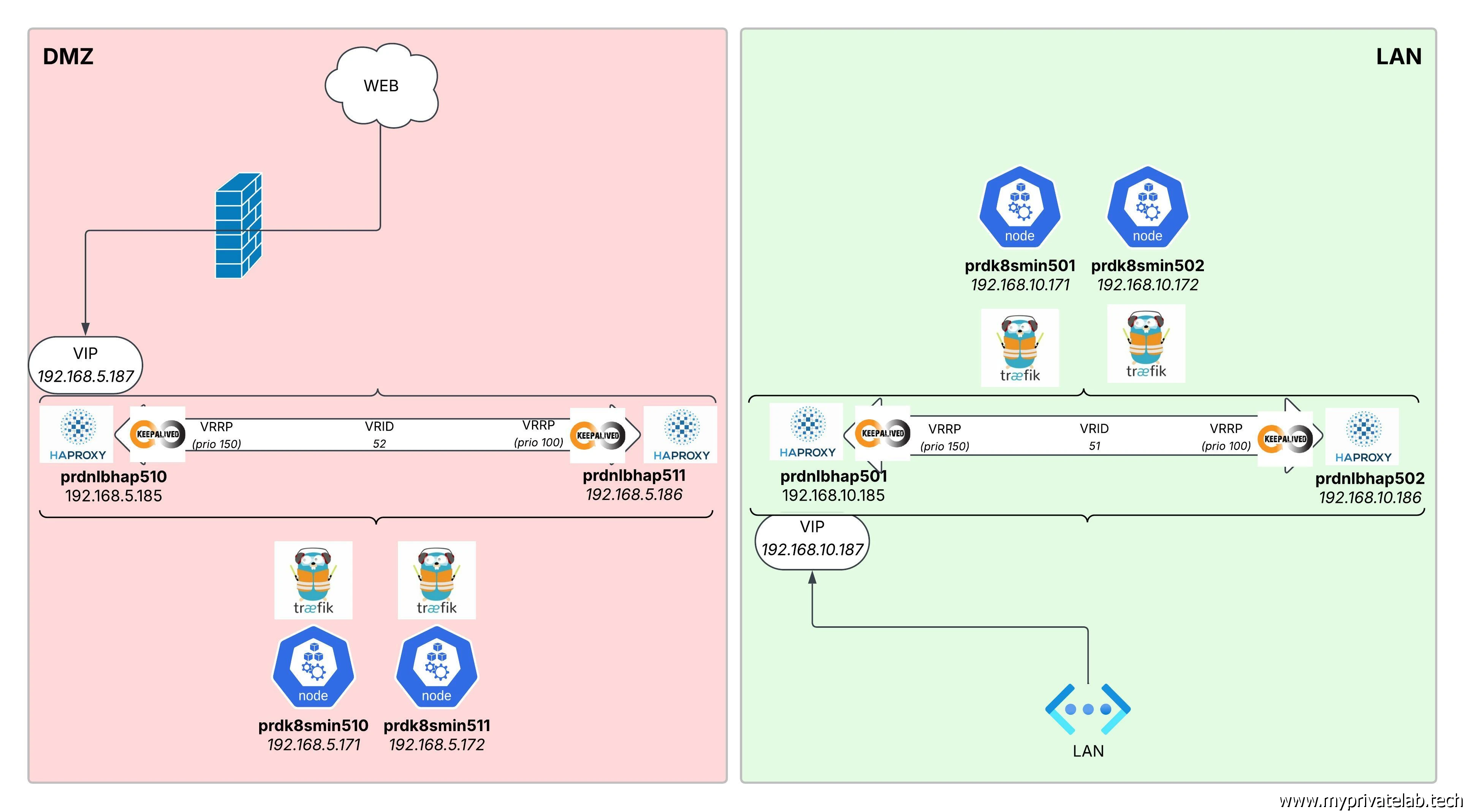
In the proposed architecture, the first point of entry for accessing an application within the cluster is a load balancer address that varies depending on where the target application is hosted: either on the LAN or in the DMZ.
These load balancers will be responsible for rerouting traffic to one of the nodes that corresponds to the desired network zone.
To achieve this, we will use HAproxy and Keepalived.
Click the image to enlarge.
HAproxy
HAproxy is a leading open-source solution for load balancing. It is among the most widely used load balancing and proxy software in the world, particularly for TCP and HTTP applications.

Click the image to enlarge.
HAProxy was created in 2000 by Willy Tarreau, a French developer (who is also a historical and major contributor to the Linux kernel). He designed this tool to meet the critical performance and stability requirements of web infrastructures that were beginning to experience significant traffic spikes in the early 2000s.
Therefore, it is a robust software solution that is still actively maintained (version 3.4.3 was released on July 29, 2026) with a strong history and a very extensive knowledge base.
The main risk associated with using an HAproxy server is the SPOF, or Single Point of Failure. If all connections must pass through it, its failure will result in a complete outage of all traffic flows.
That's why, in the target architecture (and unlike my previous cookbook), we will deploy two HAproxy servers per environment (LAN/DMZ), rather than just one.
Each pair of HAproxy servers will manage a VIP, or Virtual IP. This IP address can be "transferred" from one HAproxy instance to another based on the health status of the servers.
If one of the VMs associated with a pair fails and was responsible for managing the virtual IP address, the second VM will be able to detect this and take over management of that IP address to continue ensuring traffic flow.
VRRP/Keepalived
This mechanism can be implemented using VRRP
VRRP (Virtual Router Redundancy Protocol) is a network protocol designed to increase the availability and reliability of routing paths.
Although it was originally created for physical routers, it is now massively used in web infrastructures to secure load balancers, especially HAProxy.
The central idea of VRRP is to group several routing instances (here, HAproxy) so that they appear as a single logical entry point to the network and clients.
Here are the key concepts:
- Virtual IP (VIP): The instances in the group share a single virtual IP address (and an associated virtual MAC address). Client traffic is sent to this VIP.
- Roles (Master / Backup): Within the VRRP cluster, one machine is elected as MASTER and actively manages the VIP's traffic. The other machines are in BACKUP mode and wait.
- Heartbeat: The MASTER continuously sends announcement messages to signal to the group that it is still operational.
- Failover: If the BACKUP servers stop receiving announcements from the MASTER (due to a hardware crash, network problem, or restart), the BACKUP node with the highest priority immediately takes over the VIP and becomes the new MASTER. This failover is often transparent to end users.
To implement VRRP, we chose to use Keepalived

Click the image to enlarge.
Keepalived is also an open-source routing software written in C, designed to provide simple and robust high availability and load balancing features specifically for Linux infrastructures.
Again, the origin is French, as it was created in 2001 by Alexandre Cassen. The project is deeply linked to the Linux ecosystem and evolves closely with developments in the kernel's network stack (especially Netfilter and IPVS).
Keepalived revolves around three main modules that make it a formidable tool for network resilience:
- Complete VRRP implementation: This is the orchestrator of high availability. Keepalived manages the announcement of messages, the election of MASTER/BACKUP roles, and the dynamic assignment of the virtual IP (VIP) on the active machine's network interface.
- Health Checking: It continuously monitors the health of services. Keepalived can run local scripts to check that the HAProxy process is running correctly. If it detects that the local HAProxy service has crashed, Keepalived demotes itself, forcing the VIP to fail over to the BACKUP node.
- LVS (Layer 4 Load Balancing) Management: Although often used only for its VRRP function in front of an HAProxy instance, Keepalived natively includes functionality to configure LVS. This allows for extremely fast TCP/UDP load balancing because it is processed directly at the Linux kernel level, without going up to the application layer.
Principles
Regarding the overall implementation, the objective is summarized in the following table:
| Zone | Node | VIP | VRID | Backend |
|---|---|---|---|---|
| LAN | prdnlbhap501 / 502 | 192.168.10.187/24 | 51 | workers LAN, NodePorts 30080-30443 80/443 |
| DMZ | prdnlbhap510 / 511 | 192.168.5.187/24 | 52 | workers DMZ, NodePorts 31080-31443 80/443 |
Keepalived will ensure the availability of the external virtual address (which node holds the VIP). HAProxy will handle traffic distribution (which K8S worker receives the request).
Note that the Kubernetes API (TCP 6443) is not within the scope. It will be handled by kube-vip on the control planes (see the architecture presented in step 0). Our HAProxy load balancers should only handle application traffic.
A word also about the concept of VRID, which appears in the table. This is the "Virtual Router ID". It is the identifier of the virtual router in the context of VRRP. Each instance participating in routing must be associated with this same identifier. In our case, since we have two pairs of load balancers to manage, we use one VRID per pair. Given that a firewall exists between each of these pairs, we could have chosen an identical VRID, but it is simpler to differentiate them for better understanding.
Here are also some specific details related to the target configuration:
- We will work in TCP mode, not HTTP. TLS termination (encryption) will be handled by Traefik, which will be positioned behind the load balancers (this point will be discussed later). The HAProxy instances should only act as pass-through devices. For those who like networking, our HAProxy instances will remain on layer 4 of the OSI model, which is the Transport layer.
- Unlike other designs, for VRRP we will use unicast, not multicast. VRRP can be used with more than two instances and work with a whole group of routers, so multicast is more efficient for that need. But in our case, since we work with pairs of HAproxy servers, we can target communications without broadcasting information across the entire network. From a security perspective, this lets us filter on the IPs taking part in the routing.
Supported resilience
It is also important to understand the mechanisms that will be put in place to secure the HAproxy pairs.
Several levels of monitoring will be applied.
The first level uses VRRP. Each member of a pair will send an announcement to its neighbor (unicast). If none of the three announcements receive a response, the sending instance will consider its peer to be out of service. In the case of the BACKUP HAproxy server, it will become MASTER. Note that in production environments, dedicated heartbeat links are not uncommon.
This first level covers cases of failure due to a node being shut down, a kernel panic, a network outage, and other major failures.
A second, more advanced level will be implemented using a script. This script will monitor the status of the HAproxy service on the node itself. This will allow us to detect the loss of the service and cover the case where a node is UP (responds to the VRRP announcement) but has an HAproxy service in error.
This second level will address issues related to HAproxy.
Finally, the HAproxy servers themselves will monitor their backend. This is not related to VIP failovers, but rather to ensuring that packets are only sent to the K8S cluster node capable of processing the request. This check will be performed using a simple TCP port check on the K8S nodes.
In summary
| Failure | Detection | VIP moved after |
|---|---|---|
| MASTER node (HAproxy) down | VRRP silence | Approximately 3.6 seconds |
| HAproxy failed | Via script chk_haproxy (2 attempts every 2 seconds) | Approximately 4 seconds |
| Worker Traefik failed | TCP check | No VIP failover, but the faulty node is ejected after approximately 6 seconds |
This could be improved later: for example, the HAproxy check only looks at the state of the HAproxy service, not necessarily at its saturation or other more subtle problems. But this is already a good start.
Deployment via Ansible
As with the previous steps, the goal will be to use Ansible to deploy and configure the HAproxy and Keepalived components
Before proceeding, I suggest you take a look at, or reread, the step 3 article about Ansible and the underlying logic.
Playbook
Regarding Ansible, the first thing to do is use the playbook xkub_20_haproxy.yml, which contains the following:
---
# Paires HAProxy + keepalived (VIP LAN et VIP DMZ).
- name: Load balancers applicatifs LAN et DMZ
  hosts: nlb_haproxy_lan:nlb_haproxy_web
  become: true
  roles:
    - xkub_haproxy_keepalived
playbooks/xkub_20_haproxy.yml
The goal is to associate the role xkub_haproxy_keepalived with the servers in the inventory that are present in the groups nlb_haproxy_lan and nlb_haproxy_web.
Indeed, unlike the previous steps, here we are only interested in the servers that follow the naming convention prdnlbhap, which are not members of the K8S cluster.
Role
Let's focus on the role xkub_haproxy_keepalived
As usual, in the default folder, at the level of the main.yml file, you will find the variables specific to this role.
---
# Rôle xkub_haproxy_keepalived — valeurs par défaut.
# Les variables de zone (haproxy_zone, haproxy_vip, haproxy_backend_*,
# haproxy_peer_group, xkub_haproxy_keepalived_router_id) sont définies dans
# inventory/group_vars/nlb_haproxy_{lan,web}.yml.

xkub_haproxy_keepalived_packages:
  - haproxy
  - keepalived
  - psmisc # fournit killall, utilisé par le check keepalived

# Interface portant la VIP. Sur Rocky Linux 10 virtualisé XCP-ng, les cartes
# xen-netfront sont nommées enX0 — à vérifier sur les VMs (`ip -br a`).
xkub_haproxy_keepalived_vrrp_interface: enX0

# Le MASTER de chaque paire est le premier hostname (tri alphabétique) du
# groupe : prdnlbhap501 (LAN) et prdnlbhap510 (DMZ).
xkub_haproxy_keepalived_is_master: "{{ inventory_hostname == (groups[haproxy_peer_group] | sort | first) }}"
xkub_haproxy_keepalived_priority: "{{ 150 if xkub_haproxy_keepalived_is_master | bool else 100 }}"

# Proxy protocol vers Traefik (send-proxy) : désactivé tant que Traefik n'est
# pas configuré pour l'accepter — activer les deux côtés ensemble.
xkub_haproxy_keepalived_use_proxy_protocol: false

# Timeouts repris de l'existant PhotonOS
xkub_haproxy_keepalived_timeout_client: 30s
xkub_haproxy_keepalived_timeout_server: 30s
xkub_haproxy_keepalived_timeout_connect: 30s
roles/xkub_haproxy_keepalived/defaults/main.yml
The main objective is to install the packages, specifically haproxy and keepalived, using the variable xkub_haproxy_keepalived_packages. Since we are working on an XCP-ng infrastructure, the names of the interfaces to use on the VMs are enX0.
A small detail: we will not immediately enable Traefik instance monitoring on the HAProxy side, since they do not yet exist.
Handler folder
Now, regarding the handlers folder, the content of the main file is as follows:
---
- name: Reload haproxy
  ansible.builtin.systemd_service:
    name: haproxy
    state: reloaded

- name: Restart keepalived
  ansible.builtin.systemd_service:
    name: keepalived
    state: restarted
roles/xkub_haproxy_keepalived/handlers/main.yml
These are the restart commands for HAProxy and Keepalived. Nothing special here.
The tasks
We can move on to the task folder, where the main.yml file only displays the sequence of tasks to be performed by referencing other YAML files.
---
# Rôle xkub_haproxy_keepalived — paires de load balancers applicatifs LAN et DMZ.
# Frontends 80/443 sur la VIP → NodePorts Traefik des workers de la zone.
- name: Installation des paquets
  ansible.builtin.import_tasks: 01_install.yml
  tags:
    - xkub
    - xkub.haproxy_keepalived
    - xkub.haproxy_keepalived.install

# Le pare-feu est ouvert AVANT le démarrage des services : dans l'autre sens,
# le premier déploiement laisse une fenêtre où keepalived échange du VRRP encore
# bloqué, ce qui produit une double élection MASTER transitoire (les deux nœuds
# se croient seuls). Ouvrir d'abord puis démarrer est aussi le sens sûr du point
# de vue sécurité : on n'expose jamais un service avant sa règle.
- name: Politique firewalld
  ansible.builtin.import_tasks: 04_firewalld.yml
  tags:
    - xkub
    - xkub.haproxy_keepalived
    - xkub.haproxy_keepalived.firewalld

- name: Configuration HAProxy
  ansible.builtin.import_tasks: 02_haproxy.yml
  tags:
    - xkub
    - xkub.haproxy_keepalived
    - xkub.haproxy_keepalived.haproxy

- name: Configuration keepalived (VIP)
  ansible.builtin.import_tasks: 03_keepalived.yml
  tags:
    - xkub
    - xkub.haproxy_keepalived
    - xkub.haproxy_keepalived.keepalived
roles/xkub_haproxy_keepalived/tasks/main.yml
Note that the order of the tasks is important. We start by installing the packages, then we open the firewall, then we configure HAProxy and finally Keepalived. That's why I ultimately had to move the execution of the 04_firewalld.yml file, initially intended to be run at the end, before 02_haproxy.yml
It would be necessary to renumber the files to be consistent
The first file 01_install.yml deals with the installation of the components
---
- name: Installer haproxy, keepalived et psmisc
  ansible.builtin.dnf:
    name: "{{ xkub_haproxy_keepalived_packages }}"
    state: present
    update_cache: true

# Le BACKUP doit pouvoir binder la VIP qu'il ne porte pas encore : sans ce
# sysctl, haproxy refuse de démarrer sur le nœud passif.
- name: Autoriser le bind sur une IP non locale (VIP)
  ansible.posix.sysctl:
    name: net.ipv4.ip_nonlocal_bind
    value: "1"
    sysctl_file: /etc/sysctl.d/90-haproxy.conf
    state: present
    reload: true

# SELinux reste ENFORCING (règle 11) : on autorise explicitement haproxy à se
# connecter aux ports non standards (NodePorts 30000-32767) via le booléen dédié.
- name: Autoriser haproxy à joindre les NodePorts (SELinux)
  ansible.posix.seboolean:
    name: haproxy_connect_any
    state: true
    persistent: true
roles/xkub_haproxy_keepalived/tasks/01_install.yml
We install HAProxy and Keepalived on each targeted server.
The VMs' sysctl settings must be changed, because otherwise a BACKUP HAproxy server could not start its service, since the VIP it is bound to would not be available yet (VRRP only assigns the IP, the VIP, to the MASTER; so we allow the kernel to run HAproxy even if the IP it must use is not available on the BACKUP server).
For security reasons, we do not disable SELinux; instead, we allow HAproxy to use any kind of port, beyond those allowed by default by SELinux.
Now let's move on to 02_haproxy.yml
---
# Un seul template pour les deux zones : la zone est portée par les variables
# de groupe (nlb_haproxy_lan / nlb_haproxy_web) — plus de variantes _lan/_dmz.
- name: Déployer la configuration HAProxy
  ansible.builtin.template:
    src: haproxy.cfg.j2
    dest: /etc/haproxy/haproxy.cfg
    owner: root
    group: root
    mode: "0644"
    validate: haproxy -c -f %s
  notify: Reload haproxy

- name: Activer et démarrer HAProxy
  ansible.builtin.systemd_service:
    name: haproxy
    state: started
    enabled: true
roles/xkub_haproxy_keepalived/tasks/02_haproxy.yml
Here, things are straightforward. We simply request the HAproxy configuration template (which we will see shortly) to be copied to the servers and then restart the HAproxy service (using the commands defined in the handler) to take into account this new configuration.
Now let's move on to 03_keepalived.yml
---
# VRRP en unicast entre les deux membres de la paire (pas d'auth_pass : le
# mécanisme VRRPv2 est faible et déconseillé ; l'unicast + le filtrage
# firewalld limitent la surface). MASTER = prdnlbhap501 / prdnlbhap510.
- name: Déployer la configuration keepalived
  ansible.builtin.template:
    src: keepalived.conf.j2
    dest: /etc/keepalived/keepalived.conf
    owner: root
    group: root
    mode: "0600"
  notify: Restart keepalived

- name: Activer et démarrer keepalived
  ansible.builtin.systemd_service:
    name: keepalived
    state: started
    enabled: true
roles/xkub_haproxy_keepalived/tasks/03_keepalived.yml
The same applies to keepalived. We retrieve the configuration (which we will also see shortly) and then restart the service immediately afterwards.
Finally, we finish with 04_firewalld.yml
---
# firewalld reste actif : on ouvre 80/443 (frontends) et le
# protocole VRRP entre les membres de la paire.
- name: S'assurer que firewalld est actif
  ansible.builtin.systemd_service:
    name: firewalld
    state: started
    enabled: true

- name: Ouvrir les services HTTP/HTTPS
  ansible.posix.firewalld:
    service: "{{ item }}"
    permanent: true
    immediate: true
    state: enabled
  loop:
    - http
    - https

# VRRP est restreint aux SEULES IP des pairs de la paire, jamais ouvert à
# l'ensemble du sous-réseau . C'est la
# contrepartie du choix de ne pas utiliser d'`auth_pass` : l'authentification
# VRRPv2 étant faible par conception, le filtrage réseau est la vraie mesure
# de protection. Sans `source address`, n'importe quel hôte du même L2 pourrait
# annoncer une priorité supérieure, s'emparer de la VIP et intercepter le
# trafic applicatif de la zone. La liste des pairs est dérivée du même groupe
# d'inventaire que les `unicast_peer` de keepalived.conf.j2 : les deux restent
# donc cohérents par construction.
- name: Autoriser le protocole VRRP depuis les pairs de la paire uniquement
  ansible.posix.firewalld:
    rich_rule: >-
      rule family="ipv4"
      source address="{{ hostvars[item].ansible_host }}/32"
      protocol value="vrrp" accept
    permanent: true
    immediate: true
    state: enabled
  loop: "{{ groups[haproxy_peer_group] | difference([inventory_hostname]) | sort }}"

# Nettoyage de l'ancienne règle non restreinte, laissée en place par les runs
# antérieurs au durcissement : sans cette tâche, elle survivrait indéfiniment
# dans la configuration permanente de firewalld et continuerait d'autoriser
# VRRP depuis n'importe quelle source.
- name: Retirer l'ancienne règle VRRP sans restriction de source
  ansible.posix.firewalld:
    rich_rule: rule protocol value="vrrp" accept
    permanent: true
    immediate: true
    state: disabled
roles/xkub_haproxy_keepalived/tasks/04_firewalld.yml
The goal is to open the necessary ports on the servers and allow traffic specific to HAproxy and the VRRP protocol.
This is where we use the unicast feature so that VRRP announcements are only made between the IP addresses of the HAproxy servers belonging to the same pair. We use the inventory variables to obtain the correct rules.
The templates
Now let's move on to the most interesting folder, which is the templates folder
In this folder, we find two files:
haproxy.cfg.j2
# {{ ansible_managed }}
# HAProxy zone {{ haproxy_zone | upper }} — VIP {{ haproxy_vip }}
# Frontends 80/443 -> NodePorts Traefik {{ haproxy_zone }}.
# L'API Kubernetes (6443) n'est pas frontée ici : kube-vip.

global
    log /dev/log local0
    maxconn 4000
    user haproxy
    group haproxy
    daemon

defaults
    mode tcp
    log global
    option tcplog
    option dontlognull
    timeout client  {{ xkub_haproxy_keepalived_timeout_client }}
    timeout server  {{ xkub_haproxy_keepalived_timeout_server }}
    timeout connect {{ xkub_haproxy_keepalived_timeout_connect }}

frontend fe_traefik_{{ haproxy_zone }}_http
    bind {{ haproxy_vip }}:80
    default_backend bk_traefik_{{ haproxy_zone }}_http

frontend fe_traefik_{{ haproxy_zone }}_https
    bind {{ haproxy_vip }}:443
    default_backend bk_traefik_{{ haproxy_zone }}_https

backend bk_traefik_{{ haproxy_zone }}_http
    option tcp-check
{% for host in groups[haproxy_backend_group] | sort %}
    server {{ host.split('.')[0] }} {{ hostvars[host].ansible_host }}:{{ haproxy_backend_port_http }} check
{% endfor %}

backend bk_traefik_{{ haproxy_zone }}_https
    option tcp-check
{% for host in groups[haproxy_backend_group] | sort %}
    server {{ host.split('.')[0] }} {{ hostvars[host].ansible_host }}:{{ haproxy_backend_port_https }} check{{ ' send-proxy' if xkub_haproxy_keepalived_use_proxy_protocol | bool else '' }}
{% endfor %}
roles/xkub_haproxy_keepalived/templates/haproxy.cfg.j2
This is the template associated with the HAproxy configuration. It will rely on the variables of the role and the names of the hosts retrieved from the Ansible inventory.
The configuration is quite simple. We see the use of the "tcp" mode, as explained previously.
Next, we define the frontend interfaces, which are the interfaces that will use the VRRP VIP managed by Keealived.
Then, we define the backend servers, which are the K8S nodes to which requests should be forwarded.
Thanks to the concept of variables and the Ansible inventory, the content of this file will be dynamically filled when it is copied to the target servers, taking into account the network location of the server (LAN/DMZ).
Now it's time to configure Keepalived keepalived.conf.j2:
# {{ ansible_managed }}
# keepalived zone {{ haproxy_zone | upper }} — VIP {{ haproxy_vip }}/{{ haproxy_vip_prefix }}
global_defs {
    router_id {{ inventory_hostname.split('.')[0] }}
}

# La VIP ne reste sur ce nœud que si haproxy tourne
vrrp_script chk_haproxy {
    script "/usr/bin/killall -0 haproxy"
    interval 2
    fall 2
    rise 2
}

vrrp_instance VI_{{ haproxy_zone | upper }} {
    state {{ 'MASTER' if xkub_haproxy_keepalived_is_master | bool else 'BACKUP' }}
    interface {{ xkub_haproxy_keepalived_vrrp_interface }}
    virtual_router_id {{ xkub_haproxy_keepalived_router_id }}
    priority {{ xkub_haproxy_keepalived_priority }}
    advert_int 1
    unicast_src_ip {{ ansible_host }}
    unicast_peer {
{% for host in groups[haproxy_peer_group] | sort if host != inventory_hostname %}
        {{ hostvars[host].ansible_host }}
{% endfor %}
    }
    virtual_ipaddress {
        {{ haproxy_vip }}/{{ haproxy_vip_prefix }}
    }
    track_script {
        chk_haproxy
    }
}
roles/xkub_haproxy_keepalived/templates/keepalived.conf.j2
Here, too, it is made dynamic thanks to the variables from the role and the inventory.
We determine the router ID (router_id) within the pair based on the name of the server that will host the configuration.
The section "vrrp_script chk_haproxy" allows you to define the commands to be executed to check the status of the HAproxy service. We don't call an external script; we directly define the commands to use:
"/usr/bin/killall -0 haproxy"
  interval 2
  fall 2
  rise 2
Then, we define the VRID with the concepts of MASTER and BACKUP to indicate to VRRP which server should have higher priority in each HA pair. This is important because, by default, a higher priority is assigned to the first server in each pair to determine which one is the MASTER under normal conditions.
That completes the overview; now all that remains is to apply it
Implementation
To do this, go to WSL and then to the Ansible directory tree to start the execution of the playbook
ansible-playbook playbooks/xkub_20_haproxy.yml
Click the image to enlarge.
Each of the four servers we are interested in will be processed, and the various components will be installed along with their associated configurations.
(As usual, don't hesitate to run the playbook several times to ensure that it can be replayed as needed).

Click the image to enlarge.
If everything goes well, you should be able to find the HAproxy and Keepalived configuration on each server.
Controls and tests
Contents of the configuration files
Let's check on the servers associated with the LAN pair, namely prdnlbhap501/prdnlbhap502
Here is the HAproxy configuration on each node (/etc/haproxy/haproxy.cfg)
- On prdnlbhap501, which is the MASTER
# Ansible managed
# HAProxy zone LAN — VIP 192.168.10.187
# Frontends 80/443 -> NodePorts Traefik lan.
# L'API Kubernetes (6443) n'est pas frontée ici : kube-vip.

global
    log /dev/log local0
    maxconn 4000
    user haproxy
    group haproxy
    daemon

defaults
    mode tcp
    log global
    option tcplog
    option dontlognull
    timeout client  30s
    timeout server  30s
    timeout connect 30s

frontend fe_traefik_lan_http
    bind 192.168.10.187:80
    default_backend bk_traefik_lan_http

frontend fe_traefik_lan_https
    bind 192.168.10.187:443
    default_backend bk_traefik_lan_https

backend bk_traefik_lan_http
    option tcp-check
    server prdk8smin501 192.168.10.171:30080 check
    server prdk8smin502 192.168.10.172:30080 check

backend bk_traefik_lan_https
    option tcp-check
    server prdk8smin501 192.168.10.171:30443 check
    server prdk8smin502 192.168.10.172:30443 check
prdnlbhap501, /etc/haproxy/haproxy.cfg
- On prdnlbhap502, which is the BACKUP
# Ansible managed
# HAProxy zone LAN — VIP 192.168.10.187
# Frontends 80/443 -> NodePorts Traefik lan.
# L'API Kubernetes (6443) n'est pas frontée ici : kube-vip.

global
    log /dev/log local0
    maxconn 4000
    user haproxy
    group haproxy
    daemon

defaults
    mode tcp
    log global
    option tcplog
    option dontlognull
    timeout client  30s
    timeout server  30s
    timeout connect 30s

frontend fe_traefik_lan_http
    bind 192.168.10.187:80
    default_backend bk_traefik_lan_http

frontend fe_traefik_lan_https
    bind 192.168.10.187:443
    default_backend bk_traefik_lan_https

backend bk_traefik_lan_http
    option tcp-check
    server prdk8smin501 192.168.10.171:30080 check
    server prdk8smin502 192.168.10.172:30080 check

backend bk_traefik_lan_https
    option tcp-check
    server prdk8smin501 192.168.10.171:30443 check
    server prdk8smin502 192.168.10.172:30443 check
prdnlbhap502, /etc/haproxy/haproxy.cfg
In fact, for HAproxy, the configuration is identical because each server must be able to perform the same functions. The difference lies more in Keepalived, which determines which server should hold the VIP.
Here is the content of the configuration (/etc/keepalived/keepalived.conf)
- On prdnlbhap501, which is the MASTER
# Ansible managed
# keepalived zone LAN — VIP 192.168.10.187/24
global_defs {
    router_id prdnlbhap501
}

# La VIP ne reste sur ce nœud que si haproxy tourne
vrrp_script chk_haproxy {
    script "/usr/bin/killall -0 haproxy"
    interval 2
    fall 2
    rise 2
}

vrrp_instance VI_LAN {
    state MASTER
    interface enX0
    virtual_router_id 51
    priority 150
    advert_int 1
    unicast_src_ip 192.168.10.185
    unicast_peer {
        192.168.10.186
    }
    virtual_ipaddress {
        192.168.10.187/24
    }
    track_script {
        chk_haproxy
    }
}
prdnlbhap501, /etc/keepalived/keepalived.conf
- On prdnlbhap502, which is the Backup
# Ansible managed
# keepalived zone LAN — VIP 192.168.10.187/24
global_defs {
    router_id prdnlbhap502
}

# La VIP ne reste sur ce nœud que si haproxy tourne
vrrp_script chk_haproxy {
    script "/usr/bin/killall -0 haproxy"
    interval 2
    fall 2
    rise 2
}

vrrp_instance VI_LAN {
    state BACKUP
    interface enX0
    virtual_router_id 51
    priority 100
    advert_int 1
    unicast_src_ip 192.168.10.186
    unicast_peer {
        192.168.10.185
    }
    virtual_ipaddress {
        192.168.10.187/24
    }
    track_script {
        chk_haproxy
    }
}
prdnlbhap502, /etc/keepalived/keepalived.conf
The difference is subtle, but you can notice that the MASTER node (501) has a priority of 150, while the BACKUP (502) has a priority of 100. This is how, by default, the IP address of the VIP 192.168.10.187 will be assigned and active on prdnlbhap501.
You will also notice the unicast addresses used to send the heartbeat, which correspond to the servers' real IP addresses.
I won't detail the DMZ configurations on the servers prdnlbhap510/prdnlbhap511
It's exactly the same thing, but with the IP range of the DMZ network (192.168.5.x).
Failover tests
Now that everything is functional.
This is the time to test.
Let's start by using Ansible to list the status of the IPs on the interfaces. For this, we can use the command
ansible nlb_haproxy_lan:nlb_haproxy_web -b -m shell -a "ip -br a show enX0"
Click the image to enlarge.
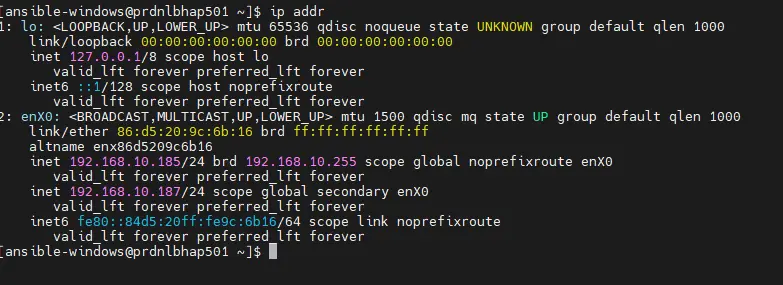
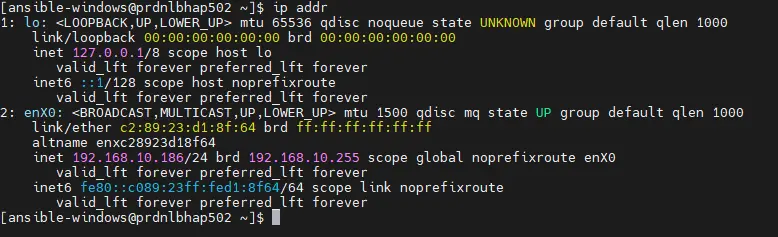
The output shows that only the MASTER nodes have two IPs because they have their actual IP and the VIP IP
This corresponds well to our nominal situation.
This is something we can check directly on the servers (ip addr).
Click the image to enlarge.
Click the image to enlarge.
Now let's test the resilience of the entire system.
Scenario: abrupt shutdown of an HAproxy server
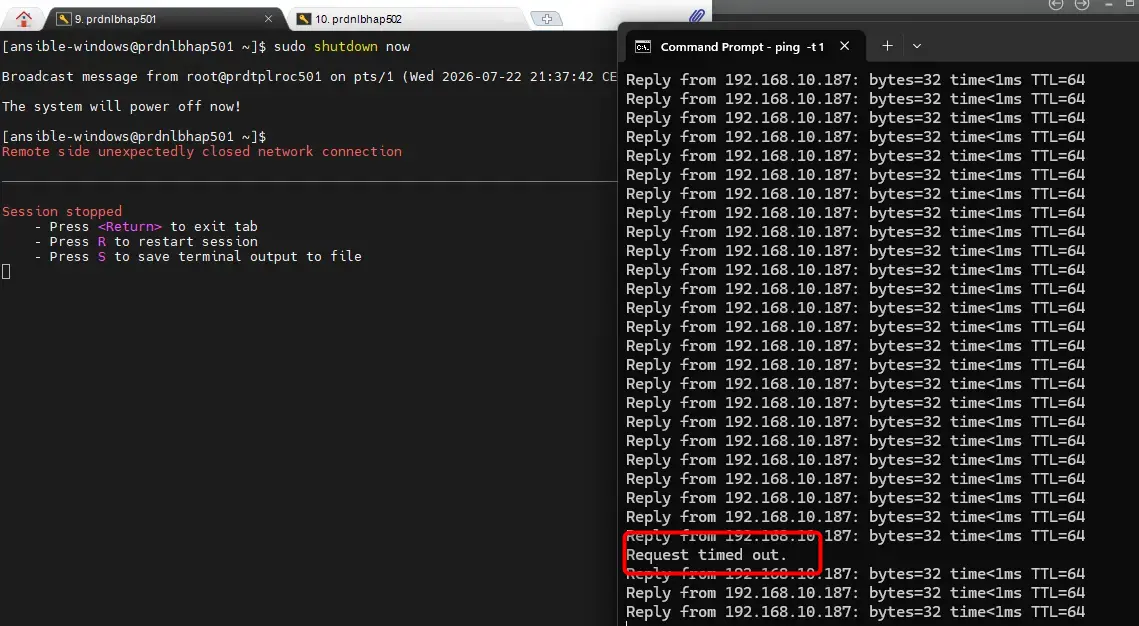
First, we will abruptly shut down the server prdnlbhap501, which is the MASTER on the LAN pair.
To evaluate the outage, we continuously ping the VIP IP address. We then notice that one packet is lost, just for the time it takes for the BACKUP, i.e., prdnlbhap502, to take over management of the VIP
Click the image to enlarge.
We can confirm this by running an ip addr command on that server to see that the VIP is now assigned to it.
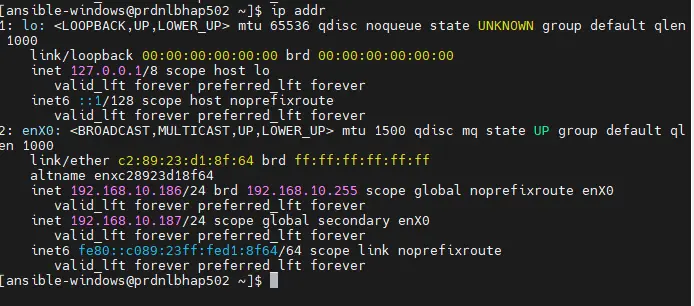
Click the image to enlarge.
Scenario: HAproxy service failure
Now let's use the pair in the DMZ to simulate the other scenario, which is the failure of HAproxy, but without shutting down the node.
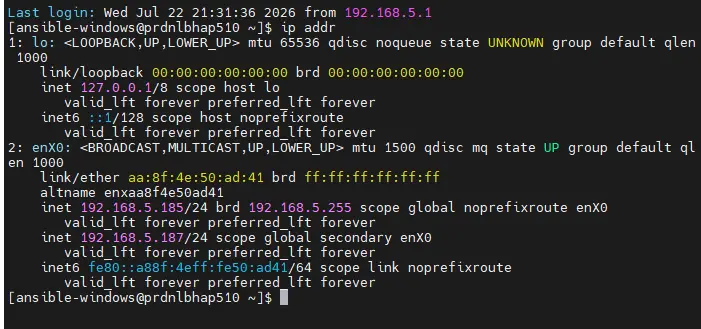
Click the image to enlarge.
To do this, we simply stop the HAproxy service on prdnlbhap510. Again, using continuous pinging, we observe a loss of one packet.
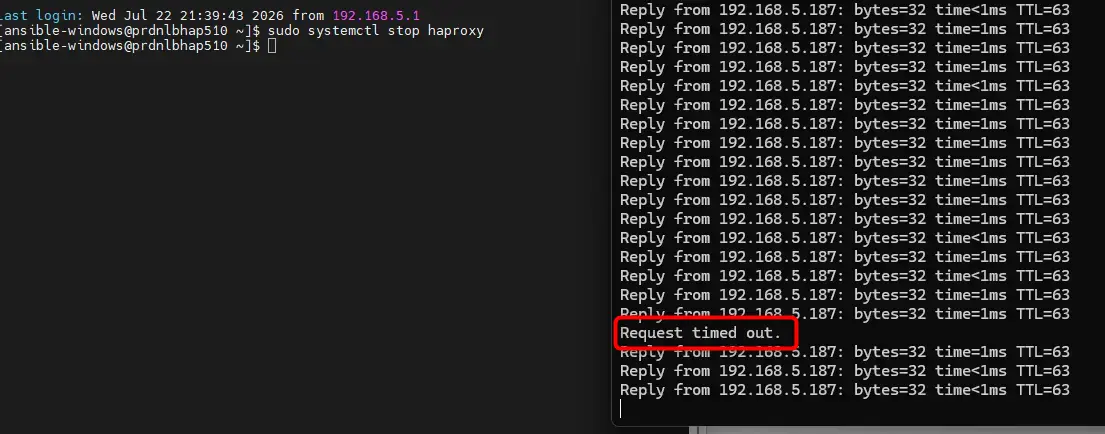
Click the image to enlarge.
It is indeed the server prdnlbhap511 that has taken over the VIP
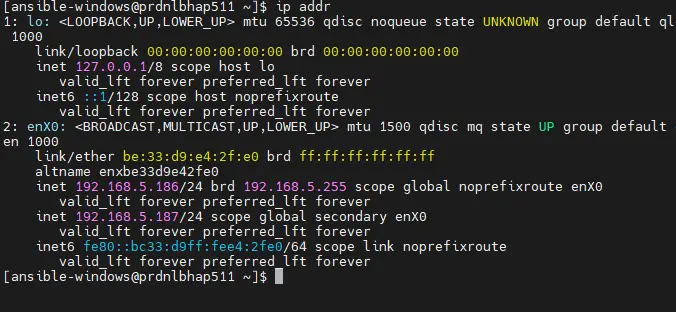
Click the image to enlarge.
In this situation, the actual interface of prdnlbhap510 is still active and responding. However, since HAProxy is no longer operational, the keepalived monitoring HAProxy caused prdnlbhap510 to relinquish the virtual IP address (VIP), which was then transferred to prdnlbhap511 (in reality, the priorities were modified so that prdnlbhap511 becomes MASTER).
If we now restore the HAproxy service on prdnlbhap510, the VIP will return to it.
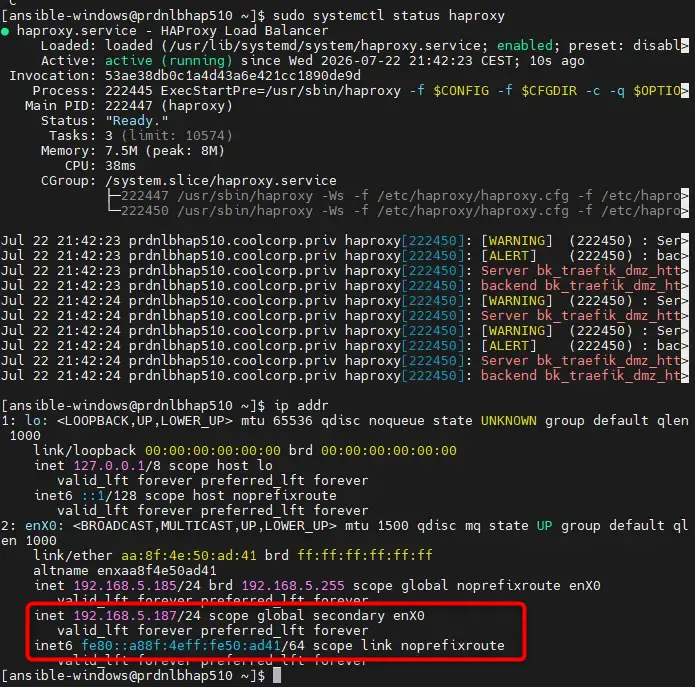
Click the image to enlarge.
This is a point we haven't specified, but the configuration is in rollback mode. If the conditions allow the MASTER to be activated again, the VIP will automatically be restored to it.
Conclusion
We have now reached the end of this article. Using Ansible has once again allowed us to automate the configuration of the necessary components, while also serving as a basis for explaining the operation and logic behind HAproxy/Keepalived. As before, AI, as described at the beginning of the cookbook, helped me speed up the writing of the YAML files and configurations, but I haven't lost my understanding of the subject.
Kubernetes is one thing, but it is important to know that third-party components are usually still needed to bring a K8S cluster online. These elements are just as critical as the Kubernetes nodes themselves, and they must be deployed knowingly, with the right level of resilience.
Having multiple servers within a K8S cluster for good availability is not effective if the external components that are essential for accessing applications in the cluster are not resilient themselves.
The HAproxy/Keepalived duo is a recognized and robust standard; it just needs to be implemented intelligently and in line with our needs.
Now that we have addressed these issues, we can move on to deploying Kubernetes itself in the next article.
Summary of variables and equivalent commands outside of Ansible
This appendix summarizes all the variables used by Ansible in this article and provides an equivalent for the commands and configurations implemented by Ansible in this section.
Variables used
| Variable | Valeur | Déclarée dans |
|---|---|---|
xkub_haproxy_keepalived_packages |
haproxy, keepalived, psmisc |
roles/xkub_haproxy_keepalived/defaults/main.yml |
xkub_haproxy_keepalived_vrrp_interface |
enX0 |
roles/xkub_haproxy_keepalived/defaults/main.yml |
xkub_haproxy_keepalived_is_master |
true pour le premier hôte trié de haproxy_peer_group (prdnlbhap501, prdnlbhap510), false sinon |
roles/xkub_haproxy_keepalived/defaults/main.yml |
xkub_haproxy_keepalived_priority |
150 (MASTER) / 100 (BACKUP) |
roles/xkub_haproxy_keepalived/defaults/main.yml |
xkub_haproxy_keepalived_use_proxy_protocol |
false |
roles/xkub_haproxy_keepalived/defaults/main.yml |
xkub_haproxy_keepalived_timeout_client |
30s |
roles/xkub_haproxy_keepalived/defaults/main.yml |
xkub_haproxy_keepalived_timeout_server |
30s |
roles/xkub_haproxy_keepalived/defaults/main.yml |
xkub_haproxy_keepalived_timeout_connect |
30s |
roles/xkub_haproxy_keepalived/defaults/main.yml |
haproxy_zone |
lan / dmz |
inventory/group_vars/nlb_haproxy_lan.yml / nlb_haproxy_web.yml |
haproxy_vip |
{{ haproxy_vip_lan }} → 192.168.10.187 / {{ haproxy_vip_dmz }} → 192.168.5.187 |
inventory/group_vars/nlb_haproxy_lan.yml / nlb_haproxy_web.yml |
haproxy_vip_lan |
192.168.10.187 |
inventory/group_vars/clu_k8s_xkub/main.yml |
haproxy_vip_dmz |
192.168.5.187 |
inventory/group_vars/clu_k8s_xkub/main.yml |
haproxy_vip_prefix |
24 |
inventory/group_vars/clu_k8s_xkub/main.yml |
haproxy_peer_group |
nlb_haproxy_lan / nlb_haproxy_web |
inventory/group_vars/nlb_haproxy_lan.yml / nlb_haproxy_web.yml |
haproxy_backend_group |
k8s_traefik_lan / k8s_traefik_web |
inventory/group_vars/nlb_haproxy_lan.yml / nlb_haproxy_web.yml |
haproxy_backend_port_http |
{{ traefik_nodeport_lan_http }} → 30080 / {{ traefik_nodeport_dmz_http }} → 31080 |
inventory/group_vars/nlb_haproxy_lan.yml / nlb_haproxy_web.yml |
haproxy_backend_port_https |
{{ traefik_nodeport_lan_https }} → 30443 / {{ traefik_nodeport_dmz_https }} → 31443 |
inventory/group_vars/nlb_haproxy_lan.yml / nlb_haproxy_web.yml |
traefik_nodeport_lan_http / _https |
30080 / 30443 |
inventory/group_vars/clu_k8s_xkub/main.yml |
traefik_nodeport_dmz_http / _https |
31080 / 31443 |
inventory/group_vars/clu_k8s_xkub/main.yml |
xkub_haproxy_keepalived_router_id |
51 (LAN) / 52 (DMZ) |
inventory/group_vars/nlb_haproxy_lan.yml / nlb_haproxy_web.yml |
Groupe k8s_traefik_lan |
prdk8smin501 (192.168.10.171), prdk8smin502 (192.168.10.172) |
inventory/hosts.yml |
Groupe k8s_traefik_web |
prdk8smin510 (192.168.5.171), prdk8smin511 (192.168.5.172) |
inventory/hosts.yml |
ansible_host |
IP de chaque HAProxy (tableau ci-dessus) | inventory/hosts.yml |
ansible_user |
ansible-windows |
inventory/hosts.yml (all.vars) |
Equivalent without Ansible
Connexion : ssh ansible-windows@<serveur>, puis sudo -i. Toutes les commandes tournent en root. « HAProxy » désigne les 4 serveurs ci-dessus. Les étapes suivent l'ordre du rôle : installation, firewalld, HAProxy, keepalived.
| # | Action | Serveur(s) | Compte | Commande(s) |
|---|---|---|---|---|
| 1 | Installer les paquets | HAProxy | root | dnf install -y --refresh haproxy keepalived psmisc |
| 2 | Autoriser le bind sur la VIP (IP non locale) | HAProxy | root | echo 'net.ipv4.ip_nonlocal_bind = 1' > /etc/sysctl.d/90-haproxy.confsysctl -p /etc/sysctl.d/90-haproxy.conf |
| 3 | Autoriser HAProxy à joindre les NodePorts (SELinux) | HAProxy | root | setsebool -P haproxy_connect_any on |
| 4 | firewalld actif | HAProxy | root | systemctl enable --now firewalld |
| 5 | Ouvrir HTTP et HTTPS | HAProxy | root | firewall-cmd --permanent --add-service=http --add-service=https |
| 6 | VRRP accepté depuis le seul pair | HAProxy | root | firewall-cmd --permanent --add-rich-rule='rule family="ipv4" source address="<IP du pair>/32" protocol value="vrrp" accept'Pair : 501 → 192.168.10.186, 502 → 192.168.10.185, 510 → 192.168.5.186, 511 → 192.168.5.185 |
| 7 | Retirer l'ancienne règle VRRP sans restriction, appliquer | HAProxy | root | firewall-cmd --permanent --remove-rich-rule='rule protocol value="vrrp" accept'firewall-cmd --reload |
| 8 | Écrire et valider la configuration HAProxy | HAProxy | root | Écrire /tmp/haproxy.cfg (bloc A en LAN, bloc B en DMZ)haproxy -c -f /tmp/haproxy.cfginstall -m 644 /tmp/haproxy.cfg /etc/haproxy/haproxy.cfg |
| 9 | Démarrer HAProxy (recharger si modifié) | HAProxy | root | systemctl enable --now haproxysystemctl reload haproxy |
| 10 | Configuration keepalived | HAProxy | root | Créer /etc/keepalived/keepalived.conf (bloc C, à adapter selon le tableau D), chmod 600 |
| 11 | Démarrer keepalived (redémarrer si modifié) | HAProxy | root | systemctl enable --now keepalivedsystemctl restart keepalived |
Ansible valide le fichier HAProxy avant de l'installer (validate: haproxy -c -f %s). L'étape 8 reproduit cette sécurité : un fichier invalide n'écrase jamais la configuration en place.
Bloc A /etc/haproxy/haproxy.cfg (prdnlbhap501 et prdnlbhap502)
global
    log /dev/log local0
    maxconn 4000
    user haproxy
    group haproxy
    daemon

defaults
    mode tcp
    log global
    option tcplog
    option dontlognull
    timeout client  30s
    timeout server  30s
    timeout connect 30s

frontend fe_traefik_lan_http
    bind 192.168.10.187:80
    default_backend bk_traefik_lan_http

frontend fe_traefik_lan_https
    bind 192.168.10.187:443
    default_backend bk_traefik_lan_https

backend bk_traefik_lan_http
    option tcp-check
    server prdk8smin501 192.168.10.171:30080 check
    server prdk8smin502 192.168.10.172:30080 check

backend bk_traefik_lan_https
    option tcp-check
    server prdk8smin501 192.168.10.171:30443 check
    server prdk8smin502 192.168.10.172:30443 check
Bloc B /etc/haproxy/haproxy.cfg (prdnlbhap510 et prdnlbhap511)
Les sections global et defaults sont identiques au bloc A. Seuls les frontends et les backends changent :
frontend fe_traefik_dmz_http
    bind 192.168.5.187:80
    default_backend bk_traefik_dmz_http

frontend fe_traefik_dmz_https
    bind 192.168.5.187:443
    default_backend bk_traefik_dmz_https

backend bk_traefik_dmz_http
    option tcp-check
    server prdk8smin510 192.168.5.171:31080 check
    server prdk8smin511 192.168.5.172:31080 check

backend bk_traefik_dmz_https
    option tcp-check
    server prdk8smin510 192.168.5.171:31443 check
    server prdk8smin511 192.168.5.172:31443 check
Bloc C /etc/keepalived/keepalived.conf (exemple : prdnlbhap501)
global_defs {
    router_id prdnlbhap501
}

vrrp_script chk_haproxy {
    script "/usr/bin/killall -0 haproxy"
    interval 2
    fall 2
    rise 2
}

vrrp_instance VI_LAN {
    state MASTER
    interface enX0
    virtual_router_id 51
    priority 150
    advert_int 1
    unicast_src_ip 192.168.10.185
    unicast_peer {
        192.168.10.186
    }
    virtual_ipaddress {
        192.168.10.187/24
    }
    track_script {
        chk_haproxy
    }
}
Tableau D valeurs keepalived propres à chaque serveur
| Serveur | router_id |
Instance | state |
virtual_router_id |
priority |
unicast_src_ip |
unicast_peer |
virtual_ipaddress |
|---|---|---|---|---|---|---|---|---|
| prdnlbhap501 | prdnlbhap501 | VI_LAN |
MASTER | 51 | 150 | 192.168.10.185 | 192.168.10.186 | 192.168.10.187/24 |
| prdnlbhap502 | prdnlbhap502 | VI_LAN |
BACKUP | 51 | 100 | 192.168.10.186 | 192.168.10.185 | 192.168.10.187/24 |
| prdnlbhap510 | prdnlbhap510 | VI_DMZ |
MASTER | 52 | 150 | 192.168.5.185 | 192.168.5.186 | 192.168.5.187/24 |
| prdnlbhap511 | prdnlbhap511 | VI_DMZ |
BACKUP | 52 | 100 | 192.168.5.186 | 192.168.5.185 | 192.168.5.187/24 |